
1. Introduction
Thank you for choosing the LIECTROUX YW810 Robot Window Cleaner. This intelligent device is designed to simplify window cleaning, offering efficient and safe operation for various glass surfaces. This manual provides essential information for the proper setup, operation, maintenance, and troubleshooting of your robot window cleaner. Please read this manual thoroughly before using the product to ensure optimal performance and safety.
2. Product Overview
2.1 Key Features
- Deep Window Cleaning: Integrated suction motor provides 2800Pa strong suction, combined with dual spiral cleaning heads and microfiber cloths for effective cleaning on vertical glass surfaces.
- Versatile Application: Compatible with various glass types, windows, tiles, glass floors, and hard-to-reach areas like high-rise interior/exterior windows.
- Intelligent Cleaning Modes: Features 3 pre-programmed automatic cleaning modes, intelligent AI path planning, and remote control for comprehensive window cleaning.
- APP Control: Control the robot via a smartphone application with a simple operating interface.
- Safety and Fall Protection: Built-in UPS battery provides 25 minutes of absorption protection during power outages, preventing falls. Equipped with a 4m professional safety rope and a 5.2m adapter cord.
- Dual Water Spray: Automatic water spraying function to assist in cleaning.
- Micron-scale Atomization Technology: Bilateral ultrasonic water atomization (15um mist) to soften stubborn stains.
- Low Noise Operation: Noise level during operation is ≤65dB.
2.2 Product Components
The LIECTROUX YW810 includes the main robot unit, power adapter, extension cords, safety rope, remote control, and microfiber cleaning cloths.

Figure 2.2.1: LIECTROUX YW810 Robot Window Cleaner and its smartphone application interface.

Figure 2.2.2: Detailed view of the robot's cleaning mechanism, highlighting micron-scale spray, double-disc rotation, and microfiber cloth.

Figure 2.2.3: Illustration of the microfiber cleaning pads, designed to effectively remove various types of stains including rain marks, dirt, and general grime.
3. Setup
- Attach Cleaning Cloths: Ensure the microfiber cleaning cloths are securely attached to the robot's cleaning pads.
- Connect Power: Connect the power adapter to the robot and then plug it into a power outlet. The robot requires continuous power to operate.
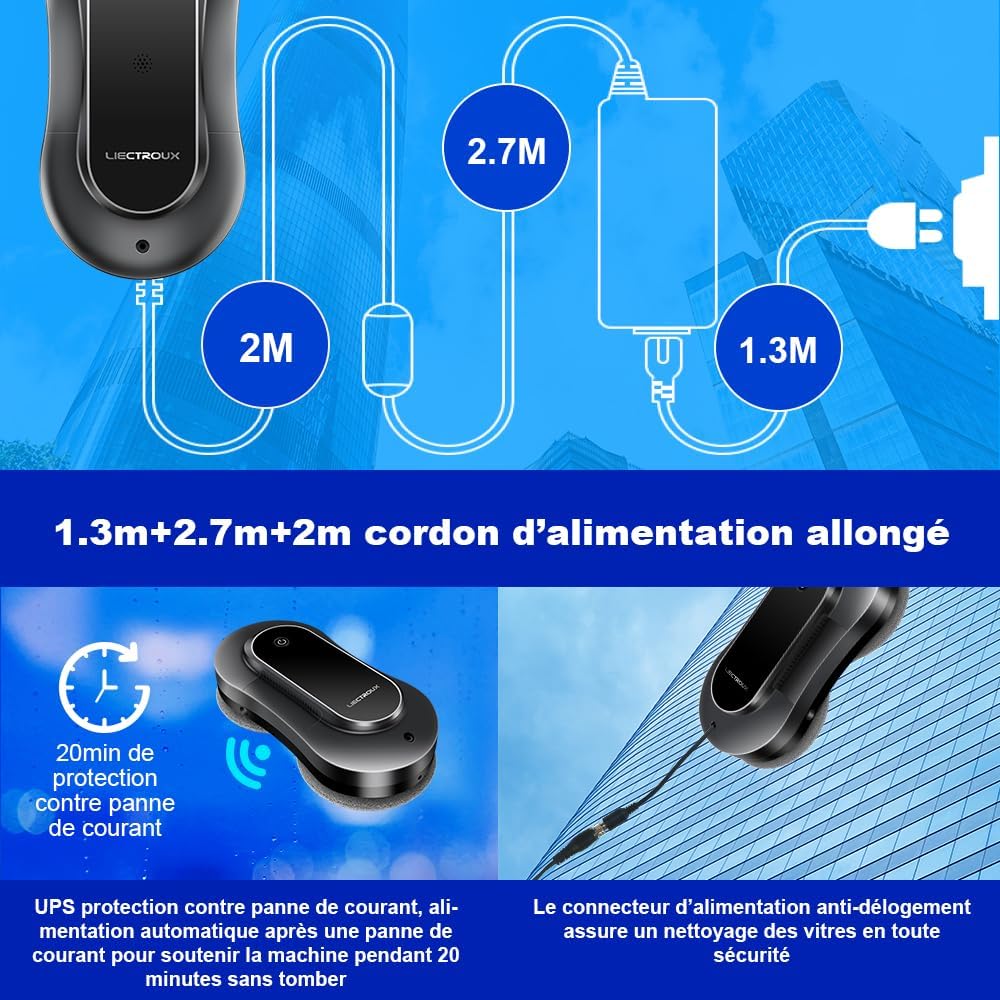
Figure 3.1: Diagram showing the extended power cord setup (1.3m + 2.7m + 2m) and the anti-dislodgement power connector for secure operation.
- Attach Safety Rope: Always attach the professional safety rope to a secure anchor point before placing the robot on the window. This is crucial for preventing falls, especially when cleaning high windows.

Figure 3.2: Illustration of the robot's multiple safety protections, including the bionic suction cup and the safety rope, capable of supporting up to 6KG.
- Fill Water Tank: Locate the water tank and fill it with appropriate window cleaning solution or distilled water. The robot features dual water spray for effective cleaning.
- Power On: Press the power button on the robot to turn it on.
4. Operating Instructions
4.1 Placing the Robot on the Window
Hold the robot firmly against the glass surface. The suction motor will activate, creating a strong vacuum seal. Ensure the robot is securely attached before releasing it.
4.2 Cleaning Modes and Control
The LIECTROUX YW810 offers both automatic and manual cleaning options.
- Automatic Cleaning Modes: The robot features 3 pre-programmed automatic cleaning modes. These modes utilize intelligent AI path planning to cover the entire window surface efficiently.

Figure 4.2.1: The robot's intelligent path planning, illustrating three cleaning patterns: Top-down, Left-to-right, and Right-to-left.
- APP Control: Download the dedicated LIECTROUX app on your smartphone. After activating the robot's power button, you can connect and control the robot via the app. The app interface is designed for ease of use.

Figure 4.2.2: Controlling the robot window cleaner using the smartphone application, showing the simple interface for operation.
- Remote Control: Use the provided 2.4G wireless remote control to operate the robot. It has an effective operating distance of 15 meters, allowing you to control the window cleaner remotely with a simple press of a button.

Figure 4.2.3: Operating the robot with the one-button remote control, demonstrating its ease of use from a distance.
4.3 Removing the Robot from the Window
Once cleaning is complete, or if you need to remove the robot, firmly grasp the robot and press the release button (if applicable, or power off). The suction will disengage, allowing you to safely remove the device. Always ensure you have a firm grip on the robot before disengaging suction.
5. Maintenance
- Cleaning Microfiber Cloths: After each use, remove the microfiber cleaning cloths from the robot. Wash them with water and mild detergent. Allow them to air dry completely before reattaching for next use.
- Cleaning the Robot Body: Wipe the exterior of the robot with a soft, damp cloth. Do not use abrasive cleaners or immerse the robot in water.
- Water Tank Maintenance: Regularly empty and rinse the water tank to prevent residue buildup. Use only recommended cleaning solutions or distilled water to avoid clogging the spray nozzles.
- Storage: Store the robot in a cool, dry place away from direct sunlight when not in use.
6. Troubleshooting
If you encounter issues with your LIECTROUX YW810, please refer to the following common problems and solutions:
| Problem | Possible Cause | Solution |
|---|---|---|
| Robot does not stick to the window. | Insufficient suction; dirty cleaning pads; uneven surface. | Ensure power is connected and robot is powered on. Clean or replace microfiber cloths. Ensure surface is clean and relatively flat. |
| Robot falls during operation. | Power outage; safety rope not attached; suction loss. | Ensure continuous power supply. Always attach the safety rope to a secure point. Check for obstructions or excessive dirt on the window. The UPS battery provides temporary power during outages. |
| Robot does not move or clean effectively. | Dirty cleaning pads; low water in tank; obstacle detection. | Clean or replace microfiber cloths. Refill water tank. Clear any obstacles from the cleaning path. |
| APP or remote control not responding. | Robot not powered on; battery low (remote); out of range; connectivity issue. | Ensure robot is powered on. Replace remote control batteries. Move closer to the robot. Re-pair the device if necessary. |
7. Specifications
| Feature | Specification |
|---|---|
| Brand | LIECTROUX |
| Model Name | YW810 |
| Color | Silver Gray |
| Material | ABS |
| Product Dimensions (L x W x H) | 29.5L x 14.5W x 8.2H centimeters |
| Item Weight | 4 Kilograms |
| Power Source | Corded Electric |
| Control Method | Application, Remote Control |
| Special Feature | Fall Protection (Anti-drop) |
| Suction Power | 2800Pa (from feature bullets) |
| UPS Battery Backup | 25 minutes (from feature bullets) |
| Noise Level | ≤65dB (from aplus media image) |
8. Safety Information
To ensure safe operation of your LIECTROUX YW810 Robot Window Cleaner, please observe the following safety guidelines:
- Always connect the safety rope to a secure anchor point before placing the robot on any vertical surface.
- Ensure the robot is continuously connected to a power source during operation. The built-in UPS battery is for emergency power loss only, not for cordless operation.
- Do not use the robot on cracked, damaged, or extremely dirty glass surfaces.
- Keep hands, hair, and loose clothing away from moving parts of the robot.
- Do not allow children or pets to approach the robot during operation.
- Use only the recommended cleaning solutions or distilled water in the water tank.
- Do not attempt to disassemble or repair the robot yourself. Contact qualified service personnel for assistance.
- Ensure the power cord and safety rope are not tangled or obstructed during operation.
9. Warranty and Support
Specific warranty details for the LIECTROUX YW810 Robot Window Cleaner are not provided in the product specifications. Please refer to your purchase documentation or contact the seller directly for warranty information.
Spare Parts Availability: Information regarding the availability of spare parts for this product is currently unavailable.
For technical support or service inquiries, please contact the vendor or retailer from whom you purchased the product.


