
KAIWEETS EXPLORER X II2025
KAIWEETS Metal Detector User Manual
Model: EXPLORER X II2025
Brand: KAIWEETS
Product Overview
The KAIWEETS EXPLORER X II2025 Metal Detector is designed for both adults and children, offering a versatile and precise metal detection experience. It features an upgraded color LCD screen for clear visibility in various lighting conditions, multiple detection modes, and a waterproof search coil, making it suitable for diverse environments.

Image: The KAIWEETS EXPLORER X II2025 Metal Detector, including headphones, a shovel, and batteries, ready for use.
Key Features
- Enhanced Color LCD Screen: Provides high-contrast display for clear readability even in direct sunlight. Features digital value display, bar graph, and acoustic signals for quick metal identification. Backlight for low-light conditions.
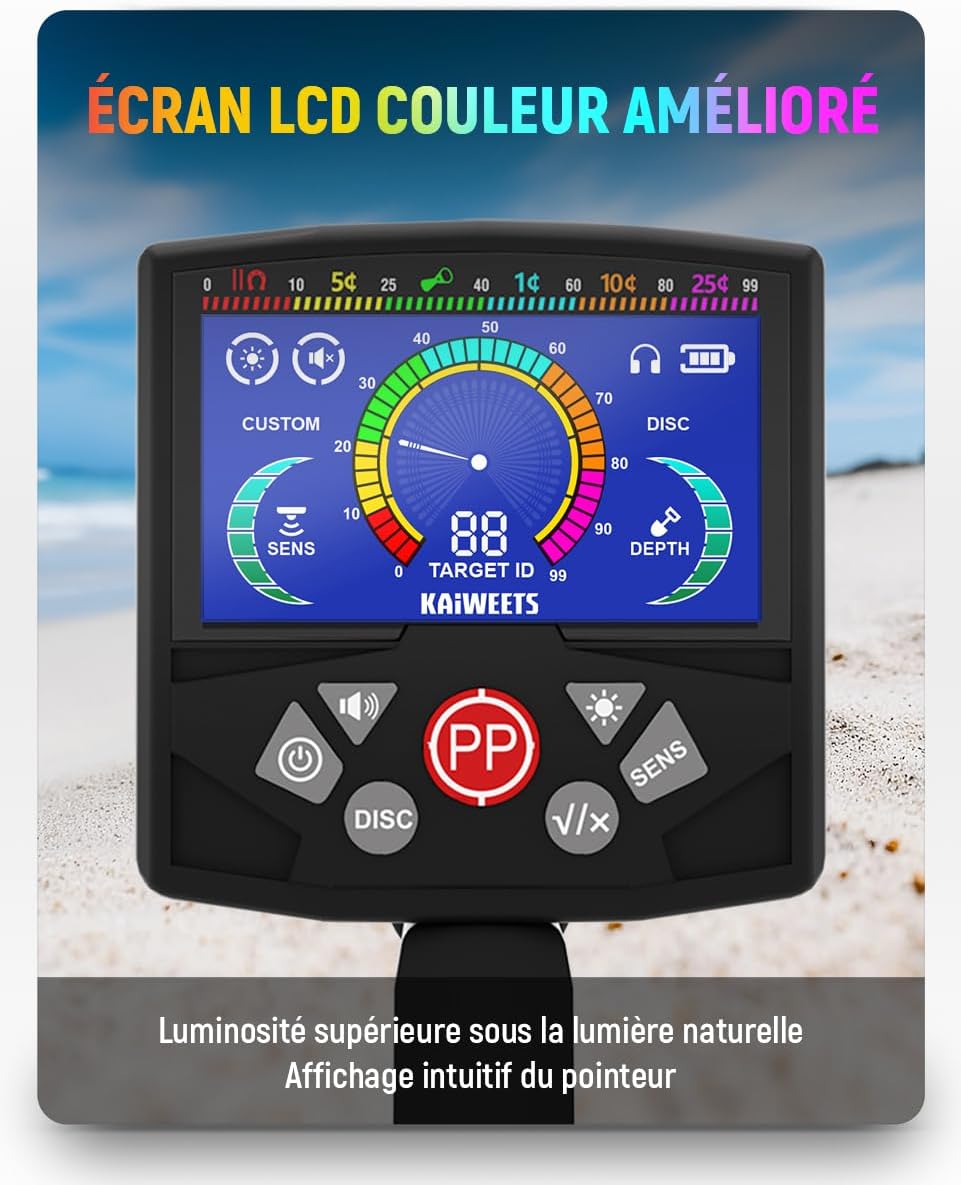
Image: Detailed view of the metal detector's vibrant color LCD screen, showing target ID, sensitivity, and depth indicators.
- Versatile Detection Modes:
- All-Metal Mode: Detects all types of metals for comprehensive searches.
- Discrimination Mode: Filters out unwanted metals.
- Notch Mode: Selectively filters specific metal types.
- Pinpoint Mode: Provides precise target location.
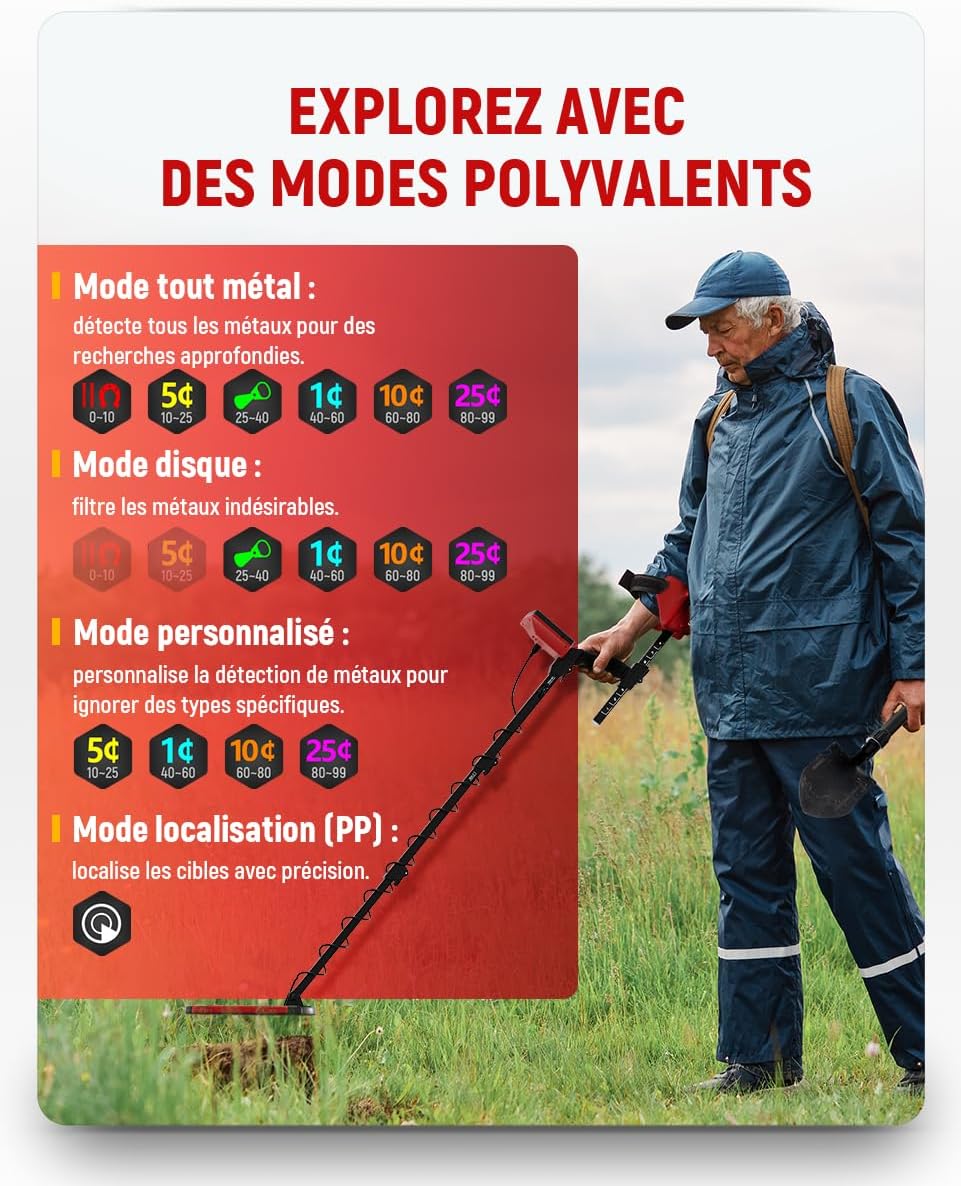
Image: A user operating the metal detector, with visual representations of the All-Metal, Discrimination, Custom, and Pinpoint modes.
- Adjustable Length & Waterproof Coil: The detector's length can be adjusted from 73 cm to 112 cm, suitable for various users. The IP68 certified search coil allows for shallow water detection.

Image: The metal detector's search coil partially submerged in water, highlighting its IP68 waterproof rating.
- Precise Location & Ground Balance: Digital target value display indicates metal conductivity. Integrated ground balance minimizes interference from mineralized soils.
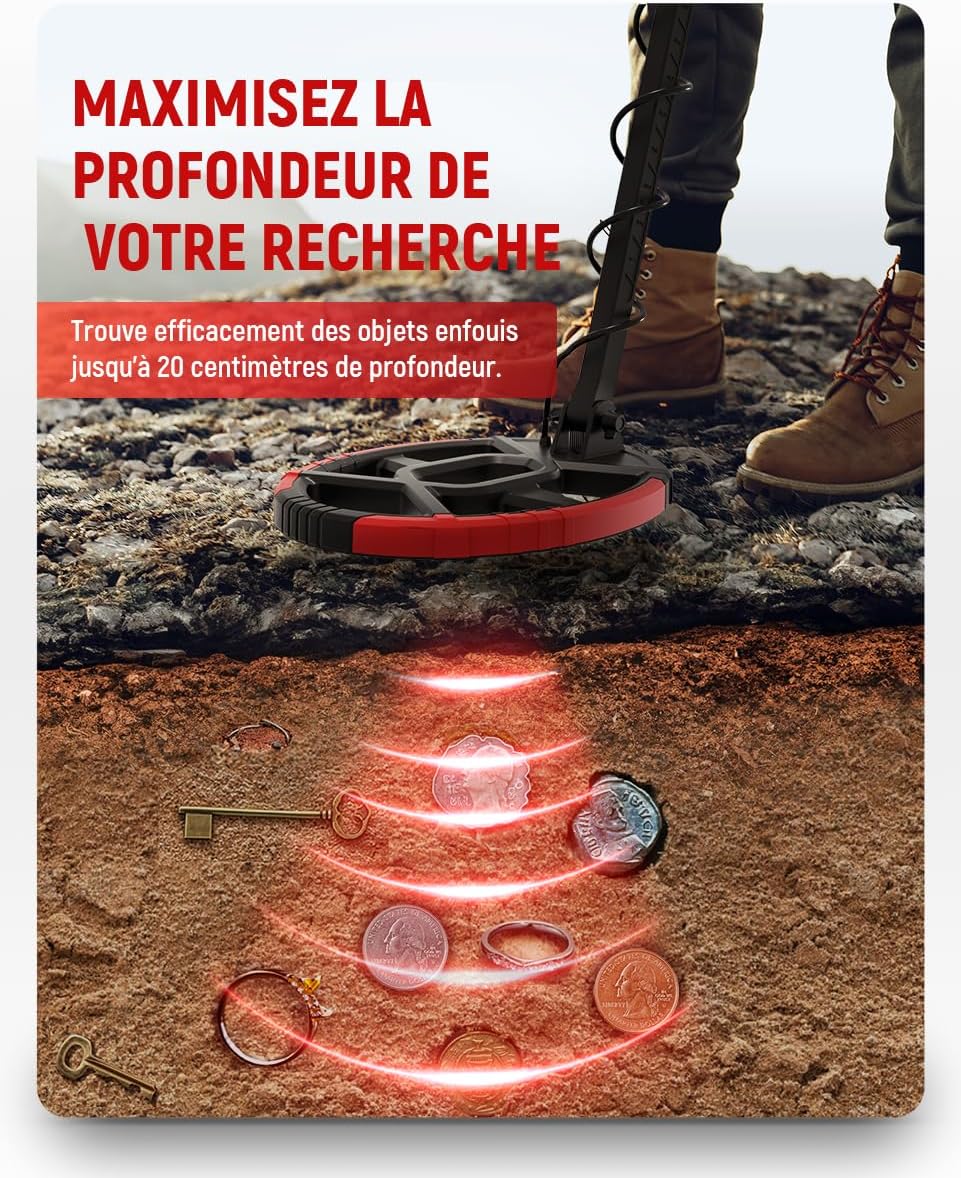
Image: An illustration showing the metal detector's coil detecting various metal objects buried up to 20 centimeters deep in the ground.
- Complete Kit: Includes high-quality headphones and a practical shovel, providing everything needed to start treasure hunting.

Image: A complete kit for metal detecting, featuring the KAIWEETS detector, over-ear headphones, and a folding shovel.
Setup Guide
1. Assembly
- Unpack all components: main unit with display, adjustable stem, search coil, armrest, headphones, and shovel.
- Attach the search coil to the lower end of the adjustable stem using the provided bolt and nut. Ensure it is securely fastened but allows for slight pivot.
- Connect the search coil cable to the main control unit. Ensure the connection is firm to prevent signal loss.
- Slide the main control unit onto the upper part of the adjustable stem. Secure it in place.
- Attach the armrest to the stem, ensuring it provides comfortable support for your forearm during use.
- Adjust the length of the stem to a comfortable height. The detector's length is adjustable from 73 cm to 112 cm.
2. Battery Installation
The KAIWEETS EXPLORER X II2025 requires 2 AAA batteries (included).
- Locate the battery compartment on the main control unit.
- Open the battery compartment cover.
- Insert the 2 AAA batteries, ensuring correct polarity (+/-).
- Close the battery compartment cover securely.
Operating Instructions
1. Power On/Off
Press and hold the power button (usually marked with a power symbol) on the control panel to turn the detector on or off. The color LCD screen will illuminate upon startup.
2. Understanding the Display

Image: A detailed diagram of the metal detector's LCD screen, illustrating various indicators such as target ID reference, volume level, battery level, headphone indicator, backlight level, target groups, sensitivity level, depth gauge, target ID number, and search modes.
- Target ID Reference: Top bar indicating different metal types and their corresponding ID ranges.
- Volume Level: Adjusts the audio output.
- Battery Level: Shows remaining battery life.
- Headphone Indicator: Illuminates when headphones are connected.
- Backlight Level: Controls screen brightness.
- Target Groups: Visual representation of detected metal categories.
- Sensitivity Level: Indicates current sensitivity setting.
- Depth Gauge: Estimates the depth of the detected object.
- Target ID Number: Numerical value for precise metal identification.
- Search Modes: Displays the currently active detection mode.
3. Selecting Detection Modes
The KAIWEETS EXPLORER X II2025 offers four primary detection modes:
- All-Metal Mode:
This mode detects all types of metals. It is ideal for general searching when you want to find any metallic object without discrimination. Activate this mode when neither the DISC nor CUSTOM button is pressed.

Image: The metal detector being used in water, with an inset showing the display in All-Metal mode.
- Discrimination (DISC) Mode:
Use the DISC button to filter out unwanted metals. This mode allows you to ignore certain types of junk metals (e.g., iron) and focus on more valuable targets. Press and hold the DISC button to select and protect specific metal types from being detected.

Image: The metal detector being used on grass, with an inset showing the display in Discrimination mode.
- Custom Mode:
This mode allows you to personalize metal detection to ignore specific types. It provides more granular control over which metals are detected or ignored based on your preferences.

Image: The metal detector being used on a beach at sunset, with an inset showing the display in Custom mode.
- Pinpoint (PP) Mode:
Once a target is detected, use the Pinpoint mode to determine its exact location before digging. Press the PP button, and slowly move the coil over the detected area. The signal strength will increase as you get closer to the target.

Image: The metal detector's coil pinpointing buried coins, with an inset showing the display in Pinpoint mode and sound wave indicators.
4. Adjusting Settings
- Sensitivity (SENS): Use the SENS button to adjust the detector's sensitivity. Higher sensitivity increases detection depth but may also pick up more ground noise. Adjust based on ground conditions. The device offers 6 adjustable sensitivity levels.
- Volume: Adjust the volume of the audio alerts using the dedicated volume controls. There are 3 volume options.
- Backlight: Adjust the screen backlight for optimal visibility in different lighting conditions. There are 3 brightness settings.

Image: The metal detector's display highlighting the sensitivity control and a muted volume icon, indicating adjustable settings for precise detection.
5. Ground Balance
The integrated ground balance feature helps minimize interference from mineralized soils. The detector automatically adjusts to ground conditions to provide stable signals. If experiencing excessive false signals, try reducing sensitivity or re-balancing the ground.
6. Using Headphones
Connect the included headphones to the headphone jack on the control unit. Headphones allow you to hear subtle target signals more clearly, especially in noisy environments, and conserve battery life.
Maintenance
- Cleaning: After each use, especially in wet or dirty conditions, wipe down the search coil and stem with a damp cloth. Ensure the control unit is kept dry. Do not use abrasive cleaners or solvents.
- Battery Care: Remove batteries if the detector will not be used for an extended period to prevent leakage and damage. Store batteries in a cool, dry place.
- Storage: Store the metal detector in a dry, cool place away from direct sunlight and extreme temperatures. The foldable design allows for space-saving storage.
Troubleshooting
| Problem | Possible Cause | Solution |
|---|---|---|
| No power/Display off | Low or dead batteries; Incorrect battery installation; Loose connection. | Replace batteries; Check battery polarity; Ensure all connections are secure. |
| False signals/Chattering | High sensitivity setting; Mineralized ground; Electrical interference; Nearby metal objects. | Reduce sensitivity; Perform ground balance; Move away from power lines/electronics; Check for large surface metal. |
| No detection/Weak signals | Low sensitivity setting; Discrimination mode active; Coil not parallel to ground; Deep target. | Increase sensitivity; Switch to All-Metal mode; Keep coil parallel and close to ground; Target may be too deep for detection range. |
| Inaccurate target ID | Target is oxidized or broken; Multiple targets close together; Ground mineralization. | Sweep from different angles; Use Pinpoint mode for precise location; Adjust ground balance. |
Specifications
| Feature | Detail |
|---|---|
| Model Number | EXPLORER X II2025 |
| Dimensions (L x W x H) | 42.5 x 31.5 x 14 cm |
| Weight | 2 Kilograms |
| Adjustable Length | 73 - 112 cm |
| Power Source | Battery Powered (2 AAA batteries included) |
| Material | Metal |
| Waterproof Rating | IP68 (Search Coil) |
| Display Type | LCD Color Screen |
| Detection Depth | Up to 20 cm (approx.) |
| Detection Modes | All-Metal, Discrimination, Notch, Pinpoint |
| Sensitivity Levels | 6 adjustable levels |
| Backlight Settings | 3 adjustable levels |
| Volume Options | 3 adjustable options |
Warranty and Support
Warranty Information
Specific warranty details for the KAIWEETS EXPLORER X II2025 Metal Detector are not provided in this manual. Please refer to the product packaging or the official KAIWEETS website for the most up-to-date warranty policy. Keep your purchase receipt as proof of purchase for any warranty claims.
Customer Support
For technical assistance, troubleshooting, or any questions regarding your KAIWEETS metal detector, please contact KAIWEETS customer support.
You can typically find contact information on the KAIWEETS official website or through the retailer where you purchased the product.
Online Support: Visit the official KAIWEETS website for FAQs, product registration, and support contact forms.
Related documentsEXPLORER X II2025


Ask a question about this manual
Ask about setup, troubleshooting, compatibility, parts, safety, or missing instructions. Manuals+ will review the question and use this page’s manual context to help answer it.