
1. Introduction
Thank you for choosing the Livguard Solar Inverter 1500 VA 12V. This advanced pure sine wave inverter is designed to provide reliable and efficient power backup for your home or office, integrating seamlessly with solar power. Featuring a built-in 40A solar charge controller, it optimizes energy utilization from solar panels, reducing electricity costs and ensuring uninterrupted power supply. This manual provides essential information for the safe installation, operation, and maintenance of your inverter.
2. Safety Information
Please read all safety instructions carefully before installation and operation. Failure to follow these instructions may result in electric shock, fire, or serious injury.
- Qualified Personnel: Installation and maintenance should only be performed by qualified personnel.
- Ventilation: Ensure the inverter is installed in a well-ventilated area, away from direct sunlight, heat sources, and flammable materials. Maintain adequate clearance around the unit for airflow.
- Water and Moisture: Do not expose the inverter to water, rain, or excessive humidity.
- Battery Safety: Batteries contain corrosive acid and produce explosive gases. Wear protective eyewear and gloves when handling batteries. Ensure proper ventilation in the battery area. Do not smoke or allow sparks/flames near batteries.
- Grounding: The inverter must be properly grounded to prevent electric shock.
- Disconnect Power: Always disconnect all power sources (AC input, battery, solar panels) before performing any maintenance or wiring.
- Overload Protection: Do not overload the inverter beyond its rated capacity.
3. Package Contents
Verify that all items are present in the package:
- 1 x Livguard Solar Inverter LS_OG1750/12V
- 1 x Instruction Manual
- 1 x Warranty Card
4. Product Features
The Livguard Solar Inverter LS_OG1750/12V offers a range of features designed for optimal performance and user convenience:
- Pure Sine Wave Output: Delivers high-quality, stable power (1500VA, 1260 watts peak load) suitable for sensitive electronics like computers and TVs, ensuring noiseless operation and protection against damage.
- Built-in 40A PWM Solar Charge Controller: Maximizes energy harvesting from solar panels for fast battery charging, contributing to reduced electricity bills.
- Hybrid Solar & Grid System: Automatically switches between solar and grid power to meet load demands, providing continuous backup during power outages.
- Advanced Protection: Includes thermal, overload, short-circuit, and reverse PV connection safeguards for enhanced safety and durability.
- User-Friendly LCD Display: Provides real-time system status, including voltage, load percentage, battery health, and solar power generation.
- Battery Compatibility: Supports one 12V lead-acid battery (C10) ranging from 90 Ah to 200 Ah.
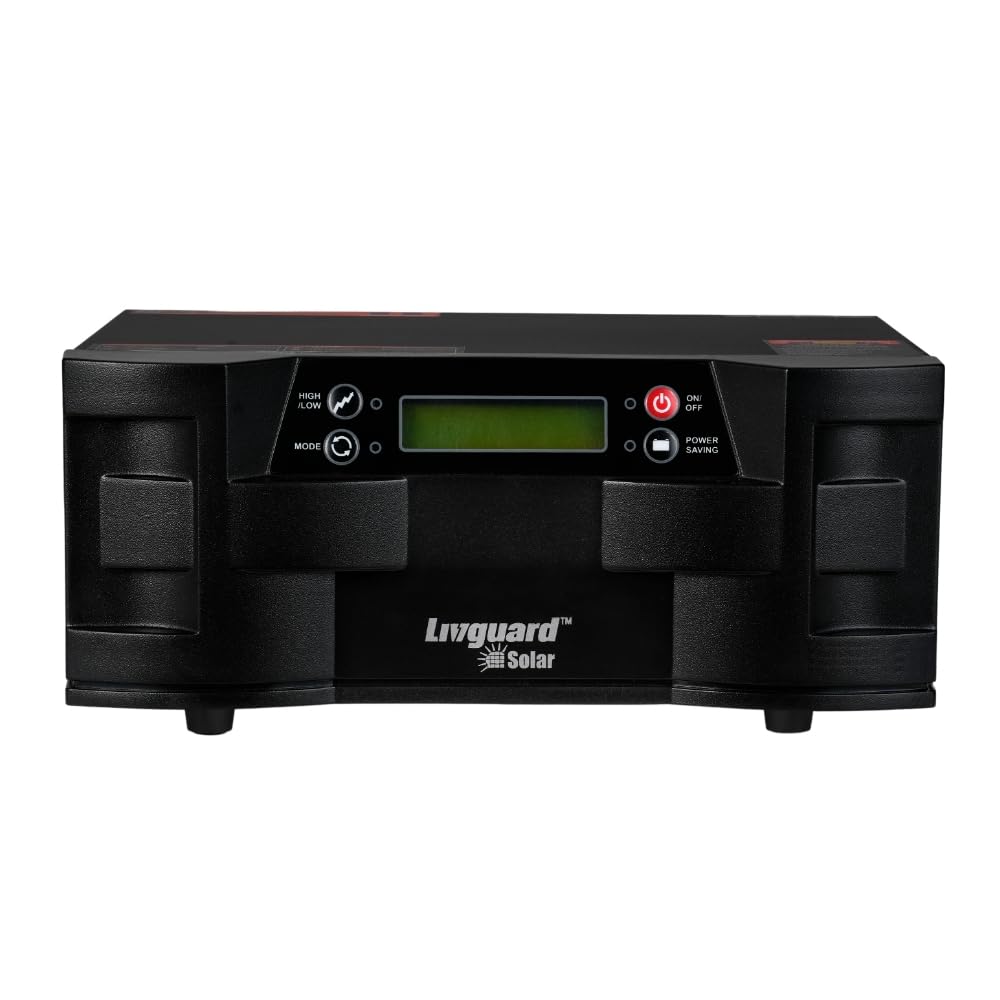
Image: Front view of the Livguard Solar Inverter 1500 VA 12V, showing the LCD display and control buttons.
5. Setup and Installation
Proper installation is crucial for the safe and efficient operation of your inverter. Please follow these steps carefully.
5.1 Site Selection
- Install the inverter in a cool, dry, and well-ventilated indoor area.
- Avoid locations with direct sunlight, high temperatures, dust, or corrosive gases.
- Ensure sufficient clearance (at least 20 cm) around the inverter for proper heat dissipation.
- Mount the inverter on a sturdy, non-flammable surface.
5.2 Battery Connection
The inverter requires a 12V lead-acid battery (C10 type, 90-200 Ah capacity).
- Ensure the inverter is OFF and disconnected from all power sources.
- Connect the positive (+) terminal of the battery to the positive (+) terminal of the inverter.
- Connect the negative (-) terminal of the battery to the negative (-) terminal of the inverter.
- Ensure connections are tight and secure. Incorrect polarity will damage the inverter.
5.3 Solar Panel Connection (Optional)
If using solar panels, connect them to the designated solar input terminals on the inverter.
- Ensure solar panels are disconnected or covered to prevent power generation during connection.
- Connect the positive (+) output of your solar array to the solar positive (+) terminal on the inverter.
- Connect the negative (-) output of your solar array to the solar negative (-) terminal on the inverter.
- Verify correct polarity and secure connections.
5.4 AC Input (Grid) Connection
Connect the inverter to your main AC power supply.
- Connect the AC input cable from your mains supply to the AC input terminal on the inverter.
- Ensure the AC input is within the specified voltage range for the inverter.
5.5 AC Output (Load) Connection
Connect your appliances to the inverter's output.
- Connect your home/office wiring or individual appliances to the AC output terminals of the inverter.
- Ensure the total load does not exceed the inverter's rated capacity (1260 watts).

Image: Livguard Solar Inverter powering various household appliances like a water pump, mixer, fan, microwave, TV, and fridge.
6. Operating Instructions
Once installed, operating your Livguard Solar Inverter is straightforward.
6.1 Powering On/Off
- To Power On: Press and hold the Power button (usually marked with a power symbol) for a few seconds until the LCD display illuminates.
- To Power Off: Press and hold the Power button again until the display turns off and the inverter shuts down.
6.2 LCD Display Monitoring
The user-friendly LCD screen provides critical information about the inverter's status:
- Input/Output Voltage: Displays the current AC input and output voltage.
- Load Percentage: Indicates the percentage of the inverter's capacity currently being used by connected appliances.
- Battery Health/Charge Level: Shows the battery's state of charge and overall health.
- Solar Power Generation: If solar panels are connected, it displays the power being generated by the solar array.
- Operational Mode: Indicates whether the inverter is operating in UPS mode, Normal mode, or charging mode.
- Alarms/Errors: Displays error codes or warnings if any issues are detected.

Image: Visual representation of the inverter's key features including battery compatibility, fast charging, and LCD display.
6.3 Operating Modes (UPS/Normal)
The inverter offers different operating modes to suit your power requirements:
- UPS Mode: Provides stable power with minimal transfer time during power cuts, ideal for sensitive electronics.
- Normal Mode: Offers a wider voltage window for grid power, optimizing solar energy use and reducing reliance on the grid. Refer to the inverter's front panel or manual for mode selection instructions.
6.4 Bypass Mode
In bypass mode, the inverter allows grid power to directly supply the load, bypassing the inverter's internal circuitry. This is useful for maintenance or when the inverter is not needed for backup. The inverter features under/over voltage protection even in bypass mode.
7. Maintenance
Regular maintenance ensures the longevity and optimal performance of your Livguard Solar Inverter.
- Cleaning: Periodically clean the inverter's exterior with a dry, soft cloth. Ensure ventilation openings are free from dust and debris. Do not use liquid cleaners.
- Battery Inspection: For lead-acid batteries, regularly check electrolyte levels and top up with distilled water if necessary. Keep battery terminals clean and free from corrosion.
- Connection Checks: Annually inspect all electrical connections (battery, solar, AC input/output) to ensure they are tight and secure. Loose connections can cause overheating and poor performance.
- Ventilation: Ensure the installation area remains well-ventilated and free from obstructions.
- Environmental Conditions: Monitor the operating environment to ensure it stays within the recommended temperature and humidity ranges.
8. Troubleshooting
This section provides solutions to common issues you might encounter. For problems not listed here, please contact customer support.
| Problem | Possible Cause | Solution |
|---|---|---|
| Inverter does not power on | Battery not connected or discharged; Power button not pressed correctly; No AC input. | Check battery connections and charge level; Press and hold power button; Verify AC input supply. |
| No output power | Overload; Short circuit; Inverter in fault mode; Output circuit breaker tripped. | Reduce load; Check for short circuits in connected appliances; Reset inverter; Check and reset output breaker. |
| Battery not charging | AC input not present; Solar panels not connected or insufficient sunlight; Faulty battery; Charge controller issue. | Check AC input; Verify solar panel connections and sunlight; Test battery; Contact service. |
| Overload alarm | Connected load exceeds inverter capacity. | Immediately disconnect non-essential appliances to reduce the load. |
| High temperature alarm | Poor ventilation; Overload; High ambient temperature. | Ensure proper ventilation; Reduce load; Move inverter to a cooler location if possible. |
9. Specifications
Detailed technical specifications for the Livguard Solar Inverter LS_OG1750/12V:
| Feature | Specification |
|---|---|
| Brand | Livguard |
| Model Name | Livguard Solar Sine wave UPS 1500VA 12V |
| Model Number | LS_OG1750/12V |
| Capacity | 1500 VA |
| Rated Power | 1.2 KW (1260 Watts) |
| System Voltage | 12 Volts |
| Output Waveform | Pure Sine Wave |
| Solar Charge Controller | Built-in 40A PWM |
| Battery Compatibility | 1 x Lead Acid Battery (C10) from 90 Ah to 200 Ah |
| Product Dimensions (L x W x H) | 33.5 cm x 32.5 cm x 18 cm |
| Item Weight | 11400 Grams |
| Color | Black |
10. Warranty and Support
Your Livguard Solar Inverter LS_OG1750/12V comes with a manufacturer's warranty and dedicated customer support.
- Warranty Period: This product is covered by a 2-Year Manufacturer Warranty from the date of purchase. Please refer to the included Warranty Card for detailed terms and conditions.
- Customer Support: For technical assistance, troubleshooting beyond this manual, or warranty claims, please contact Livguard customer service. Refer to the contact information provided on your warranty card or the official Livguard website.