
1. Product Overview
The JZBRAIN Sequential Air Compression Recovery System is designed to provide dynamic compression to the feet, calves, knees, and thighs. This system utilizes independently controlled air chambers that inflate and deflate sequentially, simulating rhythmic squeezing and releasing actions to support muscle recovery, improve circulation, and offer full-leg comfort.

Image 1.1: The JZBRAIN Sequential Air Compression Recovery System, including the leg boots, control unit, and a portable storage bag.
2. Safety Information and Precautions
Before using the JZBRAIN Sequential Air Compression Recovery System, please read and understand all safety information. Improper use may result in injury or damage to the device.
Important Medical Considerations:
Consult a medical professional before using this device if you have any pre-existing medical conditions, including but not limited to:
- Diabetes
- High blood pressure
- Deep Vein Thrombosis (DVT) or a history of blood clots
- Tumors
- Heart conditions
- Pregnancy or postpartum
- Implanted medical electronic devices (e.g., cardiac pacemaker)
- Cerebral hemorrhage
- Acute cardiovascular and cerebrovascular conditions
- Purulent inflammation
- Any condition that makes you sensitive to high-pressure massage
This device is not intended to diagnose, treat, cure, or prevent any disease or health condition. Statements regarding dietary supplements have not been evaluated by the FDA.
3. Package Contents
Verify that all items are present in the package upon unboxing:
- 2 x Compression Leg Boots
- 1 x Control Unit
- 1 x Power Adapter
- 1 x User Manual (this document)
- 1 x Storage Bag
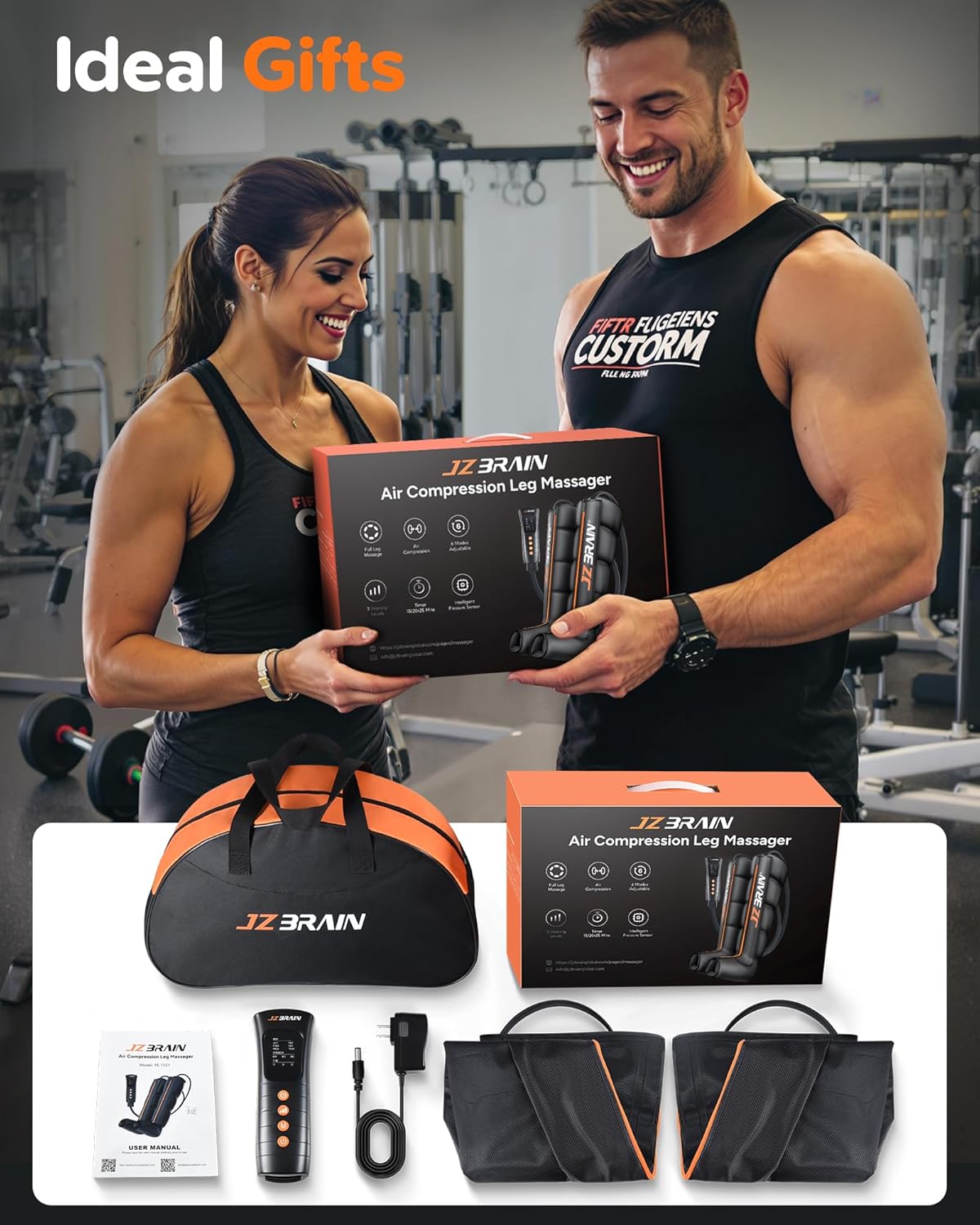
Image 3.1: All components included in the JZBRAIN Sequential Air Compression Recovery System package.
4. Specifications
| Feature | Detail |
|---|---|
| Model Number | FE-7221 |
| Product Dimensions | 0.79 x 0.79 x 0.79 inches |
| Item Weight | 5.2 Pounds |
| Material | Nylon |
| Power Source | Corded Electric (110V) |
| Target Areas | Calf, Feet, Knee, Leg, Thigh |
| Noise Level | 50-55 dB |
| Inflation Speed | Approximately 30 seconds |
5. Sizing Guide
To ensure optimal comfort and effectiveness, select the correct size based on your leg measurements. The Medium size is designed for specific dimensions:
- Medium Size:
- Inseam: 33-35 inches
- Upper Thigh Circumference: Up to 29 inches
- Lower Calf Circumference: Up to 19 inches
It is recommended to measure your inseam length (from heel to crotch), upper thigh circumference, and calf circumference before purchase. If your measurements fall between sizes, choosing the smaller size may provide a more comfortable and adjustable fit due to the reinforced dual-zipper system.

Image 5.1: Detailed sizing chart to help determine the best fit for the leg compression boots.
6. Setup Instructions
Follow these steps to set up your JZBRAIN Sequential Air Compression Recovery System:
- Unpack Components: Carefully remove all items from the packaging and ensure all listed package contents are present.
- Position Leg Boots: Place the compression leg boots around your legs. Ensure they are properly aligned and zipped up for a snug, comfortable fit. The dual-zipper system allows for flexible adjustment.
- Connect Air Hoses: Connect the air hoses extending from the leg boots to the corresponding ports on the control unit. Ensure connections are secure.
- Connect Power: Plug the power adapter into the control unit, then plug the adapter into a standard 110V power outlet.
7. Operating Instructions
The control unit allows for customization of your compression therapy session.
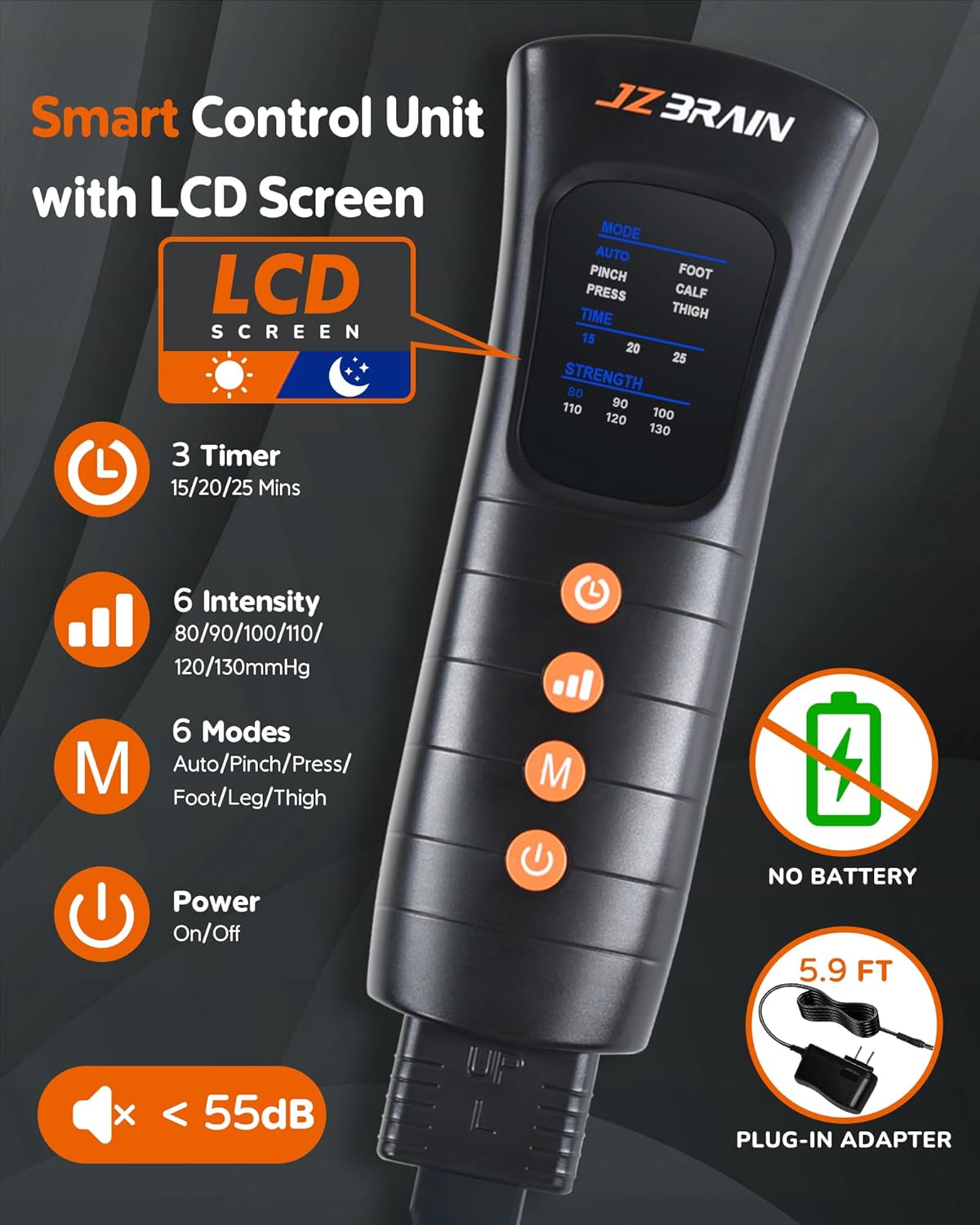
Image 7.1: The smart control unit with LCD screen for easy operation.
Control Unit Functions:
- Power On/Off: Press the power button to turn the device on or off.
- Mode Selection: The device offers 6 compression modes (M1-M6). Use the 'Mode' button to cycle through them.
- M1-M3: Full Leg Massage (Auto, Pinch, Press)
- M4-M6: Individual Zone Massage (Foot, Leg, Thigh)
- Intensity Adjustment: Select from 6 intensity levels (e.g., 80-130 mmHg) using the 'Strength' or intensity buttons.
- Timer Setting: Choose a session duration from 3 available timer options (15, 20, 25 minutes). The device features an auto-off timer.
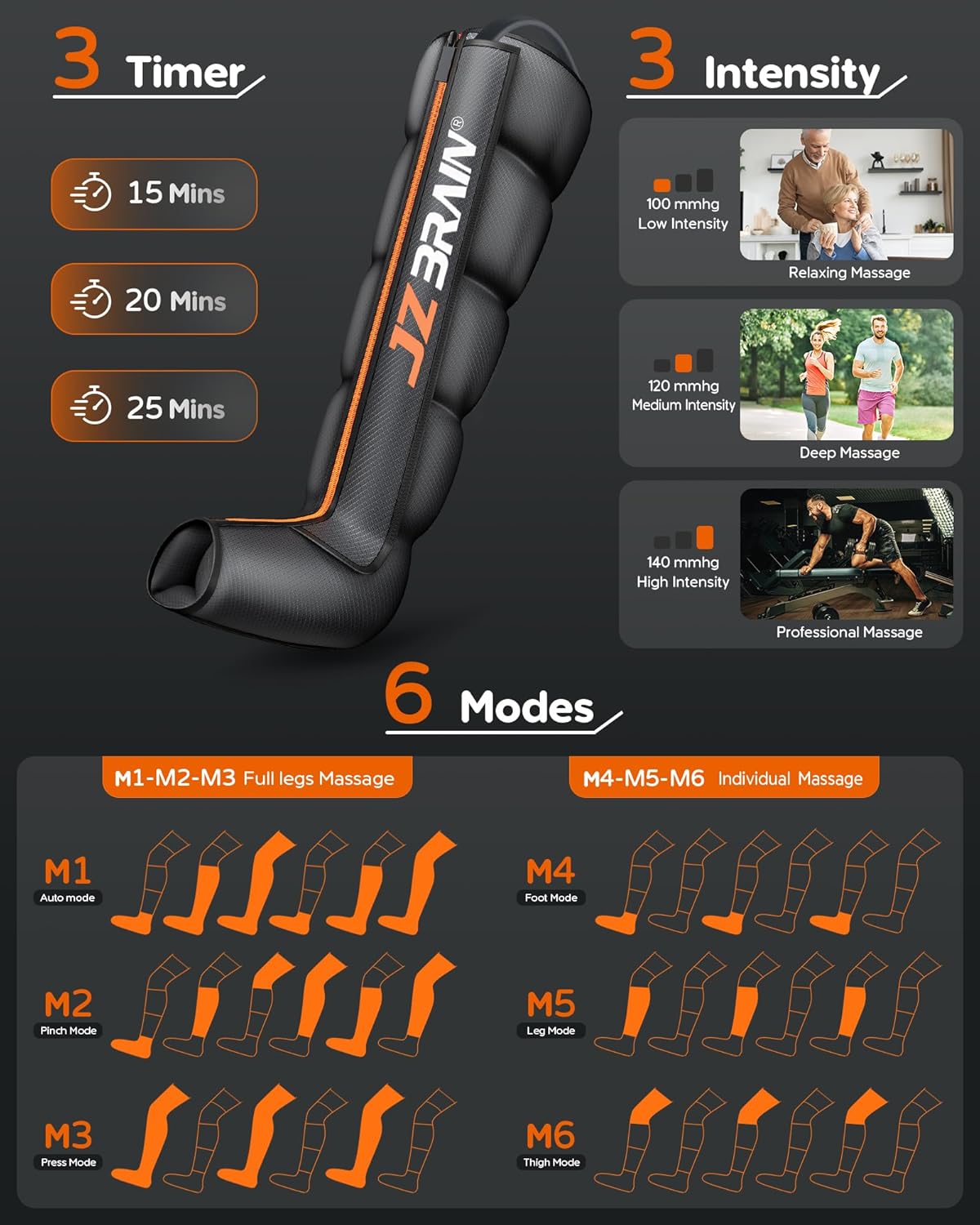
Image 7.2: Overview of available timer, intensity, and mode settings.
Usage Recommendations:
For best results, use the air compression recovery boots 1-2 times daily for 15-30 minutes per session. The system's advanced air pump ensures fast and efficient inflation, providing a stable and effective compression experience. The smart pressure sensor technology ensures consistent intensity across different leg sizes.

Image 7.3: Smart Pressure Sensor Technology ensures consistent massage intensity for various leg sizes.
8. Care and Maintenance
Proper care and maintenance will extend the lifespan of your JZBRAIN Sequential Air Compression Recovery System.
Cleaning:
- If sweating occurs during use, wipe the leg boots with a soft, damp cloth to maintain cleanliness.
- To clean the boots, simply wipe them with a soft, damp cloth.
- Do not submerge the boots or control unit in water.
- Avoid using harsh chemicals, abrasive cleaners, or solvents, as these can damage the material.
Storage:
- After each use, unplug the device from the power outlet.
- Store the device in a cool, dry place, away from direct sunlight and extreme temperatures.
- Utilize the provided storage bag for convenient and safe storage.
Durability:
The system is crafted with premium polyamide fiber and features reinforced stitching, designed for long-term reliability and tested for thousands of usage cycles.
9. Troubleshooting
If you encounter any issues with your JZBRAIN Sequential Air Compression Recovery System, please refer to the following common troubleshooting tips:
- Device Not Powering On: Ensure the power adapter is securely connected to both the control unit and a functioning 110V power outlet.
- Uneven Compression: Verify that the leg boots are properly fitted and zipped, and that all air hoses are securely connected to the control unit.
- Unusual Noise: The device operates at a low noise level (50-55 dB). If you hear any unusual or excessive noise, ensure all connections are secure and there are no obstructions.
For persistent issues or problems not listed here, please contact JZBRAIN customer support.
10. Warranty and Support
JZBRAIN is committed to providing quality products and customer satisfaction.
Warranty Information:
This product is backed by a 24-month warranty from the date of purchase. This warranty covers manufacturing defects and ensures hassle-free replacements for eligible issues.
Customer Support:
For any questions, concerns, or technical assistance, please contact JZBRAIN customer support. We offer friendly, professional support with a guaranteed reply within 24 hours.
Please visit the official JZBRAIN store for contact information: JZBRAIN Store on Amazon