
SZFZMZ TV-XM-Q20-4MP
SZFZMZ Bird Feeder with Camera User Manual
Model: TV-XM-Q20-4MP | Brand: SZFZMZ
Introduction
Thank you for choosing the SZFZMZ Bird Feeder with Camera. This smart bird feeder is designed to enhance your bird-watching experience with advanced features such as 2.5K HD video, AI bird recognition, automatic capture, and real-time notifications. Its solar-powered and IP66 waterproof design ensures reliable outdoor performance. This manual provides detailed instructions for setting up, operating, and maintaining your bird feeder.
Package Contents
- Smart bird feeder
- Solar panel
- Black band
- Mounting bracket
- Mounting screws
Setup Guide
1. Physical Installation
The bird feeder is made of high-quality bamboo and is designed for easy installation in your yard, patio, garden, porch, or deck. Use the provided mounting bracket and screws to securely attach the feeder to a suitable location, such as a tree or post. Ensure the solar panel is positioned to receive maximum sunlight for optimal charging.

Image: The SZFZMZ Bird Feeder with Camera, showing the main unit, solar panel, and a smartphone displaying a live bird view.
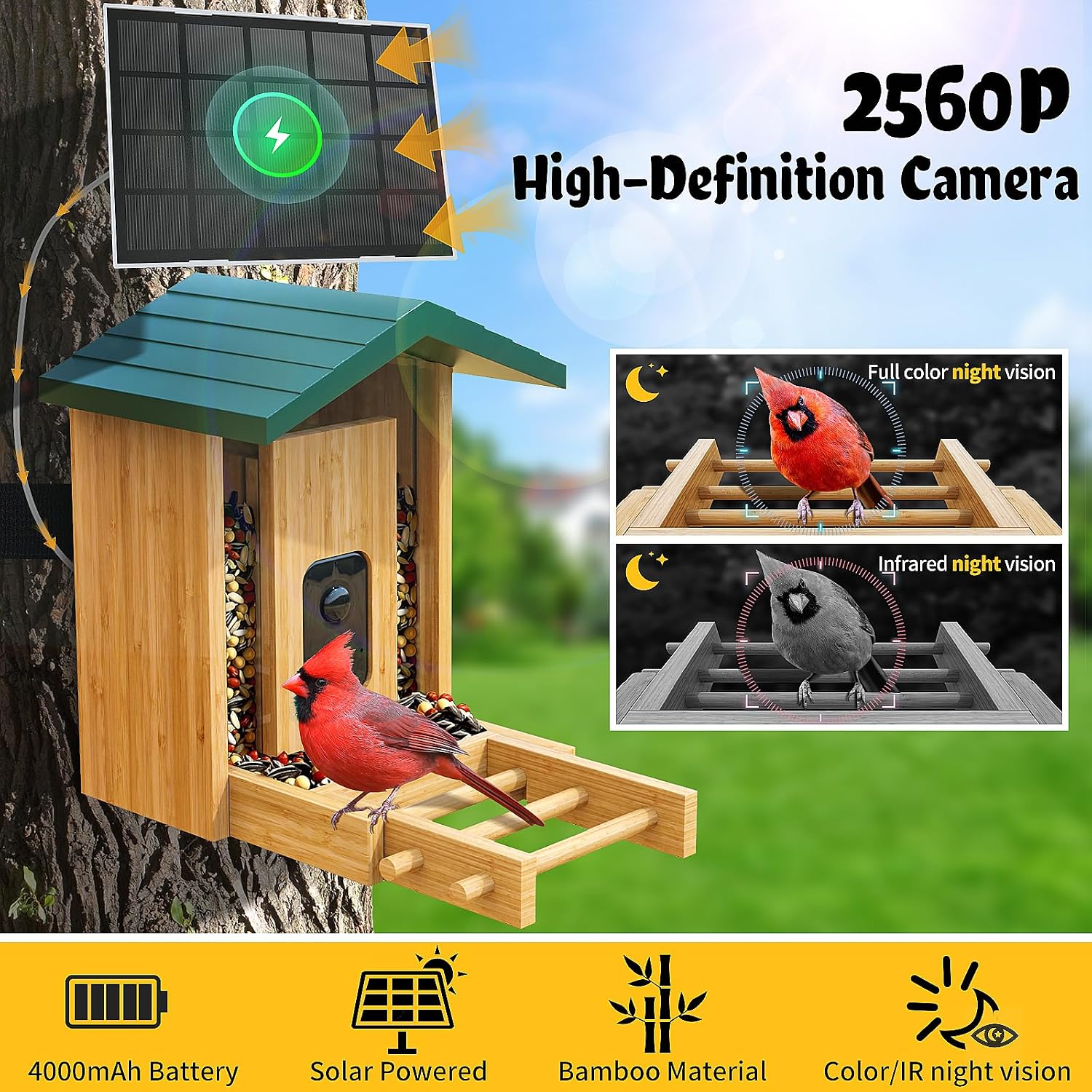
Image: Close-up of the bird feeder highlighting the 2.5K HD camera, 4000mAh battery, solar panel, bamboo material, and night vision capabilities (full color and infrared).
2. Camera and App Setup
The smart bird feeder works with the user-friendly Tris Home app. Follow these steps to connect your camera:
- Download the "Tris Home" app from your smartphone's app store (available on iOS and Android).
- Open the silicone cover on the camera unit and long-press the power button to turn it on. You will hear a voice prompt indicating it's starting up.
- In the app, select "Add Device" and choose "Bird Feeder" or "Bird Camera".
- Follow the in-app instructions to connect the camera to your 2.4 GHz Wi-Fi network. Note: 5 GHz Wi-Fi is not supported.
- The app will generate a QR code. Point your smartphone screen with the QR code towards the camera lens at a distance of 25-35 cm (approximately 10-14 inches).
- Once the camera successfully scans the QR code, you will hear a "Configured" alert tone. The device will then be added to your app.

Image: A smartphone displaying a notification for motion detection from the smart bird feeder, indicating instant alerts.
3. Filling the Feeder
The bird feeder has a 1.5L large capacity container. Open the top lid of the feeder and pour in your desired bird food. Ensure the lid is securely closed after filling to protect the food from elements.
Operating Instructions
Live View and Notifications
Once connected, you can access the live feed from your bird feeder camera through the Tris Home app. The camera provides a 130° viewing angle and 2.5K resolution for clear images and video, even at night with its full-color and infrared night vision capabilities.
- AI Bird Recognition: The feeder uses advanced AI algorithms to recognize over 12,000 bird species.
- Motion Detection & Notifications: Receive instant notifications on your mobile phone when birds approach the feeder, allowing you to view them in real-time.
- Automatic Recording: The camera automatically captures video clips when motion is detected.
- Two-Way Audio: Listen to bird chirping and use the two-way audio feature to deter unwanted visitors like squirrels.

Image: Graphic illustrating the AI identification feature, capable of recognizing over 12,000 bird species, along with 2.4G WiFi, 2560P resolution, 130° wide angle, and instant push notifications.

Image: The bird feeder in a rainy environment, demonstrating its IP66 waterproof rating and a "Go away" speech bubble next to a squirrel, indicating its deterrence capabilities.
Storage Options
Recorded videos and photos can be saved using two methods:
- Cloud Storage: A 30-day free trial is available for new users. Subscription plans are available for extended cloud storage.
- TF Memory Card: Supports up to 128GB (TF card not included).
Sharing Features
The app allows you to connect up to 10 mobile phones simultaneously, enabling friends and family to birdwatch with you. You can also easily share captured videos and photos on social media platforms.

Image: Multiple individuals viewing and sharing content from the bird feeder camera on their smartphones, illustrating the multi-user and social sharing features.
Maintenance
Power Management
The bird feeder is equipped with a built-in 4000mAh rechargeable battery and a 3W solar panel. The solar panel provides continuous charging, ensuring uninterrupted operation throughout the day. No need for frequent battery replacement or manual charging under normal sunlight conditions.
Weather Resistance
With an IP66 waterproof rating, the smart bird feeder is designed to withstand various outdoor weather conditions, including wind and rain.
Cleaning and Refilling
Regularly check the bird food level and refill as needed. Periodically clean the feeder to ensure hygiene for the birds and optimal camera performance. The design allows for easy refilling and cleaning.
Troubleshooting
- Cannot connect to Wi-Fi: Ensure your Wi-Fi network is 2.4 GHz. The device does not support 5 GHz networks. Check your Wi-Fi password and signal strength.
- Camera not powering on: Ensure the battery is charged. If it's a new setup, fully charge the device before first use. Long-press the power button to ensure it's activated.
- No SD card detected / Local recording failed: If you intend to use local storage, ensure a TF memory card (up to 128GB) is properly inserted. If not, consider subscribing to cloud storage for recording.
- Poor image quality at night: Ensure the camera lens is clean and free from obstructions. Verify that the night vision feature is enabled in the app settings.
- Squirrels are still accessing the feeder: Utilize the two-way audio feature in the app to activate the alarm or speak through the speaker to deter squirrels.
Specifications
| Feature | Detail |
|---|---|
| Brand | SZFZMZ |
| Model Number | TV-XM-Q20-4MP |
| Target Species | Birds |
| Material | Bamboo |
| Mounting Type | Freestanding |
| Product Dimensions | 11"L x 6.5"W x 9.8"H |
| Power Source | Solar Powered |
| Included Components | Smart bird feeder, Black band, Mounting bracket, Mounting screws, Solar panel |
| Capacity | 1.5 Liters |
| Color | Green |
| Item Weight | 4.7 Pounds |
| Batteries | 1 Lithium Ion batteries required (included) |
| Camera Resolution | 2.5K HD (2560P) |
| Wi-Fi Compatibility | 2.4 GHz only |
| Waterproof Rating | IP66 |
Warranty and Support
The SZFZMZ Bird Feeder with Camera comes with a one-year warranty. If you encounter any problems during use or have questions, please feel free to contact us through the vendor's support channels (refer to your purchase documentation for specific contact details).
Ask a question about this manual
Ask about setup, troubleshooting, compatibility, parts, safety, or missing instructions. Manuals+ will review the question and use this page’s manual context to help answer it.