
1. Introduction
Thank you for choosing the addlon 80-inch Ceiling Fan with Light. This manual provides essential information for the safe installation, operation, and maintenance of your new ceiling fan. Please read all instructions carefully before beginning installation and retain this manual for future reference.
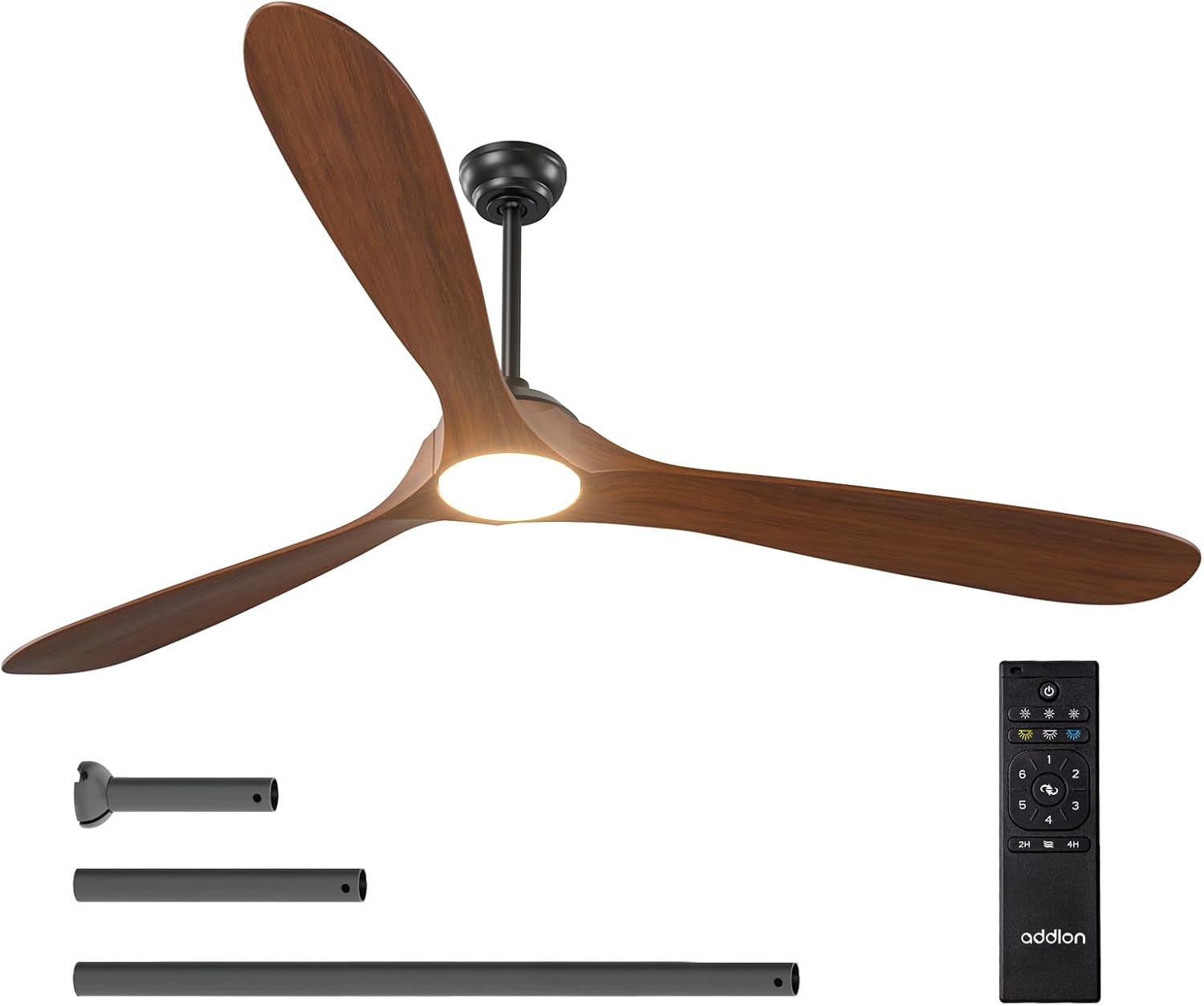
Figure 1.1: The addlon 80-inch ceiling fan with light, remote control, and various downrod lengths.
2. Important Safety Information
WARNING: Risk of Electric Shock
- Before installing or servicing this ceiling fan, always disconnect the power supply by turning off the circuit breaker at the main electrical panel.
- All electrical connections must be in accordance with local and National Electric Code (N.E.C.) standards and ANSI/NFPA 70.
- If you are unfamiliar with proper electrical wiring connections, consult a qualified electrician.
- Do not alter, re-locate, or remove wiring when nothing goes wrong with the product.
- Double-check all connections and screws to ensure they are tight and correct.
- Verify that the supply voltage is correct by comparing it with the product information.
- To avoid fire, shock, and serious personal injury, please read all instructions carefully.
- Ensure the installation site allows a minimum of 7.5 feet from the blades to the floor.
- This fan is designed for indoor/outdoor use, but avoid direct rain exposure.
3. Package Contents
Verify that all components listed below are included in your package. If any parts are missing or damaged, please contact addlon customer support.

Figure 3.1: All components of the addlon ceiling fan laid out for inspection.
- Motor Housing
- 3 Wood Blades
- Light Kit (LED panel and cover)
- Remote Control with Holder
- Downrods (various lengths)
- Mounting Bracket
- Canopy and Canopy Cover
- Hardware Pack (screws, wire nuts, washers)
- Instruction Manual
4. Setup and Installation
This section guides you through the installation process. For a visual guide, please refer to the installation videos provided.
4.1. Pre-Installation Steps
- Disconnect Power: Turn off the circuit breaker to the fan location.
- Remove Existing Fixture: Carefully remove any existing light fixture or ceiling fan.
- Prepare Mounting Bracket: Separate the mounting bracket from the canopy. Secure the mounting bracket to the ceiling junction box using appropriate screws for your ceiling type.
4.2. Assembling the Fan
- Remove Motor Protection Plates: Unscrew and remove the three motor protection plates from the motor assembly.
- Attach Downrod: Thread the electrical wires from the motor through the downrod. Insert the downrod into the motor housing and secure it with the provided pin and screws. Tighten all screws firmly.
- Hang Motor Assembly: Carefully lift the motor assembly and hang it onto the ceiling mounting bracket. Ensure the downrod ball engages the ridge on the hanger bracket for secure placement.
4.3. Wiring Connections
Make sure all connections are tight and secure. Match wire colors as follows:
- Green Wire: Connect to the Ground wire.
- White Wire: Connect to the Neutral wire.
- Black Wire: Connect to the Live wire.
Note: Both the fan and the light are powered by a controller and DC motor. It is not possible to control the light/fan independently with multiple wall switches. If you have more than one live wire, connect one of them and insulate the other.

Figure 4.1: Illustration of proper wiring connections for the ceiling fan.
4.4. Attaching Blades and Light Kit
- Install Blades: Attach each wood blade to the motor using two screws and spacers for each. Ensure all screws are tightened to prevent wobbling.
- Connect Light Kit: Plug the terminal pairs of the LED panel tightly. Secure the LED panel to the motor housing with the provided screws.
- Install Light Cover: Attach the light cover to the light kit by twisting it clockwise until it snaps into place.
4.5. Installation Videos
For detailed visual instructions, please refer to the following official installation videos:
Video 4.1: Installation guide for addlon Wood Blades Ceiling Fan with Light. This video demonstrates the full installation process.
Video 4.2: Installation guide for addlon 52-inch Wood Ceiling Fan with Light. While for a 52-inch model, many steps are similar to the 80-inch version.
5. Operating Instructions
Your addlon ceiling fan is operated via the included remote control. Familiarize yourself with the remote's functions for optimal use.

Figure 5.1: Overview of the multi-function remote control for the addlon ceiling fan.
5.1. Remote Control Functions
- Power ON/OFF: Press the power button to turn the fan and light on or off.
- Fan Speed: Select from 6 adjustable wind speeds (Level 1-2 for comfortable wind, Level 3-4 for natural wind, Level 5-6 for high cooling wind).
- Light Control:
- Brightness Adjustment: Dimmable from 10% to 100%.
- Color Temperature (CCT): Choose from 3000K (warm white), 4000K (nature white), or 6000K (cold white).
- Reversible Function: Switch between forward mode (cooler air in summer) and reverse mode (improved air circulation in winter).
- Timer Setting: Set the fan to turn off automatically after 2 or 4 hours.
- Memory Function: The fan retains the last settings for speed, direction, and light when turned off via a wall switch.
5.2. Fan Features Overview
Video 5.1: Overview of the addlon Wood Ceiling Fan Series, highlighting key features and benefits.
Video 5.2: Features of addlon 60/72/80-inch Wood Blades Ceiling Fans with Lights, including speed, light, and reversible functions.
6. Maintenance
Regular maintenance ensures optimal performance and longevity of your ceiling fan.
- Cleaning: Use a soft, damp cloth to clean the fan blades and motor housing. Do not use abrasive cleaners or solvents.
- Tighten Screws: Periodically check all screws and connections for tightness. Retighten as necessary.
- Blade Balance: If the fan wobbles, ensure all blades are securely attached and balanced. A balancing kit (not included) may be used if needed.
7. Troubleshooting
If you experience issues with your fan, refer to the following common problems and solutions:
| Problem | Possible Cause | Solution |
|---|---|---|
| Fan does not start | No power to the fan; Loose wire connections; Remote control battery low. | Check circuit breaker; Verify all wire connections are secure; Replace remote control battery. |
| Fan wobbles | Loose blade screws; Unbalanced blades; Loose mounting bracket. | Tighten all blade screws; Use a balancing kit; Ensure mounting bracket is securely fastened. |
| Light does not work | Loose wire connection to light kit; Faulty LED panel. | Check light kit wiring; Contact customer support for replacement LED panel. |
| Remote control not working | Low battery; Remote not paired. | Replace battery; Refer to remote pairing instructions (usually in a separate quick start guide). |
| Fan is noisy | Loose screws; Motor issue. | Check and tighten all screws; If noise persists, contact customer support. |
8. Specifications
| Feature | Detail |
|---|---|
| Brand | addlon |
| Model Name | KDM80WOO06R1 |
| Size | 80 inch |
| Product Dimensions | 79.92"D x 79.92"W x 19.69"H |
| Item Weight | 17.86 pounds |
| Power Source | AC |
| Wattage | 100 watts |
| Motor Type | DC |
| Number of Power Levels | 6 |
| Control Method | Remote |
| Special Features | 6 Speeds, Adjustable Color Temperature (3CCT), Dimmable (10%-100%), Remote Controlled, Reversible, Noiseless |
| Indoor/Outdoor Usage | Indoor (avoid direct rain for outdoor use) |
| UPC | 850067050629 |
9. Warranty and Support
addlon offers comprehensive support for your product:
- Motor Warranty: Up to 120 months (10 years).
- Other Parts Warranty: 2 years.
- Customer Support: 24-hour customer support is available. Please feel free to contact us with any questions you may have during installation or use.