
iZEEKER iG200, iG420
iZEEKER Trail Camera User Manual
Models: iG200, iG420
1. Introduction
This user manual provides comprehensive instructions for the iZEEKER iG200 No Glow Trail Camera and the iZEEKER iG420 Solar Trail Camera. It covers setup, operation, maintenance, and troubleshooting to ensure optimal performance of your devices. Please read this manual thoroughly before using your trail cameras.
2. Package Contents
iG200 Package Includes:
- 1 x iG200 Trail Camera
- 1 x USB Cable
- 1 x User Manual
- 1 x Strap
iG420 Package Includes:
- 1 x iG420 Solar Trail Camera
- 1 x 32GB SD Card
- 1 x USB Cable
- 1 x User Manual
- 1 x Strap

Image: The iZEEKER iG200 (left) and iG420 (right) trail cameras, along with included accessories like a 32GB SD card, USB cable, and strap.
3. Product Overview
3.1 iZEEKER iG200 No Glow Trail Camera
The iG200 is an entry-level trail camera designed for discreet monitoring. It features no-glow infrared LEDs for stealthy night vision, making it ideal for security or wildlife observation without disturbing animals. It captures high-quality images and videos with a fast trigger speed.

Image: A split image demonstrating the iG200's ability to capture wildlife both day (color) and night (black and white) with 32MP photo and 1080P video resolution.

Image: Close-up of the iG200 camera highlighting its 940nm no-glow IR LEDs, which ensure the camera remains stealthy at night.
3.2 iZEEKER iG420 Solar Trail Camera
The iG420 is an upgraded trail camera featuring a built-in solar panel for extended battery life and continuous operation. It offers superior 4K video resolution and 48MP photos, providing clearer and more vivid details of wildlife. Its low-glow IR technology ensures excellent night vision.

Image: The iG420 solar-powered trail camera mounted on a tree, showcasing its integrated solar panel for battery saving.

Image: A close-up of a fox, illustrating the clearer and smoother 4K video quality captured by the iG420 camera.

Image: A split image demonstrating the iG420's ability to capture wildlife both day (color) and night (black and white) with 48MP ultra-clear photo resolution.
3.3 Common Features
- Ultra-fast Trigger Speed: Both cameras feature sensitive PIR sensors for instant capture of moments. The iG200 has a 0.2-0.4s trigger speed, while the iG420 boasts 0.1-0.3s.
- Waterproof Design: Both models feature an innovative clamshell design and unique bottom-opening battery case, ensuring IP66 waterproof performance in extreme weather.
- Easy Aiming & Setup: The LCD screen and lens are front-facing on both models, allowing for easy adjustment of the lens angle during mounting. Keypads light up for convenient use in the dark.
- Versatile Features: Both cameras include multiple features such as timer, time lapse, PIR sensitivity adjustment, temperature display, watermark, and password protection.

Image: A trail camera capturing a fast-moving animal, illustrating the rapid 0.2-second trigger speed.
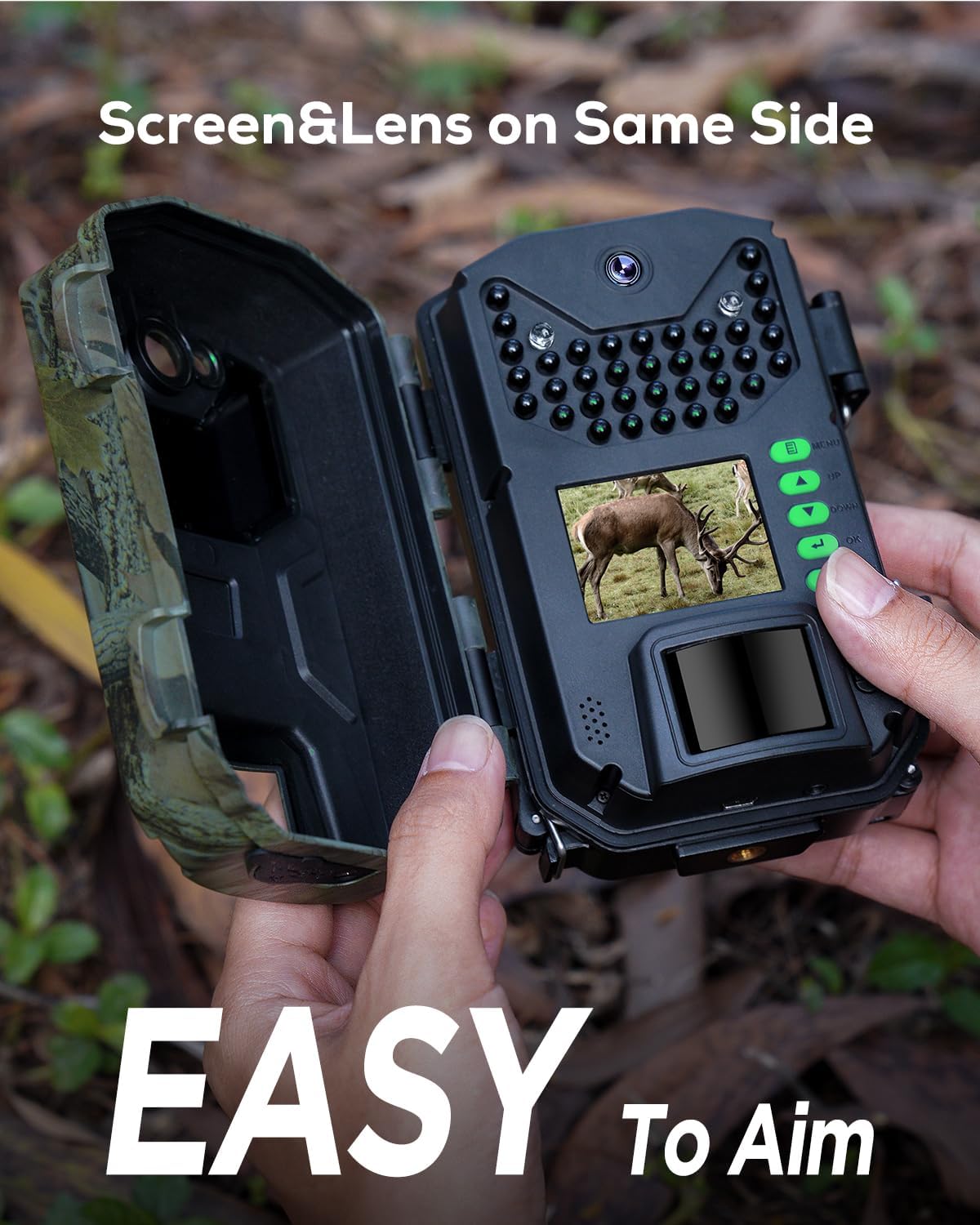
Image: Hands holding the iG200 camera, demonstrating how the front-facing screen and lens make it easy to aim and set up.

Image: Hands holding the iG420 camera, demonstrating how the front-facing screen and lens make it easy to aim and use.
4. Setup Guide
4.1 Powering the Camera
iG200: Requires 8 AA batteries (not included). Open the bottom battery compartment and insert batteries, ensuring correct polarity. The camera can also be powered via a 6V DC external power source.
iG420: Features a built-in rechargeable battery and a solar panel for primary power. For extended operation or in low light conditions, it also supports 8 AA backup batteries (not included). Insert AA batteries into the bottom compartment, observing polarity. Ensure the solar panel is exposed to direct sunlight for optimal charging.
4.2 Inserting the SD Card
Both cameras support SD cards up to 256GB (a 32GB SD card is included with the iG420). Locate the side card slot and gently insert the SD card until it clicks into place. Ensure the camera is OFF before inserting or removing the SD card to prevent data corruption.
4.3 Mounting the Camera
Use the provided strap to secure the camera to a tree or pole. Position the camera at a height that allows for optimal detection of target subjects. The front-facing screen and lens facilitate easy aiming. Ensure the camera is stable and not prone to movement from wind or animals.
5. Operating Instructions
5.1 Basic Operation
- Power On: Switch the camera from OFF to ON mode. The LCD screen will light up.
- Mode Selection: Use the mode button (usually labeled 'M' or 'MODE') to switch between Photo, Video, and Photo+Video modes.
- Accessing Menu: Press the 'MENU' button to enter the settings menu. Use the arrow keys to navigate and 'OK' to confirm selections.
- Exiting Menu: Press 'MENU' again to exit the settings.
5.2 Key Settings
- Photo Resolution: Select desired image quality (e.g., 32MP, 20MP for iG200; 48MP, 36MP for iG420). Higher resolution yields better detail but consumes more storage.
- Video Resolution: Choose video quality (e.g., 1080P for iG200; 4K, 2K for iG420).
- PIR Sensitivity: Adjust the Passive Infrared sensor sensitivity (Low, Medium, High) based on the environment to minimize false triggers.
- Trigger Interval: Set the delay between consecutive captures after a trigger event.
- Time Lapse: Enable time-lapse mode to capture images at set intervals, useful for monitoring long-term events like plant growth.
- Timer: Set specific times for the camera to be active.
- Password Protection: Set a password to prevent unauthorized access to your camera settings and captured media.
6. Specifications
iG200 Specifications:
- Power Source: Battery powered (AA)
- Trigger Speed: 0.2~0.4s
- Photo Resolution: 32MP, 20MP, 16MP, 12MP, 8MP, 5MP, 2MP
- Video Resolution: 1080P, 720P, 480P
- Night Vision Distance: 65ft (20m)
- IR Flash: 36 no glow LEDs (940nm)
- Detection Angle: 90°
- Lens Angle: 55°
- Screen: 2.0" color TFT LCD
- Working Temperature: -4°F to 140°F (-20°C to 60°C)
- Waterproof: IP66
iG420 Specifications:
- Power Source: Solar powered, Battery powered (AA)
- Trigger Speed: 0.1~0.3s
- Photo Resolution: 48MP, 36MP, 20MP, 16MP, 14M, 12M, 10M, 8M, 5MP, 3MP, 2MP, 1MP
- Video Resolution: 4K, 2K, 1080P, 720P, 480P
- IR Flash: 40pcs 850nm Low Glow Infrared LEDs
- Detection Angle: 90°
- Lens Angle: 89°
- Screen: 2.0" color TFT LCD
- Working Temperature: -4°F to 140°F (-20°C to 60°C)
- Waterproof: IP66
7. Maintenance
- Cleaning: Use a soft, dry cloth to clean the camera lens and body. Avoid abrasive cleaners or solvents.
- Battery Replacement: Replace batteries when the low battery indicator appears. For iG420, ensure the solar panel is clean and exposed to sunlight.
- SD Card Management: Regularly format the SD card in the camera's settings to ensure optimal performance and prevent data corruption. Back up important files before formatting.
- Storage: When not in use for extended periods, remove batteries and store the camera in a cool, dry place.
8. Troubleshooting
| Problem | Possible Cause | Solution |
|---|---|---|
| Camera not powering on | Low or dead batteries; incorrect battery polarity; power switch in OFF position. | Replace batteries; check battery orientation; switch to ON. For iG420, ensure solar panel is charging or use backup AA batteries. |
| No images/videos captured | SD card full or corrupted; PIR sensitivity too low; camera not in active mode; detection zone issues. | Format or replace SD card; increase PIR sensitivity; check camera mode; adjust camera position. |
| Poor night vision | IR LEDs obstructed; low battery power affecting IR performance. | Clear obstructions from IR LEDs; replace batteries. |
| False triggers | PIR sensitivity too high; camera facing heat sources (e.g., direct sun, moving branches). | Decrease PIR sensitivity; reposition camera away from heat sources or swaying objects. |
9. Warranty and Support
iZEEKER products are designed for reliability and performance. For warranty information, technical support, or service inquiries, please refer to the contact information provided on the iZEEKER official website or your purchase documentation. Please have your model number (iG200 or iG420) and purchase date ready when contacting support.
You can visit the iZEEKER Store on Amazon for more information: iZEEKER Amazon Store
Related documentsiG200, iG420


Ask a question about this manual
Ask about setup, troubleshooting, compatibility, parts, safety, or missing instructions. Manuals+ will review the question and use this page’s manual context to help answer it.