
Introduction
This manual provides detailed instructions for the operation and maintenance of your Casio G-Shock GM2110D-4A Octagonal Orange Stainless Steel Watch. Please read this manual carefully to ensure proper use and to fully utilize all features of your watch. Keep this manual for future reference.
Product Overview
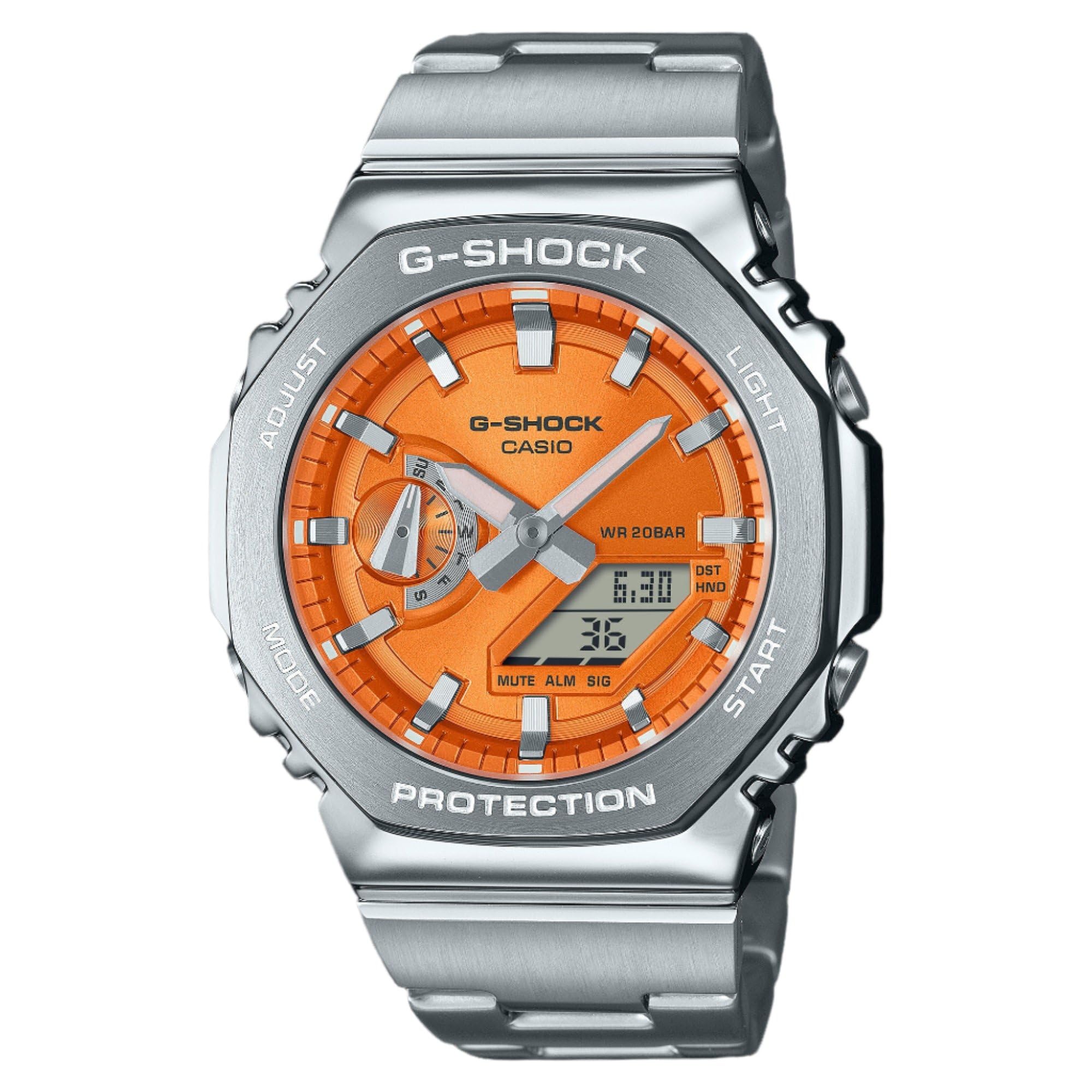
Figure 1: Casio G-Shock GM2110D-4A Octagonal Orange Stainless Steel Watch. This image shows the watch with its octagonal silver-tone stainless steel case and band, featuring an orange analog-digital dial. The dial displays the time 6:30 and the date 36, with 'G-SHOCK CASIO' and 'WR 20BAR PROTECTION' clearly visible. The watch's functional buttons, labeled 'ADJUST', 'MODE', 'LIGHT', and 'START', are positioned around the case.
The Casio G-Shock GM2110D-4A is a robust analog-digital watch designed for durability and functionality. It features an orange dial with silver-tone hands, housed within a silver-tone stainless steel case and band. Key features include quartz movement, 200-meter water resistance, and a scratch-resistant mineral crystal. The watch also includes various functions such as alarm, light, shock resistance, and a timer.
Setup
1. Initial Time Setting
- In the Timekeeping Mode, press and hold the ADJUST button (top left) until the city code starts to flash in the digital display. This indicates the setting mode.
- Use the MODE button (bottom left) to cycle through the settings: City Code → DST → 12/24-hour format → Seconds → Hour → Minute → Year → Month → Day.
- Use the START button (bottom right) or LIGHT button (top right) to change the flashing value.
- After configuring all settings, press the ADJUST button to exit the setting mode. The analog hands will automatically adjust to the digital time.
2. Home City Selection
Selecting your Home City is crucial for correct timekeeping and World Time functions. Follow the initial time setting steps to select your desired city code.
Operating Instructions
1. Mode Navigation
Press the MODE button (bottom left) to cycle through the watch's various modes:
- Timekeeping Mode (current time and date)
- World Time Mode (times in different cities)
- Stopwatch Mode
- Timer Mode
- Alarm Mode
2. Timekeeping Mode
This mode displays the current time and date. Use the ADJUST button to enter setting mode for time and date adjustments as described in the "Setup" section.
3. World Time Mode
In World Time Mode, use the START button (bottom right) to scroll through different city codes and view their current times.
4. Stopwatch Mode
- Press START to begin timing.
- Press START again to pause/resume.
- Press ADJUST to reset the stopwatch to zero while it is paused.
5. Timer Mode
- In Timer Mode, press and hold ADJUST to enter setting mode.
- Use MODE to select hours, minutes, or seconds.
- Use START or LIGHT to change the values.
- Press ADJUST to exit setting mode.
- Press START to begin the countdown.
6. Alarm Mode
- In Alarm Mode, press and hold ADJUST to enter setting mode.
- Use MODE to select hour or minute.
- Use START or LIGHT to change the values.
- Press ADJUST to exit setting mode.
- Press START to toggle the alarm ON/OFF. An indicator will show when the alarm is active.
7. Illumination (Light)
Press the LIGHT button (top right) to illuminate the watch face for easy viewing in low-light conditions.
Maintenance
1. Cleaning
Wipe the watch regularly with a soft, dry cloth to remove dirt and moisture. For stainless steel parts, a slightly damp cloth can be used, followed by a dry cloth. Avoid using chemical cleaners or solvents.
2. Water Resistance
This watch is water resistant to 200 meters (20 BAR). This means it is suitable for recreational scuba diving. Do not operate buttons while the watch is submerged in water. After exposure to saltwater, rinse the watch with fresh water and wipe it dry.
3. Battery Replacement
The watch is powered by a battery. When the display becomes dim or functions become erratic, it may be time for a battery replacement. It is recommended to have the battery replaced by an authorized Casio service center to ensure proper sealing and water resistance.
Troubleshooting
- Digital display is blank or dim: The battery may be low. Consider battery replacement.
- Time is incorrect: Ensure your Home City setting is correct and adjust the time as described in the "Setup" section. Check for DST (Daylight Saving Time) settings.
- Analog hands do not match digital time: Perform a hand alignment correction. Refer to the full Casio module manual for detailed steps, typically involving holding specific buttons in Timekeeping Mode to enter hand adjustment.
- Watch stops working after exposure to water: Immediately take the watch to an authorized service center. Do not attempt to open the watch yourself.
Specifications
| Feature | Detail |
|---|---|
| Model Number | GM2110D-4A |
| Movement | Quartz (Analog-Digital) |
| Case Material | Stainless Steel |
| Band Material | Stainless Steel |
| Crystal | Scratch Resistant Mineral |
| Water Resistance | 200 Meters (20 BAR) |
| Case Diameter | 44 mm |
| Case Thickness | 11.8 mm |
| Band Width | 25 mm |
| Dial Color | Orange |
| Additional Features | Alarm, Light, Shock Resistant, Timer, World Time |
Warranty and Support
This Casio G-Shock watch comes with a limited warranty. For specific warranty terms, conditions, and duration, please refer to the warranty card included with your purchase or visit the official Casio website. For technical support, service, or inquiries, please contact Casio customer service directly.
You can find more information and support resources on the official Casio website: www.casio.com


