
1. Introduction
This manual provides essential information for the safe and efficient operation, installation, and maintenance of your ACiQ 12000 BTU Mini Split AC/Heating System. This inverter-driven system offers both cooling and heating capabilities, high energy efficiency (21 SEER2), and convenient WiFi control. Please read this manual thoroughly before installation and use, and retain it for future reference.
2. Safety Information
Important Safety Instructions:
- Installation must be performed by a qualified and certified HVAC professional in accordance with all local and national electrical and safety codes.
- Do not attempt to install or service the unit yourself. Improper installation can result in electric shock, fire, water leakage, or other damage.
- Ensure the power supply matches the specifications listed on the unit's nameplate.
- Always disconnect power before performing any maintenance or cleaning.
- Keep children and pets away from the outdoor unit.
- Do not block the air intake or outlet of either unit.
- The refrigerant used in this unit is R454B. Handle with care and only by certified technicians.
3. Product Overview
The ACiQ 12000 BTU Mini Split AC/Heating System provides efficient climate control for spaces up to 400-600 sq. ft. It includes an indoor air handler, an outdoor condenser unit, and all necessary components for installation.

Figure 3.1: ACiQ 12000 BTU Mini Split AC/Heating System components.
Included Components:

Figure 3.2: Detailed view of included installation components.
- Indoor Unit
- Outdoor Unit
- Remote Control
- 16ft Line Set
- Wall Cap
- Drain Lines
- Power Cords
- Mounting Hardware
- AAA Batteries
- User Manual (this document)
4. Setup and Installation
The ACiQ Mini Split system is designed for professional installation. While the outdoor unit comes pre-charged with refrigerant, a qualified technician is required to vacuum the line set before operation to ensure proper system function and warranty validity.
Key Installation Considerations:
- Room Size: This 12,000 BTU unit is suitable for areas between 400-600 square feet. Refer to Figure 4.1 for general guidance on unit sizing.
- Power Requirements: The system operates on 208/230V. Ensure appropriate electrical wiring and circuit protection are in place.
- Line Set: A 16ft line set is included. Ensure the indoor and outdoor units are positioned within this distance.
- Drainage: Proper drainage for condensate from the indoor unit is crucial.
- Mounting: The indoor unit is wall-mounted, and the outdoor unit should be placed on a stable, level surface.

Figure 4.1: ACiQ Mini Split Unit Size Recommendations.
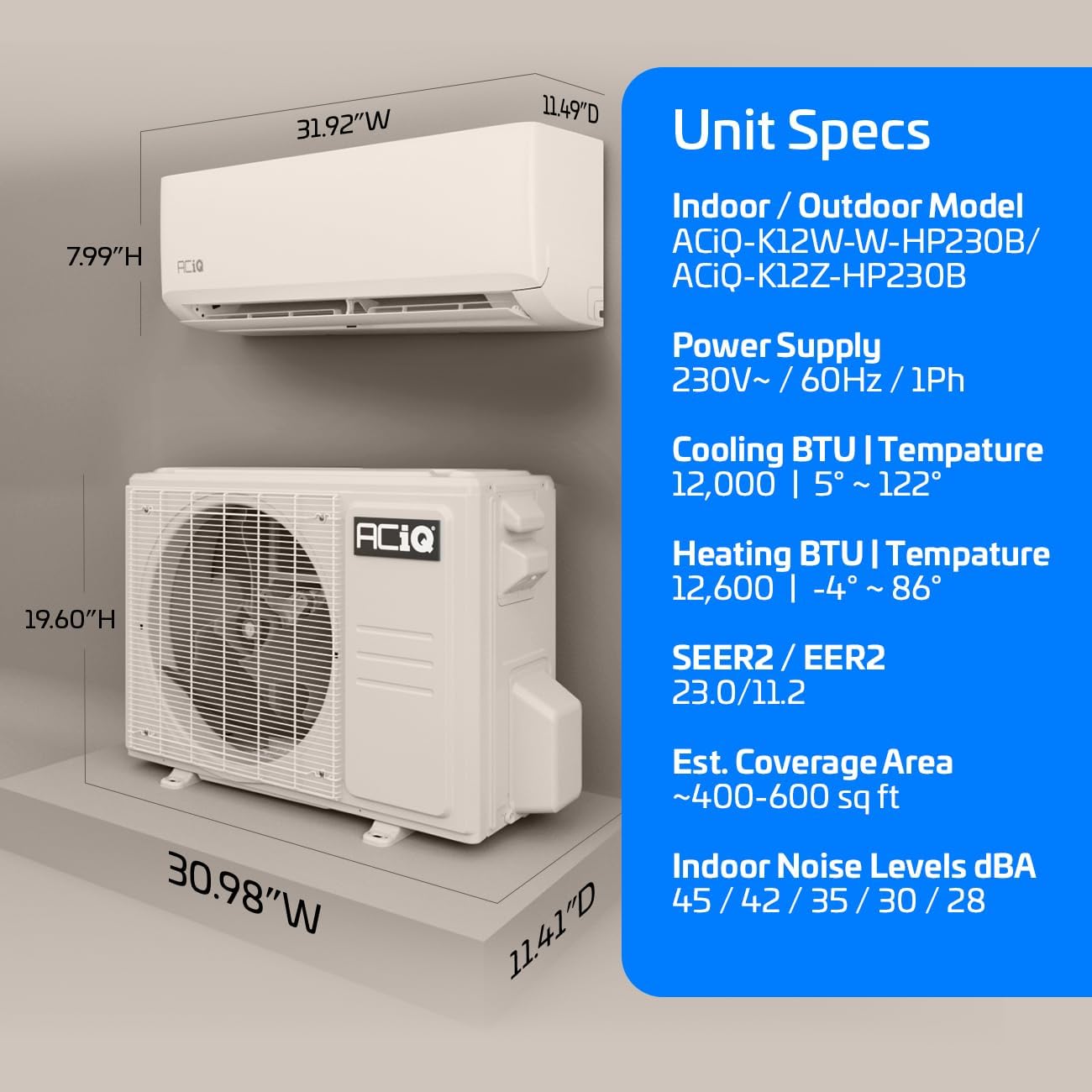
Figure 4.2: ACiQ Mini Split Unit Specifications and Dimensions.
5. Operating Instructions
Your ACiQ Mini Split system offers various modes for year-round comfort, controlled via the included remote or the WiFi-enabled smartphone app.
Operating Modes:
- Cooling Mode: Provides cooling with an operating range of 5°F to 122°F outdoor temperatures.
- Heating Mode: Provides heating with an operating range of -4°F to 86°F outdoor temperatures.
- Fan Mode: Circulates air without heating or cooling.
- Dry Mode: Dehumidifies the air.
- Auto Mode: Automatically selects cooling or heating based on the set temperature.

Figure 5.1: ACiQ Mini Split System operating temperature range for heating and cooling.
Remote Control Features:
The remote control allows direct access to various functions:

Figure 5.2: Remote control feature icons.
- I Feel Mode: Adjusts temperature based on the remote's sensor.
- Sleep Mode: Optimizes temperature and fan speed for comfortable sleep.
- Eco Mode: Energy-saving operation.
- Mute Mode: Reduces operational sounds.
- Timers: Schedule on/off times.
- Turbo Mode: Rapid cooling or heating.
WiFi Control:
The ACiQ system features built-in WiFi, allowing control via a smartphone app (iOS or Android) from any location. The app is compatible with Amazon Alexa, Google Assistant, and IFTTT for smart home integration.

Figure 5.3: WiFi-enabled control via smartphone app.
Quiet Operation:
The indoor unit operates at noise levels as low as 28 dBA, ensuring minimal disturbance.

Figure 5.4: Quiet indoor operation for enhanced comfort.
6. Maintenance
Regular maintenance ensures optimal performance and longevity of your ACiQ Mini Split system.
- Air Filter Cleaning: Clean the air filters of the indoor unit every two weeks or as needed. Remove filters, wash with mild detergent and warm water, rinse thoroughly, and allow to dry completely before reinserting.
- Indoor Unit Cleaning: Wipe the surface of the indoor unit with a soft, damp cloth. Do not use harsh chemicals or abrasive cleaners.
- Outdoor Unit Cleaning: Periodically clear any debris (leaves, dirt) from around the outdoor unit to ensure proper airflow. The coils may require professional cleaning annually.
- Professional Inspection: Schedule an annual inspection and service by a qualified HVAC technician to check refrigerant levels, electrical connections, and overall system health.
7. Troubleshooting
Before contacting customer support, review the following common issues and solutions:
| Problem | Possible Cause | Solution |
|---|---|---|
| Unit does not turn on | No power, remote batteries dead, circuit breaker tripped | Check power supply, replace remote batteries, reset circuit breaker |
| Insufficient cooling/heating | Dirty air filters, blocked outdoor unit, incorrect mode/temperature setting, low refrigerant | Clean filters, clear obstructions, verify settings, contact technician for refrigerant check |
| Water leakage from indoor unit | Clogged drain line, improper installation | Clear drain line, contact technician for inspection |
| Unusual noise | Loose parts, foreign objects, fan imbalance | Inspect for loose parts/objects, contact technician if noise persists |
| WiFi connectivity issues | Router issues, incorrect app setup | Restart router, reconfigure app connection, ensure strong WiFi signal |
If problems persist after attempting these solutions, please contact ACiQ customer support.
8. Specifications
| Feature | Specification |
|---|---|
| Brand | ACiQ |
| Model Info | ACiQ-K12W-W-HP230B / ACiQ-K12Z-HP230B |
| Capacity | 12,000 BTU (1 Ton) |
| Efficiency (SEER2) | 21 SEER2 |
| Voltage | 230 Volts |
| Wattage | 2530 watts |
| Noise Level (Indoor) | As low as 28 dB |
| Product Dimensions (Indoor) | 11.49"D x 31.92"W x 7.99"H |
| Estimated Coverage Area | 400-600 Square Feet |
| Installation Type | Ductless Wall-Mounted |
| Refrigerant Type | R454B |
| Special Features | Built-in WiFi, 16ft Installation Kit Included, Heating down to -4°F |
9. Warranty and Support
ACiQ stands behind its products with a comprehensive warranty:
- 6-Year Compressor Warranty
- 4-Year Parts Warranty
These warranty terms are valid when the system is registered online with the manufacturer at no extra charge. Please visit the official ACiQ website for warranty registration and detailed terms and conditions.

Figure 9.1: ACiQ Warranty Coverage.
Customer Support:
For technical assistance, warranty claims, or any questions regarding your ACiQ Mini Split system, please refer to the contact information provided on the ACiQ official website or your purchase documentation.


