Product Overview
The Bxmgr BN59-01432A TM2360E is a solar-powered voice remote control designed for compatibility with various Samsung Smart TVs, including Neo QLED 8K HDR models. It features both solar and USB Type-C charging capabilities, voice control functionality, and dedicated shortcut buttons for popular streaming services.

Image: Front and back view of the BN59-01432A TM2360E Solar Voice Remote, showcasing its minimalist design and solar panel on the rear.

Image: Diagram highlighting key features such as soft silicone keypad, easy setup, comfortable grip, durable ABS material, upgraded chip, and Bluetooth connectivity.
Setup and Pairing
The BN59-01432A TM2360E remote control can often be used out of the box with basic infrared functionality. However, to access all features, including voice control, Bluetooth pairing is recommended.
Initial Use (Infrared)
Upon first use, the remote may operate basic TV functions (like power, volume, channel) via infrared without any pairing. Point the remote directly at your TV for this functionality.
Bluetooth Pairing for Full Functionality
For voice control and more stable button responsiveness, pair the remote via Bluetooth:
- Ensure your Samsung Smart TV is powered on.
- Point the remote control towards the TV.
- Press and hold the Back button (curved arrow) and the Play/Pause button (triangle and two vertical lines) simultaneously for 3 seconds or more.
- A "Pairing has begun" message will appear on your TV screen.
- Release the buttons once the indicator light above the power button illuminates.
- The TV will confirm successful pairing.

Image: Visual guide demonstrating the simultaneous press of the Back and Play/Pause buttons for Bluetooth pairing.
Operating Instructions
Once paired, the remote offers various functions for an enhanced viewing experience.
Voice Control
The remote features a voice search function. After successful Bluetooth pairing:
- Press and hold the Microphone icon button on the remote control.
- Speak your command or desired content (e.g., "Open Netflix," "Change to Channel 5," "Volume up").
- Release the button when finished speaking.
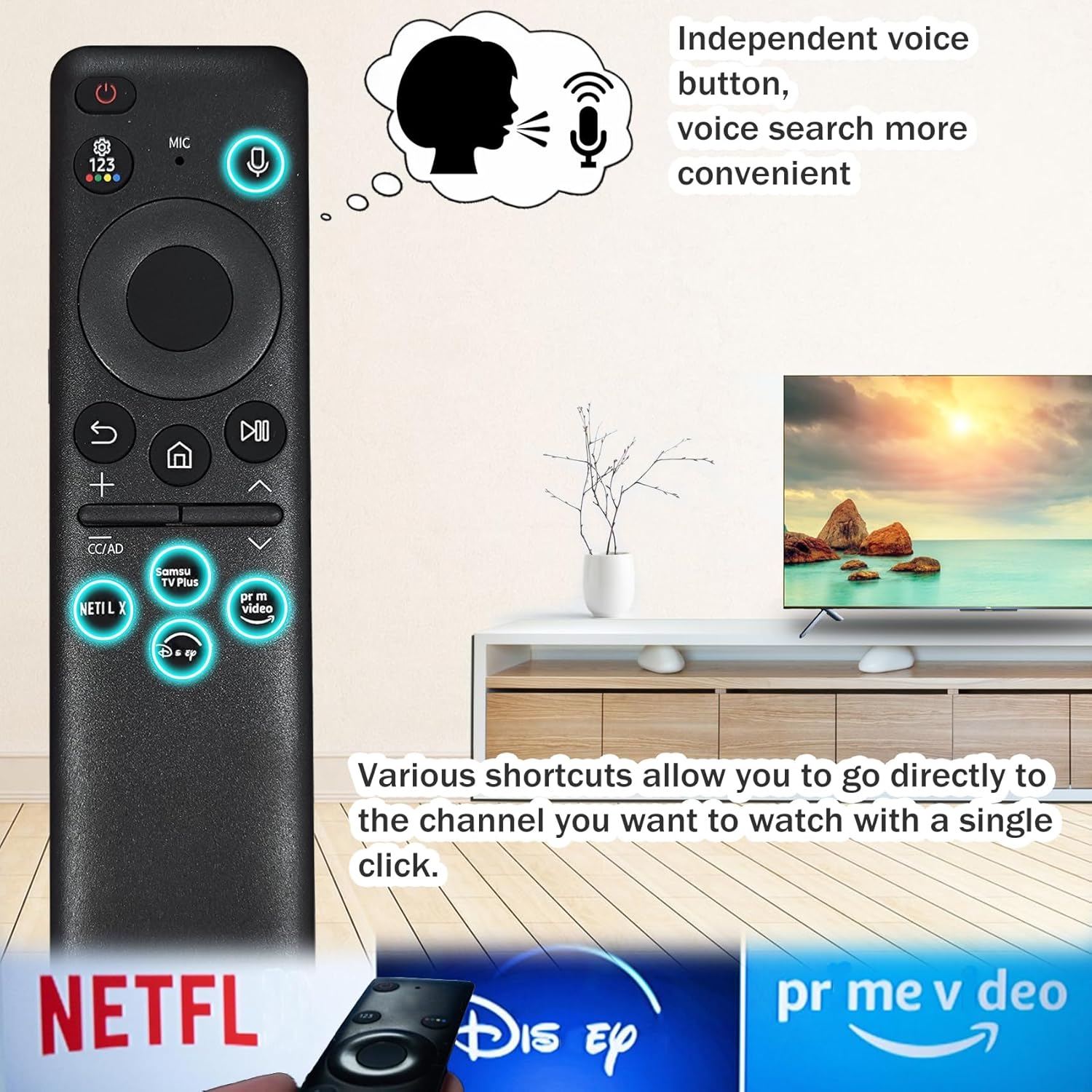
Image: Illustration of the voice control button and dedicated shortcut buttons for popular streaming services, enabling quick access.
Shortcut Buttons
Dedicated shortcut buttons provide one-touch access to popular streaming services:
- Press the Netflix button to launch Netflix.
- Press the Disney+ button to launch Disney+.
- Press the Prime Video button to launch Prime Video.
- Other buttons like Samsung TV Plus are also available for direct access.
Maintenance and Charging
The BN59-01432A TM2360E remote offers two convenient charging methods to ensure continuous operation without the need for disposable batteries.
Solar Charging
The remote is equipped with a solar charging panel on its back. To charge using solar power:
- Place the remote control with its back panel facing a light source, such as sunlight or bright indoor lighting.
- Regular exposure to light will help maintain the battery charge and extend its life.
USB Type-C Charging
For faster charging or when solar charging is not feasible, use a USB Type-C cable (not included):
- Locate the USB Type-C port on the remote control.
- Connect a standard USB Type-C cable (avoid fast charging cables) to the remote and a power source (e.g., TV USB port, wall adapter).
- The LED light on the front of the remote will illuminate during charging.
- The LED light will turn off once the battery is fully charged.

Image: Detailed view of the remote's back, highlighting the solar charging panel and the USB Type-C charging port for convenient power options.
Important Note: When not in use, expose the remote control to light to extend its battery life. This dual charging system provides flexibility and reduces environmental impact by eliminating the need for disposable batteries.
Troubleshooting
If you encounter issues with your remote control, refer to the following common solutions:
Remote Not Responding / Buttons Not Working
- Check Battery Level: Ensure the remote is sufficiently charged. Use either solar charging or USB Type-C charging.
- Re-pair Remote: If the remote was previously paired via Bluetooth but is no longer responding, try re-pairing it by holding the Back and Play/Pause buttons simultaneously for 3 seconds.
- Line of Sight (Infrared): For basic functions without Bluetooth pairing, ensure there is a clear line of sight between the remote and the TV's infrared receiver.
Voice Function Not Working
- Ensure Bluetooth Pairing: The voice function requires the remote to be paired with the TV via Bluetooth. Follow the pairing instructions in the "Setup and Pairing" section.
- Hold Microphone Button: Remember to press and hold the microphone button while speaking your command. Release it after speaking.
- Check TV Settings: Verify that voice recognition settings are enabled on your Samsung Smart TV. Consult your TV's user manual for specific instructions.
Intermittent Connectivity
- Reduce Interference: Ensure there are no large metallic objects or other electronic devices causing interference between the remote and the TV.
- Proximity: While Bluetooth offers more range than infrared, ensure you are within a reasonable distance from the TV.
Product Specifications
| Feature | Detail |
|---|---|
| Model Number | BN59-01432A VG-TM2360E |
| Brand | Bxmgr |
| Power Source | Solar Cell, USB Type-C (Rechargeable Battery Included) |
| Special Feature | Voice Search, Shortcut Buttons (Netflix, Disney+, Prime Video, Samsung TV Plus) |
| Connectivity | Bluetooth, Infrared (IR) |
| Compatible Devices | Samsung Neo QLED 8K HDR Smart TVs, Frame Crystal UHD Smart TV, and other compatible Samsung Smart TVs |
| Color | BN59-01432A Black |
| Item Weight | 1.76 ounces |
| Package Dimensions | 5.87 x 1.69 x 0.94 inches |
Compatibility
The BN59-01432A TM2360E remote is compatible with a wide range of Samsung Neo QLED 8K HDR Smart TVs and other Samsung Smart TV models. A partial list of compatible models includes:
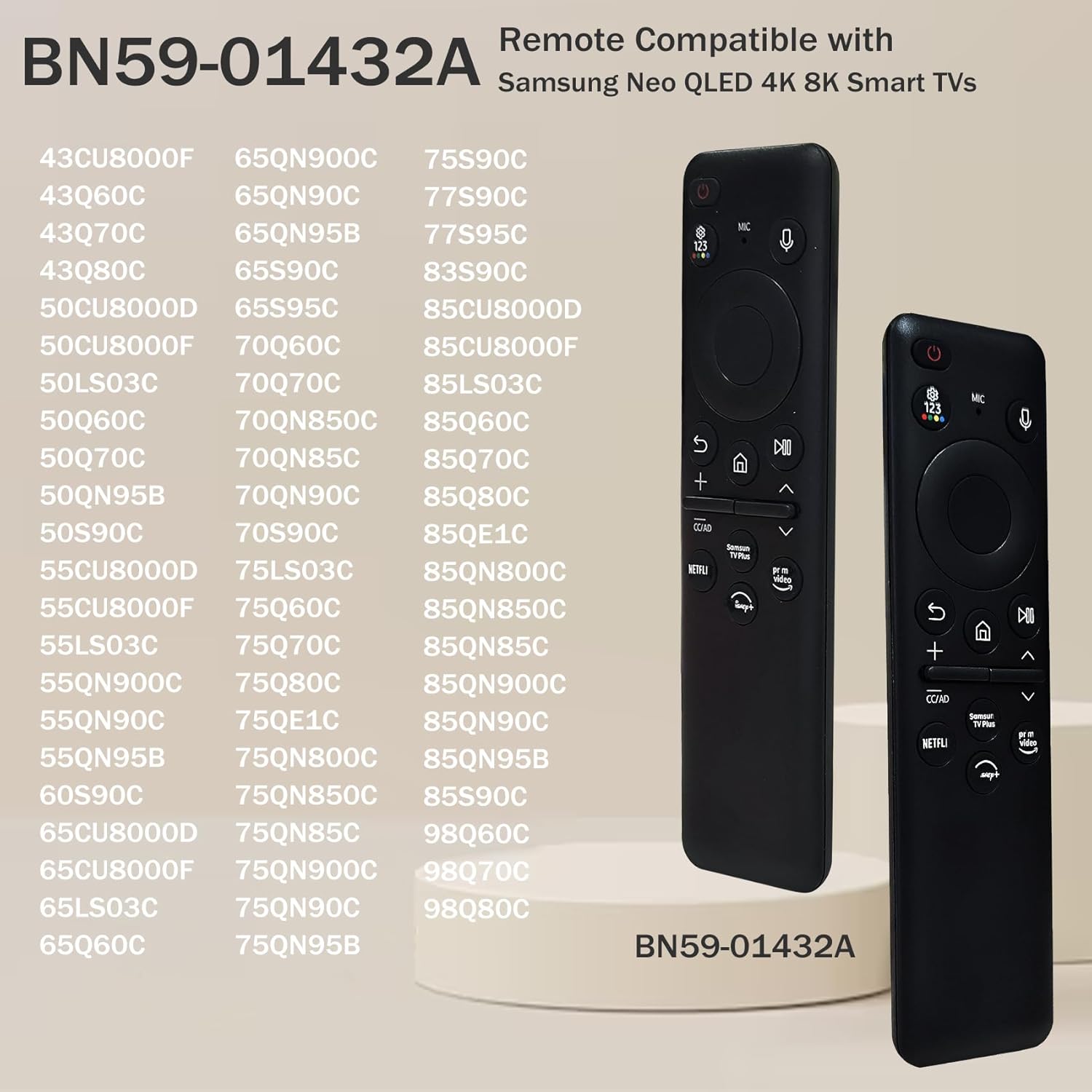
Image: A visual representation of various Samsung TV models compatible with the BN59-01432A remote control.
- 65QN800C
- 75QN800C
- 85QN800C
- 65QN900C
- 75QN900C
- 85QN900C
- 43CU8000F
- 43Q60C
- 43Q70C
- 43Q80C
- 50CU8000D
- 50LS03C
- 50Q60C
- 50Q70C
- 50QN95B
- 50S90C
- 55CU8000D
- 55LS03C
- 55QN90C
- 55QN95B
- 60S90C
- 65CU8000D
- 65LS03C
- 65Q60C
- 65QN900C
- 65QN95B
- 65S90C
- 65S95C
- 70Q60C
- 70QN850C
- 70QN85C
- 70QN90C
- 70S90C
- 75LS03C
- 75Q60C
- 75Q80C
- 75QE1C
- 75QN800C
- 75QN850C
- 75QN900C
- 75QN95B
- 75S90C
- 77S90C
- 77S95C
- 83S90C
- 85CU8000D
- 85CU8000F
- 85LS03C
- 85Q70C
- 85Q80C
- 85QE1C
- 85QN800C
- 85QN850C
- 85QN900C
- 85QN95B
- 85S90C
- 98Q60C
- 98Q70C
- 98Q80C
If your specific model is not listed, please refer to your TV's documentation or contact customer support to confirm compatibility.
Official Product Video
Video: An official product video demonstrating the features and usage of the BN59-01432A TM2360E Solar Voice Remote, including solar charging, voice control, and easy access buttons.
Warranty and Support
Bxmgr provides comprehensive after-sales service for the BN59-01432A TM2360E solar cell remote control. We offer up to 5 years of after-sales support from the date of purchase.
If you encounter any issues or have questions regarding your remote control, please contact us directly through your order details. Our support team aims to provide a solution within 12 hours to ensure your satisfaction.
For further assistance, please visit the Bxmgr Store on Amazon.


