
WERHY H0
WERHY Electric Scooter H0 User Manual
Model: H0 | For Ages 10+
1. Introduction
Thank you for choosing the WERHY Electric Scooter H0. This manual provides essential information for the safe operation, maintenance, and troubleshooting of your new electric scooter. Please read it thoroughly before first use and keep it for future reference. The WERHY H0 is designed for youth aged 10 and above, offering a powerful yet lightweight and foldable solution for personal transportation.

Image: The WERHY Electric Scooter H0, showcasing its sleek design and integrated headlight. A smaller inset image shows a person carrying the folded scooter, highlighting its portability.
2. Safety Information
Your safety is paramount. Always wear a helmet and appropriate protective gear (knee pads, elbow pads) when riding. Ensure you understand local regulations regarding electric scooter use. This scooter is designed for youth aged 10+ with a recommended height of 4.0ft-5.5ft and a maximum load of 220 lbs.
- Always check the scooter before each ride for loose parts, tire pressure, and brake functionality.
- Do not ride in heavy rain, on slippery surfaces, or through puddles deeper than 0.8 inches.
- Avoid riding on busy roads or areas with heavy pedestrian traffic.
- Maintain a safe distance from other vehicles and pedestrians.
- Do not perform stunts or sudden maneuvers.
- Ensure both hands are on the handlebars while riding.
- The scooter has passed stringent UL 2272 testing for electrical safety.

Image: Illustration of the scooter's safety features, including the E-ABS front brake and bell, and the rear drum brake, emphasizing safe riding practices.
3. Product Overview and Components
Familiarize yourself with the main components of your WERHY Electric Scooter H0:
- Handlebars: For steering and control.
- Digital Display: Shows speed, battery level, and riding mode.
- Throttle: Controls acceleration.
- Brake Levers: Activates the E-ABS front brake and rear drum brake.
- Headlight: For illumination during low-light conditions.
- Folding Mechanism: Allows for compact storage and transport.
- Deck: Standing platform.
- Motor: 350W powerful motor located in the front wheel.
- Solid Tires: 8.5-inch solid tires for a comfortable ride.
- Rear Light: For visibility from behind.

Image: A young rider on the WERHY Electric Scooter, with overlays highlighting the 350W motor, 8.5-inch solid tire, and 15-degree max slope capability.
4. Setup and Assembly
The WERHY Electric Scooter H0 comes largely pre-assembled. Follow these steps for final setup:
- Unfolding: Carefully lift the handlebar stem until it clicks into place. Ensure the folding mechanism is securely locked.
- Handlebar Attachment: If detached, align the handlebars with the stem and secure them using the provided screws and tools.
- Initial Charge: Before first use, fully charge the scooter. Connect the charger to the charging port and plug it into a power outlet. The charging indicator will change when fully charged (approx. 4 hours).
- Tire Check: Although solid tires, ensure they are free from debris and in good condition.

Image: A person holding the WERHY Electric Scooter in its folded state, demonstrating its lightweight (22 lbs) and compact design for easy portability.
5. Operating Instructions
Operating your WERHY Electric Scooter H0 is intuitive. Follow these guidelines:
5.1 Power On/Off
- Power On: Press and hold the power button on the digital display for a few seconds.
- Power Off: Press and hold the power button again until the display turns off.
5.2 Riding Modes and Speed Control
The scooter features 3 speed modes:
- E (Eco Mode): Approximately 7.5 mph (12 km/h) - Energy-saving, suitable for beginners.
- D (Drive Mode): Approximately 11 mph (18 km/h) - Balanced speed for general use.
- S (Sport Mode): Up to 19 mph (30 km/h) - Maximum performance.
Toggle between modes by pressing the power button briefly while the scooter is on.
5.3 Acceleration and Braking
- Acceleration: Gently press the throttle lever on the right handlebar.
- Braking: Squeeze the brake levers on the handlebars. The scooter features an E-ABS front brake and a rear drum brake for effective stopping.
5.4 Cruise Control
Activate cruise control by maintaining a consistent speed for a few seconds. The scooter will beep to indicate activation. To deactivate, press the throttle or brake lever.
5.5 Smart App Connectivity
Connect your scooter to the WERHY app via Bluetooth for enhanced control and monitoring:
- Features: Adjust riding modes, control light settings, view speed levels, manage cruise control, set start mode, and display real-time scooter status.
- Lock/Unlock: Secure your scooter remotely.
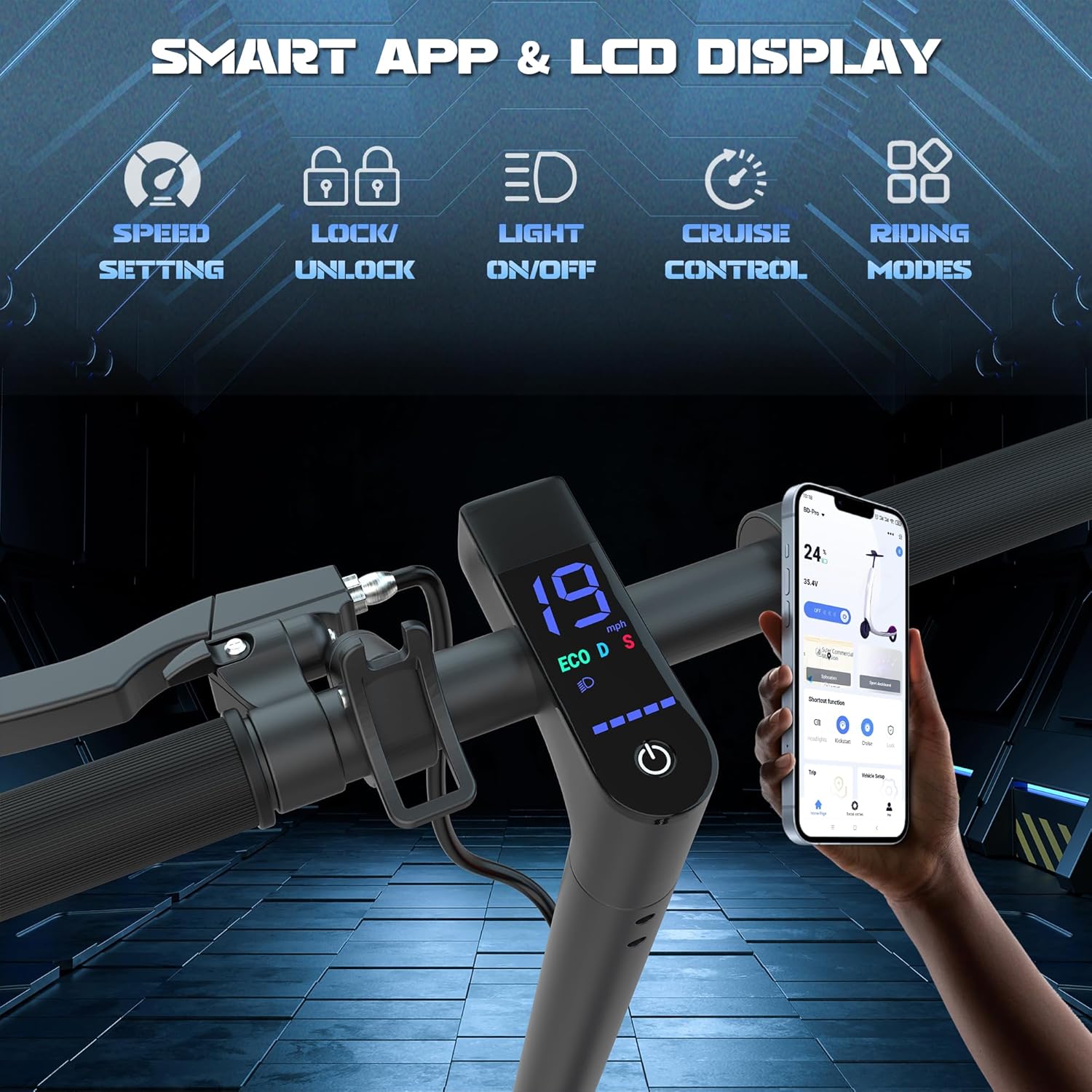
Image: Close-up of the scooter's digital display showing speed and mode, alongside a smartphone screen demonstrating the WERHY app's interface for speed setting, lock/unlock, light control, cruise control, and riding modes.
6. Maintenance
Regular maintenance ensures the longevity and optimal performance of your scooter:
- Cleaning: Wipe the scooter with a damp cloth. Do not use high-pressure water jets or immerse the scooter in water.
- Battery Care: Charge the battery regularly, even if not in use, to prolong its lifespan. Avoid completely draining the battery. Store in a cool, dry place.
- Brake Inspection: Periodically check the brake levers and cables for proper tension and responsiveness. Adjust if necessary.
- Tire Inspection: Although solid, inspect tires for any damage or embedded objects.
- Folding Mechanism: Keep the folding mechanism clean and lubricated for smooth operation.
- Storage: Store the scooter indoors in a dry environment when not in use.
7. Troubleshooting
If you encounter issues, refer to this section before contacting support:
| Problem | Possible Cause | Solution |
|---|---|---|
| Scooter does not power on | Low battery; Loose connections; Power button malfunction | Charge the battery; Check all cable connections; Contact support if issue persists |
| Reduced range or speed | Low battery; Overload; Riding uphill; Cold weather | Fully charge battery; Ensure rider weight is within limits; Avoid steep inclines; Battery performance may decrease in cold temperatures |
| Brakes not effective | Brake cable loose; Worn brake pads | Adjust brake cable tension; Inspect and replace brake pads if worn (professional service recommended) |
| App connection issues | Bluetooth off; App not updated; Scooter not discoverable | Ensure Bluetooth is enabled on your device; Update the app to the latest version; Restart scooter and app |
8. Specifications
| Feature | Detail |
|---|---|
| Brand | WERHY |
| Model Name | H0 (12Miles-Kidscooter) |
| Motor Power | 350W |
| Battery Capacity | 36V 162WH |
| Max Speed | Up to 19 MPH (30 km/h) |
| Max Range | Up to 12 Miles (under specific conditions) |
| Charging Time | Approx. 4 Hours |
| Tire Type | 8.5-inch Solid Tires |
| Braking System | E-ABS Front Brake, Rear Drum Brake |
| Max Load | 220 Pounds (100 kg) |
| Net Weight | 22 lbs (10 kg) |
| Recommended Age | 10+ Years |
| Recommended Height | 4.0ft - 5.5ft |
| Special Features | Cruise Control, Digital Display, Foldable, Smart App Connectivity |

Image: A visual summary of key specifications including 350W powerful motor, 4 hours fast charging, 220lbs max load, 8.5-inch solid tires, 19MPH max speed, and 8-12 miles long range.
9. Warranty and Support
WERHY is committed to providing excellent performance and quality products. Your WERHY Electric Scooter H0 comes with a limited warranty:
- Warranty Period: 12-month or 180-day for different parts.
- Coverage: Covers manufacturing defects under normal use.
- Exclusions: Does not cover damage from misuse, accidents, unauthorized modifications, or normal wear and tear.
For warranty claims, technical support, or any questions, please contact WERHY customer service. Refer to your purchase documentation for specific contact details or visit the official WERHY website.
Manufacturer: Huizhou Dinghan Technology Co.,Ltd
Ask a question about this manual
Ask about setup, troubleshooting, compatibility, parts, safety, or missing instructions. Manuals+ will review the question and use this page’s manual context to help answer it.