
1. Introduction
Thank you for choosing the COMFEE' CIH741F238K0 Induction Cooktop. This manual provides essential information for the safe and efficient use of your new appliance. Please read it thoroughly before installation and operation, and keep it for future reference.
This 7200W induction cooktop features 4 burners, 9 power levels, a Boost function, and intuitive touch controls, designed to enhance your cooking experience with precision and speed.

2. Important Safety Information
Always follow basic safety precautions when using electrical appliances to reduce the risk of fire, electric shock, burns, or injury.
- Electrical Safety: Ensure the cooktop is correctly installed by a qualified electrician. Do not operate with wet hands or if the surface is cracked.
- Hot Surfaces: Although induction surfaces do not heat directly, residual heat from cookware can make the surface hot. Exercise caution and allow the cooktop to cool before cleaning.
- Cookware: Use only magnetic cookware suitable for induction. Non-magnetic pots or pans will not heat.
- Children and Pets: Keep children and pets away from the cooktop during operation and while it is cooling. Utilize the child safety lock feature.
- Overheating Protection: The cooktop is equipped with an automatic shutdown feature to prevent overheating.
- Residual Heat Indicator: The cooktop features indicators to show if a cooking zone is still hot after use.
- Ventilation: Ensure adequate ventilation around the appliance as specified in the installation instructions.

3. Product Overview
The COMFEE' CIH741F238K0 is a built-in induction cooktop featuring a sleek ceramic glass surface and four independent cooking zones. Each zone offers precise temperature control and a dedicated timer.
Key Features:
- 4 Cooking Zones: Provides ample space for multiple pots and pans.
- 9 Power Levels: Offers versatile cooking options from gentle melting to rapid boiling.
- Boost Function: Delivers instant maximum power for quick heating.
- Integrated Timer: Independent timers for each zone (1-99 minutes).
- Touch Control Panel: Easy and precise operation.
- Child Safety Lock: Prevents accidental operation.
- Overheat Protection: Automatic shutdown for safety.
- Residual Heat Indicator: Visual warning for hot surfaces.
- Durable Ceramic Glass: Enhanced shock resistance and easy to clean.

4. Setup and Installation
Proper installation is crucial for the safe and optimal performance of your induction cooktop. It is recommended that installation be performed by a qualified professional.
4.1 Unpacking
Carefully remove the cooktop from its packaging. Inspect for any damage during transit. Retain packaging for potential future transport or service.
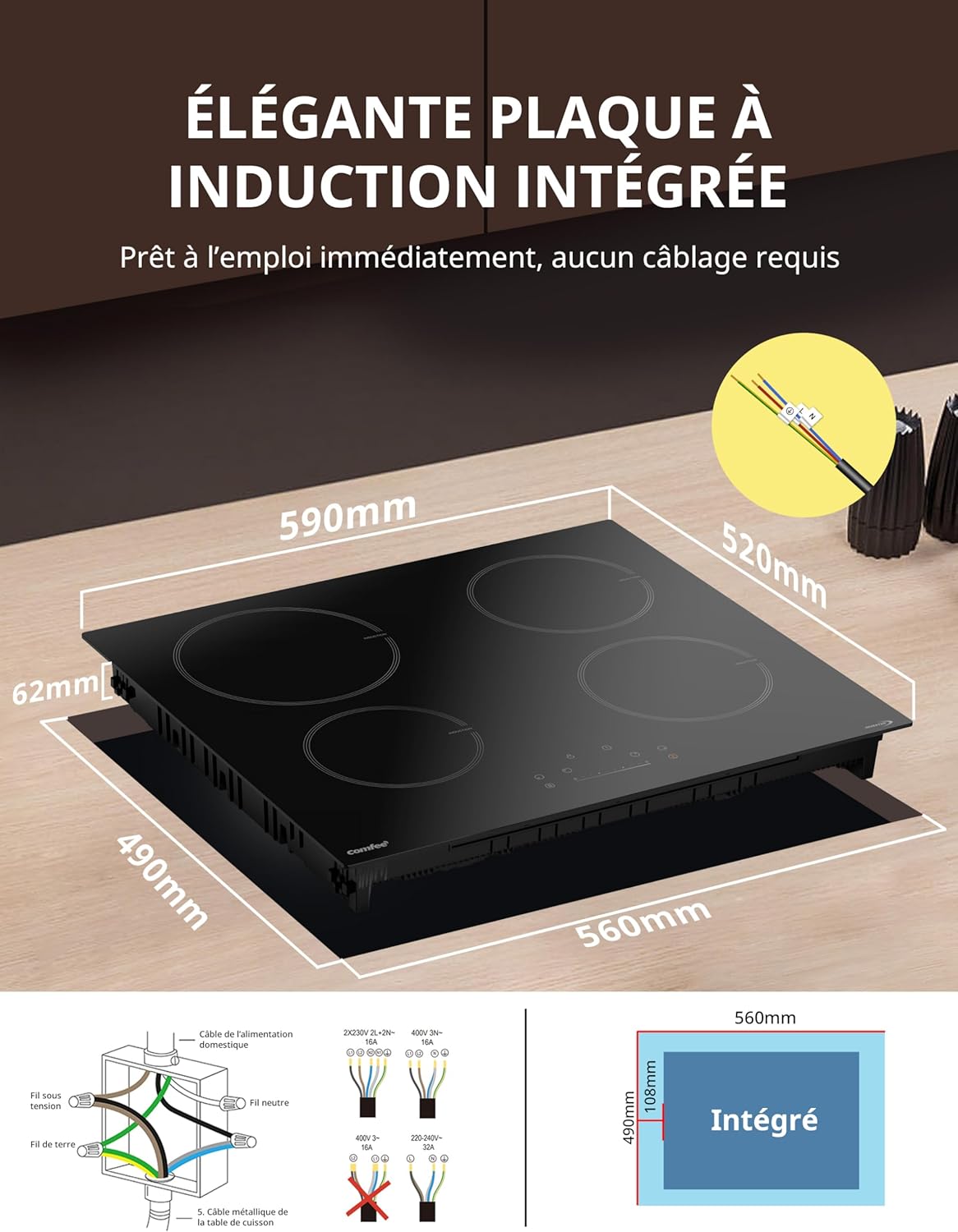
4.2 Dimensions and Cut-out
Ensure your countertop cut-out matches the required dimensions for a secure fit. The product dimensions are approximately 59 cm (L) x 52 cm (W) x 6.2 cm (H).
4.3 Electrical Connection
The cooktop requires a 220V electrical supply with a power rating of 7200W. The wiring is designed for straightforward connection, but professional installation is advised to ensure compliance with local electrical codes and safety standards.
5. Operating Instructions
Familiarize yourself with the touch control panel for efficient operation.
5.1 Powering On/Off
Press the power button (ON/OFF) to turn the cooktop on or off. The display will illuminate upon activation.
5.2 Selecting a Cooking Zone
After powering on, select the desired cooking zone by pressing its corresponding zone selection button. The display for that zone will light up.
5.3 Adjusting Power Levels
Once a zone is selected, use the '+' and '-' buttons or slide your finger along the control bar to adjust the power level from 1 to 9. Level 1 is for gentle melting, while level 9 is for rapid boiling.

5.4 Using the Boost Function
For instant maximum heat, select a cooking zone and then press the Boost button (B). This function provides a surge of power to quickly bring liquids to a boil or rapidly heat cookware. The Boost function operates for a limited time before returning to a high power level.

5.5 Setting the Timer
Each cooking zone has an independent timer, adjustable from 1 to 99 minutes. Select the desired cooking zone, then press the timer button and use the '+' and '-' controls to set the duration. The cooktop will automatically turn off the zone once the timer expires.
5.6 Activating Child Safety Lock
To prevent accidental operation, especially by children, activate the child safety lock. Press and hold the lock button for a few seconds until the indicator lights up. To deactivate, press and hold the lock button again.
5.7 Touch Control Panel
The cooktop features a responsive touch control panel for all functions. A simple press is usually sufficient to activate or adjust settings.

5.8 Compatible Cookware
Induction cooktops require cookware with a magnetic base. The minimum diameter for cookware is 12 cm to ensure proper heating. Compatible materials include cast iron, enameled iron, and stainless steel with a magnetic base. Incompatible materials include glass, ceramic, aluminum, copper, and cookware with irregular bases.

6. Maintenance and Cleaning
Regular cleaning and maintenance will ensure the longevity and optimal performance of your cooktop.
6.1 Cleaning the Ceramic Glass Surface
- Always ensure the cooktop is cool before cleaning.
- Wipe spills immediately with a damp cloth to prevent them from drying and hardening.
- For stubborn stains, use a ceramic hob scraper or a specialized ceramic hob cleaner. Follow the product instructions.
- Avoid abrasive cleaners, scouring pads, or harsh chemicals, as these can scratch or damage the surface.
- After cleaning, wipe the surface with a clean, damp cloth and then dry thoroughly with a soft cloth to prevent water marks.

6.2 General Care
- Do not drop heavy objects on the cooktop surface.
- Avoid dragging cookware across the surface to prevent scratches.
- Do not use the cooktop as a storage surface.
7. Troubleshooting
If you encounter issues with your cooktop, refer to the following common problems and solutions before contacting customer service.
| Problem | Possible Cause | Solution |
|---|---|---|
| Cooktop does not turn on. | No power supply; Child lock activated. | Check power connection and circuit breaker. Deactivate child lock. |
| Cooking zone not heating. | Incompatible cookware; Cookware not centered; No cookware detected. | Use magnetic cookware. Center the pot/pan. Ensure cookware is on the zone. |
| Cooktop makes noise during operation. | Normal fan operation; Cookware vibration. | This is normal for induction cooktops. Some cookware may vibrate slightly. |
| Error code displayed. | Internal fault; Overheating. | Turn off the cooktop, wait a few minutes, then restart. If the error persists, contact customer service. |
| Cooktop turns off unexpectedly. | Overheat protection activated; Timer expired. | Allow the cooktop to cool. Check if a timer was set. |
8. Specifications
| Feature | Detail |
|---|---|
| Brand | Comfee |
| Model Number | CIH741F238K0 (Internal Reference: MC-IF7454BJ1-A) |
| Product Dimensions (L x W x H) | 59 x 52 x 6.2 cm |
| Weight | 9.27 kg |
| Installation Type | Drop-in |
| Special Features | Timer, Adjustable Temperature, Safety Lock |
| Hob Type | Induction |
| Number of Hobs | 4 |
| Color | Black |
| Voltage | 220 Volts |
| Wattage | 7200 Watts |
| Power Source | Electric Corded |
| Certification | General Safety and Performance Standards |
| Surface Material | Ceramic Glass |
| Components Included | Plug |
9. Warranty and Support
For information regarding the product warranty, please refer to the warranty card included with your purchase or contact Comfee customer service. Keep your proof of purchase for warranty claims.
If you require technical assistance, spare parts, or have any questions not covered in this manual, please contact Comfee customer support through their official website or the contact information provided in your product documentation.


