
Zstar dehumidifiers
Zstar 35 Pint Dehumidifier User Manual
Model: dehumidifiers | Brand: Zstar
Introduction
The Zstar 35 Pint Dehumidifier is designed to efficiently remove excess moisture from your home, creating a more comfortable and healthier environment. It is suitable for various spaces including basements, bedrooms, bathrooms, offices, and kitchens, covering areas up to 3000 square feet. This unit features smart humidity control, multiple fan speeds, and convenient drainage options, ensuring optimal performance and ease of use.

Figure 1: Zstar 35 Pint Dehumidifier, a white rectangular unit with a top handle and a visible water level indicator on the front. It features an Energy Star label.

Figure 2: Illustration showing how the dehumidifier helps protect homes from common humidity-related issues such as musty smells, wet clothes, furniture damage, and dampness.
Setup
Unpacking
Carefully remove the dehumidifier from its packaging. Inspect the unit for any signs of damage during transit. Retain the packaging materials for future storage or transport.
Placement
For optimal performance, place the dehumidifier on a flat, stable surface in the area where moisture reduction is desired. Ensure there is at least 8 inches (20 cm) of space around the unit for proper airflow. Keep doors and windows closed in the room where the dehumidifier is operating to maximize efficiency.

Figure 3: Examples of suitable placement locations for the dehumidifier, including living rooms, basements, bedrooms, and dining rooms, highlighting its versatility.
Mobility
The dehumidifier is equipped with a convenient handle and wheels for easy mobility. To move the unit, ensure the water tank is empty to prevent spills.

Figure 4: Image illustrating the dehumidifier's built-in handle and wheels, demonstrating its ease of movement for repositioning within the home.
Operating Instructions
Control Panel Overview
The dehumidifier features a user-friendly smart control panel located on the top of the unit. This panel allows you to monitor and adjust humidity levels, set timers, and customize preferences.

Figure 5: Close-up view of the dehumidifier's smart control panel, showing icons for Timer Setting, Humidity & Timer Increment, Humidity & Timer Decrement, Airflow Speed, and On/Off.
Power On/Off
Press the On/Off button to turn the unit on or off. The unit will automatically restart with previous settings after a power failure.
Humidity Setting
Adjust the desired humidity level between 35% and 85% using the Humidity Increment and Decrement buttons. The recommended optimal humidity level is 45%-55%.
Fan Speed Adjustment
The unit offers 3 fan speeds: High, Medium, and Low. Press the Airflow Speed button to cycle through the available speeds. The dehumidifier operates quietly at approximately 42dB.

Figure 6: The dehumidifier operating quietly in a bedroom setting, illustrating its low noise level (47dB shown in image, product spec says 42dB, will use 42dB as per feature bullet) for peaceful dehumidification.
Sleep Function (Comfort Mode)
The sleep function automatically sets humidity levels to a comfortable mode. Refer to the control panel for specific activation instructions, typically by holding a button for 3 seconds.
Timer Setting
Use the Timer Setting button to program the unit to turn on or off automatically after a set period.
Drainage Options
The dehumidifier offers two methods for water removal:
- Manual Drainage: The 4.4L (1.16 Gallon) water tank can be easily removed and emptied when full.
- Continuous Drainage: For continuous operation without manual emptying, connect the included 16.4-inch drain hose to the continuous drainage outlet.

Figure 7: Diagram showing the dehumidifier's dimensions, the 1.16 Gallon water tank capacity, built-in handles, washable filter, and the included draining hose.
Auto Shut-off Protection
When the water tank is full, the dehumidifier will automatically shut off, an alarm will sound, and the "tank full" indicator will flash. The unit will not operate until the bucket is emptied and reinserted correctly.
Maintenance
Emptying the Water Tank
When the "tank full" indicator illuminates, carefully remove the water tank from the front of the unit. Dispose of the collected water. Reinsert the tank firmly until it clicks into place. The unit will resume operation.
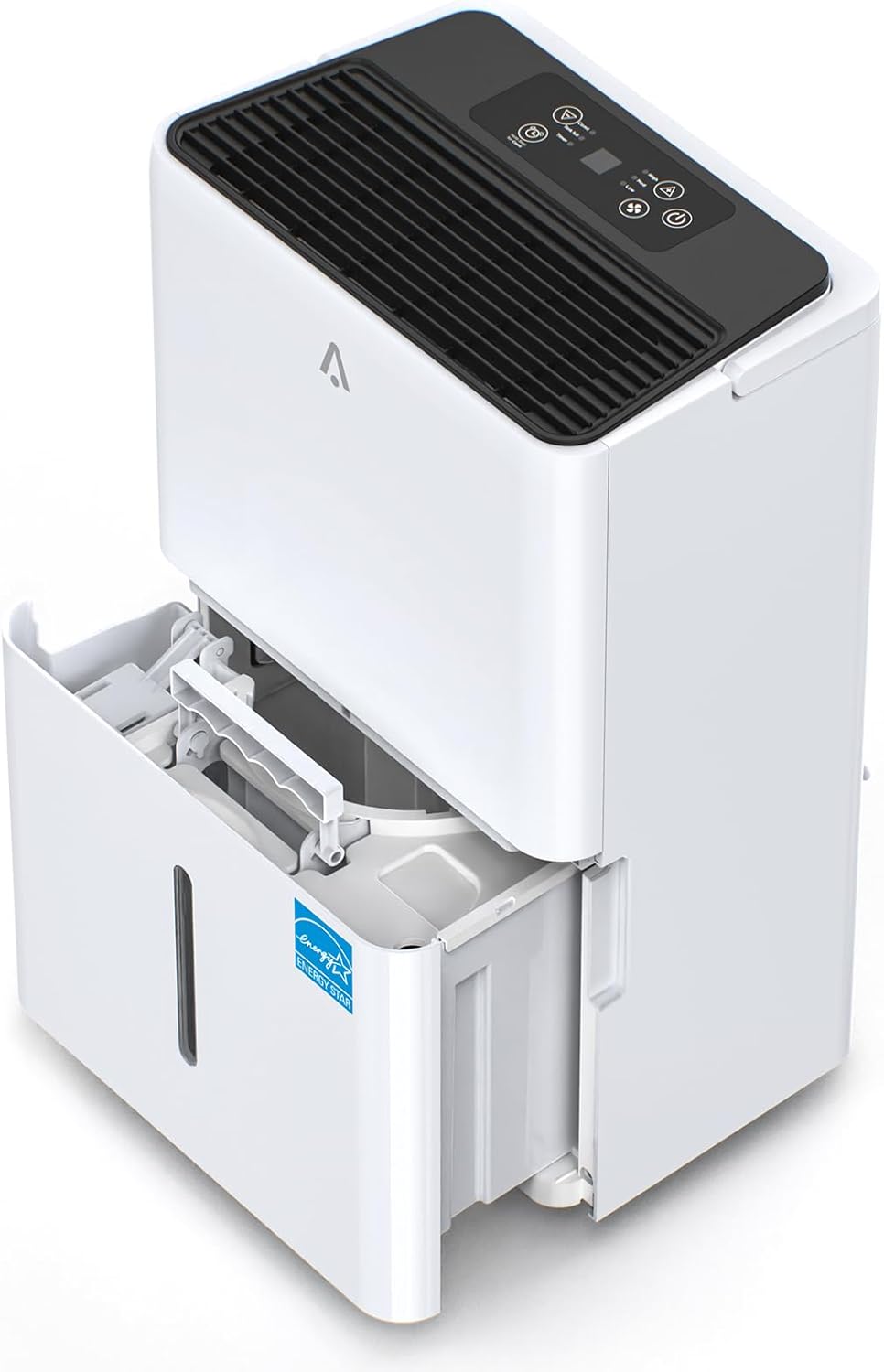
Figure 8: Image demonstrating the process of removing the water collection tank from the dehumidifier for emptying.
Cleaning the Air Filter
The dehumidifier is equipped with a reusable and washable air filter. Regularly clean the filter to maintain optimal air quality and unit efficiency. To clean, remove the filter, rinse it under running water, and allow it to air dry completely before reinserting.
General Cleaning
Wipe the exterior of the unit with a soft, damp cloth. Do not use harsh chemicals or abrasive cleaners. Ensure the unit is unplugged before cleaning.
Troubleshooting
| Problem | Possible Cause | Solution |
|---|---|---|
| Dehumidifier does not turn on. | No power; Water tank full or improperly inserted. | Check power connection; Empty and reinsert water tank correctly. |
| Unit runs but does not dehumidify. | Air filter clogged; Room temperature too low; Doors/windows open. | Clean air filter; Ensure room temperature is above 41°F (5°C); Close all doors and windows. |
| "Tank Full" indicator flashes but tank is not full. | Water tank sensor malfunction or debris. | Remove and clean the water tank and sensor area; Reinsert tank firmly. |
| Unit is noisy. | Unit not on a level surface; Air filter clogged. | Place unit on a flat, stable surface; Clean air filter. |
Specifications
| Feature | Detail |
|---|---|
| Brand | Zstar |
| Model Name | dehumidifiers |
| Capacity | 35 Pints/Day |
| Floor Area Coverage | Up to 3000 sq. ft. |
| Water Tank Capacity | 4.4L (1.16 Gallons) |
| Product Dimensions (D x W x H) | 8.3"D x 12.2"W x 19.7"H |
| Item Weight | 29.8 Pounds |
| Color | White |
| Special Feature | Adjustable Humidity Control, Auto Shut-off, Washable Filter |
| Operation Mode | Comfort, Continuous |
| Noise Level | Approx. 42dB |
| Included Components | Dehumidifier, Drain Hose (16.4 inch) |
| UPC | 198723460826 |
Warranty and Support
Return Policy
This product is eligible for a refund or replacement within 30 days of purchase, as per Amazon's return policy.
Protection Plans
Extended protection plans are available for purchase to cover your dehumidifier beyond the standard return period. Options include 3-Year and 4-Year protection plans, as well as a monthly Complete Protect plan.
- 3-Year Protection Plan
- 4-Year Protection Plan
- Complete Protect (monthly plan covering eligible past and future purchases)
For detailed terms and conditions regarding protection plans, please refer to the specific plan documentation or contact the plan provider.
Customer Support
For any questions, technical assistance, or warranty claims, please contact Zstar customer support through the official brand website or your point of purchase. Please have your model number and purchase date ready when contacting support.
Ask a question about this manual
Ask about setup, troubleshooting, compatibility, parts, safety, or missing instructions. Manuals+ will review the question and use this page’s manual context to help answer it.