
1. Introduction
Thank you for purchasing the Jocca Mini Refrigerator with LED Mirror 4L. This compact and versatile appliance is designed to keep your items cool or warm, making it ideal for cosmetics, beverages, snacks, and more. Its portable design and dual power options (AC/DC) allow for use in various settings, from your home or office to your car. Please read this manual carefully before use to ensure proper operation and maintenance.
2. Safety Information
- Ensure the power supply matches the appliance's requirements (AC 100-240V or DC 12V).
- Do not block the ventilation openings on the appliance.
- Keep the appliance away from direct sunlight, heat sources, and moisture.
- Do not immerse the appliance in water or other liquids.
- Unplug the appliance before cleaning or if it will not be used for an extended period.
- Keep out of reach of children.
- Do not use the appliance if the power cord or plug is damaged.
3. Package Contents
- Jocca Mini Refrigerator with LED Mirror 4L
- Removable internal shelf
- AC power cord for home use
- DC power cord for car use
4. Product Overview and Features
The Jocca Mini Refrigerator is designed for convenience and versatility, offering both cooling and warming functions in a compact form factor.
4.1. Key Features
- LED Mirror Door: Features an integrated mirror with 3 adjustable LED intensity levels, perfect for makeup application and skincare routines.
- Cooling and Warming Function: Capable of cooling items up to 16°C below ambient temperature or warming them up to 65°C.
- Compact and Lightweight: With a 4L capacity and weighing only 1.65 kg, it is highly portable and suitable for small spaces.
- Dual Power Connection (AC/DC): Includes cables for both domestic (AC) and in-car (DC) use, offering flexibility for various environments.
- Organizable Interior: Equipped with a removable internal shelf and a door shelf for organized storage of cosmetics, snacks, or beverages.
- Quiet and Energy-Efficient: Operates silently and with low energy consumption, making it suitable for bedrooms or offices.
4.2. Product Views

Figure 1: Front view of the mini refrigerator with its LED mirror door.
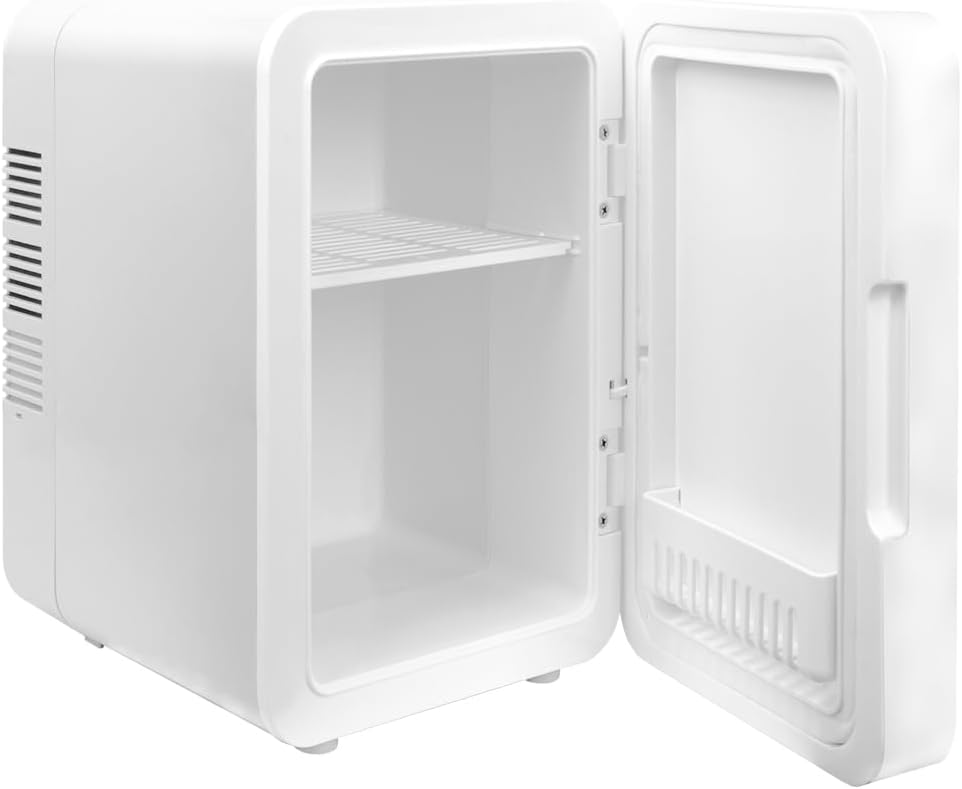
Figure 2: Interior of the mini refrigerator showing the removable shelf.

Figure 3: Visual representation of the cooling and warming functions.

Figure 4: Example of storing cosmetic products inside the mini refrigerator.
5. Setup
- Unpack: Carefully remove the mini refrigerator and all accessories from the packaging.
- Placement: Place the appliance on a flat, stable surface. Ensure there is adequate ventilation around the unit (at least 10 cm clearance on all sides) to prevent overheating.
- Power Connection:
- For Home/Office Use (AC): Connect the AC power cord to the AC port on the back of the unit, then plug it into a standard wall outlet.
- For Car Use (DC): Connect the DC power cord to the DC port on the back of the unit, then plug it into your vehicle's 12V cigarette lighter socket.
- Initial Use: Allow the refrigerator to sit for at least 30 minutes after plugging it in before placing items inside, especially when switching between cooling and warming functions.
6. Operating Instructions
6.1. Cooling and Warming Functions
- Locate the switch on the back of the unit.
- To activate the cooling function, slide the switch to the 'COOL' position. A green indicator light will illuminate.
- To activate the warming function, slide the switch to the 'WARM' position. A red indicator light will illuminate.
- To turn off the appliance, slide the switch to the 'OFF' position.
- For optimal performance, ensure the door is closed securely after placing or removing items.
6.2. Using the LED Mirror
- The mirror on the door features integrated LED lighting.
- To turn on the LED light, gently touch the touch sensor located on the mirror surface.
- To adjust the brightness, touch and hold the sensor. The light will cycle through 3 intensity levels. Release when the desired brightness is reached.
- To turn off the LED light, touch the sensor again.
6.3. Organizing the Interior
The mini refrigerator includes a removable internal shelf and a door shelf to help organize your items. You can adjust or remove the shelves to accommodate different sizes of products.
- To remove an internal shelf, gently slide it out of its grooves.
- To reinsert, align the shelf with the desired grooves and slide it in until secure.
7. Maintenance and Cleaning
Regular cleaning will help maintain the efficiency and longevity of your mini refrigerator.
- Disconnect Power: Always unplug the appliance from the power source before cleaning.
- Clean Interior: Wipe the interior with a soft cloth dampened with mild soap and water. Do not use abrasive cleaners or solvents.
- Clean Exterior: Wipe the exterior surfaces with a soft, dry or slightly damp cloth.
- Clean Fan/Vents: Periodically clean the fan and ventilation openings on the back of the unit with a soft brush or vacuum cleaner to remove dust and ensure proper airflow.
- Dry Thoroughly: Ensure all parts are completely dry before reconnecting to power.
8. Troubleshooting
- Appliance not turning on:
- Check if the power cord is securely plugged into both the appliance and the power outlet (or car socket).
- Ensure the power switch on the back is set to 'COOL' or 'WARM', not 'OFF'.
- Verify the power outlet is functional.
- Not cooling/warming effectively:
- Ensure the ventilation openings are not blocked.
- Check that the door is closed tightly.
- The cooling/warming effect is dependent on ambient temperature. Allow sufficient time for the unit to reach the desired temperature.
- Avoid frequently opening the door.
- Excessive noise:
- Ensure the appliance is placed on a flat, stable surface.
- Check for any obstructions in the fan area.
9. Specifications
| Feature | Specification |
|---|---|
| Brand | Jocca |
| Model Number | 2400 |
| Capacity | 4 Liters |
| Dimensions (L x W x H) | 21.2 x 29.7 x 29.7 cm |
| Weight | 1.9 kg |
| Cooling Temperature | Up to 16°C below ambient temperature |
| Warming Temperature | Up to 65°C |
| Voltage | 240 Volt (AC) / 12 Volt (DC) |
| Defrost System | Manual |
| Special Feature | Portable, LED Mirror |
10. Warranty and Support
For warranty information and return policies, please refer to the terms provided by your retailer at the time of purchase. If you have received a defective or damaged product, please consult the retailer's help page for assistance. For specific information regarding purchases made on marketplaces, please refer to their respective help pages.
For further assistance or technical support, please contact Jocca customer service through the contact information provided on the product packaging or the official Jocca website.