
Singing Machine ISM9022
Singing Machine Platinum Plus Wi-Fi Karaoke Machine User Manual
Model: ISM9022
Introduction
The Singing Machine Platinum Plus is a state-of-the-art Wi-Fi karaoke machine designed for an immersive and convenient singing experience. This system integrates directly with popular music and karaoke streaming services, eliminating the need for external devices or physical media. With its wireless microphones and versatile connectivity options, it provides a comprehensive solution for home entertainment and parties.
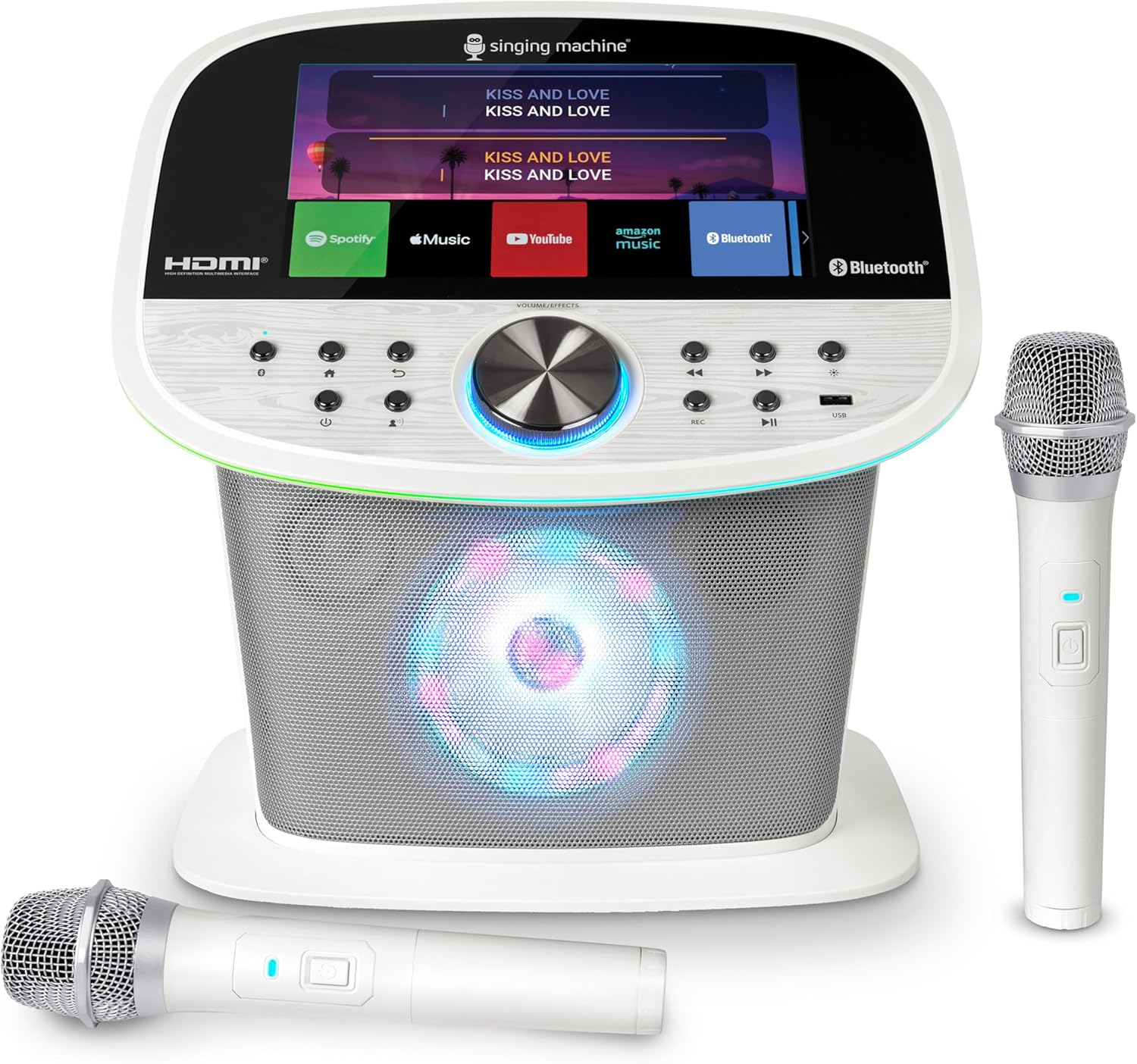
Image: The Singing Machine Platinum Plus karaoke system, featuring a central unit with a display and speaker, accompanied by two wireless microphones.
What's in the Box
Please verify that all components are present before setup.
- Singing Machine Platinum Plus Karaoke Machine
- 2 Wireless Microphones
- Type-C Power Adaptor
- 4 AAA Batteries (for microphones)
Features
The Platinum Plus karaoke machine is equipped with a range of features to enhance your singing experience:
- Unlimited Karaoke Access: Built-in Wi-Fi apps provide direct access to YouTube, Spotify, Apple Music, Amazon Music, Pandora, and Singing Machine Karaoke without requiring a phone or CDs.
- Wireless Duet Mode: Includes two wireless microphones with batteries, enabling simultaneous singing for duets or group performances.
- 22 Voice Effects: Transform vocals with a variety of fun and professional voice effects, from chipmunk to concert-ready.
- TV & Sound System Ready: Connects to a TV via HDMI for a large-screen display of lyrics and visuals, or to external speakers via Line Out for amplified audio.
- Compact & Portable Design: With dimensions of 25 x 25 x 20 cm and a lightweight build, the unit is easy to transport and set up in various locations.
- 10" Touch-Screen Display: Provides an intuitive interface for navigating songs, settings, and apps.
- USB Port: Allows for recording and playback of performances.
- Dynamic Light Show: Integrated lights sync to the beat of the music, adding a visual element to performances.

Image: An annotated diagram highlighting the key features of the karaoke machine, such as Wi-Fi audio and streaming, 10" touch-screen, 2 wireless microphones, Bluetooth audio, 22 voice effects, USB port for record & playback, powerful speakers, and a dynamic light show.
Setup Guide
- Power Connection: Connect the Type-C power adaptor to the machine and plug it into a standard electrical outlet.
- Insert Microphone Batteries: Open the battery compartment on each wireless microphone and insert the provided AAA batteries, ensuring correct polarity.
- Initial Power On: Press the Power button on the unit. The touch-screen display will illuminate.
- Connect to Wi-Fi: On the touch-screen, navigate to the Settings menu and select Wi-Fi. Choose your home Wi-Fi network from the list and enter the password to connect. This enables access to streaming apps.
- Optional: Connect to TV (HDMI): For a larger display, connect an HDMI cable (not included) from the HDMI OUT port on the karaoke machine to an HDMI IN port on your television. Select the corresponding HDMI input on your TV.
- Optional: Connect to External Speakers (Line Out): For amplified sound, connect an audio cable (not included) from the Line Out port on the karaoke machine to the audio input of your external speaker system.

Image: Visual guide illustrating how to connect the karaoke machine to home Wi-Fi, a TV via HDMI, and additional speakers via Line Out.
Operating Instructions
Using Built-in Apps
Once connected to Wi-Fi, you can access various streaming services directly from the machine's touch-screen:
- From the home screen, tap on the icon for your desired app (e.g., YouTube, Spotify, Apple Music, Amazon Music, Pandora, Singing Machine Karaoke).
- Follow the on-screen prompts to log in to your account or browse available content.
- Select a song to begin playback. Lyrics will display on the screen (if available through the service).

Image: Display screens illustrating the selection of music streaming services, song categories (Pop, Rock, Country, etc.), and language options for karaoke tracks.
Microphone Usage & Voice Effects
- Turn on the wireless microphones using their power buttons. They will automatically connect to the machine.
- Adjust microphone volume using the dedicated MIC volume controls on the unit.
- Press the 'Voice Effects' button to cycle through the 22 available voice effects. Experiment to find your preferred sound.
Recording and Playback
- To record your performance, insert a USB drive into the USB port on the unit.
- Press the 'REC' button to start recording. Press it again to stop.
- To play back recorded tracks, navigate to the USB playback option on the screen.
Bluetooth Streaming
You can also stream audio from a Bluetooth-enabled device to the karaoke machine:
- Ensure Bluetooth is enabled on your external device (e.g., smartphone, tablet).
- On the karaoke machine, select the Bluetooth input mode.
- On your device, search for and select "Singing Machine" from the list of available Bluetooth devices.
- Once paired, you can play music from your device through the karaoke machine's speakers.
Companion App Integration
Enhance your experience by using the Singing Machine Companion App:
- Scan the QR code displayed on the machine's screen (or TV if connected) with your smartphone to access the companion app.
- The app allows guests to browse and queue songs, offering vocal removal control for a true karaoke experience, and options for solo or duet performances.

Image: The karaoke machine's screen displaying a QR code for the companion app, along with controls for vocal removal and options for solo or duet singing.
Relevant link for companion app: https://karaoke-web-companion-prod.stingray.com/en/join?id=vWve3m
Maintenance
Proper care ensures the longevity and optimal performance of your Singing Machine Platinum Plus:
- Cleaning: Use a soft, dry cloth to clean the exterior of the unit and microphones. Do not use abrasive cleaners or solvents.
- Storage: When not in use, store the machine in a cool, dry place away from direct sunlight and extreme temperatures.
- Battery Care: Remove batteries from the microphones if they will not be used for an extended period to prevent leakage.
- Ventilation: Ensure the unit's vents are not blocked to prevent overheating.
Troubleshooting
| Problem | Possible Cause | Solution |
|---|---|---|
| No power | Power adaptor not connected or outlet not active. | Ensure power adaptor is securely connected to the unit and a working electrical outlet. |
| No sound from speakers | Volume too low; external speakers not connected properly; internal speaker disabled. | Increase master volume. If using external speakers, check connections. Ensure internal speaker is enabled in settings if applicable. |
| Microphones not working | Microphones not turned on; low batteries; out of range. | Turn on microphones. Replace AAA batteries. Ensure microphones are within operating range of the unit. |
| Cannot connect to Wi-Fi | Incorrect password; network issues; unit too far from router. | Double-check Wi-Fi password. Restart your router. Move the unit closer to the Wi-Fi router. |
| Lyrics not appearing on TV | HDMI cable not connected; incorrect TV input selected; streaming service does not provide lyrics. | Ensure HDMI cable is securely connected. Select the correct HDMI input on your TV. Verify if the chosen song/service supports lyric display. |
Specifications
| Feature | Detail |
|---|---|
| Model Number | ISM9022 |
| Item Weight | 5.5 pounds |
| Product Dimensions | 15.7 x 13 x 16.7 inches |
| Color | Platinum White |
| Compatible Devices | Smart Phone, Smart TV, Home Wifi |
| Connector Type | Wireless, HDMI |
| Speaker Count | 2 |
| Power Source | Battery Powered (for microphones), AC Adaptor (for unit) |
| Voltage | 5 Volts |
| Special Feature | 22 built-in voice effects |
| Recommended Uses | Home Karaoke, Singing, Outdoor Party Events |
Warranty and Support
Singing Machine is committed to the quality and craftsmanship of its products. For warranty information and technical support, please refer to the official Singing Machine website or contact their customer service directly. Keep your proof of purchase for any warranty claims.
For further assistance, visit the Singing Machine Store on Amazon.
Related documentsISM9022


Ask a question about this manual
Ask about setup, troubleshooting, compatibility, parts, safety, or missing instructions. Manuals+ will review the question and use this page’s manual context to help answer it.