
Product Overview
The ZOSI 3K Lite Wired Security Camera System provides comprehensive surveillance with advanced features for home and business security. This system includes an 8-channel 5MP-Lite DVR with a pre-installed 1TB HDD and eight 1080p weatherproof dome cameras. Key features include AI motion detection, 80ft night vision, and remote access capabilities.

Image: An overview of the ZOSI 8-channel 1080P AI Wired Security System, highlighting human/vehicle detection, 8TB hard drive support, instant push alerts, and IP66 weatherproof rating.

Image: A child playing with a dog in a yard, demonstrating the sharp, crisp visuals of 1080p Full HD clarity, compared to a blurred 720p image.
Package Contents
Verify that all items listed below are included in your package:
- 1 x 8-Channel DVR with 1TB HDD pre-installed
- 8 x 1080p Dome Cameras
- 8 x BNC+DC Cables (60ft each)
- 2 x 1-to-4 Power Splitters
- 3 x Power Adapters
- 1 x USB Mouse
- 8 x Mounting Screw Bags
- 1 x Ethernet Cable
- 8 x Mounting Templates
- 1 x Quick Start Guide

Image: Visual representation of the ZOSI security system package contents, including 8 dome cameras, 1 DVR with 1TB HDD, BNC cables, power splitters, USB mouse, power adapters, mounting screws, Ethernet cable, mounting templates, and a quick start guide.
Setup Guide
1. System Connection Diagram
Before installation, familiarize yourself with the connection points on your DVR and cameras.
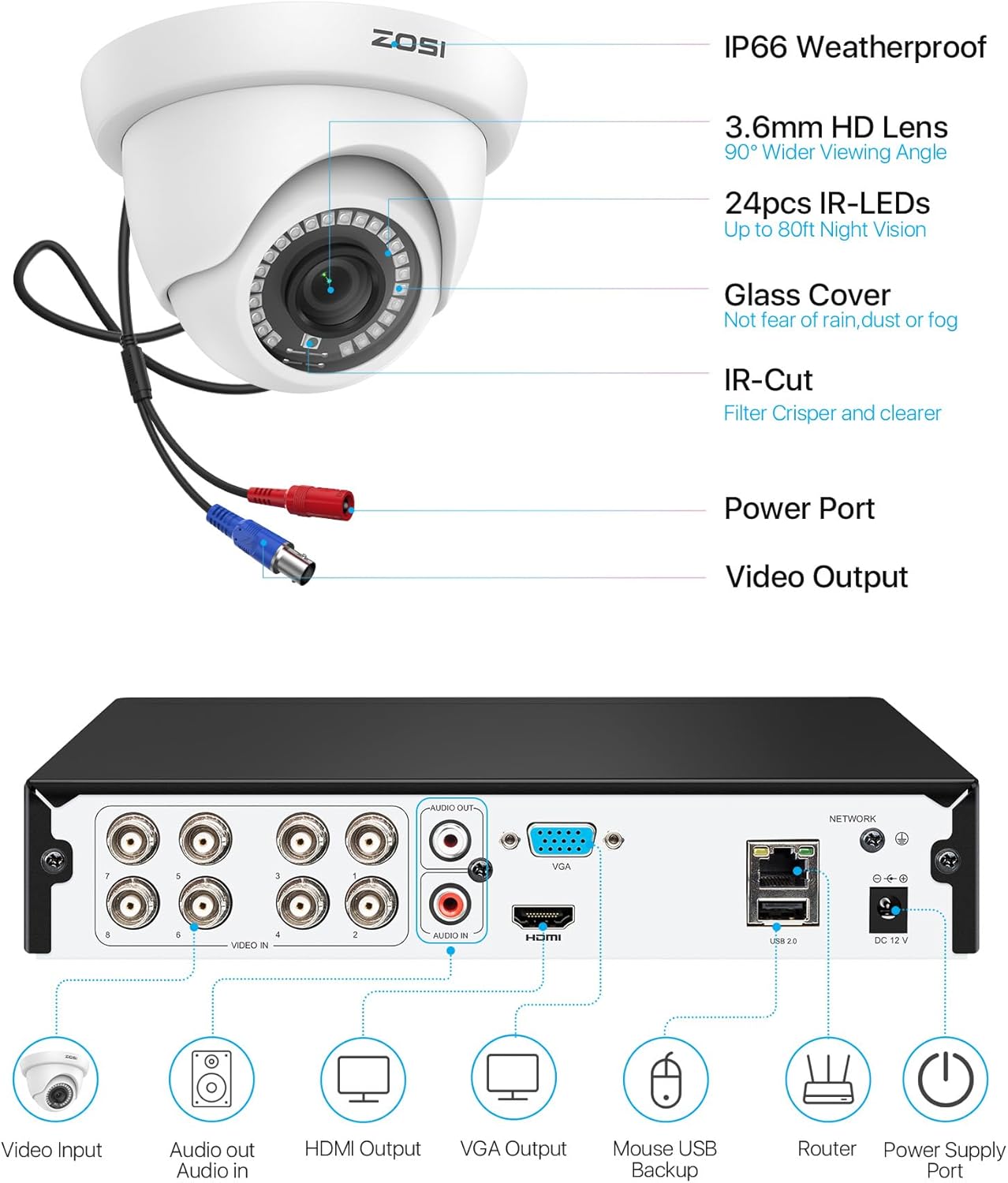
Image: Detailed diagram showing the rear panel of the ZOSI DVR with video input (BNC), audio input/output, HDMI output, VGA output, USB ports, network port, and power supply port. Also shows the camera with video output and power input.
- Connect Cameras: Connect each camera to the DVR's BNC video input ports using the provided BNC+DC cables.
- Power Cameras: Use the 1-to-4 power splitters and power adapters to supply power to the cameras.
- Connect DVR to Monitor: Connect the DVR to a monitor using either an HDMI or VGA cable.
- Connect USB Mouse: Plug the USB mouse into a USB port on the DVR for navigation.
- Network Connection (Optional for Remote Access): Connect the DVR to your router using the Ethernet cable.
- Power On: Connect the DVR to a power outlet using its power adapter.

Image: An image illustrating the simplicity of installing the ZOSI security system, showing a camera being mounted and connected.
2. Initial Setup Wizard
Upon first power-on, the DVR will guide you through an initial setup wizard. Follow the on-screen prompts to:
- Set language and time zone.
- Create a strong password for the DVR.
- Configure network settings (if connected to a router).
- Format the hard drive (if prompted).
3. Remote Access Setup (ZOSI Smart App)
To view your cameras remotely on a mobile device or PC:
- Download App: Download the free "ZOSI Smart" app from the App Store (iOS) or Google Play Store (Android).
- Register Account: Create a new account and log in.
- Add Device: Follow the in-app instructions to add your DVR system. This typically involves scanning a QR code on the DVR or manually entering device details.
- View Live Feed: Once added, you can view live camera feeds and access recorded footage from anywhere with an internet connection.

Image: Illustrates the three steps for remote access: 1. Connect cameras to DVR, 2. Download the ZOSI Smart app, 3. Enjoy live surveillance view instantly on a mobile device.

Image: Shows the ZOSI Smart app interface on a laptop, tablet, and smartphone, demonstrating remote viewing capabilities across various devices.
Operating Instructions
1. Recording Modes
The ZOSI DVR supports various recording modes:
- Continuous Recording: Records 24/7 without interruption.
- Scheduled Recording: Records only during specified time slots.
- Motion-Detected Recording: Records when motion is detected by the cameras.
- Recycle Recording: Overwrites the oldest footage when the hard drive is full.
You can customize the recording mode for each camera through the DVR's menu settings.

Image: An image showing the ZOSI DVR with a built-in 1TB hard drive, indicating support for up to 8 cameras and expandability up to 8TB, with various surveillance scenes displayed.

Image: A monitor displaying multiple camera views from a ZOSI system, emphasizing continuous 24/7 recording and protection with a 1TB HDD, 8-camera support, and expandable storage.

Image: An image showing the ZOSI DVR with icons for LAN Recording and Local Storage, indicating continuous monitoring and recording even without an internet connection.
2. Smart AI Motion Detection
The system features advanced AI detection to distinguish between people and vehicles, reducing false alarms.
- Customizable Detection Zones: Define specific areas within the camera's view where motion detection should be active.
- Privacy Masking: Mask out private areas that you do not wish to record.
- Alerts: Receive instant notifications and email alerts with screenshots when motion is detected.

Image: A man walking towards a car in a driveway, with icons indicating "Person" and "Vehicle" detection, illustrating the Smart AI Detection feature.

Image: Two panels showing a house and yard. One panel illustrates a green grid over a detection zone, and the other shows black boxes for privacy masking over windows, demonstrating customizable zones and privacy features.
3. Playback
Access recorded footage locally via the DVR or remotely through the ZOSI Smart app or client software.
- Search: Easily search for specific events by date, time, or motion detection.
- Download: Download important footage for backup via USB.

Image: A smartphone screen displaying the ZOSI app's smart playback interface, showing a timeline and thumbnails of recorded events, with a focus on identifying people and vehicles.
Maintenance
Regular maintenance ensures optimal performance and longevity of your security system:
- Clean Cameras: Periodically clean camera lenses and housings with a soft, damp cloth to remove dust, dirt, or water spots. Avoid abrasive cleaners.
- Check Connections: Ensure all cables (BNC, power, Ethernet) are securely connected and free from damage.
- DVR Ventilation: Keep the DVR in a well-ventilated area, free from obstructions, to prevent overheating.
- Software Updates: Check the ZOSI website or app for firmware updates for your DVR and cameras to ensure you have the latest features and security patches.
- Data Backup: Regularly back up important footage to an external USB drive or cloud storage (if supported) to prevent data loss.
Troubleshooting
Here are solutions to common issues you might encounter:
No Video Display
- Check Power: Ensure the DVR and all cameras are properly powered on.
- Cable Connections: Verify that all BNC video cables and HDMI/VGA cables are securely connected.
- Monitor Input: Confirm your monitor is set to the correct input source (HDMI/VGA).
- Camera Status: Check if camera IR lights are on at night, indicating power.
Remote Access Issues
- Network Connection: Ensure the DVR is connected to the internet via an Ethernet cable and your router is functioning.
- App Login: Double-check your ZOSI Smart app login credentials.
- Device Added: Confirm the DVR is correctly added to your ZOSI Smart app account.
- Firewall/Router Settings: Your router's firewall might be blocking the connection. Consult your router's manual or ISP for port forwarding settings if necessary (though usually not required for P2P connections).
Poor Image Quality / Night Vision
- Clean Lens: Clean the camera lens for any smudges or dirt.
- Lighting: Ensure there are no strong light sources directly facing the camera at night, which can cause glare.
- IR Range: Verify the object is within the camera's 80ft IR night vision range.
- Resolution Settings: Check the DVR's video output resolution settings.

Image: An illustration of a house at night, showing the 80ft infrared night vision range of a ZOSI dome camera, allowing clear visibility in darkness.

Image: A split image showing a house scene in daylight and the same scene in clear black and white night vision, demonstrating the camera's ability to deliver crisp details in total darkness.
False Motion Alerts
- Adjust Sensitivity: Lower the motion detection sensitivity in the DVR settings.
- Refine Detection Zones: Adjust the detection zones to exclude areas with frequent, irrelevant movement (e.g., trees swaying, busy roads).
- Enable AI Detection: Ensure AI Human/Vehicle Detection is enabled to filter out non-human/vehicle movements.
Specifications
| Feature | Detail |
|---|---|
| Brand | ZOSI |
| Model Number | 8VMA-419W8S-10-US-ANX2 |
| Connectivity Technology | Wired |
| Video Capture Resolution | 1080p |
| Number of Channels | 8 |
| Memory Storage Capacity | 1 TB (expandable up to 8TB) |
| Special Features | App Control, AI Human/Vehicle Detection, Smart Playback |
| Night Vision Range | 80 feet (IR Night Vision) |
| Viewing Angle | 90 degrees |
| Weatherproof Rating | IP66 (Operating Temp: -10°C/14°F to 55°C/131°F) |
| Video Compression | H.265+ |
| Recording Modes | Continuous, Scheduled, Motion-Detected, Recycle |

Image: An illustration showing a wider field of view (FOV 90°) provided by the 3.6mm lens, ensuring broader coverage with no blind spots.

Image: A ZOSI dome camera shown under rain, with temperature ratings for cold (-10°C / 14°F) and hot (55°C / 131°F) conditions, indicating its IP66 weatherproof durability.

Image: A comparison between H.264 and H.265+ video compression, showing H.265+ occupies 25% bandwidth compared to H.264's 100%, resulting in over 50% storage savings while maintaining video quality.
Warranty and Support
ZOSI is committed to providing reliable security solutions and excellent customer service.
- Warranty: Your ZOSI security system is covered by a 2-Year Coverage warranty.
- Technical Support: ZOSI offers Lifetime Technical Support for its products.
- Return Policy: A 30-Day Hassle-Free Return Policy is available.
- Contact: For technical assistance, warranty claims, or product inquiries, please visit the official ZOSI website or refer to the contact information provided in your Quick Start Guide.
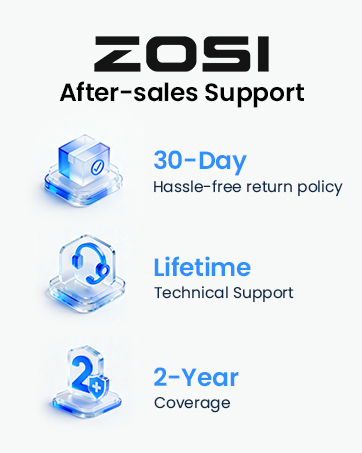
Image: An illustration representing ZOSI's commitment to customer support, showing a person with a headset, symbolizing assistance.


