
Rolanstar CPT043
Rolanstar L-Shape Desk User Manual
Model: CPT043
Introduction
Thank you for choosing the Rolanstar L-Shape Desk. This versatile desk is designed to enhance your home office, gaming setup, or study area with its spacious design, integrated power solutions, and dynamic LED lighting. This manual provides essential information for assembly, operation, and maintenance to ensure you get the most out of your new desk.

Figure 1: Overview of the Rolanstar L-Shape Desk.
Key Features:
- Large Storage Capacity: Features four fabric drawers and a large file drawer, suitable for various office supplies and documents.
- Integrated Power: Equipped with 2 AC outlets and 2 USB ports for convenient device charging.
- Stylish RGB LED Lights: Customizable lighting with over 60,000 colors and multiple dynamic modes, controllable via smart app or remote.
- Reversible L-Shaped Design: Allows for flexible installation in two different configurations to suit your space.
- Ergonomic Monitor Stand: A raised stand designed to promote a healthy sitting posture and reduce neck strain.
Setup and Assembly
The Rolanstar L-Shape Desk requires assembly. Please follow the detailed instructions provided in the separate assembly guide included with your package. Ensure all components are present before beginning assembly.
Important Assembly Notes:
- Tools Required: A screwdriver (preferably power drill for efficiency) is recommended in addition to the included tools.
- Component Identification: All parts are numbered for easy identification. Refer to the assembly guide for part diagrams.
- Reversible Design: The L-shaped configuration can be assembled in two directions (left or right orientation) to best fit your room layout. Decide on your preferred orientation before starting assembly.
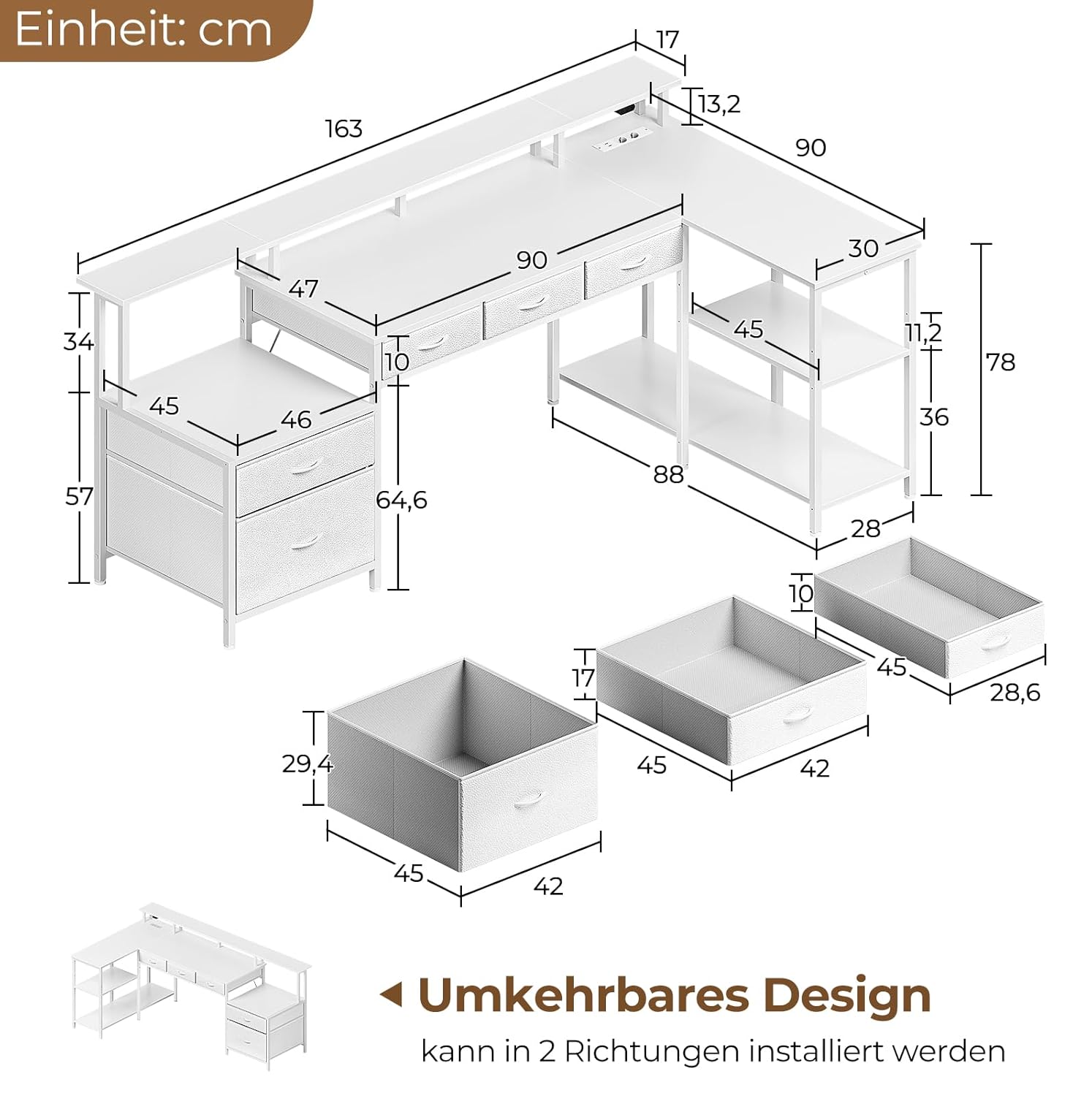
Figure 2: Desk dimensions and illustration of reversible assembly options.
It is advisable to assemble the desk in the room where it will be used, or in a spacious area, to avoid difficulty in moving the assembled unit.
Operating Instructions
Integrated Power Outlets and USB Ports:
The desk features a built-in power strip with 2 standard AC outlets (120V/12A) and 2 USB ports (5V/2A). These are designed to provide convenient power access for your electronic devices directly from your workspace.
- Usage: Simply plug your devices into the available outlets or USB ports.
- Safety: Do not overload the outlets. Ensure the total power consumption of connected devices does not exceed the rated capacity.

Figure 3: Built-in AC outlets and USB charging ports.
RGB LED Lighting System:
The desk is equipped with an RGB LED strip light that can be customized to create various atmospheres. Control is available via a smart app or the included remote control.
- Smart App Control: Download the designated smart app (refer to the LED light manual for app name and QR code) to access over 60,000 colors, multiple dynamic modes, and music synchronization features.
- Remote Control: Use the provided remote to switch the lights on/off, change colors, adjust brightness, and select pre-set modes.
- Modes: Explore various modes including static colors, fading, jumping, and music-sync modes that react to audio.

Figure 4: RGB LED lighting in action, showing app control options.
Storage Drawers and Monitor Stand:
Utilize the integrated storage solutions for an organized workspace.
- Fabric Drawers: The four fabric drawers are ideal for storing office supplies, stationery, and small personal items.
- File Drawer: The large file drawer is designed to accommodate both Legal and Letter-sized documents, helping you keep important papers neatly organized.

Figure 5: File drawer accommodating Legal and Letter-sized documents.
- Monitor Stand: Place your monitor(s) on the raised stand to elevate your screen to an ergonomic viewing height, promoting better posture and reducing neck and eye strain during long periods of use.
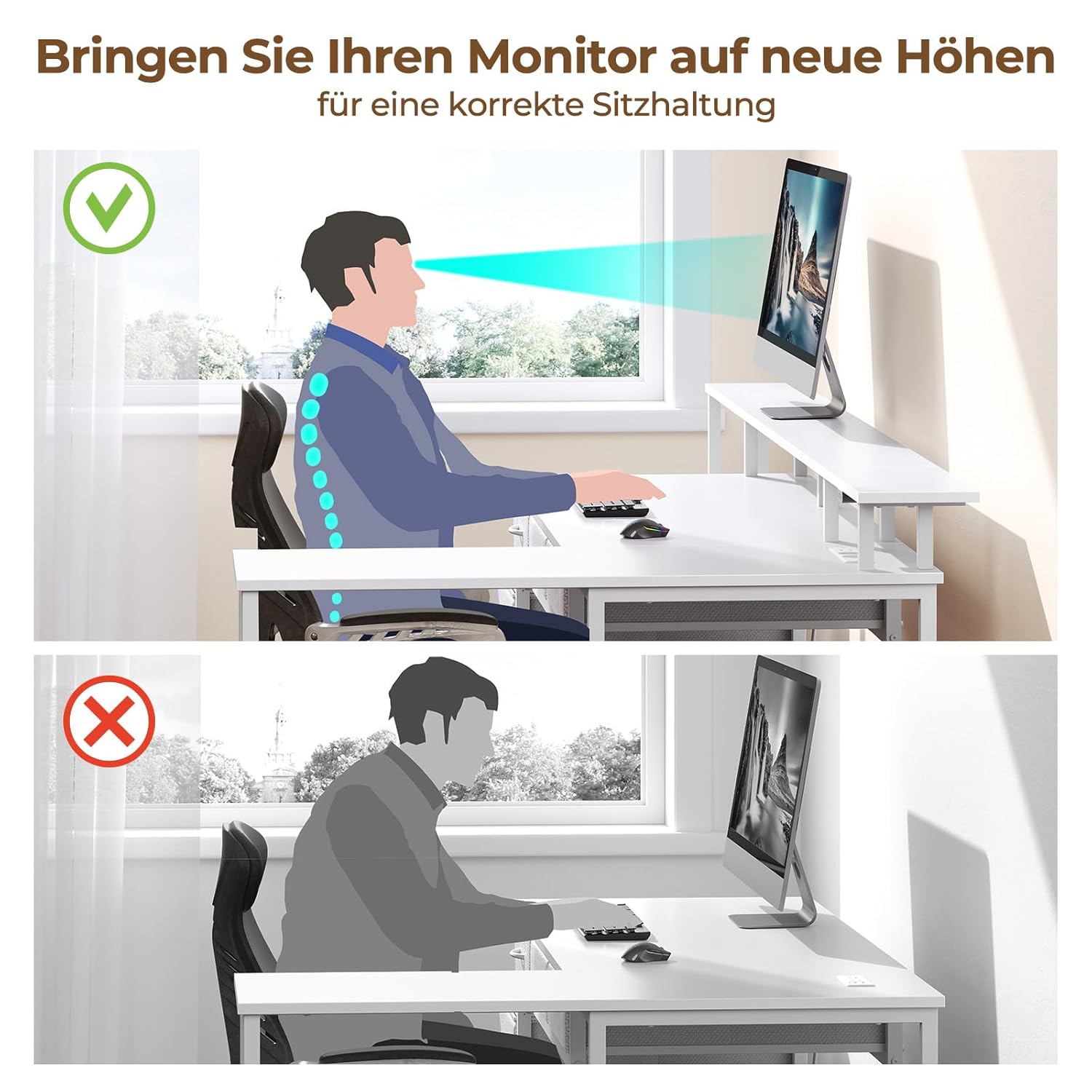
Figure 6: Benefits of using the ergonomic monitor stand for proper posture.
Maintenance and Care
To ensure the longevity and appearance of your Rolanstar L-Shape Desk, follow these simple maintenance guidelines:
- Cleaning: Wipe surfaces with a soft, damp cloth. Avoid harsh chemicals or abrasive cleaners, which can damage the finish.
- Spills: Promptly clean up any spills to prevent staining or damage to the desk material.
- Heat and Moisture: Avoid placing hot items directly on the desk surface. Use coasters for drinks to prevent moisture rings.
- Weight Distribution: Distribute weight evenly across the desk surface and shelves to maintain stability and prevent warping.
- Drawer Care: The fabric drawers can be spot cleaned with a mild detergent if necessary. Ensure they are completely dry before reinserting.
Troubleshooting
This section addresses common issues you might encounter with your Rolanstar L-Shape Desk. For problems not listed here, please refer to the assembly guide or contact customer support.
| Problem | Possible Cause | Solution |
|---|---|---|
| Desk feels wobbly or unstable. | Loose screws or uneven floor. | Check all assembly screws and tighten them. Ensure the desk is on a flat, level surface. Adjust leveling feet if present. |
| LED lights are not turning on. | Power connection issue, remote battery, or app connectivity. | Ensure the desk's power cord is securely plugged into a working outlet. Check the remote control battery. Verify Bluetooth/Wi-Fi connection for app control. |
| Power outlets/USB ports not working. | Desk not powered, or circuit overload. | Confirm the desk's main power plug is connected. Unplug some devices to check for overload. Test the outlet with another device. |
| Drawers are difficult to open/close. | Overloaded, misaligned, or obstruction. | Reduce contents in the drawer. Check for any obstructions. Ensure the drawer is correctly seated in its runners. |
Specifications
| Attribute | Detail |
|---|---|
| Brand | Rolanstar |
| Model Name | Rolanstar Schreibtisch L Form mit Schubladen |
| Item Model Number | CPT043 |
| Product Dimensions | 163D x 90W x 91.2H Centimeters |
| Colour | White |
| Item Weight | 25.2 Kilograms |
| Assembly Required | Yes |
| Included Components | Built-in Outlet |
| Maximum Height | 91.2 Centimetres |
Warranty and Support
Specific warranty details for the Rolanstar L-Shape Desk are not provided in this manual. For information regarding warranty coverage, claims, or technical support, please refer to the warranty card included with your product or contact Rolanstar customer service directly through their official website or the retailer from whom you purchased the desk.
Always retain your proof of purchase for warranty purposes.
Ask a question about this manual
Ask about setup, troubleshooting, compatibility, parts, safety, or missing instructions. Manuals+ will review the question and use this page’s manual context to help answer it.