
Introduction
Thank you for choosing the pTron Bassbuds Neo TWS Earbuds. This manual provides essential information for setting up, operating, and maintaining your new wireless earbuds. Please read it carefully to ensure proper use and to maximize your listening experience.

Image: Overview of pTron Bassbuds Neo TWS Earbuds showcasing features like ENC, 50ms Game Mode, 35 hours playtime, touch controls, 13mm dynamic drivers, Bluetooth 5.3, Type-C fast charging, and IPX5 water resistance.
1. Setup
1.1 Initial Charging
Before first use, fully charge the earbuds and the charging case.
- Connect the provided Type-C charging cable to the charging case and a power source.
- The charging case has a 300mAh battery and takes approximately 1.2 hours to fully charge.
- The earbuds have a 40mAh battery each and take approximately 1 hour to fully charge when placed in the charging case.
- A fully charged case provides up to 35 hours of total playback time with the earbuds.

Image: Illustration of the pTron Bassbuds Neo earbuds and charging case, highlighting the 13mm dynamic drivers, 35 hours total battery life, 10-150 minutes charging time, and Type-C fast charging.
1.2 Pairing with a Device
The Bassbuds Neo utilize Bluetooth 5.3 technology for a fast and stable connection.
- Open the charging case. The earbuds will automatically enter pairing mode.
- On your smartphone, tablet, or laptop, enable Bluetooth.
- Search for available devices and select "pTron Bassbuds Neo" from the list.
- Once connected, you will hear a confirmation tone, and the earbuds will be ready for use.
- The earbuds support 1-step pairing for convenience and have a wireless range of up to 10 meters.

Image: Visual representation of pTron Bassbuds Neo's wireless connectivity, featuring Bluetooth 5.3, 1-step pairing, 10m wireless range, stereo/mono bud use, wide compatibility, and 50ms low-latency for music and game modes.
2. Operating Instructions
2.1 Touch Controls
The pTron Bassbuds Neo feature intuitive touch controls for easy management of music and calls. Specific touch gestures are detailed below:
- Play/Pause: Single tap on either earbud.
- Next Track: Double tap on the right earbud.
- Previous Track: Double tap on the left earbud.
- Answer/End Call: Single tap on either earbud.
- Reject Call: Long press on either earbud.
- Activate Voice Assistant: Triple tap on either earbud.
- Game/Music Mode Switch: Long press the right earbud for 2 seconds.

Image: A user wearing pTron Bassbuds Neo earbuds, demonstrating the intuitive touch controls and voice assistant activation. The image also highlights the IPX5 splash and sweat resistance.
2.2 Calling Functionality
The earbuds are equipped with built-in HD microphones and TruTalk AI-ENC (Environmental Noise Cancellation) technology for clear voice calls.
- TruTalk AI-ENC actively reduces environmental noise, ensuring your voice is heard clearly by the recipient.
- Both earbuds can be used for stereo phone calls.
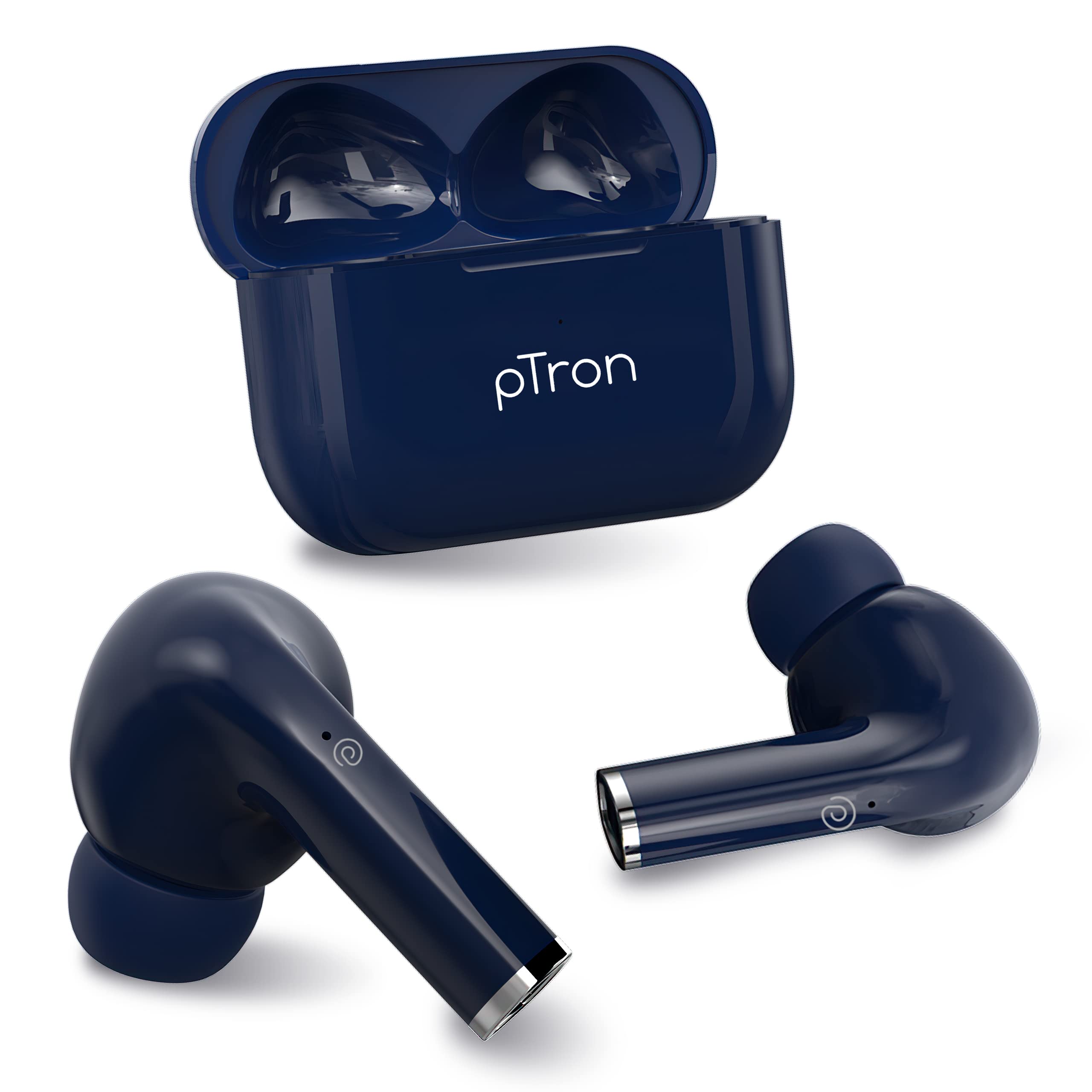
Image: Diagram illustrating the TruTalk AI-ENC technology in pTron Bassbuds Neo, showing how it filters out noise to enhance voice clarity during calls.
2.3 Game/Music Modes
Switch between Game Mode and Music Mode to optimize your audio experience.
- Game Mode: Provides 50ms low-latency audio, reducing delay between in-game actions and sound, ideal for gaming.
- Music Mode: Delivers pristine audio quality with enhanced bass, suitable for general listening.
- To switch modes, long press the right earbud for 2 seconds.
2.4 Wearing the Earbuds
The Bassbuds Neo are designed for a secure and comfortable fit.
- Gently insert each earbud into your ear canal.
- Rotate the earbud slightly until it feels snug and stable.
- The ergonomic design and lightweight nature (3.2g per earbud) ensure comfort during extended use and physical activities.
3. Maintenance
3.1 Cleaning
Regular cleaning helps maintain sound quality and hygiene.
- Use a soft, dry, lint-free cloth to wipe the earbuds and charging case.
- For ear tips, remove them and clean with a mild soap solution if necessary, then rinse and dry thoroughly before reattaching.
- Do not use abrasive cleaners or immerse the earbuds or case in water.
3.2 Water Resistance (IPX5)
The pTron Bassbuds Neo earbuds are IPX5 water-resistant.
- This rating means they can withstand light rain and sweat during workouts.
- They are not designed for swimming, showering, or submersion in water.
- Ensure the earbuds are dry before placing them back in the charging case to prevent damage.
4. Troubleshooting
If you encounter issues with your pTron Bassbuds Neo, refer to the following common solutions:
| Problem | Solution |
|---|---|
| Earbuds not pairing |
|
| Only one earbud working |
|
| Low volume or poor sound quality |
|
| Charging issues |
|
5. Specifications
Detailed technical specifications for the pTron Bassbuds Neo TWS Earbuds:
- Model Name: Bassbuds
- Connectivity Technology: Bluetooth 5.3, Wireless
- Audio Driver Type: Dynamic Driver
- Audio Driver Size: 13 mm
- Speaker Frequency Response: 20Hz-20kHz
- Speaker Impedance: 32 Ohms
- Earbud Battery: 40mAh (each)
- Case Battery: 300mAh
- Earbud Charge Time: 1 hour
- Case Charge Time: 1.2 hours
- Total Playback Time (with case): Up to 35 hours
- Control Method: Touch
- Microphone: Built-in HD Mic with TruTalk AI-ENC
- Low-Latency: 50ms (Game Mode)
- Water Resistance: IPX5
- Material: Acrylonitrile Butadiene Styrene (ABS)
- Item Weight: 34 Grams (total)
- Product Dimensions: 6 x 4.5 x 2.5 cm
- Included Components: Cable, Ear Cushions, User Manual
6. Warranty and Support
The pTron Bassbuds Neo TWS Earbuds come with a manufacturer's warranty and dedicated customer support.
- Warranty: 1-Year manufacturer warranty from the date of purchase.
- Customer Care: For any support or warranty claims, please contact:
- Phone: 040-67138888
- Email: support@ptron.in
- Manufacturer: PALRED ELECTRONICS PVT. LTD., SY.NO. 56, 1ST FLOOR, GUNDLAPOCHAMPALLY VILLAGE, TECH PARK MTP, TSIIC-IALA NACHARAM, HYDERABAD - 500076, TELANGANA, INDIA.


