
PINDOWS PDS-642
PINDOWS PDS-642 Analog Digital Sport Watch User Manual
Model: PDS-642
Introduction
This manual provides comprehensive instructions for the operation and maintenance of your PINDOWS PDS-642 Analog Digital Sport Watch. This timepiece combines classic analog display with modern digital functionalities, offering versatility for various activities. Please read this manual thoroughly to ensure proper use and to maximize the lifespan of your watch.
Watch Components
Familiarize yourself with the main components of your PINDOWS PDS-642 watch:
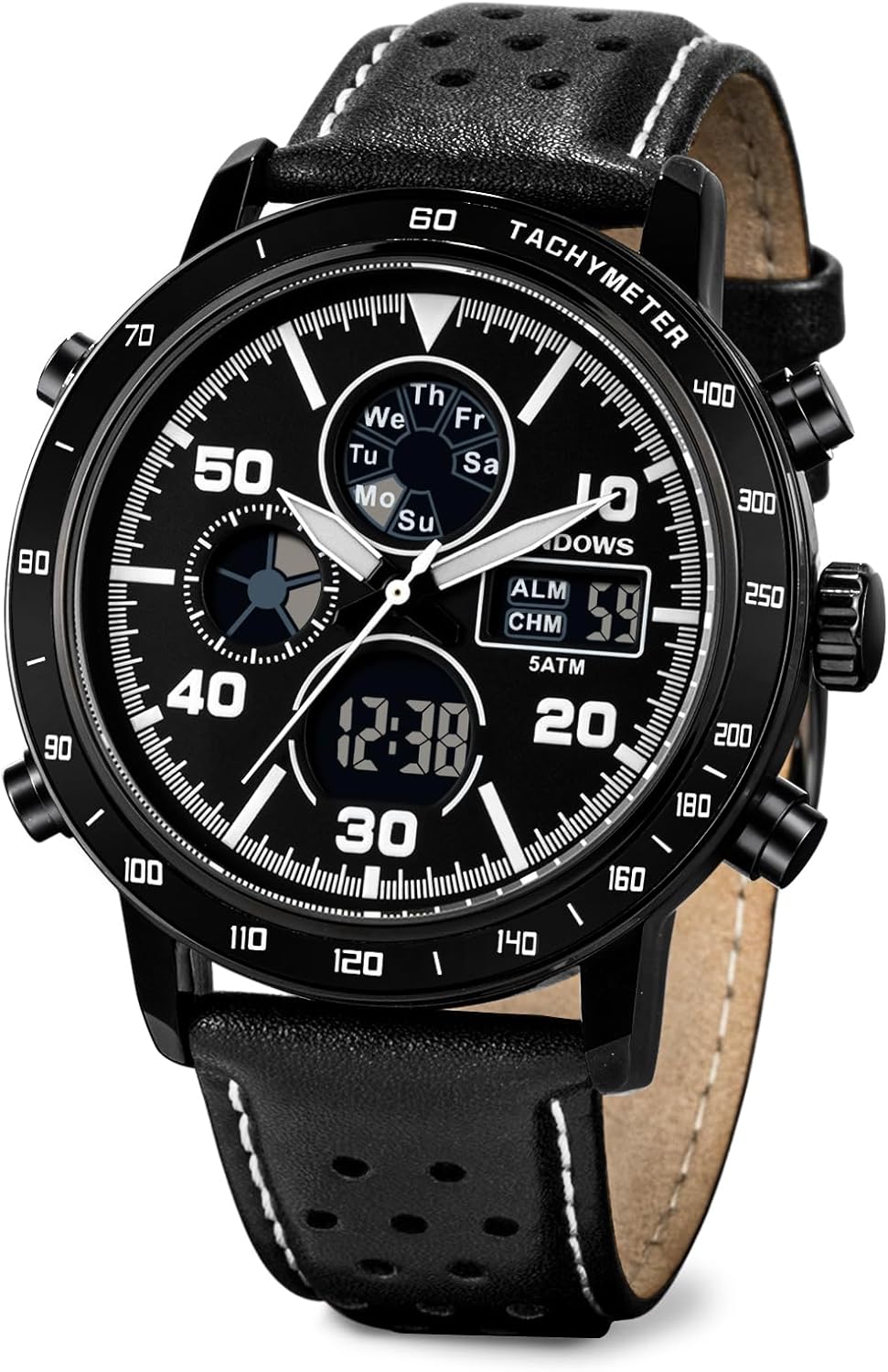
Image: Front view of the PINDOWS PDS-642 watch, showcasing the analog and digital displays, and control buttons.

Image: Detailed diagram illustrating the functions of each button and display area on the PINDOWS PDS-642 watch.
- Crown: Used for setting analog time.
- Buttons (A, B, C, D): Control digital functions such as mode selection, light, start/stop, and reset.
- Analog Display: Traditional hour, minute, and second hands.
- Digital Displays: Multiple sub-dials for date, day of week, digital time, alarm, and stopwatch.
- Strap: Durable silicone or leather strap (depending on variant).
Setup
1. Unboxing and Initial Inspection
Upon receiving your PINDOWS watch, carefully remove it from its packaging. Inspect the watch for any visible damage or defects. Remove any protective films from the watch face and case back.
Video: An unboxing demonstration of a PINDOWS watch, showing the packaging and initial handling of the timepiece.
2. Setting Analog Time
- Pull the crown (the knob on the side of the watch) out to the first position.
- Turn the crown clockwise or counter-clockwise to adjust the hour and minute hands to the desired time.
- Once the analog time is set, push the crown back into its original position to start the movement.
3. Setting Digital Time and Date
The digital display offers various functions including time, date, day of the week, alarm, and stopwatch. Refer to the detailed diagram for button identification.
- Mode Button: Press to cycle through different digital modes (Time, Alarm, Stopwatch, Chronograph).
- Adjust Button: Used to enter setting mode for the selected function.
- Start/Stop Button: Used to adjust values in setting mode or start/stop functions like the stopwatch.
- Reset Button: Used to reset values or switch between 12/24-hour format.
Specific instructions for setting each digital function are typically found in the included mini-manual. Generally, you will press the Mode button until you reach the desired setting (e.g., Time Setting), then press the Adjust button to make digits flash, use Start/Stop to change values, and Reset to move between fields. Press Adjust again to exit setting mode.
Operating Instructions
1. LED Backlight Function
To illuminate the digital display in low-light conditions, press the "Light" button (usually located on the top-left side of the watch). The LED backlight will activate for a few seconds, allowing clear readability.

Image: The PINDOWS PDS-642 watch displaying its LED backlight feature, making the digital time visible in a dark environment.
2. Alarm Function
Your watch includes an alarm function. To set the alarm, navigate to the Alarm mode using the Mode button. Use the Adjust and Start/Stop buttons to set the desired alarm time. Activate or deactivate the alarm as needed. The alarm is designed to be audible to wake you or remind you of appointments.
3. Stopwatch Function
The integrated stopwatch allows for precise timing of events. Enter Stopwatch mode using the Mode button. Use the Start/Stop button to begin and end timing, and the Reset button to clear the stopwatch. This feature is useful for sports, cooking, or other timed activities.
4. Calendar and Day of Week Display
The digital display automatically shows the current date and day of the week. Ensure these are set correctly during the initial setup for accurate information.
Maintenance
1. Water Resistance
The PINDOWS PDS-642 watch is water-resistant up to 30 meters (3 ATM). This means it is suitable for daily use, such as hand washing, splashes, and brief exposure to rain. It is not suitable for swimming, diving, or hot water steam environments (e.g., showers, saunas) as this can compromise the water seals.

Image: Visual representation of the watch's 5 ATM water resistance, suitable for daily splashes and rain, but not for submersion.
2. Cleaning and Care
- Wipe the watch case and strap regularly with a soft, dry cloth to remove dust and dirt.
- For silicone straps, a mild soap and water solution can be used, ensuring to rinse thoroughly and dry completely.
- Avoid exposing the watch to extreme temperatures, direct sunlight for prolonged periods, or strong magnetic fields.
3. Battery Replacement
The watch is powered by a long-lasting battery. When the display dims or the watch stops functioning, it indicates that the battery needs replacement. It is recommended to have the battery replaced by a qualified watch technician to ensure proper sealing and maintain water resistance.
4. Scratch Resistance
The watch features anti-scratch mineral glass, providing enhanced durability against everyday wear and tear. However, it is not entirely scratch-proof, so avoid contact with abrasive surfaces.
Troubleshooting
| Problem | Possible Cause | Solution |
|---|---|---|
| Analog hands not moving | Crown pulled out; low battery. | Push crown in; replace battery. |
| Digital display blank or dim | Low battery; display mode issue. | Replace battery; cycle through modes. |
| Incorrect digital time/date | Not set correctly. | Refer to "Setting Digital Time and Date" section to reset. |
| Water inside watch | Exposure beyond 30m water resistance; crown not fully pushed in. | Immediately take to a professional watch repair service. Ensure crown is always fully pushed in. |
If you encounter issues not listed here or if the suggested solutions do not resolve the problem, please contact PINDOWS customer service for assistance.
Specifications
- Model Number: PDS-642
- Brand: PINDOWS
- Movement: Multifunction Chronograph (Analog & Digital)
- Case Material: Environmental protection vacuum plating case
- Dial Window Material: Anti-scratch mineral glass
- Water Resistance: 30 meters (3 ATM)
- Functions: Analog Time, Digital Time, Date, Day of Week, Alarm, Stopwatch, LED Backlight, Hourly Chime
- Strap Type: Leather (for 642N1:Black variant)
- Package Dimensions: 3.62 x 3.58 x 3.15 inches
- Item Weight: 5.93 ounces
Warranty and Customer Support
PINDOWS is committed to providing a satisfactory shopping experience. If you have any problems or dissatisfaction with your watch, please feel free to contact our customer service. We offer professional service to address your concerns.
For support, please visit the official PINDOWS store or contact the seller directly through your purchase platform.
Online Store: PINDOWS Official Store