
1. Introduction
Thank you for choosing the TopMade MF33 Magnetic Wallet with Find My. This innovative wallet combines secure card storage with advanced tracking capabilities, allowing you to locate your wallet using Apple's Find My network. Designed for seamless integration with iPhone 12 series and newer, this manual will guide you through its features, setup, operation, and maintenance to ensure optimal performance.
2. Product Features
- Full Find My Support: Built-in wallet tracker works with Apple Find My, no AirTag needed. Features include real-time location tracking, sound alerts (100dB alarm), Left Behind notifications, and Lost Mode. Bluetooth range up to 50m.
- Super Strong Magnetic Attachment: Magnetic force up to 3800 Gauss, providing a secure attachment to the back of your iPhone 12/13/14/15/16 series or MagSafe-compatible cases.
- Easy Card Access: Designed to securely hold 1 to 4 cards without adding bulk. A built-in card clip ensures cards stay firmly in place, and a thumb slot allows for quick access.
- RFID Blocking: Integrated RFID and NFC blocking technology protects your credit card information from unauthorized scanning and demagnetization.
- Premium Leather Material: Crafted from high-quality PU leather for durability, a classic look, and a premium feel.
- Long-lasting Rechargeable Battery: The integrated lithium-ion battery lasts up to 6 months on a single charge. Supports wireless charging (wireless charger not included).
3. Setup Guide
Follow these steps to connect your TopMade Magnetic Wallet with your iPhone and enable Find My functionality:
- Enable Two-Factor Authentication: Ensure Two-Factor Authentication is enabled for your Apple ID on your iPhone.
- Power On the Wallet: Press the power button on the wallet once to turn it on.
- Activate Find My and Bluetooth: On your iPhone, go to Settings and ensure both 'Find My' and 'Bluetooth' are turned on.
- Add to Find My App: Open the 'Find My' app on your iPhone. Navigate to 'Items' > 'Add New Item' > 'Other Supported Item' > 'Connect'. Follow the on-screen prompts to complete the pairing process.
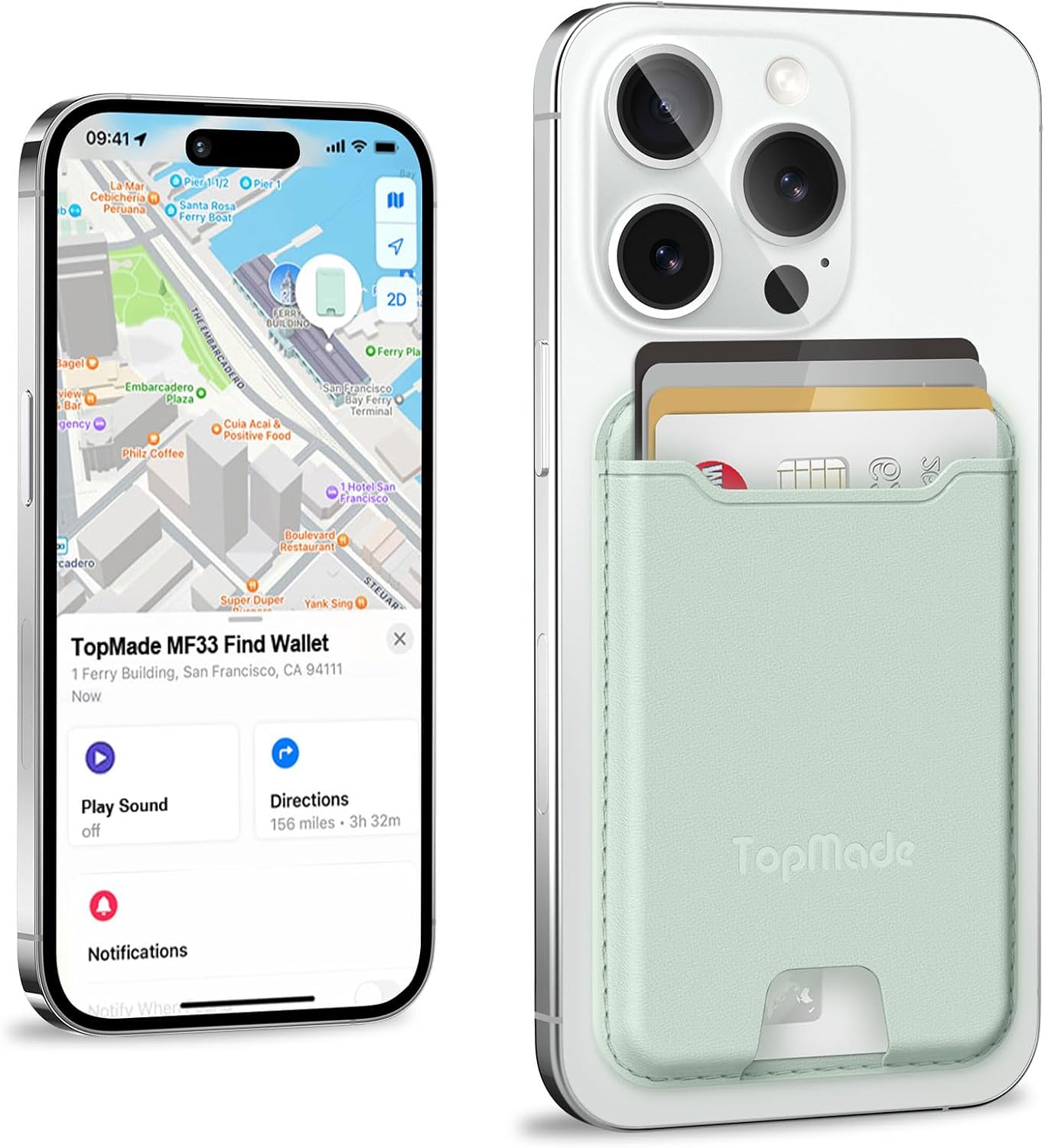
Image: The TopMade MF33 Magnetic Wallet attached to an iPhone, with the Find My app displaying its location and control options.

Image: A visual guide illustrating the four steps to easily connect the wallet with your iPhone's Find My app.
4. Operating Instructions
4.1 Attaching and Detaching
Align the wallet with the MagSafe area on the back of your compatible iPhone or MagSafe case. The strong magnets will effortlessly snap it into place. To detach, simply pull the wallet away from your device.

Image: An illustration demonstrating the strong magnetic connection between the TopMade wallet and an iPhone, highlighting the 3800 Gauss magnetic strength.
4.2 Storing and Accessing Cards
Insert up to 4 cards into the wallet's slot. The internal design ensures cards are held securely. To access a card, use the thumb slot at the bottom to push the desired card upwards.

Image: A hand demonstrating how to quickly access a card from the TopMade magnetic wallet using the thumb slot.
4.3 Using Find My Features
- Locate on Map: Open the 'Find My' app on your iPhone to see the real-time location of your wallet on a map.
- Play Sound: If your wallet is nearby but out of sight, select 'Play Sound' in the Find My app to make the wallet emit a loud 100dB alarm.
- Left Behind Notifications: Configure the Find My app to send you an alert if you leave your wallet behind at a known location.
- Lost Mode: If your wallet is lost, activate 'Lost Mode' in the Find My app. This can display a message and contact information to anyone who finds it.

Image: An iPhone screen showing a 'Wallet left behind' notification, and the wallet emitting sound waves to indicate its location under a sofa.
4.4 Charging the Wallet
The TopMade MF33 wallet supports wireless charging. Simply place the wallet on any Qi-enabled wireless charger. No special charging cable is required. A full charge can last up to 6 months.

Image: The TopMade magnetic wallet being charged wirelessly on a charging pad, with an indication that the wireless charger is not included.
5. Maintenance
5.1 Cleaning
To clean your TopMade Magnetic Wallet, gently wipe the PU leather surface with a soft, damp cloth. Avoid using harsh chemicals or abrasive materials, as these can damage the finish.
5.2 Battery Care
The wallet features a long-lasting rechargeable lithium-ion battery. For optimal battery life, avoid extreme temperatures and store the wallet in a cool, dry place when not in use for extended periods. Recharge the battery when the low battery indicator is shown or when the Find My app indicates a low charge.
6. Troubleshooting
- Wallet not found by Find My:
- Ensure the wallet's battery is charged.
- Verify that Bluetooth is enabled on your iPhone.
- Make sure the wallet is powered on (press the power button once).
- Try restarting your iPhone and the Find My app.
- Cards not holding securely:
- The wallet is designed to hold 1-4 cards. Ensure you are within this range.
- Check for any debris or foreign objects inside the card slot.
- Magnetic attachment feels weak:
- Ensure your iPhone is a MagSafe-compatible model (iPhone 12 series or newer) or that you are using an official MagSafe case or other magnetic case.
- Non-magnetic cases or thick cases may interfere with magnetic strength.
- Factory Reset: If you experience persistent issues, you can perform a factory reset. Short press the power button 4 times, then long press the power button until you hear a BEEP. This indicates the factory reset has been completed.
7. Specifications
| Feature | Detail |
|---|---|
| Model Number | MF33 |
| Dimensions | 0.37 x 2.59 x 3.85 inches |
| Item Weight | 3.52 ounces |
| Material | High-quality PU Leather |
| Magnetic Strength | Up to 3800 Gauss |
| Card Capacity | 1-4 cards |
| Battery Life | Up to 6 months on a single charge |
| Bluetooth Range | 50 meters (approx. 160 feet) |
| Alarm Sound Level | 100dB |
| Special Features | Lightweight, Magnetic, Find My integration, RFID Blocking, Rechargeable |
8. Warranty and Support
For any questions, concerns, or support inquiries regarding your TopMade MF33 Magnetic Wallet, please contact TopMade customer service. Refer to the product packaging or the retailer's website for specific warranty information and contact details.