
Remington F7000
Remington F7 Style Series Foil Shaver (Model F7000) Instruction Manual
Brand: Remington | Model: F7000
1. Introduction
Thank you for purchasing the Remington F7 Style Series Foil Shaver. This manual provides essential information for the safe and effective use, maintenance, and care of your new shaver. Please read these instructions thoroughly before first use and keep them for future reference.
Product Overview
The Remington F7 Style Series Foil Shaver is designed for both daily shaving and versatile beard styling. It features flexible shaving foils that adapt to facial contours and a flexible shaving head for maximum skin contact. The shaver includes a ComfortTrim Pop-up trimmer for detailed styling and Tri-Flex shaving blades engineered to capture more hair in fewer passes.

Image 1.1: Remington F7 Style Series Foil Shaver, including its packaging, charging cable, cleaning brush, and travel pouch.
Safety Warnings
- This appliance can be used by children aged 8 years and above and persons with reduced physical, sensory or mental capabilities or lack of experience and knowledge if they have been given supervision or instruction concerning use of the appliance in a safe way and understand the hazards involved. Children shall not play with the appliance. Cleaning and user maintenance shall not be made by children without supervision.
- Keep the appliance dry. Do not immerse in water.
- The shaver is 100% waterproof and can be used in the shower. However, ensure the shaver is properly rinsed and dried after each wet use to prevent bacterial growth and maintain hygiene.
- Do not use the appliance if it is damaged.
- Only use the charging cable supplied with the product.
- Do not attempt to repair the appliance yourself. Contact authorized service personnel for repairs.
2. Components Included
Your Remington F7 Style Series Foil Shaver package includes the following items:
- Remington F7 Style Series Foil Shaver (Model F7000)
- USB-C Charging Cable
- Cleaning Brush
- Travel Pouch
- User Manual
- Warranty Booklet

Image 2.1: All components of the Remington F7000 shaver package, including the shaver, USB-C cable, cleaning brush, and travel pouch.
3. Setup and Charging
Initial Charge
- Before using your shaver for the first time, charge it for a full 2 hours.
- Ensure the shaver is switched off.
- Connect the USB-C charging cable to the shaver's charging port and plug the other end into a compatible USB power adapter (not included) or a USB port.
- The LED charge indicator lights will illuminate, showing the charging status. A full charge is indicated when all three LED lights are solid.
A full charge provides up to 80 minutes of cordless usage. The 3-level LED indicator will show the remaining battery life during use and charging.
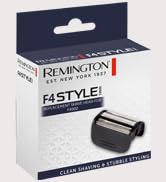
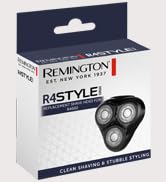
Image 3.1: Visual indicators for USB charging and the 3-level LED battery display.
4. Operating Instructions
General Shaving
- Ensure your shaver is fully charged.
- Press the power button to turn on the shaver.
- For optimal results, hold the shaver at a right angle to your skin and stretch your skin taut with your free hand.
- Shave against the direction of hair growth using short, circular strokes.
- The Tri-Flex foils and flexible head are designed to adapt to your facial contours for a close and comfortable shave.

Image 4.1: A hand demonstrating the proper grip for the Remington F7000 shaver during use.
Wet and Dry Shaving
The Remington F7000 is 100% waterproof, allowing for both dry and wet shaving. For a more comfortable shave, you can use it with shaving gel or foam in the shower.
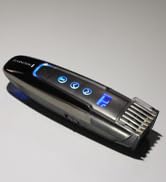
Image 4.2: Icon indicating the shaver's 100% waterproof capability, suitable for wet and dry use.
Using the Pop-Up Precision Trimmer
The integrated pop-up trimmer is ideal for detailing and shaping your beard, sideburns, or mustache.
- Locate the trimmer release button on the back of the shaver.
- Slide the button upwards to engage the pop-up trimmer.
- Use the trimmer to define edges and trim longer hairs before shaving.
- When finished, push the trimmer back down until it clicks into place.

Image 4.3: The back of the Remington F7000 shaver, highlighting the pop-up precision trimmer in its retracted position.
5. Maintenance and Cleaning
Regular cleaning and maintenance will ensure optimal performance and extend the lifespan of your shaver.
Cleaning After Each Use
- Turn off the shaver.
- Press the release buttons on the side of the shaver head to detach the foil assembly.
- Tap out any excess hair clippings.
- Use the provided cleaning brush to remove stubborn hair from the foils and cutter block. Do not use the brush on the foils themselves, as this can damage them.
- Rinse the foil assembly and cutter block under warm running water.
- Allow all parts to air dry completely before reattaching the foil assembly.

Image 5.1: A detailed view of the Remington F7000 shaver head, showing the triple flexing foils and intercept trimmer.
Replacing Foils and Cutters
For continued optimal shaving performance, it is recommended to replace the foils and cutters every 6-12 months, or when they show signs of wear. Replacement parts can be purchased from authorized Remington retailers.

Image 5.2: Example of a replacement foil and cutter pack for the Remington F7 Style Series shaver.
6. Troubleshooting
| Problem | Possible Cause | Solution |
|---|---|---|
| Shaver does not turn on. | Battery is depleted. | Charge the shaver for a full 2 hours. |
| Shaver does not provide a close shave. | Foils/cutters are worn or dirty. Incorrect shaving technique. | Clean the shaver head thoroughly. Replace foils and cutters if necessary. Ensure you are shaving against hair growth. |
| Shaver pulls hair. | Foils/cutters are dull or damaged. Battery is low. | Replace foils and cutters. Ensure the shaver is fully charged. |
| Shaver stops during use. | Battery is depleted. | Recharge the shaver. |
If you encounter issues not listed here, or if the suggested solutions do not resolve the problem, please contact Remington customer support.
7. Specifications
- Model: F7000
- Brand: Remington
- Power Source: Battery Powered (Lithium-ion)
- Battery Life: Up to 80 minutes cordless usage
- Charging Time: Approximately 2 hours for a full charge
- Waterproof: 100% waterproof (Wet & Dry use)
- Blade Material: Stainless Steel
- Features: Tri-Flex Foils, Intercept Blades, Pop-up Precision Trimmer, 3-level LED Charge Indicator, Universal Voltage
- Dimensions (L x W x H): 4.5 x 6.5 x 15.5 cm
- Weight: 250 grams
- Country of Origin: China
8. Warranty and Support
Warranty Information
Your Remington F7 Style Series Foil Shaver comes with a standard manufacturer's warranty. Please refer to the included warranty booklet for detailed terms and conditions, including warranty period and coverage. Keep your proof of purchase for any warranty claims.
Customer Support
For further assistance, product registration, or to purchase replacement parts, please visit the official Remington website or contact their customer service department. You can find more information and new arrivals at Remington Europe.

Image 8.1: Remington brand logo alongside the F7 Style Series Foil Shaver, representing official product information and support.
Ask a question about this manual
Ask about setup, troubleshooting, compatibility, parts, safety, or missing instructions. Manuals+ will review the question and use this page’s manual context to help answer it.