
Wildgame Innovations WGI-TERACC
Wildgame Innovations Terra Xt Cellular Camera User Manual
Model: WGI-TERACC
Introduction
The Wildgame Innovations Terra Xt Cellular Camera is designed to provide remote monitoring capabilities for outdoor environments, particularly for wildlife observation and property surveillance. This cellular trail camera captures high-resolution images and videos, transmitting them directly to your smartphone or computer via the HuntSmart App. Its robust design and advanced features, including the Artificial Intelligence Management (AIM) System, ensure reliable performance and intelligent data organization.
Package Contents
Verify that all items listed below are included in your package:
- Wildgame Innovations WGI-TERACC: Terra Xt Cellular Camera
- 32GB SD Card (Lexar brand)
- Microfiber Cleaning Cloth (Field Boys brand)
- Adjustable Tree Strap

Figure 1: Wildgame Innovations Terra Xt Cellular Camera with included 32GB SD card and microfiber cleaning cloth.
Setup Guide
1. Power Source Installation
The Terra Xt camera can be powered by 8 AA batteries (not included) or an external 12-volt DC power source (compatible with solar power panels, not included).
- Open the camera housing latch on the side of the unit.
- Locate the battery compartment inside the camera.
- Insert 8 new AA batteries, ensuring correct polarity (+/-) as indicated in the compartment.
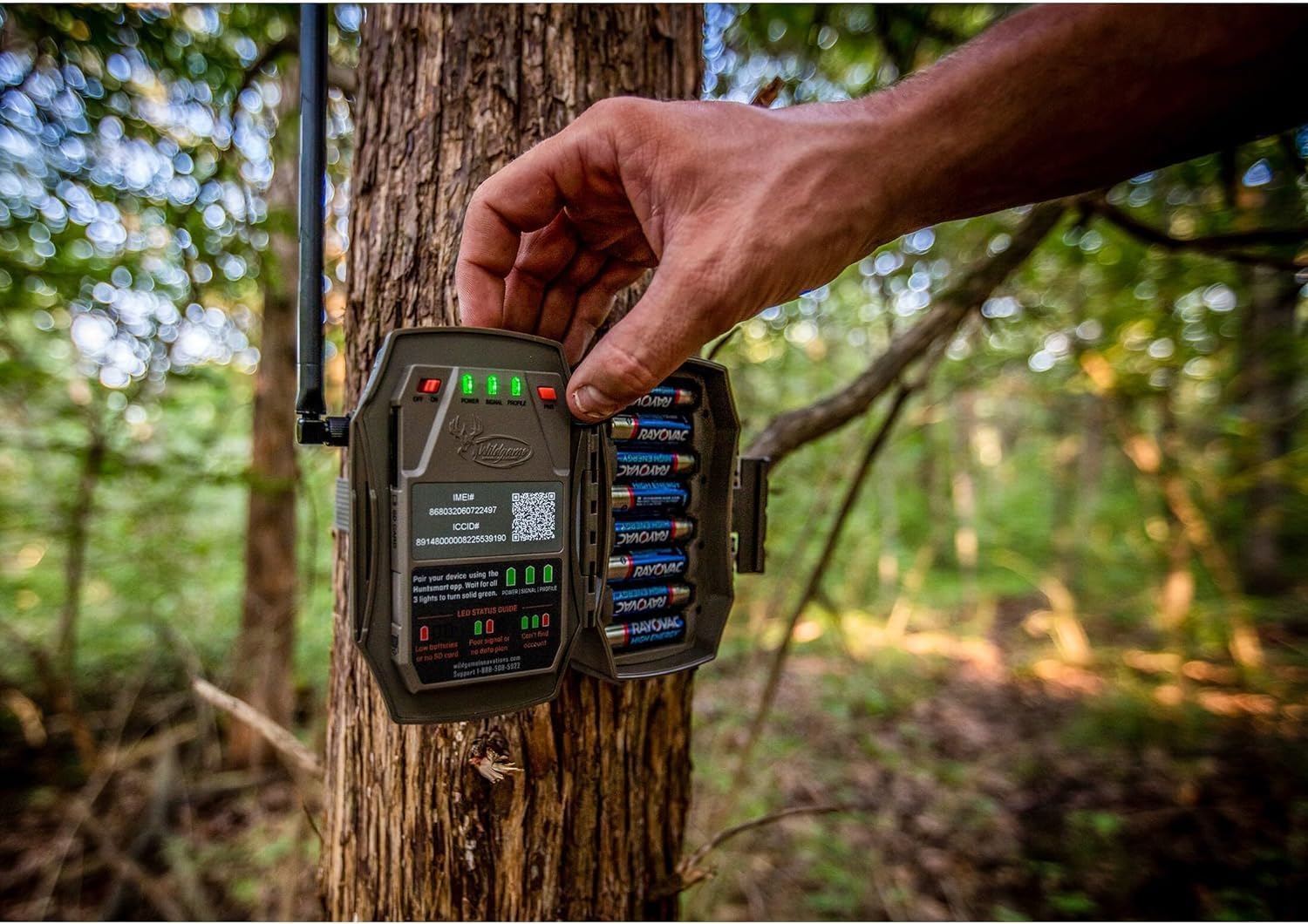
Figure 2: Proper installation of AA batteries into the camera's battery compartment.

Figure 3: Internal view of the camera, highlighting the battery slots and the QR code for app setup.
2. SD Card Installation
A 32GB SD card is included for local storage of images and videos.
- Locate the SD card slot, typically near the battery compartment.
- Insert the 32GB SD card into the slot with the label facing up until it clicks into place.
3. HuntSmart App Setup and Activation
The camera's cellular functions are managed through the Wildgame Innovations HuntSmart App.
- Download the "HuntSmart" app from your device's app store (available for Android and iOS).
- Create an account or log in if you already have one.
- Follow the in-app instructions to add a new camera. This typically involves scanning the QR code located inside the camera's housing (refer to Figure 3).
- Ensure the camera is powered on and wait for the LED status lights (Power, Signal, Profile) to turn solid green, indicating successful connection and activation.
4. Mounting the Camera
The camera is designed for outdoor use and can be mounted to a tree or pole using the included adjustable tree strap.
- Select a suitable location for the camera, ensuring a clear view of the desired monitoring area.
- Thread the adjustable tree strap through the mounting slots on the back of the camera.
- Securely fasten the camera to a tree or pole at the desired height.
- The camera also features a cable-lock ready latch for additional security (security accessories not included).

Figure 4: The Terra Xt camera securely mounted to a tree using the adjustable strap.
Operating Instructions
Powering On/Off
Once batteries are installed and the SD card is in place, the camera will power on automatically when the housing is closed or when connected to an external power source. To power off, remove batteries or disconnect the external power source.
Image and Video Capture
The camera is equipped with a motion sensor and will capture images or videos when triggered. It features a rapid 0.7-second trigger speed.
- Still Images: Captures images at 16 MP or 24 MP resolution. Images are in 16:9 ratio.
- Video: Records video in 1080p resolution, AVI format.
- Night Vision: Twenty-one 850nm LEDs provide an 80-ft. flash range for clear night captures.
Cellular Connectivity and Data Management
The Terra Xt camera utilizes cellular technology to transmit captured data to your HuntSmart App. It supports dual networks and operates anywhere cell service is available in the U.S. or Canada.
- Automatic Uploads: Captured photos and videos are automatically uploaded to your HuntSmart account.
- Artificial Intelligence Management (AIM) System: The HuntSmart App's AIM System automatically organizes and analyzes captured media. This system provides detailed information categorized by species, geolocation, and custom descriptions.
- Accessing Media: View and manage your captured images and videos directly through the HuntSmart App on your smartphone or computer.
Maintenance
- Cleaning: Use the included microfiber cleaning cloth to gently wipe the camera lens and housing. Avoid abrasive cleaners or solvents.
- Battery Replacement: Regularly check battery levels via the HuntSmart App. Replace all 8 AA batteries when low to ensure continuous operation.
- SD Card Management: Periodically check the SD card capacity. While images are uploaded to the cloud, the SD card serves as local backup. Format the SD card periodically through the app or a computer to maintain optimal performance.
- Firmware Updates: Check the HuntSmart App or Wildgame Innovations website for any available firmware updates for your camera model. Follow instructions carefully for updates.
Troubleshooting
Refer to the LED status guide inside the camera (Figure 3) for quick diagnostics. Common issues and their solutions are listed below:
| Problem | Possible Cause | Solution |
|---|---|---|
| Camera not powering on. | Low or dead batteries; incorrect battery polarity; no external power. | Replace all 8 AA batteries with new ones, ensuring correct polarity. Check external power connection if used. |
| No signal/Camera not connecting to app. | Poor cellular coverage; activation issue; app not updated. | Relocate camera to an area with better cellular reception. Re-scan QR code in app to reactivate. Ensure HuntSmart App is updated to the latest version. |
| No images/videos captured. | SD card full or corrupted; incorrect settings; sensor obstructed. | Format the SD card. Check camera settings in the app to ensure it's set to capture. Clear any obstructions from the camera's sensor. |
| Poor image/video quality. | Dirty lens; low light conditions; subject too far. | Clean the camera lens with the microfiber cloth. Ensure adequate lighting or position camera closer to the subject. |
Specifications
| Model Name | Wildgame Innovations WGI-TERACC: Terra Xt Cellular Camera / 24Mp |
| Item Model Number | WGI-TERACC |
| Indoor/Outdoor Usage | Outdoor |
| Effective Still Resolution | 16 MP, 24 MP |
| Video Capture Resolution | 1080p |
| Video Capture Format | AVI |
| Power Source | Battery Powered (8 AA batteries) or 12-volt DC jack |
| Connectivity Technology | Wireless |
| Connectivity Protocol | Cellular, Wi-Fi (for app communication) |
| Compatible Devices | Smartphone (Android) |
| Mounting Type | Tree Mount |
| Item Dimensions (L x W x H) | 10 x 4 x 8 inches |
| Item Weight | 1.12 pounds |
| Special Feature | HD Resolution, Artificial Intelligence Management (AIM) System |
Warranty and Support
For detailed warranty information, please refer to the documentation included with your product or visit the official Wildgame Innovations website. For technical support, product registration, or further assistance, please contact Wildgame Innovations customer service through their official channels.
You can visit the Wildgame Innovations Store for more information: Wildgame Innovations Store
Related documentsWGI-TERACC


Ask a question about this manual
Ask about setup, troubleshooting, compatibility, parts, safety, or missing instructions. Manuals+ will review the question and use this page’s manual context to help answer it.