
Swyran LCD Display
OEM 8" Touch Screen LCD Display User Manual
Model: LCD Display
Brand: Swyran
1. Introduction
This manual provides essential information for the installation, operation, and maintenance of your new Swyran OEM 8-inch Touch Screen LCD Display. This product is designed as a direct replacement for the OEM part DJ080PA-01A, restoring full touch functionality and display clarity to your vehicle's infotainment system. Please read this manual thoroughly before proceeding with installation or use.
2. Product Features
- Direct Replacement: Replaces OEM part DJ080PA-01A, designed to match original factory specifications perfectly.
- Premium LCD Screen: Features high accuracy. Upgraded material reduces scratches, glare, and fog, and ensures stable performance.
- Touch Sensitivity: Response time under 8ms with less than 1% touch error, providing precise and fast touch interactions.
- 8-inch Display: Standard 8-inch screen size for compatible vehicles.
- 55-pin Interface: Standardized connector for secure and reliable connection.
3. Compatibility and Fitment
This 8-inch LCD touch screen is compatible with the following vehicle models and years. Please verify your vehicle's make, model, and year before purchase to ensure proper fitment.
- Chevrolet:
- 2015-2019 Suburban
- 2015-2019 Tahoe
- 2015-2020 Colorado
- 2014-2018 Silverado
- GMC:
- 2015-2019 Yukon
- 2015-2020 GMC Canyon
- 2014-2018 GMC Sierra
- 2017-2019 ACADIA
- 2017-2019 Terrain

Image: Visual representation of compatible Chevrolet and GMC vehicle models.
4. What's in the Box
Your package should contain the following items:
- 1x LCD Monitor + Touch Screen Assembly
5. Setup and Installation
Installation of the OEM 8" Touch Screen LCD Display requires disassembling parts of your vehicle's dashboard and infotainment system. It is recommended that this installation be performed by a qualified professional to avoid damage to your vehicle or the new display. If you choose to perform the installation yourself, proceed with caution and consult vehicle-specific repair manuals or reputable online video guides for detailed steps.
General Installation Overview:
- Preparation: Ensure your vehicle is turned off and the battery is disconnected to prevent electrical damage. Gather necessary tools (e.g., trim removal tools, screwdrivers).
- Dashboard Disassembly: Carefully remove the necessary trim panels and components to access the existing infotainment display unit.
- Old Display Removal: Disconnect all cables and mounting screws securing the old display. Gently remove it from the dashboard.
- New Display Installation: Connect the 55-pin interface cable from the new LCD display to the vehicle's harness. Ensure a secure and proper connection.
- Mounting: Secure the new display unit using the original mounting screws.
- Reassembly: Carefully reassemble all removed dashboard trim panels and components. Ensure all clips and screws are properly secured.
- Testing: Reconnect the vehicle's battery. Turn on the ignition and test the new display's functionality, including touch response, display clarity, and all infotainment features.
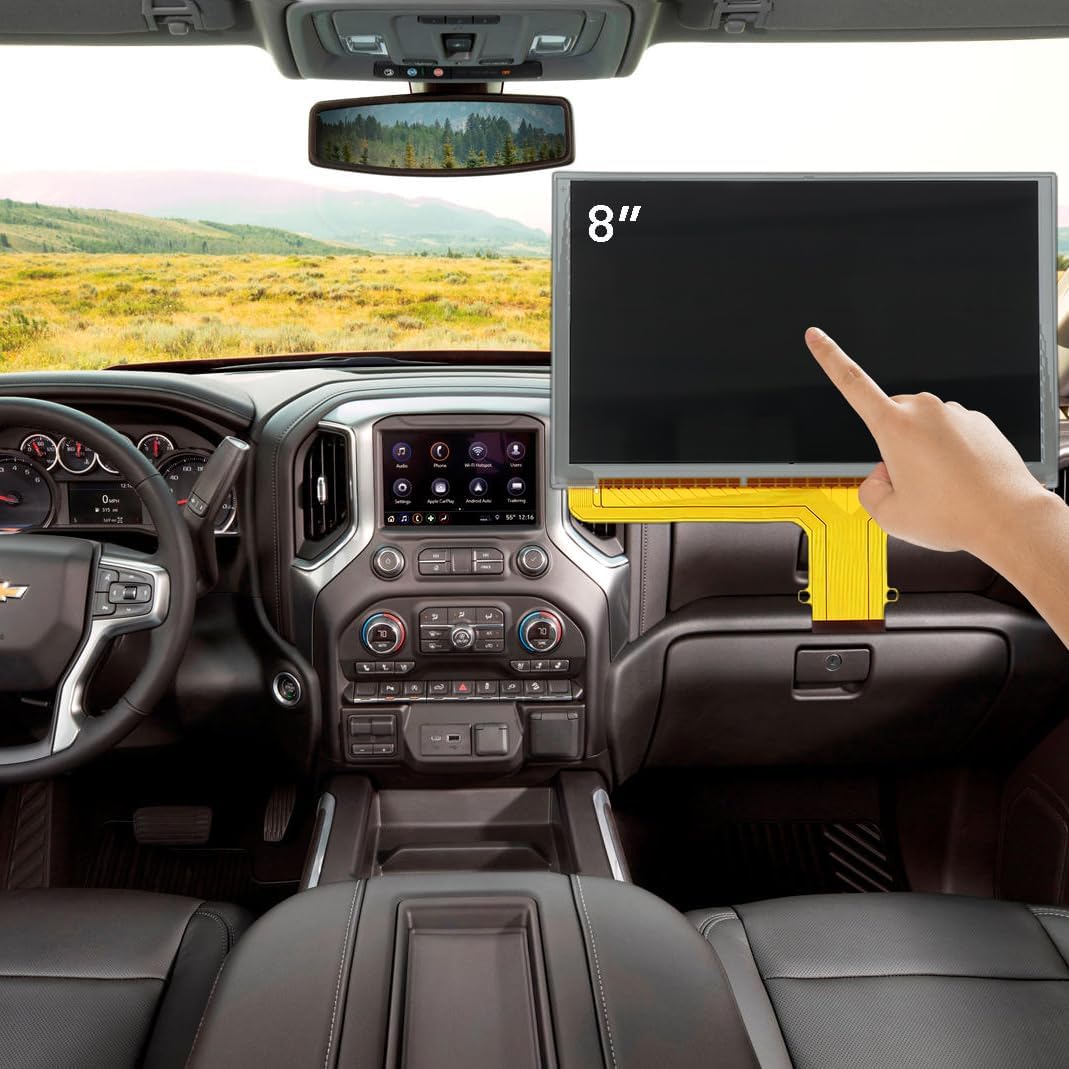
Image: The 8-inch touch screen LCD display shown in a vehicle dashboard context.

Image: Detail of the 55-pin interface connector for installation.
6. Operating the Display
The Swyran OEM 8" Touch Screen LCD Display functions identically to your vehicle's original screen. It provides a responsive touch interface for controlling your vehicle's infotainment system, including navigation, audio, phone, and other applications.
Key Operational Aspects:
- Touch Control: Interact with on-screen elements by tapping, swiping, and pinching (if supported by your vehicle's software). The display is designed for high touch accuracy and quick response.
- Display Clarity: Enjoy clear and vibrant visuals for maps, media, and vehicle information.
- Integration: The display seamlessly integrates with your vehicle's existing infotainment software and hardware.

Image: A hand demonstrating touch interaction with the display, showing a navigation interface.
7. Maintenance
To ensure the longevity and optimal performance of your LCD display, follow these simple maintenance guidelines:
- Cleaning: Use a soft, lint-free cloth specifically designed for electronics screens. Lightly dampen the cloth with water or a screen-safe cleaning solution. Do not spray liquid directly onto the screen.
- Avoid Harsh Chemicals: Do not use abrasive cleaners, ammonia-based solutions, or solvents, as these can damage the screen's surface.
- Protect from Direct Sunlight: Prolonged exposure to direct sunlight and extreme temperatures can affect the display's lifespan and performance.
- Gentle Handling: Avoid pressing too hard on the screen or using sharp objects, which can cause damage or scratches.
8. Troubleshooting
If you encounter issues with your new display, please refer to the following common problems and solutions:
| Problem | Possible Cause | Solution |
|---|---|---|
| No Display / Black Screen | Loose or incorrect cable connection; power issue; faulty unit. | Check all cable connections, especially the 55-pin interface. Ensure vehicle battery is properly connected. If issues persist, contact support. |
| Non-Responsive Touch Screen | Loose connection; software glitch; faulty touch layer. | Ensure all connections are secure. Restart the vehicle's infotainment system (refer to your vehicle's manual). If the problem continues, the unit may be defective. |
| Flickering / Distorted Display | Loose connection; electrical interference; faulty LCD panel. | Verify all cable connections are firm. Ensure no other electrical components are interfering. If the issue persists, the display may be faulty. |
| Incorrect Colors / Pixels | Faulty LCD panel. | This typically indicates a hardware issue with the LCD. Contact support for assistance. |
Many common display issues like non-responsive touch or flickering can be resolved by replacing the original unit with this product. The image below illustrates the improvement from a non-responsive screen to a quick-response display.

Image: Before and After comparison showing a non-responsive screen versus a quick-response screen.
9. Specifications
| Specification | Detail |
|---|---|
| Item Weight | 1.59 pounds |
| Package Dimensions | 11.57 x 7.32 x 1.69 inches |
| Country of Origin | China |
| Item Model Number | LCD Display |
| Display Size | 8 Inches |
| Interface | 55-pin |
| Special Feature | Touchscreen |
| Manufacturer | willyon |
| Vehicle Service Type | Car, SUV, Truck |
10. Warranty Information
This Swyran OEM 8" Touch Screen LCD Display comes with a 6-month warranty from the date of purchase. This warranty covers manufacturing defects and issues arising from normal use. It does not cover damage caused by improper installation, misuse, accidents, or unauthorized modifications. Please retain your proof of purchase for warranty claims.
11. Support
For technical assistance, installation guidance, or warranty claims, please contact the seller or manufacturer through the platform where you purchased the product. Provide your order details and a clear description of the issue to facilitate a quicker resolution.
Ask a question about this manual
Ask about setup, troubleshooting, compatibility, parts, safety, or missing instructions. Manuals+ will review the question and use this page’s manual context to help answer it.