
iWALK DBL4500NC
iWALK Portable Charger User Manual
Model: DBL4500NC | Brand: iWALK
Introduction
Thank you for choosing the iWALK Portable Charger. This compact and powerful 4,500mAh power bank is designed to provide fast and convenient charging for your USB-C compatible devices, including the latest iPhone 15/16 series and various Android smartphones. Please read this manual thoroughly to ensure proper use and maintenance of your device.
Safety Information
- Do not expose the power bank to extreme temperatures, direct sunlight, or high humidity.
- Do not disassemble, modify, or attempt to repair the device.
- Keep out of reach of children.
- Avoid dropping or subjecting the device to strong impacts.
- Use only original or certified cables for charging the power bank and your devices.
- Dispose of the power bank responsibly according to local regulations.
Package Contents
Upon opening your iWALK Portable Charger package, you should find the following items:
- 1x iWALK 4,500 mAh Portable Power Bank
- 1x USB-C to USB-C Cable
- 1x User Manual
Product Overview
The iWALK Portable Charger features a compact design with a built-in USB-C connector for direct plug-and-charge functionality. It also includes LED indicator lights to show the remaining battery level and a USB-C input port for recharging the power bank itself.
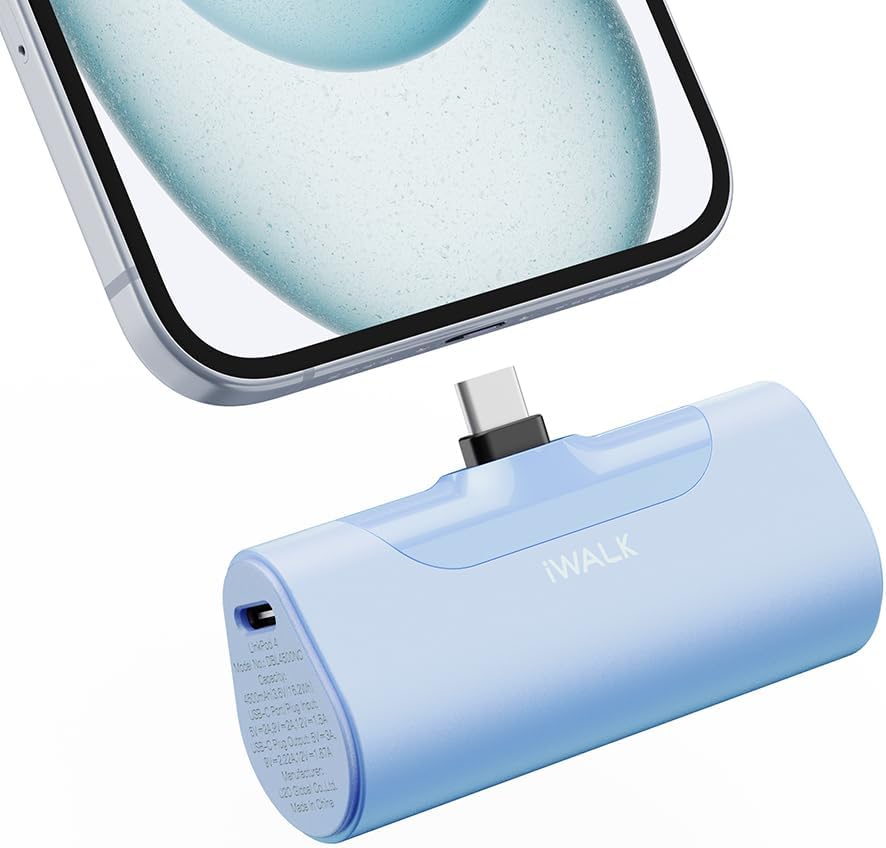
Image: The iWALK Portable Charger in baby blue, featuring its built-in USB-C connector plugged into the bottom of a smartphone. The charger is compact and designed for direct connection.

Image: A hand holding the iWALK Portable Charger next to a lipstick, illustrating its small and lightweight design, comparable in size to a lipstick.
Setup
Before first use, it is recommended to fully charge your iWALK Portable Charger. Refer to the "Charging the Power Bank" section for detailed instructions.
Operating Instructions
Charging Your Device
- Ensure your iWALK Portable Charger has sufficient charge. You can check the battery level by pressing the power button; the LED indicators will light up.
- Carefully plug the built-in USB-C connector of the power bank directly into the USB-C charging port of your smartphone or compatible device.
- The power bank will automatically begin charging your device. The LED indicators on the power bank will show its remaining charge.
- Once your device is charged, or when you wish to stop charging, simply unplug the power bank from your device.

Image: An iPhone 15 Pro being fast-charged by the iWALK Portable Charger, demonstrating 20W PD output and the ability to charge from 0% to 50% in 30 minutes.
Checking Battery Level
To check the remaining battery level of your iWALK Portable Charger, briefly press the power button located on the side of the device. The LED indicator lights will illuminate, showing the approximate charge level:
- Four LEDs: 75-100% charge
- Three LEDs: 50-75% charge
- Two LEDs: 25-50% charge
- One LED: 0-25% charge (recharge soon)
Compatibility
The iWALK Portable Charger is equipped with a built-in USB-C port, making it compatible with a wide range of devices. This includes, but is not limited to:
- iPhone 16/15 Series: iPhone 16 Pro Max, iPhone 16 Pro, iPhone 16 Plus, iPhone 16, iPhone 15 Pro Max, iPhone 15 Pro, iPhone 15 Plus, iPhone 15.
- Android Phones: Samsung Galaxy S25/S24/S23 series, Pixel, OnePlus, Huawei, and other USB-C enabled Android devices.
- Other Devices: iPad (USB-C models), AirPods (USB-C charging case), and other small electronic devices with a USB-C charging port.
Note: This charger is not applicable for older iPhone models (iPhone 14, 13, 12, 11, XS, XR, X, 8, 7, 6, SE) that use a Lightning connector.

Image: A detailed compatibility chart showing the iWALK Portable Charger's built-in USB-C connector and its compatibility with iPhone 16/15 series, various Samsung Galaxy models (S23, S22, S21, S20, S10, S9, S8, Note 10/9, Z Flip/Fold), Google Pixel phones (Pixel 8/8 Pro, Pixel 7/7 Pro), and iPad Pro/Air models.
Charging the Power Bank
To recharge your iWALK Portable Charger:
- Connect the provided USB-C to USB-C cable to the USB-C input port on the side of the power bank.
- Connect the other end of the USB-C cable to a compatible USB-C wall adapter (not included) or a computer's USB-C port.
- The LED indicators will flash to show the charging progress. Once fully charged, all four LEDs will remain solid.
- Disconnect the cable once charging is complete.
The power bank supports high-speed 18W recharging.
Maintenance
- Clean the power bank with a soft, dry cloth. Do not use liquid cleaners or aerosols.
- Store the device in a cool, dry place away from direct sunlight and extreme temperatures.
- If not used for extended periods, charge the power bank at least once every three months to maintain battery health.
Troubleshooting
| Problem | Possible Cause | Solution |
|---|---|---|
| Power bank not charging device. | Low battery on power bank; incorrect connection; incompatible device. | Recharge power bank; ensure secure connection; verify device compatibility (USB-C). |
| Power bank not recharging. | Faulty cable or adapter; power source issue. | Try a different USB-C cable and wall adapter; ensure power source is active. |
| Slow charging. | Device drawing less power; cable issue; power bank not fully charged. | Ensure device supports fast charging; use original cable; fully charge power bank. |
| LED indicators not working. | Device malfunction. | Contact customer support if troubleshooting steps do not resolve the issue. |
Specifications
| Feature | Detail |
|---|---|
| Model Number | DBL4500NC |
| Battery Capacity | 4,500 mAh |
| Output Power | 20W Fast Charging (USB-C) |
| Input Power | 18W Recharging (USB-C) |
| Product Dimensions | 3.1 x 1 x 1.5 inches |
| Item Weight | 6.4 ounces |
| Connector Type | USB Type C |
| Special Features | Fast Charging, LED Indicator Lights, Lightweight, Pocket Size, Short Circuit Protection |
Warranty and Support
iWALK provides an 18-month after-sales service for this product. For any inquiries or support needs, please follow these steps:
- Visit the iWALK Direct seller page on Amazon.
- Click on the "Ask a Question" button located on the top right corner of the screen.
- Alternatively, if you are on the product details page, click on the "seller ID" (iWALK Direct) to access their store page, then look for contact options.
- Describe your problem in detail, including your order number for faster assistance.
The iWALK service team aims to provide a solution within 24 hours.

Image: A graphic detailing the 18-month after-sales service process, showing steps to contact iWALK Direct through Amazon for support.
Related documentsDBL4500NC


Ask a question about this manual
Ask about setup, troubleshooting, compatibility, parts, safety, or missing instructions. Manuals+ will review the question and use this page’s manual context to help answer it.