
Lamzu Maya X
Lamzu Maya X Wireless Gaming Mouse User Manual
Model: Maya X
Introduction
Thank you for choosing the Lamzu Maya X Wireless Gaming Mouse. This manual provides detailed instructions for setting up, operating, maintaining, and troubleshooting your new gaming mouse. Please read this manual thoroughly to ensure optimal performance and longevity of your device.

Image: The Lamzu Maya X Wireless Gaming Mouse, split to show its internal structure and accompanied by its 8K wireless dongle.
Key Features
- Ultra-lightweight: Weighing just 47g, the MAYA X mouse is designed to be lightweight yet sturdy, providing ultimate comfort during long gaming sessions.
- Symmetrical Shape Design: It is flexible and equally accommodating for palm, claw, or fingertip grip styles.
- Equipped with Optical Switches and Dust-Proof Encoder: Optical switches last three times longer than mechanical ones and can handle over 70 million cycles, respond quickly, give tactile feedback, and act fast. The Dust-Proof wheel encoder with 30-grid roller outputs 15 pulse signals, making games more precise and responsive.
- Pixart PAW 3950 Sensor: Powered by the latest flagship sensor. It supports up to 30,000 DPI and 750 IPS, with a maximum polling rate of 8,000 Hz when using the 8K dongle.
- Nordic 52840 MCU: Making battery more power efficient, providing fast response times, accurate motion tracking, and seamless performance without any lags during gameplay.
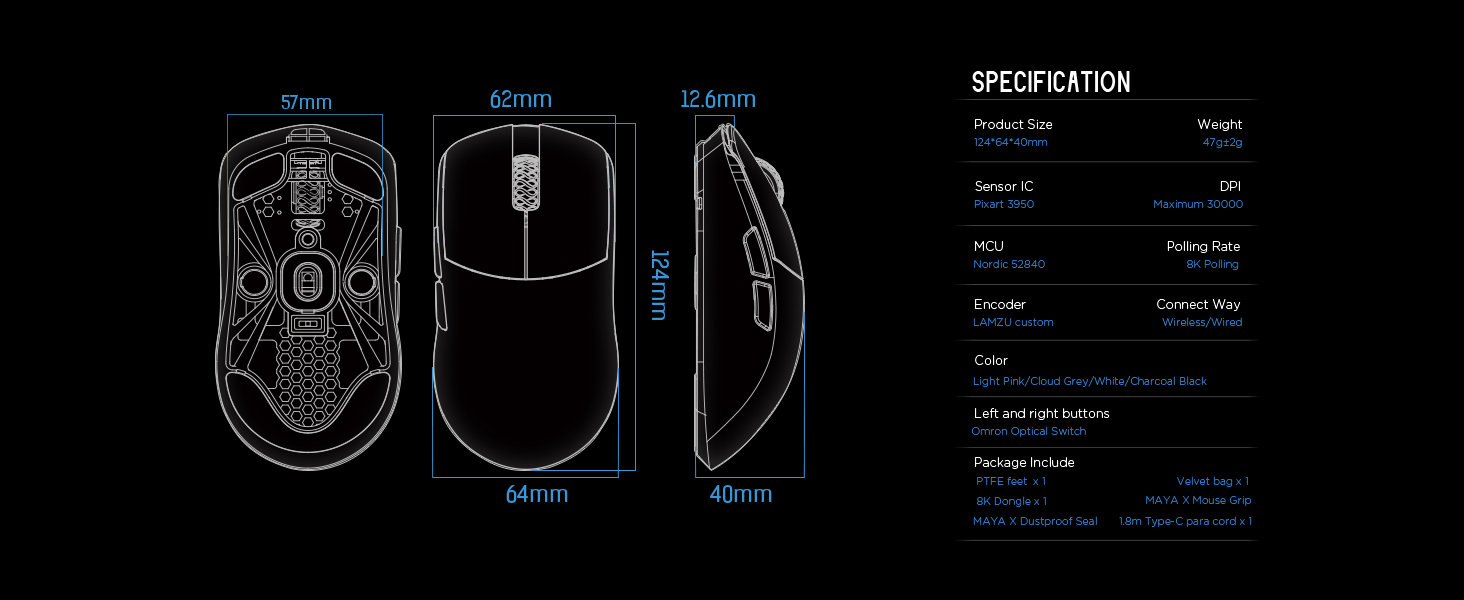
Image: Diagram illustrating the three common mouse grip types (palm, claw, fingertip) and how the symmetrical shape of the Maya X mouse accommodates them.

Image: Close-up view of the Pixart PAW 3950 sensor integrated circuit, highlighting its advanced technology.

Image: Detailed view of the Nordic 52840 Microcontroller Unit (MCU), emphasizing its role in efficient performance and 8K Polling Rate compatibility.
Setup Guide
Package Contents
- Lamzu Maya X Wireless Gaming Mouse
- PTFE Feet x 1 (extra set)
- 8K Dongle x 1
- Velvet Bag x 1
- MAYA X Mouse Grip
- MAYA X Dustproof Seal
- 1.8m Type-C Paracord x 1 (USB-C cable)
Initial Connection
The Lamzu Maya X mouse supports both 2.4G wireless and wired connections.
2.4G Wireless Connection
- Insert the included 8K dongle into an available USB port on your computer.
- Turn on the mouse using the On/Off switch located on the underside of the mouse.
- The mouse should automatically connect to the dongle. If not, refer to the software section for pairing instructions.
For optimal wireless performance, ensure the dongle is placed close to the mouse and away from sources of interference.
Wired Connection
- Connect the provided 1.8m Type-C Paracord cable to the USB-C port on the front of the mouse.
- Connect the other end of the cable to an available USB port on your computer.
- The mouse will function immediately in wired mode with a 1KHz polling rate.

Image: The Lamzu Maya X mouse demonstrating its dual connectivity modes: 2.4G wireless via dongle and wired via USB-C cable.
Software Installation (Optional but Recommended)
To unlock the full potential of your Lamzu Maya X mouse, including custom DPI settings, macro programming, and polling rate adjustments up to 8000Hz, download the official driver software from the Lamzu website. The software is web-based, eliminating the need for a local installation.
Visit: www.lamzu.com/support

Image: Screenshot of the Lamzu Aurora Web Driver interface, showing options for macro programming, button customization, DPI settings, polling rate, and LOD adjustment.
Operating the Mouse
Button Functions
The Lamzu Maya X is a 6-button gaming mouse. Refer to the diagram below for button identification:

Image: Diagram illustrating the six programmable buttons on the Lamzu Maya X mouse: Left Click, Right Click, Scroll Wheel, DPI button, Forward side button, and Back side button. Also shows the On/Off switch on the underside.
- Left Click: Primary action button.
- Right Click: Secondary action button.
- Scroll Wheel: For scrolling and middle-click function.
- DPI Button: Cycles through preset DPI levels. Customizable via software.
- Forward Side Button: Default for forward navigation. Customizable.
- Back Side Button: Default for backward navigation. Customizable.
- On/Off Switch: Located on the underside of the mouse to power on/off.
DPI Adjustment
The mouse features a Pixart PAW 3950 sensor supporting up to 30,000 DPI. You can adjust DPI settings through the dedicated DPI button or more precisely using the Lamzu Aurora Web Driver software.

Image: A stylized view of the Lamzu Maya X mouse highlighting its capability for up to 30,000 DPI, indicating high precision.
Polling Rate
The Lamzu Maya X supports a maximum polling rate of 8,000 Hz when using the included 8K dongle. This high polling rate ensures smoother cursor movement and reduced input lag.

Image: The Lamzu Maya X mouse and its 8K dongle, promoting the 8K Polling Rate with Aurora Technology for enhanced performance.
Maintenance
Cleaning
- Use a soft, dry cloth to wipe the surface of the mouse.
- For stubborn dirt, slightly dampen the cloth with water or a mild cleaning solution. Avoid harsh chemicals.
- Clean the optical sensor area on the underside regularly with a cotton swab to ensure accurate tracking.
Battery Care
- The mouse uses a Lithium Ion battery. Avoid fully discharging the battery frequently to prolong its lifespan.
- Charge the mouse using the provided USB-C cable.
- Store the mouse in a cool, dry place when not in use for extended periods.
Replacing PTFE Feet
The package includes an extra set of PTFE feet. If the existing feet show significant wear, carefully peel them off and apply the new ones, ensuring the surface is clean and dry before application.

Image: Underside view of the Lamzu Maya X mouse, showing the PTFE feet, optical sensor, and on/off switch.
Troubleshooting
Mouse Not Responding
- Check Power: Ensure the mouse is turned on using the switch on the underside.
- Battery Level: Charge the mouse if the battery is low.
- Wireless Connection: Ensure the 8K dongle is securely plugged into a USB port and within range. Try a different USB port.
- Wired Connection: Ensure the USB-C cable is securely connected to both the mouse and the computer. Try a different USB port.
- Re-pair: If using wireless, try re-pairing the mouse with the dongle via the software.
Inconsistent Tracking or Cursor Jitter
- Clean Sensor: Clean the optical sensor on the underside of the mouse.
- Surface: Use the mouse on a clean, uniform surface. Avoid highly reflective or transparent surfaces.
- DPI Setting: Adjust DPI settings in the software to a suitable level.
- Polling Rate: Ensure the polling rate is stable and appropriate for your system.
Buttons Not Functioning Correctly
- Software Check: Verify button assignments in the Lamzu Aurora Web Driver software.
- Physical Obstruction: Check for any physical debris preventing button presses.
Specifications
| Feature | Detail |
|---|---|
| Product Dimensions | 4.88 x 2.52 x 0.04 inches |
| Item Weight | 1.66 ounces (47g) |
| Model Number | Maya X |
| Batteries | 1 Lithium Ion battery (included) |
| Date First Available | September 28, 2024 |
| Manufacturer | Lamzu |
| Country of Origin | China |
| Color | Grey |
| Connectivity Technology | USB, 2.4G Wireless |
| Special Feature | Lightweight |
| Movement Detection Technology | Optical (Pixart PAW 3950) |
| Maximum DPI | 30,000 DPI |
| Polling Rate | Up to 8,000 Hz (with 8K dongle) |
| MCU | Nordic 52840 |
| Switches | Optical Switches (Omron) |
| Encoder | Dust-Proof Encoder (30-grid) |
Warranty and Support
Warranty Information
Lamzu products typically come with a manufacturer's warranty. Please refer to the warranty card included in your product packaging or visit the official Lamzu website for detailed warranty terms and conditions specific to your region.
Customer Support
For technical assistance, troubleshooting, or any inquiries regarding your Lamzu Maya X mouse, please contact Lamzu customer support:
- Website: www.lamzu.com/support
- Email: Refer to the official website for contact email.
When contacting support, please have your product model (Maya X) and purchase information ready.
Related documentsMaya X


Ask a question about this manual
Ask about setup, troubleshooting, compatibility, parts, safety, or missing instructions. Manuals+ will review the question and use this page’s manual context to help answer it.