1. Introduction
This manual provides essential information for setting up, operating, and maintaining your TOOBUR Smart Watch IDW20. Please read it thoroughly to ensure proper usage and to fully utilize all features of your new smartwatch.
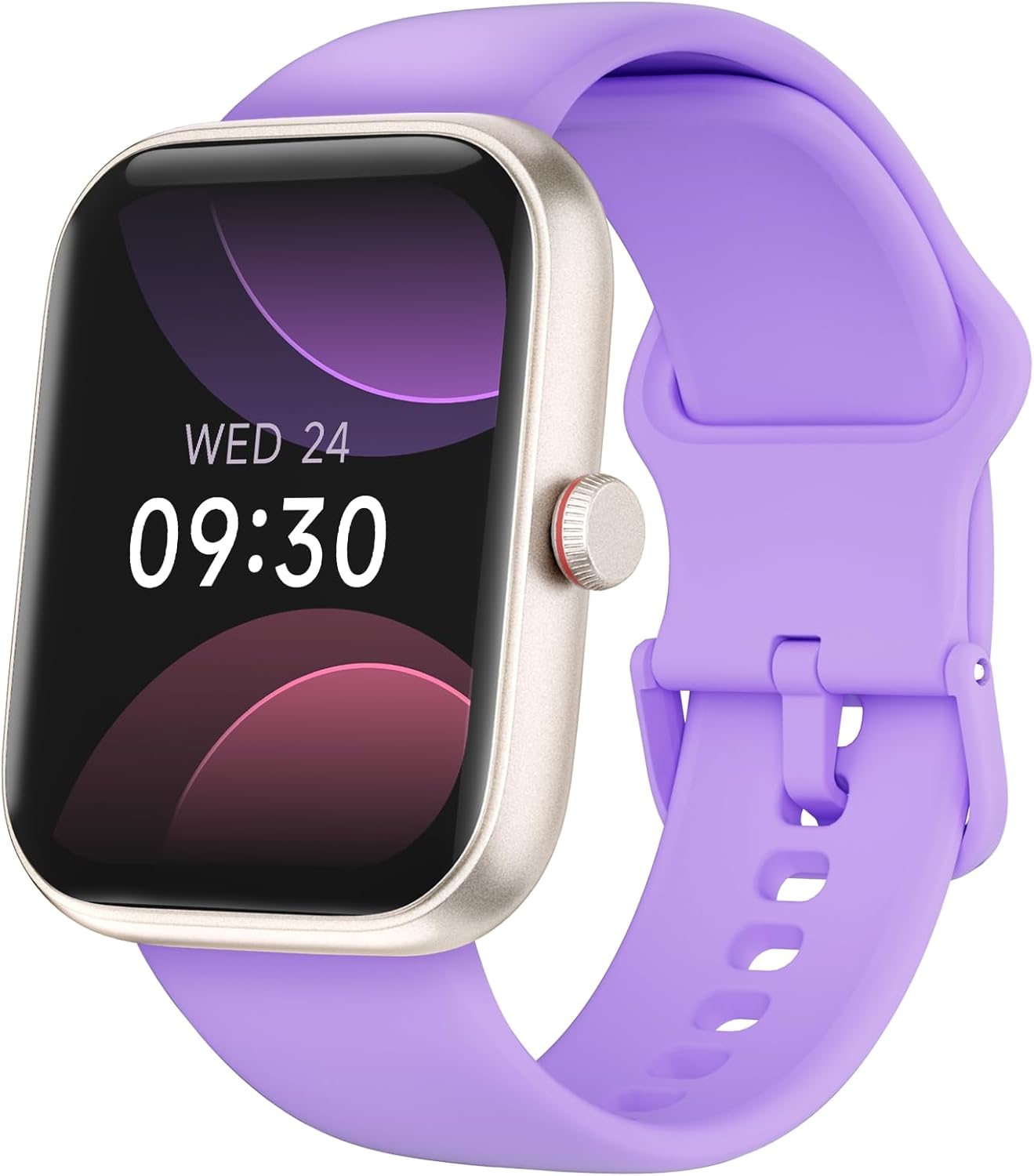
Image: The TOOBUR Smart Watch IDW20 in Lilac, showcasing its vibrant display.
2. Package Contents
Verify that all items are present in your product packaging:
- TOOBUR Smart Watch IDW20 (with Watch Band)
- Charging Cable
- Operation Manual

Image: An illustration of the TOOBUR Smart Watch IDW20, its charging cable, and the operation manual, indicating a wrist size fit of 145mm-190mm.
3. Setup Guide
Follow these steps to set up your TOOBUR Smart Watch IDW20:
- Download the VeryFit App: Scan the QR code on the product packaging or search for "VeryFit" in your device's app store (Google Play for Android, App Store for iOS).
- Enable Bluetooth: Turn on Bluetooth on your smartphone.
- Pair Device: Open the VeryFit App, navigate to "Add Device," find "IDW20" in the list, and connect.
- Grant Permissions: Confirm to enable necessary notification permissions within the app for full functionality.

Image: Visual steps for connecting the smartwatch: 1. Download VeryFit App, 2. Turn on Bluetooth, 3. Add device (IDW20), 4. Confirm notification permissions.
4. Operating Instructions
4.1. Calls and Notifications
The smartwatch allows you to answer and make calls directly from your wrist using its built-in speaker and microphone (Bluetooth 5.3 compatible). You will also receive real-time notifications for messages, emails, and social media alerts. Note: You cannot reply to messages directly from the watch.

Image: The smartwatch displaying an incoming call and a dialpad for making calls, along with icons representing various app notifications.
4.2. Alexa Built-in Voice Assistant
Long press the button on your watch to activate Alexa. Use voice commands to control smart home devices, set alarms, check weather, and more.

Image: A user demonstrating the Alexa voice assistant feature on the smartwatch to control smart home devices.
4.3. Health Monitoring
The watch continuously monitors your heart rate, stress levels, and blood oxygen. It provides alerts for abnormalities and tracks your sleep quality (awake, REM, light, and deep sleep stages). All data syncs with the VeryFit App for detailed analysis.

Image: The smartwatch displaying heart rate data and menstrual cycle tracking, highlighting its 24-hour health monitoring capabilities.

Image: The smartwatch displaying detailed sleep data, including durations for light, deep, and REM sleep, and awake periods.
4.4. Fitness Tracking
Track daily steps, distance, and calories burned across 100 sports modes, including running, cycling, and Pilates. Generate detailed exercise reports in the VeryFit App for scientific training insights.

Image: The smartwatch displaying an 'Outdoor run' summary with duration, calories, steps, distance, and heart rate, surrounded by icons representing 100 different sports modes.
4.5. Customization
Choose from over 100 watch faces in the VeryFit App or personalize your watch with your own images to match your style.

Image: A dynamic display of the smartwatch showcasing a variety of watch faces, emphasizing the ability to personalize with over 100 options.
4.6. Other Functions
The TOOBUR Smart Watch IDW20 offers additional features to enhance your daily life:
- Music Control
- Weather Forecast
- Camera Control
- Find Your Phone
- Calculator
- Calendar
- Timer
- Breathing Exercises
- Mini Games

Image: The smartwatch interface showing icons for various additional functions like weather, camera control, calculator, and games.
5. Maintenance and Care
5.1. Battery Life and Charging
The smartwatch features a long-lasting battery. A full charge takes approximately 2.5 hours. With typical use, the battery lasts 5-7 days, and up to 30 days in standby mode.
- Charging Time: 2 Hours
- Average Usage: 5-7 Days
- Standby Time: 30 Days
- Power-saving Mode: Up to 20 Days

Image: An infographic illustrating the battery performance of the smartwatch, including charging time, average usage, and standby duration.
5.2. Waterproofing
The TOOBUR Smart Watch IDW20 is IP68 waterproof, allowing for swimming up to 5 meters deep. It is suitable for various aquatic activities. Important: Avoid using the watch for diving, in saunas, with hot water, or in seawater, as these conditions may compromise its waterproof integrity.

Image: The smartwatch in water, showing its 'Pool swim' tracking feature, demonstrating its IP68 waterproof capability.
6. Specifications
| Feature | Detail |
|---|---|
| Model Name | IDW20 |
| Brand | TOOBUR |
| Screen Size | 1.91 Inches |
| Shape | Rectangular |
| GPS | Built-in GPS |
| Battery Cell Composition | Lithium Ion |
| Wireless Communication Standard | Bluetooth |
| Connectivity Technology | Bluetooth |
| Special Features | Alarm Clock, Multisport Tracker, Notifications, Phone Call, Sedentary Reminder, Alexa Built-in |
| Operating System | Android (Compatible with iOS 9.0+ and Android 6.0+) |
| Item Weight | 3.52 ounces |
| Product Dimensions | 9.45 x 1.38 x 0.39 inches |
| Water Resistance | IP68 (5 meters deep) |
7. Troubleshooting
If you encounter any issues with your TOOBUR Smart Watch IDW20, consider the following:
- Connection Issues: Ensure Bluetooth is enabled on your phone and the watch is within range. Restart both devices and try pairing again through the VeryFit App.
- Notifications Not Appearing: Check that all necessary notification permissions are granted to the VeryFit App in your phone's settings. Ensure the app is running in the background.
- Inaccurate Data: Ensure the watch is worn snugly on your wrist. For GPS-related activities, ensure a clear view of the sky.
- Battery Draining Quickly: Reduce screen brightness, limit background app refresh, and disable unnecessary features if not in use.
- Watch Not Responding: Try restarting the watch. If unresponsive, charge it for at least 30 minutes.
For further assistance, refer to the help section within the VeryFit App or contact customer support.
8. Warranty and Support
TOOBUR products are designed for reliability and performance. For warranty information or technical support, please refer to the contact details below:
- Website: www.toobur.com
- Email: support@toobur.com
- VeryFit App: Access help and FAQs directly within the application.

Image: The back of the product packaging, displaying the TOOBUR logo, QR code for the VeryFit app, website, and support email address.


