
1. Introduction
This manual provides detailed instructions for the VINGVO Body Worn Camera, model VINGVOh6tvcyd3im. This portable device is designed for high-definition video recording, featuring a 180-degree rotatable lens and infrared night vision capabilities. Please read this manual thoroughly before using the camera to ensure proper operation and to maximize its performance.
2. Package Contents
Verify that all items listed below are included in your package:
- 1 x VINGVO Body Worn Camera
- 1 x Strap
- 1 x Data Cable (USB-C)
- 1 x Card Reader
- 1 x Instruction Manual

Image: Contents of the VINGVO Body Worn Camera package, including the camera, strap, USB-C data cable, and card reader.
3. Product Overview
Familiarize yourself with the camera's components and controls.
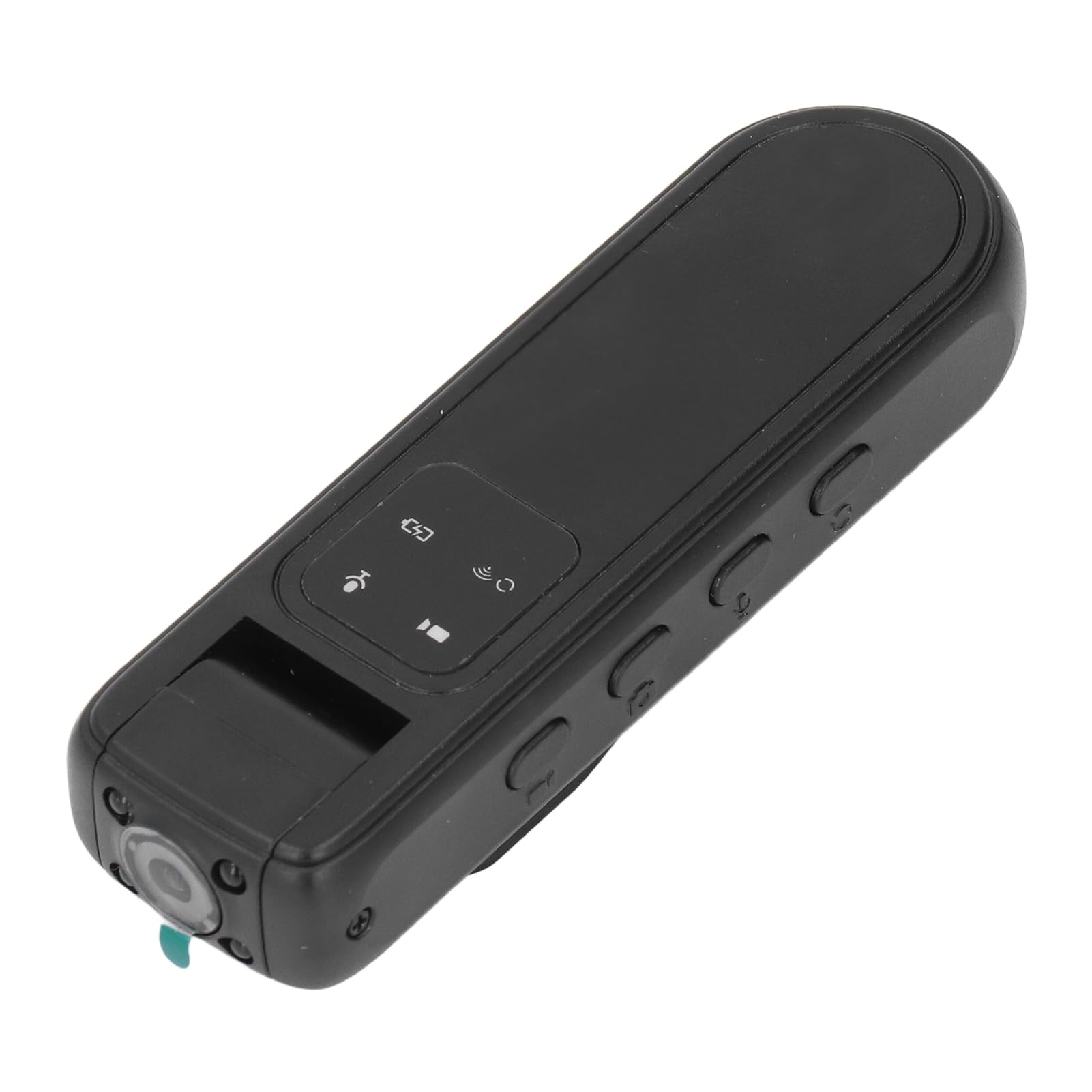
Image: Front view of the VINGVO Body Worn Camera, showing the lens and main body.

Image: Top view of the camera, highlighting control buttons and indicators.

Image: Side view of the camera, showing additional control buttons.

Image: Opposite side view of the camera, showing the microSD card slot and reset button.

Image: Back view of the camera, featuring the rotatable clip for attachment.

Image: Bottom view of the camera, showing the USB-C charging port.
4. Setup
4.1 Charging the Camera
Before first use, fully charge the camera. Connect the provided USB-C data cable to the camera's USB-C port and the other end to a USB power adapter (not included) or a computer's USB port. The charging indicator will show the charging status and turn off when fully charged. The built-in 1000mAh lithium-ion battery ensures extended usage.
4.2 Inserting a Memory Card
The camera supports up to a 128GB memory card (not included). Locate the microSD card slot on the side of the camera. Gently insert the memory card with the contacts facing down until it clicks into place. To remove, push the card in again until it springs out.
4.3 APP Connection (for Viidure APP)
To utilize advanced features and real-time viewing, connect the camera to the exclusive Viidure APP:
- Scan the QR code provided in the physical instruction manual (or search for 'Viidure' in your device's app store) to download and install the APP.
- Follow the on-screen prompts within the APP to connect your camera. This typically involves turning on the camera's Wi-Fi and connecting your smartphone to the camera's Wi-Fi network.
- Once connected, you can view real-time images and sound, and manage camera settings directly from your smartphone.
5. Operating Instructions
5.1 Power On/Off
To power on, slide the 'ON/OFF' switch to the 'ON' position. To power off, slide it to the 'OFF' position.
5.2 Video Recording
Press the dedicated video recording button to start recording. Press it again to stop. Videos are saved in MP4 format with a 16:9 ratio. Ensure a memory card is inserted before recording.
5.3 Infrared Night Vision
The camera supports infrared night vision for clear recording in low-light conditions. Activate or deactivate this feature using the designated button or through the Viidure APP.
5.4 Lens Rotation
The camera features a 180-degree rotatable lens. Adjust the lens manually to capture various scenes and angles without needing to reposition the entire camera.
5.5 Audio Recording
The camera can record audio, saved in WAV format. This feature typically operates concurrently with video recording or can be activated independently if supported by the camera's mode settings.
5.6 Taking Pictures
Press the dedicated photo button to capture still images. Pictures are saved in JPG format.
6. Maintenance
To ensure the longevity and optimal performance of your VINGVO Body Worn Camera, follow these maintenance guidelines:
- Cleaning: Use a soft, dry cloth to clean the camera body. For the lens, use a specialized lens cleaning cloth and solution. Avoid harsh chemicals or abrasive materials.
- Storage: Store the camera in a cool, dry place away from direct sunlight, extreme temperatures, and high humidity.
- Battery Care: For long-term storage, charge the battery to approximately 50% every few months to prevent deep discharge.
- Avoid Impacts: While made of durable ABS material, avoid dropping or subjecting the camera to strong impacts.
7. Troubleshooting
If you encounter issues with your camera, refer to the following common solutions:
- Camera not turning on: Ensure the battery is charged. Connect the camera to a power source and try again.
- Cannot record video/take pictures: Check if a memory card is properly inserted and has sufficient free space. The memory card might be full or corrupted.
- Poor video/image quality: Ensure the lens is clean. Check lighting conditions; activate infrared night vision if in a dark environment.
- APP connection issues: Ensure the camera's Wi-Fi is enabled and your smartphone is connected to the correct camera Wi-Fi network. Restart both the camera and the APP.
- Camera unresponsive: Use a thin object (like a paperclip) to press the reset button located near the microSD card slot. This will restart the camera without deleting data.
8. Specifications
| Feature | Specification |
|---|---|
| Item Type | Body Worn Camera |
| Material | ABS |
| Lens Angle | 180° Lens Rotation |
| Infrared Night Vision | Support |
| Video Format | MP4 |
| Video Ratio | 16:9 |
| Recording Format | WAV |
| Picture Format | JPG |
| Storage | Support Up to 128GB Memory Card (not Included) |
| Battery Type | Built-in 1000mAh Lithium-ion Battery |
| APP | for Viidure |
| Item Weight | 4.1 ounces |
| Package Dimensions | 5.51 x 3.54 x 1.18 inches |
| Model Number | VINGVOh6tvcyd3im |
9. Warranty and Support
For warranty information or technical support, please refer to the documentation included with your purchase or contact VINGVO customer service directly. Details can typically be found on the manufacturer's official website or through your retailer.