
Favoto HT16 Bicycle Helmet User Manual
Model: HT16
Introduction
Thank you for choosing the Favoto HT16 Bicycle Helmet. This manual provides essential information for the proper setup, operation, and maintenance of your helmet. Please read these instructions carefully before using the helmet to ensure your safety and optimize product performance. This helmet is designed for cycling and offers enhanced protection and visibility features.
Product Overview
The Favoto HT16 helmet is constructed with high-quality materials for durability and safety, featuring integrated lighting and adjustable components for a comfortable fit.
Key Components
- Helmet Shell: Made from durable Polycarbonate (PC) for impact resistance.
- Inner Lining: High-quality Expanded Polystyrene (EPS) foam for shock absorption, with a removable and washable inner padding.
- Adjustable Head Circumference System: Dial-based system for a secure and customized fit.
- Integrated LED Lights: Front warning light and rear light with multiple modes, including turn signals.
- Type-C Charging Port: For convenient recharging of the helmet's integrated battery.
- Remote Control: Wireless control for LED lights and turn signals.
- Detachable Sun Visor: Provides shade and protection from glare.
- Magnetic Goggles: Optional eye protection that attaches magnetically to the helmet.

Image: Favoto HT16 Helmet Package Contents. This image displays the helmet along with its accessories: magnetic goggles, sun visor, charging cable, remote control, and user manual.

Image: Favoto HT16 Helmet Internal Structure. This diagram illustrates the internal components of the helmet, highlighting the EPS foam for shock absorption and the removable, washable inner lining.
Setup
1. Sizing and Fit Adjustment
Before first use, ensure the helmet fits correctly. Measure your head circumference to select the appropriate size. The Favoto HT16 helmet is available in size L (59-61cm).

Image: Favoto HT16 Helmet Size Chart. This chart provides head circumference measurements for different helmet sizes, advising users to measure their head before purchase.
- Place the helmet on your head so it sits level and covers your forehead.
- Locate the adjustable dial at the rear of the helmet.
- Turn the dial clockwise to tighten the fit until the helmet is snug but comfortable, without causing pressure points.
- Turn the dial counter-clockwise to loosen the fit.
- Adjust the chin straps so they form a 'V' shape below your ears and the buckle is centered under your chin. Tighten the strap until it is snug, allowing only one or two fingers to fit between the strap and your chin.

Image: Favoto HT16 Helmet Adjustable Size Dial. This image shows the rear of the helmet with the adjustable dial, indicating how to tighten and loosen the fit for optimal comfort and security.
2. Attaching the Visor and Goggles
The helmet comes with a detachable sun visor and magnetic goggles for versatile use.
- Sun Visor: Align the visor's clips with the corresponding slots on the helmet's front edge and press firmly until it clicks into place. To remove, gently pull the visor away from the helmet.
- Magnetic Goggles: Position the goggles near the helmet's front. The integrated magnets will automatically snap the goggles into place. To remove, gently pull them away. The grey coating on the lenses blocks harmful UV rays (UV382).
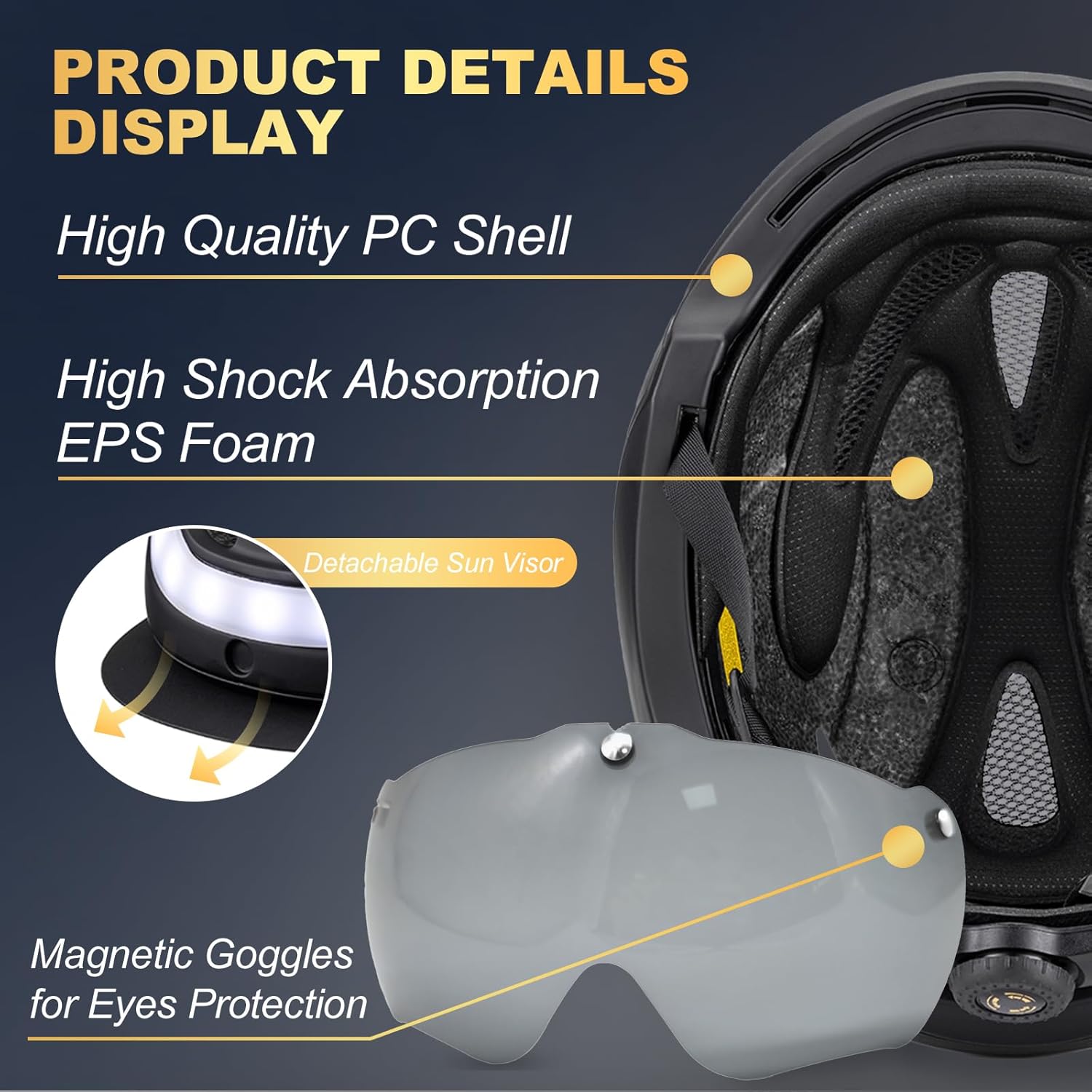
Image: Favoto HT16 Helmet Detachable Visor and Magnetic Goggles. This image highlights the helmet's high-quality PC shell, EPS foam, and shows how the detachable sun visor and magnetic goggles are integrated for eye protection.
3. Charging the Helmet
The helmet features an integrated rechargeable battery for its LED lights. Use the provided Type-C USB cable for charging.
- Locate the Type-C charging port on the rear of the helmet, typically near the rear LED light assembly.
- Connect the Type-C end of the charging cable to the helmet and the USB-A end to a compatible power source (e.g., computer USB port, wall adapter).
- An indicator light will show the charging status. Refer to the helmet's specific light indicators for full charge notification.

Image: Favoto HT16 Helmet LED Lights and Type-C Charging Port. This image illustrates the front and rear LED light design, including the Type-C universal charging port for the helmet's integrated battery.
Operating Instructions
1. Using the LED Lights
The helmet is equipped with a powerful front warning light and a versatile rear light system for enhanced visibility.
- Front Light: Provides a steady warning light.
- Rear Light Modes: The rear light offers four adjustable modes:
- Always On: Continuous illumination.
- Slow Flash: Gentle, rhythmic flashing.
- Fast Flash: Rapid flashing for increased attention.
- Left & Right Turn Signals: Indicates your turning direction.
Image: Favoto HT16 Helmet LED Lighting Modes. This image details the front and rear LED design, showcasing the four lighting modes: Always On, Slow Flash, Fast Flash, and Left & Right Turn Signals, along with the Type-C charging port.
2. Remote Control Operation
The included remote control allows for convenient wireless activation of turn signals and adjustment of lighting modes.
- Mount the remote control securely on your bicycle handlebars within easy reach.
- Use the designated buttons on the remote to cycle through the rear light modes (Always On, Slow Flash, Fast Flash).
- Press the left or right arrow buttons to activate the corresponding turn signal. The signal will flash for a set duration or until deactivated.

Image: Favoto HT16 Helmet Remote Control. This image displays the rear of the helmet with its LED lights and the remote control, emphasizing its convenience for wirelessly activating turn signals and changing lighting modes.
3. Ventilation System
The helmet features an aerodynamic design with multiple vents to ensure excellent airflow, reducing wind resistance and keeping you cool during rides.

Image: Favoto HT16 Helmet Ventilation System. This diagram illustrates the helmet's ventilation channels, showing how air flows through to reduce wind resistance and provide cooling during cycling.
Maintenance
- Cleaning the Helmet: The inner lining of the helmet is removable and washable. Gently detach the pads and hand wash them with mild soap and water. Allow them to air dry completely before reattaching.
- Cleaning the Shell: Wipe the exterior of the helmet with a soft, damp cloth and mild soap. Avoid abrasive cleaners or solvents, as these can damage the helmet's finish and materials.
- Storage: Store the helmet in a cool, dry place away from direct sunlight and extreme temperatures. Do not store it near heat sources or chemicals.
- Battery Care: Recharge the helmet's battery regularly, even if not in frequent use, to maintain battery health. Avoid fully discharging the battery for extended periods.
- Inspection: Regularly inspect the helmet for any signs of damage, such as cracks in the shell, dents in the EPS foam, or frayed straps. If damage is found, replace the helmet immediately.
Troubleshooting
- Lights Not Working: Ensure the helmet's battery is charged. Check the remote control battery if applicable. If issues persist, try recharging the helmet.
- Remote Control Not Responding: Check the remote control's battery. Ensure there are no obstructions between the remote and the helmet. Re-pair the remote if necessary (refer to specific pairing instructions if provided with the product).
- Helmet Feels Loose: Re-adjust the head circumference dial and chin straps as described in the Setup section.
- Discomfort: Ensure the helmet is properly sized and adjusted. Check that the inner padding is correctly positioned.
Specifications
| Feature | Detail |
|---|---|
| Model Number | HT16 |
| Brand | Favoto |
| Size | L (59-61cm) |
| Age Range | Adult |
| Color | Titanium |
| Outer Material | Polycarbonate (PC) |
| Inner Material | Expanded Polystyrene (EPS) |
| Special Features | Aerodynamic design, adjustable head circumference, front and rear LED lights, magnetic goggles, detachable sun visor |
| Included Components | 1 Bicycle Helmet, 1 Remote Control |
| Battery Type | 1 Lithium-ion (rechargeable, integrated) |
| Weight | 740 grams (approximate package weight) |
Warranty and Support
For warranty information or technical support, please refer to the documentation included with your purchase or contact Favoto customer service through their official website or the retailer where the product was purchased. Keep your proof of purchase for warranty claims.
