
SENIX CHX6-L
SENIX X6 3 Amp Battery Charger Instruction Manual
Model: CHX6-L
1. Product Overview
The SENIX X6 3 Amp Battery Charger (Model CHX6-L) is designed for use with SENIX 60 Volt Max* Lithium-ion Batteries. This charger provides rapid charging capabilities and features an Intelligent Battery Control System to monitor cell charge and temperature, ensuring efficient recharging. A fan-cooled charging system helps prevent overheating of both the battery and charger. Indicator lights provide real-time charging status. The charger is compatible with all SENIX X6 60V Max, B30X6, B40X6, B60X6, B80X6, and B120X6 batteries.
Key Features
- Rapid Charging: Charges SENIX 60 Volt Max* batteries in under 75 minutes for minimal downtime.
- Intelligent Battery Control System: Monitors each cell’s charge and temperature for optimal and efficient recharging.
- Fan-Cooled Charging System: Helps prevent the battery and charger from overheating during operation.
- Indicator Lights: Provides clear visual feedback on the current charging status of the battery.
- Wide Compatibility: Compatible with all SENIX X6 60V Max, B30X6, B40X6, B60X6, B80X6, and B120X6 batteries.
- Wall Mounting Capable: Includes a mounting hole for convenient storage and access.
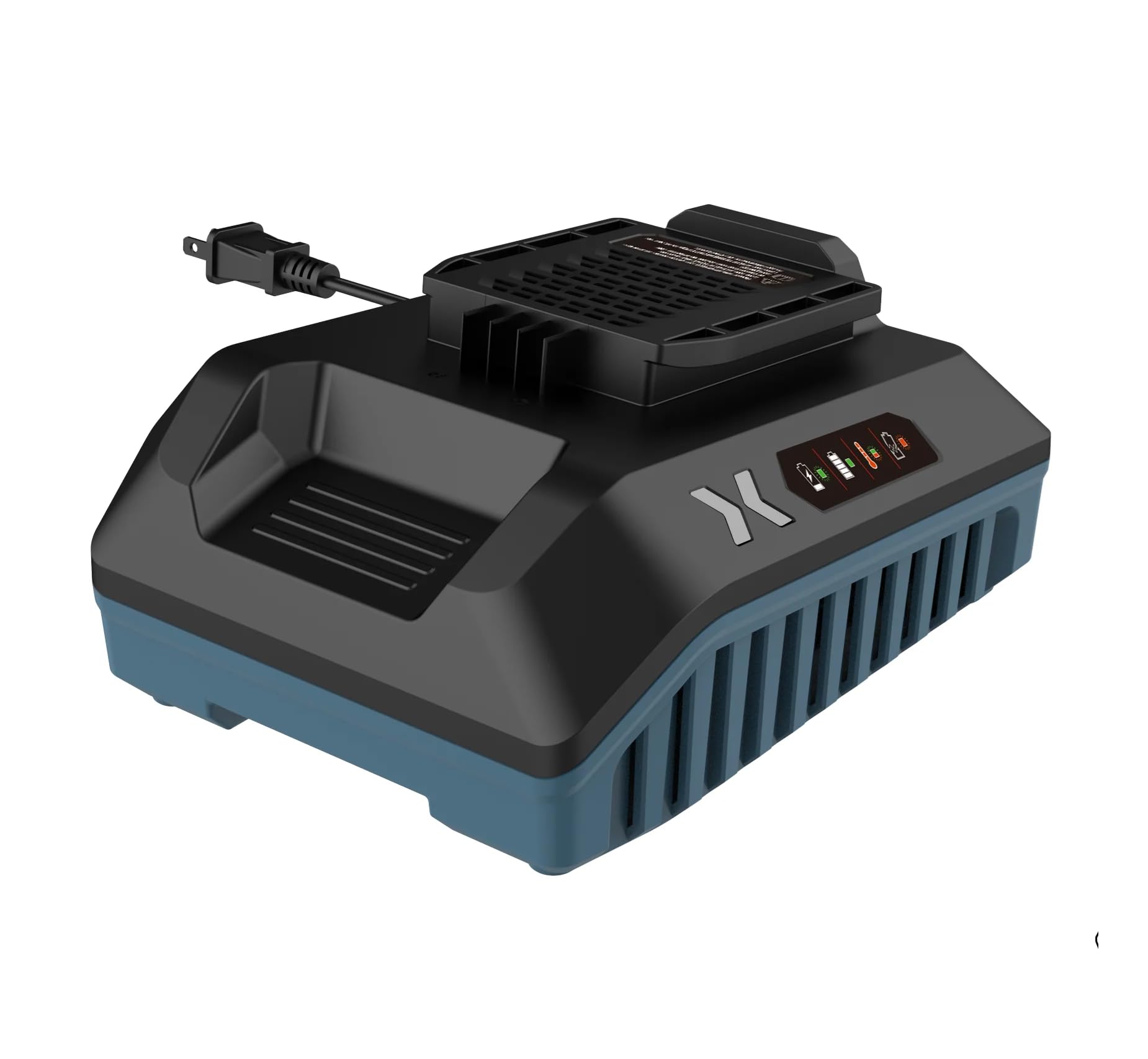
Figure 1: SENIX X6 60V Lithium-Ion Battery Charger (Model CHX6-L)

Figure 2: SENIX X6 60V Lithium-Ion Battery Power System with compatible tools.

Figure 3: SENIX X6 60V Lawn Mower, Chainsaw, and Blower.
2. Important Safety Information
Read all safety warnings, instructions, illustrations, and specifications provided with this power tool. Failure to follow all instructions listed below may result in electric shock, fire, and/or serious injury.
- Always ensure the charger is connected to a power source with the correct voltage.
- Do not charge batteries in damp or wet conditions.
- Use only SENIX X6 60V Max Lithium-ion batteries with this charger. Using other batteries may cause injury or damage.
- Do not attempt to disassemble the charger or battery. Contact qualified service personnel for repairs.
- Keep the charger away from heat sources and direct sunlight.
- Ensure proper ventilation during charging to prevent overheating.
- Disconnect the charger from the power source when not in use or before cleaning.
- Do not operate the charger if the cord or plug is damaged.
3. Setup
Unpacking
Carefully remove the charger and any accessories from the packaging. Inspect the unit for any signs of damage during transit. Retain the packaging for future storage or if the product needs to be returned.
Wall Mounting
The SENIX X6 Battery Charger is designed with a mounting hole for convenient wall installation. This allows for easy storage and access to your charger and batteries, keeping your workspace organized.
- Select a suitable location for mounting, ensuring it is near a power outlet and away from moisture or excessive heat.
- Use appropriate fasteners (screws, anchors) for your wall type. The mounting holes are designed to accommodate standard screw heads.
- Securely attach the charger to the wall using the designated mounting hole on the back of the unit.

Figure 4: Rear view of SENIX X6 charger illustrating wall mounting holes.
4. Operation
Charging a Battery
- Plug the charger into a standard electrical outlet. The charger's indicator light may briefly illuminate.
- Align the SENIX 60 Volt Max* Lithium-ion battery with the charging port on the charger.
- Slide the battery onto the charger until it clicks securely into place.
- The charger's indicator lights will show the charging status. A blinking green light typically indicates that the battery is actively charging.
- Once fully charged, the indicator light will turn solid green. Remove the battery from the charger by pressing the release button and sliding it off.
Battery Indicator Lights
The SENIX X6 Charging Station features indicator lights that provide visual feedback on the battery's charge status and any potential issues:
- Blinking Green: Battery is actively charging.
- Solid Green: Battery is fully charged.
- Blinking Red: Battery or charger temperature is outside the optimal charging range. Charging will resume automatically once the temperature normalizes.
- Solid Red: Indicates a fault with the battery or charger. Disconnect and re-insert the battery. If the issue persists, contact customer support.

Figure 5: SENIX X6 3 Amp Battery Charger with a 60V battery inserted, showing indicator lights.

Figure 6: Close-up of SENIX X6 60V battery with power indicator button to check charge level.
5. Maintenance
- Cleaning: Regularly clean the charger and battery contacts with a dry, clean cloth. Do not use liquids or solvents.
- Storage: Store the charger and batteries in a cool, dry place, away from direct sunlight and extreme temperatures. Ensure batteries are partially charged (not fully depleted or fully charged) for long-term storage.
- Inspection: Periodically inspect the charger cord and plug for any damage. Do not use if damaged.
6. Troubleshooting
| Problem | Possible Cause | Solution |
|---|---|---|
| Battery not charging (no indicator light) | Charger not plugged in, power outlet fault, damaged charger. | Check power connection. Try a different outlet. Inspect charger for damage. |
| Blinking Red Indicator | Battery or charger is too hot or too cold. | Move the charger and battery to a room temperature environment (10°C to 40°C or 50°F to 104°F) and allow them to cool down or warm up. Charging will resume automatically. |
| Solid Red Indicator | Battery fault or charger fault. | Remove the battery, wait a few seconds, and re-insert. If the light remains solid red, the battery or charger may be defective. Contact customer support. |
7. Specifications
| Feature | Detail |
|---|---|
| Model Number | CHX6-L |
| Input Voltage | Standard AC (as per region) |
| Output Voltage | 60 Volts |
| Charging Current | 3 Amp |
| Compatible Batteries | SENIX X6 60V Max Lithium-ion (B30X6, B40X6, B60X6, B80X6, B120X6) |
| Approx. Charge Time (60V Max*) | Under 75 minutes |
| Product Dimensions | 8.75 x 8.75 x 6.25 inches |
| Item Weight | 1.83 pounds |
| Manufacturer | SENIX |
8. Warranty Information
SENIX offers a limited warranty for its products. Please refer to the specific warranty terms provided with your product for full details. Generally, SENIX X6 tools come with a 5-year limited warranty, and SENIX X6 batteries come with a 3-year limited warranty.

Figure 7: SENIX Limited Warranty details.
9. Customer Support
For technical assistance, warranty claims, or general inquiries, please contact SENIX customer support. Refer to the official SENIX website or your product packaging for the most current contact information.
Website: Visit the SENIX Store on Amazon
Related documentsCHX6-L


Ask a question about this manual
Ask about setup, troubleshooting, compatibility, parts, safety, or missing instructions. Manuals+ will review the question and use this page’s manual context to help answer it.