
1. Introduction
The Vonets VSP510 is a robust 5-port Gigabit Ethernet switch designed for reliable and stable operation in demanding industrial environments. It features a durable aluminum alloy casing, wide operating temperature range, and flexible installation options, making it suitable for various industrial networking applications.
2. Key Features
- Industrial Grade Design: Engineered for harsh industrial environments with a wide operating temperature range of -40°C to +55°C.
- High Performance: Supports Gigabit SFP (optical module) ports and 10/100/1000 Mbps RJ45 ports, all supporting full/half-duplex operation.
- PoE Support: Features Power over Ethernet (PoE) output when powered by a DC 48V input (≥ 96W).
- Robust Construction: One-piece thickened aluminum alloy shell for superior heat dissipation and durability.
- Flexible Installation: Supports DIN rail and wall-mounted fixing, including free guide rail fixing accessories.
- Plug-and-Play: Simple and reliable operation with LED indicators for status monitoring.
- Advanced Protections: Includes overcurrent, overvoltage, and reverse connection protection for enhanced reliability.
3. Product Overview
The Vonets VSP510 switch features multiple ports and indicators for easy setup and monitoring.

Figure 1: Front view of the Vonets VSP510 switch, showing the overall design and port layout.

Figure 2: Close-up view of the Gigabit SFP port on the VSP510, with an optical module inserted, highlighting its plug-and-play installation capability.
4. Setup
4.1 Package Contents
- Vonets VSP510 Gigabit Ethernet Switch
- DC Power Adapter
- DIN Rail Mounting Loop and accessories
- SFP Optical Module Set (if included with specific model variant)
4.2 Installation
The VSP510 switch offers flexible installation methods to suit various industrial environments.
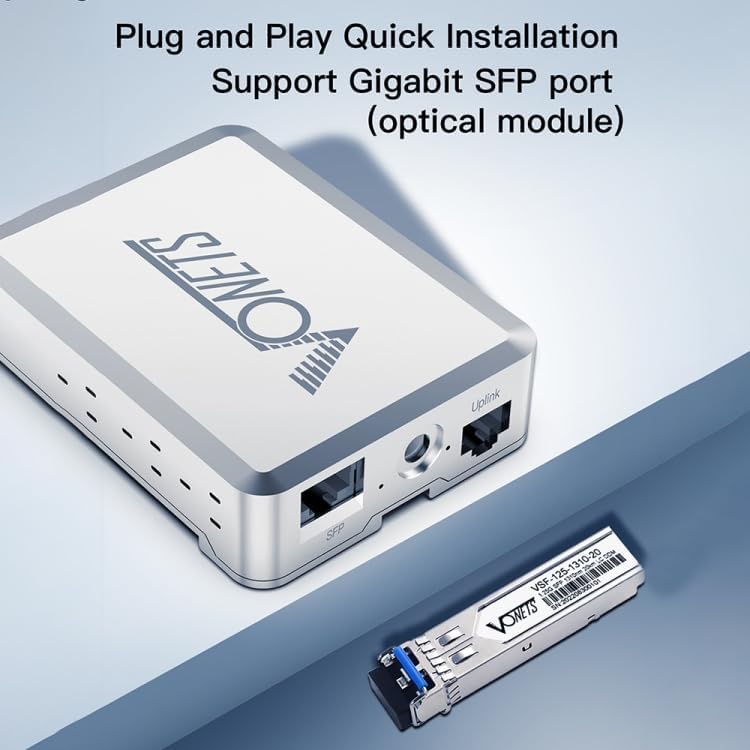
Figure 3: The Vonets VSP510 switch mounted on a DIN rail, demonstrating its suitability for industrial cabinet installations. The image highlights the guide rail fixing mechanism.
- DIN Rail Mounting: Attach the provided DIN rail mounting loop to the back of the switch. Securely clip the switch onto a standard DIN rail in your distribution box or industrial cabinet.
- Wall-Mounted Fixing: Use appropriate screws (not included) to fix the switch directly to a wall or flat surface using the designated mounting holes.
4.3 Power Connection
- Connect the DC power adapter to the power input port on the switch.
- Plug the power adapter into a suitable power outlet. The switch supports a wide DC 12V-48V input.
- If using PoE output, ensure the input power is 48V DC or higher (≥ 96W).
4.4 Network Connection
- Connect your network devices (e.g., computers, servers, IP cameras) to the RJ45 ports using standard Ethernet cables.
- For fiber optic connections, insert the SFP optical module into the SFP port and connect the fiber optic cable.
5. Operating
5.1 Power On
Once the power adapter is connected, the switch will automatically power on. The LED indicators will illuminate to show the power status and port activity.
5.2 LED Indicators
The switch features LED indicators for each port and for power status. Refer to the product label for specific indicator meanings, typically:
- Power LED: Solid green when the device is powered on.
- Link/Act LEDs (per port): Solid green when a link is established, blinking green when data is being transmitted or received.
5.3 Data Transmission
The VSP510 operates as a plug-and-play device. Once connected, it will automatically detect the speed and duplex mode of connected devices and begin forwarding data.
6. Maintenance
- Cleaning: Use a soft, dry cloth to clean the exterior of the switch. Do not use liquid or aerosol cleaners.
- Environment: Ensure the switch is operated within its specified temperature range (-40°C to +55°C) and in a well-ventilated area to prevent overheating.
- Cable Management: Keep network cables organized and free from kinks or excessive bends to ensure optimal performance.
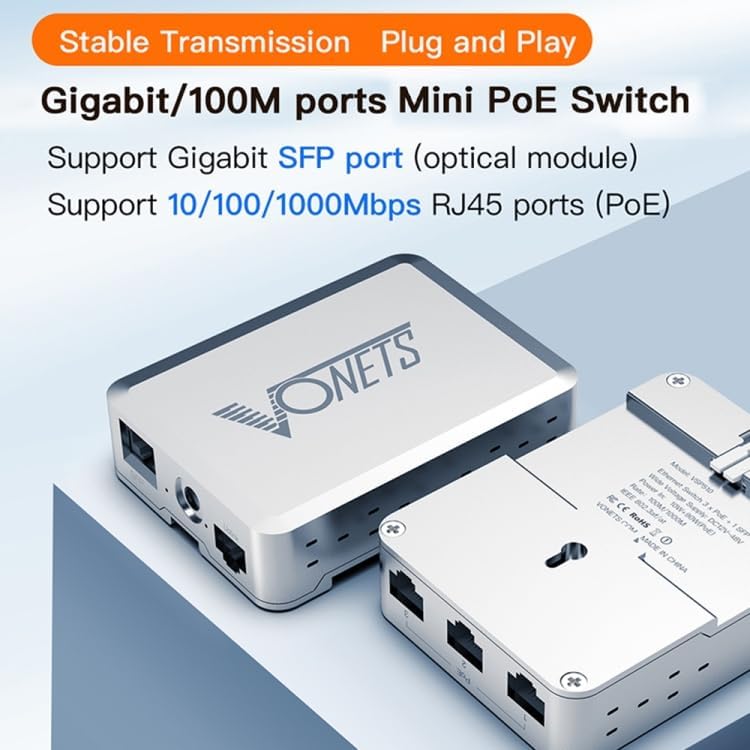
Figure 4: Illustration of the Vonets VSP510's industrial standard high and low temperature resistance, showing its ability to operate reliably from -40°C to +55°C.
7. Troubleshooting
- No Power: Ensure the power adapter is securely connected to both the switch and a working power outlet. Verify the power input voltage is within the DC 12V-48V range.
- No Link Light: Check that the Ethernet cable is properly connected to both the switch port and the connected device. Try a different cable or port. Ensure the connected device is powered on and functioning correctly.
- Slow Network Speed: Verify that all connected devices and cables support Gigabit speeds. Check for excessive network traffic or faulty cables.
- PoE Not Working: Confirm that the power input to the switch is 48V DC or higher and provides at least 96W for PoE output. Ensure the connected device is PoE-compatible.
8. Specifications
| Feature | Specification |
|---|---|
| Model | VSP510 |
| Ports | 5 (Gigabit SFP + 10/100/1000 Mbps RJ45) |
| Supported Protocols | IEEE 802.3, 802.3u, 802.3x, 802.3ab, 802.3z, 802.3af, 802.3at |
| Power Input | DC 12V-48V |
| PoE Output (with 48V input) | 10W + 90W (requires ≥ 96W input) |
| Input Power (without PoE) | 10W |
| Operating Temperature | -40°C to +55°C |
| Housing | Thickened Aluminum Alloy |
| Installation | DIN Rail, Wall-mounted |
| Overcurrent Protection | < 3A |
| Input Overvoltage Protection | < 54V-59V |
| Input Reverse Connection Protection | < 54V |
9. Warranty and Support
The Vonets VSP510 Gigabit Ethernet Switch comes with a 2-year commercial warranty. For technical support or warranty claims, please contact your retailer or the manufacturer directly. Keep your purchase receipt for warranty validation.

