
1. Introduction
This manual provides essential instructions for the safe and efficient installation, operation, and maintenance of your PPOZYLPC S-360-12 Switching Power Supply. This device converts AC input voltage to a stable 12V DC output, suitable for various applications requiring a reliable 30A, 360W power source. Please read this manual thoroughly before use and retain it for future reference.
2. Safety Information
WARNING: Improper installation or use can result in electric shock, fire, or damage to the device. Always follow these safety guidelines:
- Ensure the input voltage switch (110V/220V) is set correctly for your local power supply before connecting. Incorrect setting can damage the unit.
- Disconnect all power before making any connections or adjustments.
- This unit is designed for indoor use only. Do not expose to water, high humidity, or extreme temperatures.
- Ensure proper ventilation around the power supply to prevent overheating. Do not block ventilation openings.
- All wiring should be performed by a qualified electrician or knowledgeable individual.
- Ensure all connections are secure and properly insulated to prevent short circuits.
- Do not open the casing of the power supply. There are no user-serviceable parts inside.
- Grounding is essential for safety. Connect the ground terminal to a reliable earth ground.
3. Product Overview
The PPOZYLPC S-360-12 is a high-efficiency switching power supply designed for stable 12V DC output. It features a robust metal casing for durability and heat dissipation.

Figure 3.1: Top-down view of the PPOZYLPC S-360-12 Switching Power Supply, showing the ventilation grille and overall form factor.

Figure 3.2: Angled view of the power supply, highlighting the input/output terminals and the voltage selection switch.
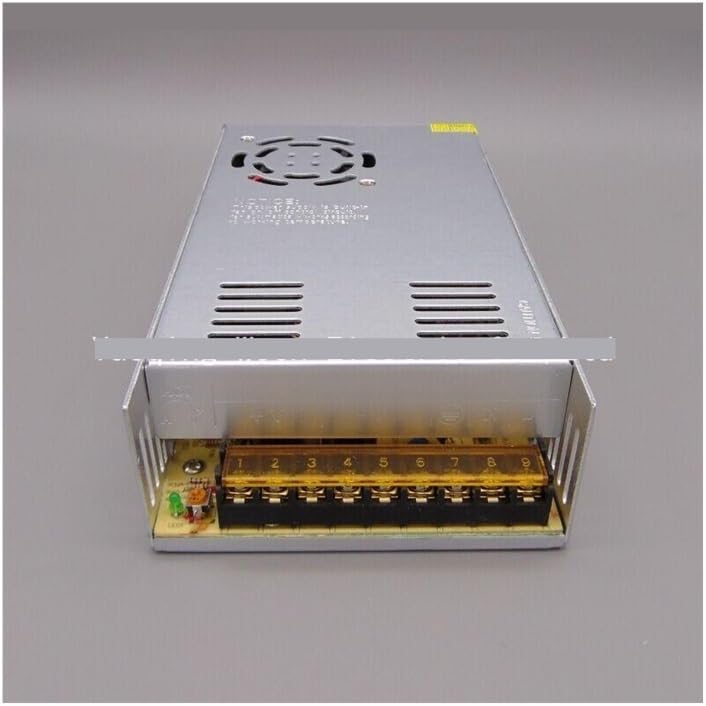
Figure 3.3: Detailed view of the terminal block, showing labeled connections for AC input (L, N, GND) and DC output (+V, -V).
4. Setup and Installation
Follow these steps to safely install your power supply:
- Mounting: Securely mount the power supply in a well-ventilated area using appropriate screws. Ensure there is adequate space around the unit for airflow.
- Input Voltage Selection: Locate the red switch on the side of the unit. Set it to either 110V or 220V according to your local mains voltage. WARNING: Verify this setting before connecting to power.
- AC Input Wiring: Connect your AC mains power to the input terminals. Refer to Figure 3.3 for terminal identification:
- Connect the Live (L) wire to the 'L' terminal.
- Connect the Neutral (N) wire to the 'N' terminal.
- Connect the Ground (GND) wire to the '⊗' (ground) terminal.
- DC Output Wiring: Connect your 12V DC load to the output terminals. Refer to Figure 3.3 for terminal identification:
- Connect the positive (+) wire of your load to the '+V' terminals.
- Connect the negative (-) wire of your load to the '-V' terminals.
- Final Check: Double-check all connections for correctness and security. Ensure no bare wires are exposed.
5. Operation
After completing the setup and safety checks:
- Apply AC power to the unit. The power supply should turn on, and the internal fan (if present) may start.
- Verify that your connected 12V DC load is receiving power and operating as expected.
- The output voltage can be finely adjusted using the small potentiometer (V ADJ) located near the output terminals. Use a small screwdriver to turn it clockwise to increase voltage or counter-clockwise to decrease it within a small range.
6. Maintenance
The PPOZYLPC S-360-12 is designed for minimal maintenance. However, periodic checks can ensure optimal performance and longevity:
- Cleaning: Periodically clean the exterior of the unit with a dry, soft cloth. Ensure ventilation openings are free from dust and debris. Do not use liquid cleaners.
- Ventilation: Ensure the installation area remains well-ventilated and free from obstructions.
- Connections: Occasionally check all wiring connections to ensure they remain tight and secure. Loose connections can cause overheating or intermittent operation.
- Environmental Conditions: Avoid operating the unit in environments with excessive dust, moisture, or extreme temperatures.
7. Troubleshooting
If you encounter issues with your power supply, refer to the table below for common problems and solutions:
| Problem | Possible Cause | Solution |
|---|---|---|
| No output voltage / Unit not powering on |
|
|
| Output voltage too low/high |
|
|
| Unit overheating |
|
|
| Intermittent power |
|
|
If the problem persists after attempting these solutions, please contact customer support.
8. Specifications
| Model Number | S-360-12 |
| Input Voltage | 110V / 220V AC (Switchable) |
| Output Voltage | 12V DC |
| Output Current | 30A |
| Output Power | 360W |
| Dimensions (L x W x H) | Approximately 1.18 x 0.79 x 0.39 inches (Package Dimensions) |
| Item Weight | 1.06 ounces / 30 Grams |
| Brand | PPOZYLPC |
9. Warranty and Support
For warranty information and technical support, please refer to the seller's policies or contact the retailer from whom you purchased this product. Keep your purchase receipt as proof of purchase.