
1. Important Safety Information
- Read all instructions before first use and retain for future reference.
- This product is intended for adult use only.
- Do not use if the product appears damaged or defective.
- Discontinue use immediately if you experience any discomfort or irritation.
- Keep out of reach of children.
- Do not immerse the product in water for extended periods, despite its waterproof rating.
- Use only the provided USB charging cable.
2. Product Overview
The Vive Enora is a versatile, double-ended pleasure tool designed for varied experiences. It features a vibrating wand head and a pulse-wave vibrating handle, both with multiple functions. Constructed from medical-grade silicone, it is waterproof and operates quietly.

Image 2.1: The Vive Enora device, showcasing its ergonomic design and dual ends.
Key Features:
- Dual Functionality: 10-function vibrating wand head and 10-function pulse-wave vibrating handle.
- Extensive Settings: Over 100 possible unique combinations with two independent motors.
- Premium Material: Made from 100% silky smooth medical-grade silicone.
- Waterproof: IPX7 rated, suitable for use in wet environments.
- Quiet Operation: Operates at under 60 dB.
- Rechargeable: USB magnetic rechargeable lithium-ion battery.
- Long Playtime: Up to 70 minutes of use on a full charge.

Image 2.2: Close-up view of the control panel on the Vive Enora, showing the power, wave, and vibration buttons.
Components:
- Wand Head (larger, rounded end)
- Handle (curved end with pulse-wave feature)
- Control Panel (Power, Wave, Vibration buttons)
- Magnetic Charging Port
- USB Magnetic Charging Cable
3. Setup
Initial Charging:
- Before first use, fully charge your Vive Enora device.
- Locate the magnetic charging port on the device.
- Connect the provided USB magnetic charging cable to the device's charging port. Ensure the magnetic connection is secure.
- Plug the USB end of the cable into a standard USB power adapter (not included) or a computer's USB port.
- The indicator light on the device will illuminate or flash to show it is charging. Refer to the indicator light section for specific charging status.
- A full charge typically takes approximately 2-3 hours. The indicator light will change or turn off when charging is complete.
- Disconnect the charger once fully charged.
4. Operating Instructions
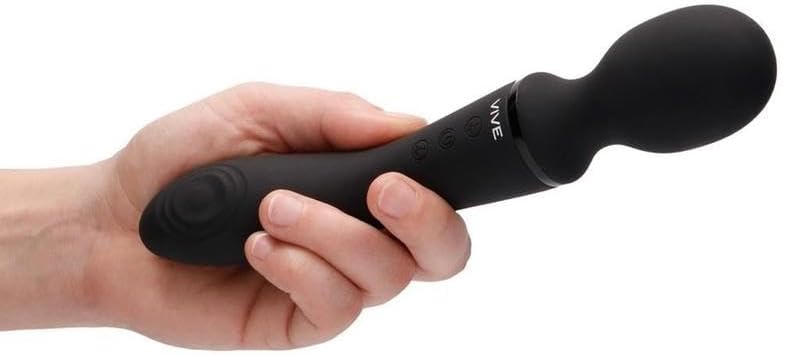
Image 4.1: The Vive Enora held in a hand, illustrating its size and ergonomic grip for comfortable use.
Control Buttons:
- Power Button (①): Turns the device on/off.
- Wave Button (②): Controls the pulse-wave functions of the handle.
- Vibration Button (③): Controls the vibration functions of the wand head.
Power On/Off:
- To turn on: Press and hold the Power Button (①) for 2-3 seconds until the device activates.
- To turn off: Press and hold the Power Button (①) for 2-3 seconds until the device deactivates.
Adjusting Functions:
- Wand Head Vibration: Once the device is on, press the Vibration Button (③) repeatedly to cycle through the 10 vibration patterns for the wand head.
- Handle Pulse-Wave: Once the device is on, press the Wave Button (②) repeatedly to cycle through the 10 pulse-wave patterns for the handle.
- The two motors operate independently, allowing you to combine different patterns for over 100 unique settings.
5. Maintenance
Cleaning:
- Always clean the device before and after each use.
- Wash the silicone surfaces with warm water and a mild, toy-safe soap or a specialized toy cleaner.
- Rinse thoroughly with clean water.
- Pat dry with a lint-free cloth or allow to air dry completely before storing.
- Do not use cleaners containing alcohol, petroleum, or acetone, as these can damage the silicone.
Storage:
- Store the device in a clean, dry, and cool place, away from direct sunlight and extreme temperatures.
- Keep it separate from other toys made of different materials to prevent material degradation.
6. Troubleshooting
| Problem | Possible Cause | Solution |
|---|---|---|
| Device does not turn on. | Battery is depleted. | Charge the device fully using the provided USB cable. |
| Device not charging. | Cable not connected properly; faulty cable/adapter. | Ensure magnetic cable is securely attached. Try a different USB port or power adapter. |
| Vibrations are weak or inconsistent. | Low battery; internal issue. | Recharge the device. If the problem persists after charging, contact customer support. |
| Buttons are unresponsive. | Device may be locked or experiencing a temporary glitch. | Try turning the device off and on again. Ensure it is fully charged. |
7. Specifications
- Material: Medical-grade Silicone
- Waterproof Rating: IPX7 (Splashproof and submersible up to 1 meter for 30 minutes)
- Noise Level: Under 60 dB
- Battery: Rechargeable Lithium-ion
- Charging: USB Magnetic Charging
- Runtime: Up to 70 minutes (depending on intensity settings)
- Functions: 10 Vibration patterns (wand head), 10 Pulse-wave patterns (handle)
8. Warranty and Support
For any questions, concerns, or technical support regarding your Vive Enora device, please refer to the contact information provided on your product packaging or the retailer's website where the product was purchased. Please retain your proof of purchase for warranty claims.
Legal Disclaimer: Statements regarding dietary supplements have not been evaluated by the FDA and are not intended to diagnose, treat, cure, or prevent any disease or health condition.