
1. Introduction
Thank you for choosing the Silvergear Portable Solar Charger and Power Bank. This device is designed to provide a reliable power source for your electronic devices using solar energy, making it ideal for outdoor activities, camping, hiking, and emergencies. This manual will guide you through the proper setup, operation, maintenance, and troubleshooting of your solar charger to ensure optimal performance and longevity.
2. Safety Information
Please read all safety instructions carefully before using the product. Failure to follow these instructions may result in electric shock, fire, or serious injury.
- Do not expose the solar charger to extreme temperatures, direct flame, or water for extended periods.
- Avoid dropping or subjecting the device to strong impacts.
- Do not attempt to disassemble, repair, or modify the device yourself. Contact qualified service personnel if service is required.
- Keep out of reach of children.
- Ensure proper ventilation when charging to prevent overheating.
- Do not use the device if it is visibly damaged.
3. Package Contents
Verify that all items are present in your package:
- Silvergear Portable Solar Charger and Power Bank
- 2 x Carabiner Clips
- User Manual (this document)
4. Product Overview
The Silvergear Portable Solar Charger is a compact and efficient device designed for on-the-go power. It features multiple solar panels that fold for easy portability and a USB output port with Quick Charge 3.0 technology for rapid device charging.

Image: The Silvergear Portable Solar Charger unfolded, showcasing its key features including 30 watts of power, Quick Charge 3.0, and its portable, foldable design.
Key Features:
- Portable Solar Power: Provides access to electricity even in remote areas.
- High Efficiency: Delivers 30 watts of power for effective charging.
- Quick Charge 3.0: Equipped with a USB port for fast charging of compatible devices.
- Foldable Design: Easily folds for compact storage and transport in a backpack.
- Versatile Attachment: Includes 2 carabiner clips for easy attachment to backpacks, tents, or trees.
- Durable and Waterproof: Designed to withstand outdoor conditions.

Image: A man hiking with the Silvergear solar panel clipped to his backpack, demonstrating its portability and ease of attachment for outdoor use.
5. Setup
Setting up your Silvergear Portable Solar Charger is straightforward:
- Unfold the Solar Panel: Carefully unfold the solar panel completely to expose all solar cells.
- Position for Sunlight: Place the unfolded solar panel in direct sunlight. Ensure no shadows are cast on the panels for maximum efficiency.
- Secure the Panel: Use the included carabiner clips to attach the solar panel to a backpack, tent, or other stable surface if needed. This prevents it from shifting and ensures continuous sun exposure.
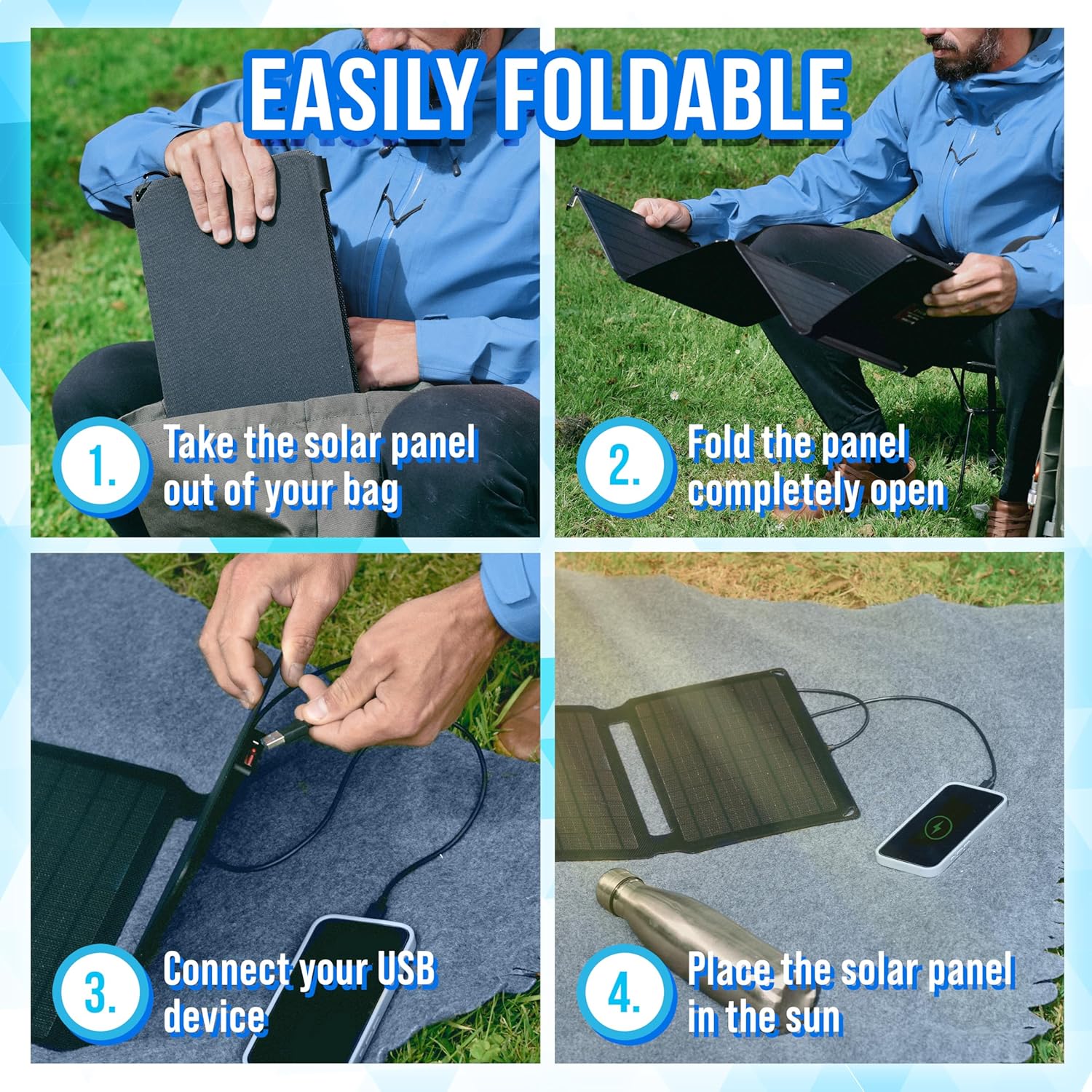
Image: A visual guide demonstrating the four steps for setting up the solar charger: taking it out of the bag, unfolding it, connecting a USB device, and placing it in the sun.
6. Operating Instructions
Once the solar panel is set up and exposed to sunlight, you can begin charging your devices.
- Connect Your Device: Plug your USB charging cable into the USB output port on the solar charger. Then, connect the other end of the cable to your electronic device (e.g., smartphone, tablet, power bank).
- Monitor Charging: The solar charger will automatically begin charging your device when sufficient sunlight is available. Some devices may display a charging indicator.
- Optimize Sunlight Exposure: For the fastest charging, periodically adjust the angle of the solar panel to ensure it is directly facing the sun.
- Quick Charge 3.0: If your device supports Quick Charge 3.0, it will benefit from faster charging speeds when connected to the compatible USB port.

Image: A close-up view of the Silvergear solar charger's integrated USB port, illustrating where to connect your device for charging.
7. Maintenance
Proper maintenance will extend the life of your solar charger:
- Cleaning: Wipe the solar panels with a soft, damp cloth to remove dust or dirt. Do not use harsh chemicals or abrasive materials. Ensure the panels are dry before folding or storing.
- Storage: When not in use, fold the solar charger and store it in a cool, dry place away from direct sunlight and extreme temperatures.
- Inspection: Periodically inspect the cables and connectors for any signs of wear or damage.
8. Troubleshooting
If you encounter issues with your Silvergear Portable Solar Charger, refer to the following common problems and solutions:
- Device not charging:
- Ensure the solar panel is in direct, unobstructed sunlight.
- Check that the USB cable is securely connected to both the solar charger and your device.
- Verify that your device's battery is not fully charged.
- Test with a different USB cable or device to rule out cable/device issues.
- Slow charging:
- Ensure the solar panels are clean and free of dirt or debris.
- Adjust the angle of the solar panel to face the sun directly.
- Charging speed is dependent on sunlight intensity; cloudy conditions will result in slower charging.
- No power indicator:
- The solar charger typically does not have a separate power indicator light. Charging status is usually indicated by the connected device.
9. Specifications
| Feature | Specification |
|---|---|
| Brand | Silvergear |
| Model Number | 4001 |
| Product Type | Foldable Solar Charger |
| Connections | USB |
| Special Features | Quick Charge 3.0 |
| Total USB Ports | 1 |
| Power Output | 30 Watts |
| Output Voltage | 15 Volts (DC) |
| Power Source | Solar Powered |
| Included Components | 2 clips |
| Portability | Yes |
10. Warranty Information
Silvergear products are manufactured to high-quality standards. Specific warranty terms and conditions are typically provided with your purchase documentation or can be found on the official Silvergear website. Please retain your proof of purchase for any warranty claims.
11. Support
For further assistance, technical support, or inquiries regarding your Silvergear Portable Solar Charger, please visit the official Silvergear website or contact their customer service department. Contact details can usually be found on the product packaging or the brand's website.