
1. Introduction
The GROWATT HELIOS 3600 Extra Battery is designed to expand the capacity of your GROWATT HELIOS 3600 Portable Power Station. This manual provides essential information for the safe and efficient use of your extra battery, including setup, operation, maintenance, and troubleshooting.
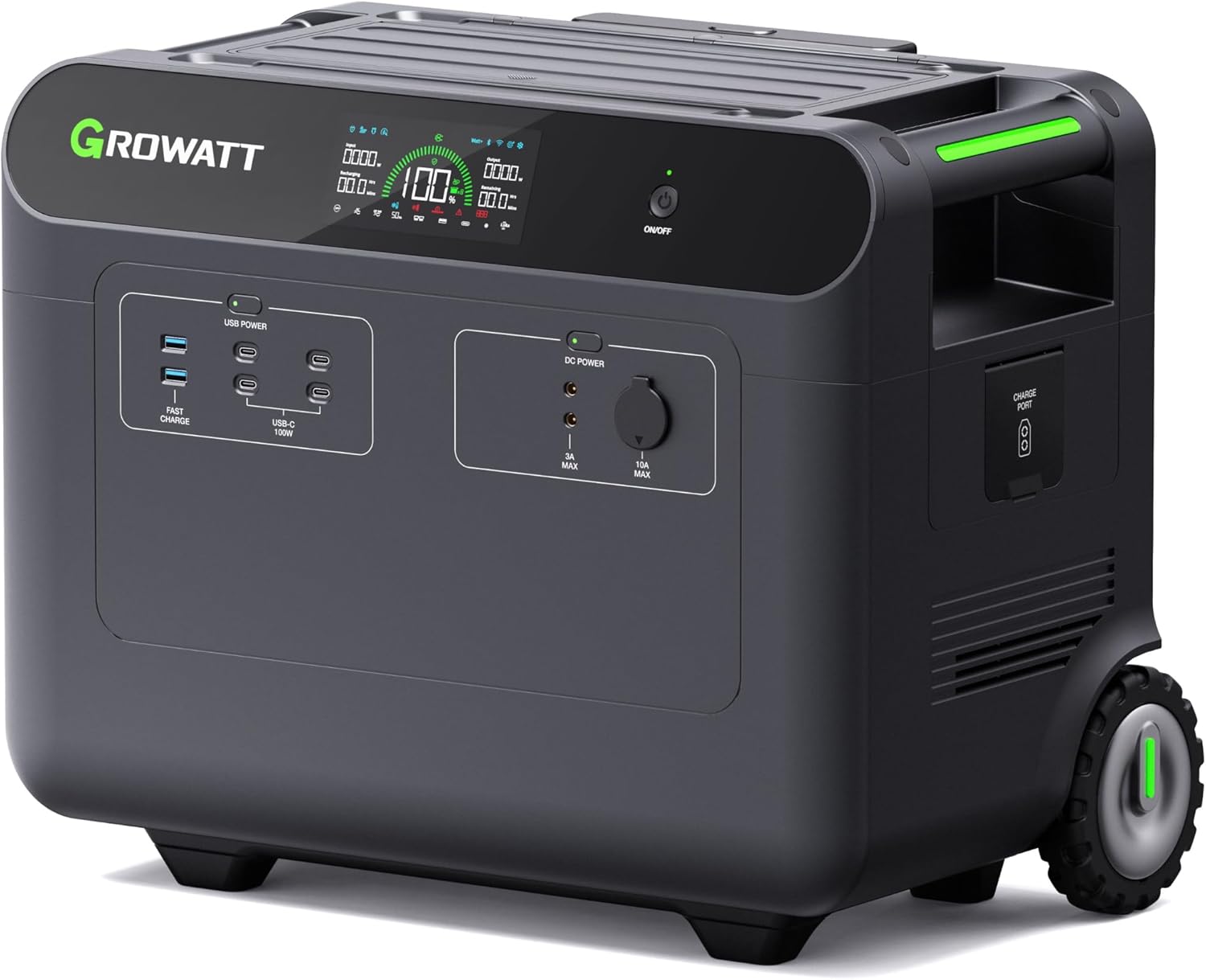
Figure 1: GROWATT HELIOS 3600 Extra Battery.
Video 1: GROWATT HELIOS 3600 Product Introduction. This video provides an overview of the HELIOS 3600 Portable Power Station and its capabilities.
2. Safety Information
Always read and understand all safety warnings and instructions before using this product. Failure to follow these instructions may result in electric shock, fire, serious injury, or property damage.
- Do not disassemble, repair, or modify the unit.
- Keep the unit away from fire, water, and extreme temperatures.
- Ensure proper ventilation during use and charging.
- Use only specified charging cables and accessories.
- Keep out of reach of children.
3. Setup
3.1 Unboxing and Included Components
Carefully unpack your GROWATT HELIOS 3600 Extra Battery and check for all included items:
- GROWATT HELIOS 3600 Expansion Battery
- Battery Expansion Cable
- User Manual
- 5-year Service Card
Video 2: GROWATT HELIOS 3600 Charging & Discharging. This video demonstrates the unboxing process and various charging methods.
3.2 Physical Setup and Portability
The extra battery features a retractable handle and large outdoor wheels for easy transport. It also includes a convenient storage compartment on top for cables and accessories.

Figure 2: Top storage compartment for cables and accessories.

Figure 3: The retractable handle and large wheels provide excellent portability.
4. Operating
4.1 Powering On/Off and Display Overview
To power on or off the unit, press and hold the main power button for 3 seconds. The detailed LCD display provides real-time information and features automatic brightness adjustment for optimal viewing.
4.2 Output Ports (Extra Battery)
The extra battery supports standalone discharging and features 9 DC outlets:
- 4 x 100W USB-C ports
- 2 x USB-A quick charge ports
- 2 x DC5521 ports
- 1 x 13.6V/10A car outlet

Figure 4: The extra battery's DC output ports for various devices.
4.3 Expandable Capacity
The GROWATT HELIOS 3600 system is highly expandable. One main unit can connect to up to 4 extra batteries, expanding the capacity from 3.6kWh to 18kWh. When using two HELIOS 3600 main units in parallel, the system can support up to 8 add-on battery packs, reaching a massive 36kWh capacity.

Figure 5: Visual representation of the expandable capacity from 3.6kWh to 36kWh.
Video 3: GROWATT HELIOS 3600 Expand the Capacity. This video illustrates how to expand the power station's capacity by adding extra batteries.
4.4 Charging Options
The HELIOS 3600 system offers multiple charging methods:
- AC Charging:
- 120V AC: Approximately 3 hours to fully charge.
- 240V AC: Approximately 1.5 hours to fully charge (requires a separately sourced cable).
- Solar Charging: Supports up to 2000W max input, fully charging in about 2.5 hours.
- Car Charging: Supports 12V/24V inputs via the car outlet.
- Alternator Charging: Up to 400W max via the Anderson port. Note: This port does not have MPPT and is not recommended for solar charging.
- Combined Charging: Utilize all three input ports simultaneously for faster charging.

Figure 6: Various charging methods including AC, solar, and car charging.
Video 4: GROWATT HELIOS 3600 Charging & Discharging. This video demonstrates the various charging methods available for the power station.
4.5 Advanced Features
The HELIOS 3600 includes several advanced features to enhance usability and performance:
- EPS (Emergency Power Supply) Functionality: The unit can switch to battery power within 20ms during a power outage, ensuring continuous operation for connected devices.
- Cold Start Function: In extremely cold weather (as low as -22°F), connecting an input source will heat the battery to its working temperature.
- MyGro App & Power Strategy: The MyGro app (available on Google Play and App Store) allows remote control and monitoring via Wi-Fi/Bluetooth. It also features Power Strategy options:
- Time of Use (TOU) Mode: Set charge and discharge times based on peak and off-peak electricity rates to optimize energy costs.
- Primary Solar Mode: Prioritize solar input for charging, maximizing solar energy utilization.
Video 5: GROWATT HELIOS 3600 Advanced Feature & APP. This video highlights the smart features and app control.
5. Maintenance
To ensure the longevity and optimal performance of your GROWATT HELIOS 3600 Extra Battery, follow these maintenance guidelines:
- Keep the unit clean and free from dust and debris.
- Store the unit in a cool, dry place away from direct sunlight when not in use.
- Charge the battery to at least 50% every 3-6 months if stored for long periods.
- Avoid exposing the unit to extreme temperatures or humidity.
6. Troubleshooting
If you encounter any issues with your GROWATT HELIOS 3600 Extra Battery, refer to the following common troubleshooting tips:
- Unit not turning on: Ensure the battery is charged. Press and hold the power button for the required duration.
- No output from DC ports: Check if the DC power is enabled on the display. Ensure devices are properly connected.
- Slow charging: Verify that the charging cable is securely connected and the power source is adequate. Consider using combined charging methods.
- App connectivity issues: Ensure Wi-Fi/Bluetooth is enabled on the unit and your mobile device. Restart the app or unit if necessary.
For more complex issues or if troubleshooting steps do not resolve the problem, please contact GROWATT customer support.
7. Specifications
Key technical specifications for the GROWATT HELIOS 3600 Extra Battery:
| Feature | Specification |
|---|---|
| Model Name | HELIOS 3600 EXPANSION |
| Capacity | 3686.4Wh |
| Battery Type | LiFePo4 (Lithium Iron Phosphate) |
| Cycle Life | 4000+ Cycles |
| DC Outlets | 4x USB-C (100W), 2x USB-A Quick Charge, 2x DC5521, 1x Car Outlet (13.6V/10A) |
| Product Dimensions | 20.4"L x 12.3"W x 16.5"H |
| Item Weight | 99 pounds |
| Color | Black |

Figure 7: The LiFePo4 battery offers a reliable and long-lasting lifespan.
8. Warranty and Support
The GROWATT HELIOS 3600 Extra Battery comes with a 5-year Service Card, ensuring peace of mind for users.
For technical support, warranty claims, or any inquiries, please contact GROWATT customer service through their official channels or visit their website for more information.
Please retain your purchase receipt and 5-year Service Card for warranty purposes.