
1. Introduction
Thank you for choosing the Katalic APF01 Automatic Cat Feeder. This device is designed to provide scheduled meals for up to two cats, ensuring consistent feeding times and portion control. Please read this manual thoroughly before operating the feeder to ensure proper use and maintenance.
2. Safety Instructions
- Read all instructions: Familiarize yourself with the feeder's functions before use.
- Indoor use only: This feeder is designed for indoor use in dry environments. Do not expose to rain or moisture.
- Power source: Use only the provided power adapter. Ensure the power cord is not damaged or pinched.
- Keep away from children and pets: Do not allow children or pets to play with the feeder or its components.
- Dry food only: Use only dry pet food with a diameter between 2-15mm. Do not use wet food, canned food, or treats.
- Unplug before cleaning: Always unplug the feeder from the power outlet before cleaning or performing maintenance.
- Do not disassemble: Do not attempt to disassemble or repair the feeder yourself. Contact customer support if issues arise.
3. Package Contents
Verify that all items listed below are included in your package:
- Katalic Automatic Cat Feeder (5L capacity)
- Stainless Steel Bowls (2)
- Power Adapter
- Desiccant Bag
- Food Tray (2)
- User Manual (this document)
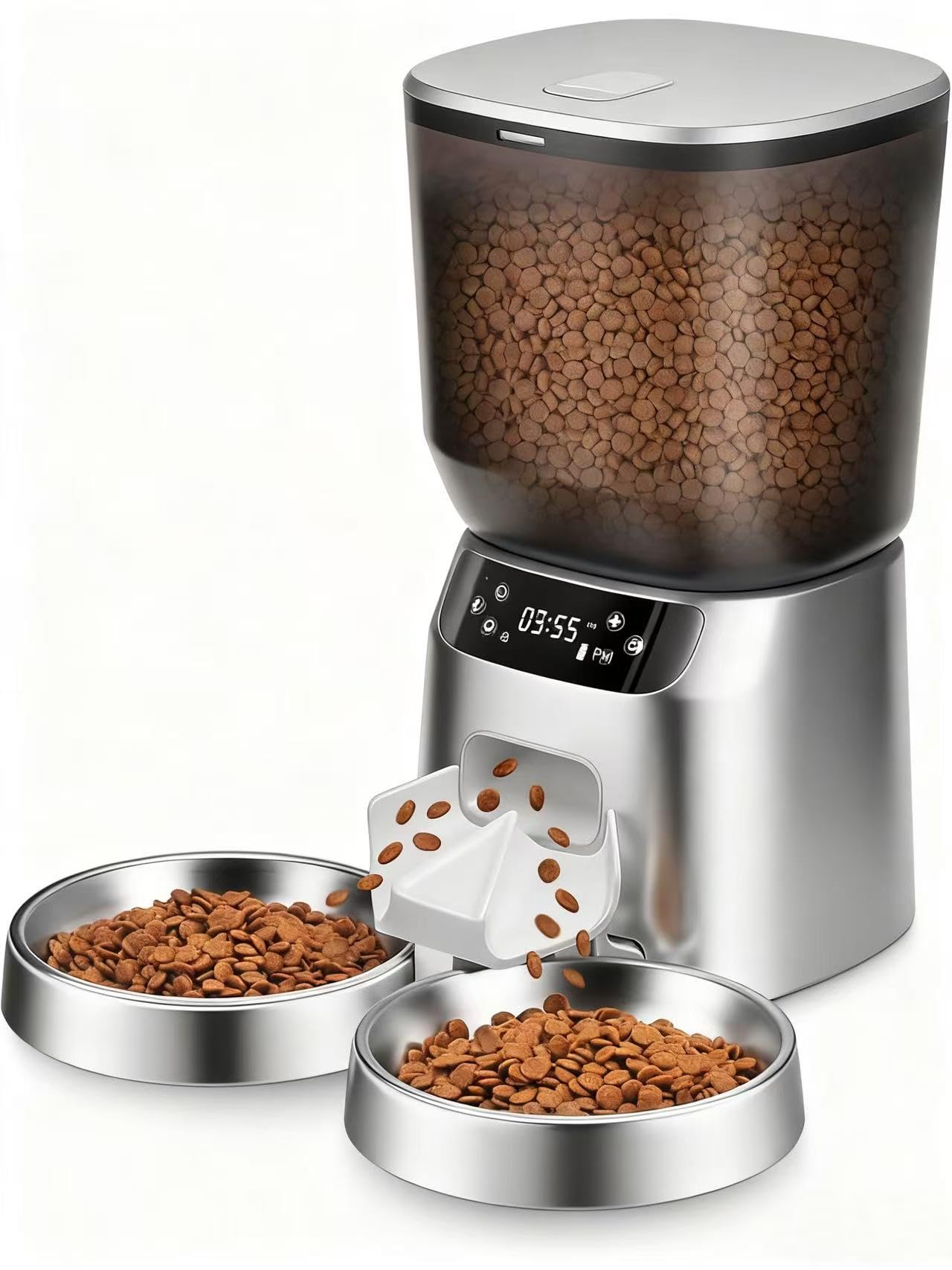
Image 3.1: Overview of the Katalic APF01 Automatic Cat Feeder with its dual food trays and bowls.
4. Setup
- Unpack Components: Carefully remove all components from the packaging.
- Assemble Food Trays: Attach the two food trays to the main unit. Ensure they click securely into place.
- Insert Stainless Steel Bowls: Place the two stainless steel bowls into the food trays.
- Install Desiccant Bag: Open the lid of the food storage container. Locate the desiccant compartment, usually under the lid. Insert the desiccant bag to keep food fresh. Replace every 1-2 months.
- Fill Food Container: Pour dry pet food into the main food storage container. Ensure the lid is securely closed after filling.
- Connect Power: Plug the power adapter into the feeder's power port, then plug the adapter into a standard electrical outlet. The feeder will power on.
Note: For optimal performance, ensure the feeder is placed on a flat, stable surface.
5. Operating Instructions
The Katalic APF01 features a user-friendly control panel for programming meal times and portions.
5.1 Control Panel Overview
The control panel typically includes buttons for SET, UP, DOWN, and MANUAL FEED. Refer to the diagram below for button identification.

Image 5.1: Illustrative diagram of the feeder's control panel.
5.2 Setting Current Time
- Press and hold the SET button for 3 seconds until the clock icon flashes.
- Use the UP and DOWN buttons to adjust the hour. Press SET to confirm.
- Use the UP and DOWN buttons to adjust the minute. Press SET to confirm and exit time setting.
5.3 Programming Meal Times and Portions
The feeder allows for up to 4 meals per day. Each meal can be programmed with a specific time and portion size.
- Press the SET button once to enter meal programming mode. The 'Meal 1' indicator will flash.
- Use UP/DOWN to set the desired hour for Meal 1. Press SET.
- Use UP/DOWN to set the desired minute for Meal 1. Press SET.
- Use UP/DOWN to set the portion size for Meal 1 (e.g., 1-20 units). Each unit is approximately 5-10g of dry food. Press SET.
- Repeat steps 2-4 for Meal 2, Meal 3, and Meal 4 if desired.
- After setting the last meal, press SET again to save and exit programming mode.
5.4 Manual Feeding
To dispense food immediately outside of scheduled meal times:
- Press the MANUAL FEED button once to dispense one portion.
- Press multiple times for additional portions.
6. Maintenance
Regular cleaning ensures the longevity and hygienic operation of your feeder.
6.1 Cleaning the Feeder
- Unplug the Feeder: Disconnect the power adapter from the wall outlet and the feeder.
- Remove Food: Empty any remaining dry food from the storage container.
- Disassemble: Remove the food trays, stainless steel bowls, and the food storage container lid.
- Wash Components: The stainless steel bowls and food trays can be washed with mild soap and water. Rinse thoroughly. The food storage container can be wiped clean with a damp cloth.
- Dry Thoroughly: Ensure all components are completely dry before reassembling. Moisture can damage the feeder or spoil food.
- Wipe Main Unit: Use a soft, dry cloth to wipe the main unit. Do not immerse the main unit in water.
- Reassemble: Reassemble all parts once dry.

Image 6.1: Detachable components of the feeder for easy cleaning.
6.2 Desiccant Bag Replacement
The desiccant bag helps keep the food fresh and dry. Replace it every 1-2 months, or more frequently in humid environments.
- Open the food container lid.
- Remove the old desiccant bag from its compartment.
- Insert a new desiccant bag.
- Close the lid securely.
7. Troubleshooting
| Problem | Possible Cause | Solution |
|---|---|---|
| Feeder not dispensing food. | No power; Food hopper empty; Food jammed; Dispensing mechanism blocked. | Check power connection; Refill food hopper; Clear any food blockages; Clean dispensing mechanism. |
| Food not evenly distributed. | Divider not properly installed; Feeder not level. | Ensure the meal divider is correctly seated; Place feeder on a flat, level surface. |
| Display not working. | No power; Power adapter faulty. | Check power connection; Try a different outlet; Contact support if adapter is suspected faulty. |
| Food getting stuck in dispenser. | Food too large; Excessive moisture; Dispenser dirty. | Use appropriate size dry food (2-15mm); Ensure desiccant is fresh; Clean the dispenser thoroughly. |
8. Specifications
- Model: APF01
- Capacity: 5 Liters
- Product Dimensions: 17.3L x 27.4W x 17.3H Centimetres
- Target Species: Cat
- Power Source: Corded Electric
- Food Type: Dry food (2-15mm diameter)
- Number of Meals: Up to 4 meals/day
- Portion Size: Programmable (typically 1-20 units per meal)
9. Warranty and Support
Katalic provides a limited warranty for this product. Please refer to the warranty card included in your package for specific terms and conditions. For technical support, troubleshooting assistance, or warranty claims, please contact Katalic customer service through the contact information provided on the warranty card or our official website.