
addlon RKPO-UL2402000DP-6
addlon Permanent Outdoor Lights 100FT with 50 Dual-LED
Model: RKPO-UL2402000DP-6
Introduction
This manual provides detailed instructions for the installation, operation, and maintenance of your addlon Permanent Outdoor Lights. Designed for versatile outdoor lighting, these 100FT lights feature 50 dual-LEDs, offering both warm white and RGB color options, controllable via remote or a smart application. The lights are cuttable and extendable, allowing for customized installations, and are built with an IP67 waterproof design for durability in various weather conditions.
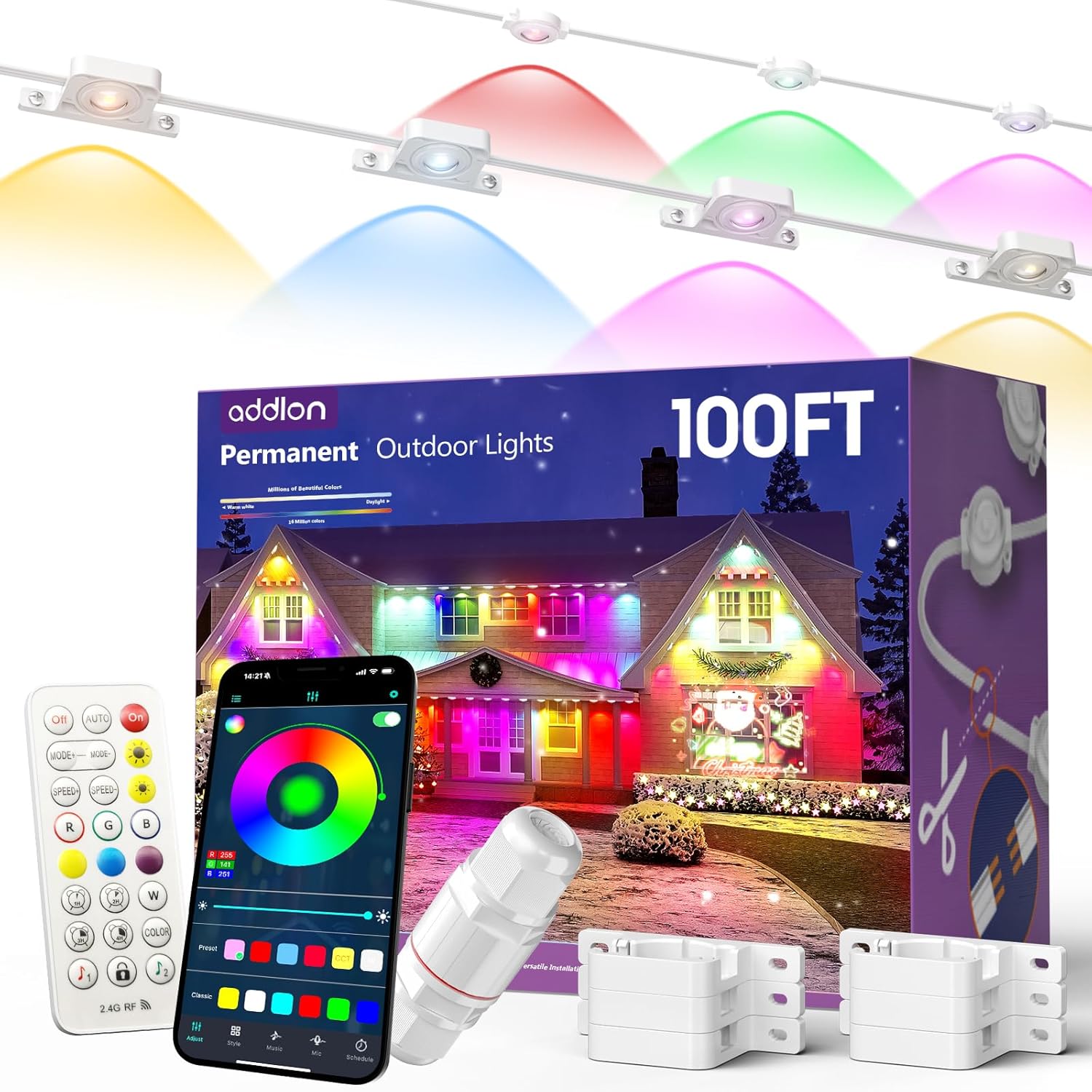
Image: addlon Permanent Outdoor Lights product overview, showcasing the light string, remote control, and smartphone application interface.
Package Contents
Verify that all components are present in your package:

Image: A visual representation of the package contents, including the light string, adapter, extension cord, remote control, and installation accessories.
- Permanent Outdoor Lights (100FT with 50 Dual-LED)
- Adapter plug
- Extension cord (6.5FT)
- Multi-function RGB remote control
- Installation accessories (3M adhesive and screws)
Key Features
- Dual-LED Design: Features both warm white LEDs for daily use and vibrant RGB LEDs for festive occasions. Offers 75 scene modes for various ambiances.
- Cuttable and Extendable: Designed for flexible DIY installation. Light strips can be cut and reconnected to fit specific rooflines or home decor styles. Supports total lengths up to 200ft when extended.
- Dual Control Options: Manage your lighting with both the included remote control and a dedicated smartphone application. The app allows for advanced customization, including setting timers and personalized lighting effects.
- Quick & Secure Installation: Includes 3M adhesive strips for quick setup and mounting brackets with screws for a more permanent and secure fit under roof eaves or on walls.
- IP67 Waterproof Design: Ensures durability and reliable performance in all weather conditions.
Setup and Installation
Follow these steps for proper installation of your addlon Permanent Outdoor Lights:
- Plan Your Layout: Determine the desired placement for your lights along eaves or walls. Ensure the string lights are placed 2-4 inches away from the wall surface for optimal light projection.
- Prepare the Surface: Clean the installation surface thoroughly with a rag or towel to remove any dust or debris. This ensures proper adhesion of the 3M adhesive strips.
- Apply Adhesive (Optional): If using 3M adhesive, peel off the backing from the adhesive pads on the back of each light unit. Press each light firmly against the cleaned surface for at least 5 seconds to secure.
- Secure with Screws (Recommended for Permanent Installation): For a more secure and permanent installation, use the provided screws and mounting brackets. The light units are designed for both top and side installation.
- Connect Light Strings (if extending): If you are using multiple light strings or extending the current one, connect them via the waterproof connectors. Ensure the screw caps are tightened to maintain the IP67 rating.
- Use Extension Cords: If additional reach is needed, utilize the included 6.5FT extension cords for auxiliary installation.
- Power Connection: Plug the adapter into a power supply. The lights should illuminate immediately.

Image: A person demonstrating the installation of the addlon Permanent Outdoor Lights under a roof eave, highlighting the secure mounting.

Image: Illustration detailing the two primary installation methods: top installation (under eaves) and side installation (on walls).

Image: A step-by-step visual guide illustrating the installation process, from planning to power connection.

Image: Visual explanation of how the light strips can be cut and reconnected for custom lengths and configurations.
Operating Instructions
Your addlon Permanent Outdoor Lights can be controlled using the included remote or the dedicated smartphone application.
Remote Control
The multi-function RGB remote control allows for basic adjustments:
- Power On/Off: Use the dedicated buttons to turn the lights on or off.
- Mode Selection: Cycle through various lighting modes.
- Brightness Adjustment: Increase or decrease the light intensity.
- Color Selection: Choose from a range of RGB colors.
- Timing: Set timers for 1, 2, 3, or 4 hours.
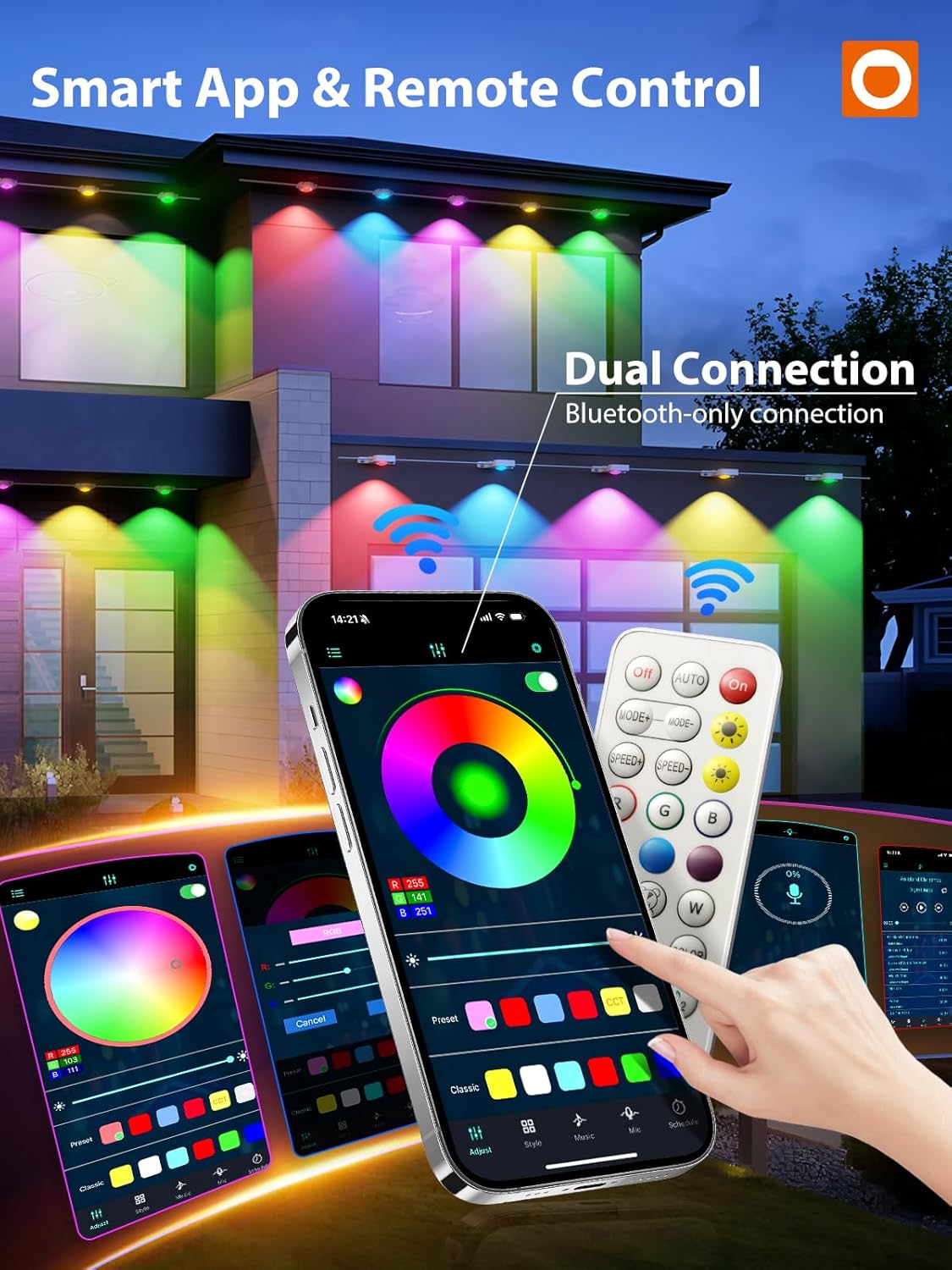
Image: The remote control and a smartphone displaying the app interface, illustrating dual control options.
Smartphone Application Control
For advanced customization and control, download the 'Surplife' app from your device's app store (App Store or Google Play).
- Download the App: Search for 'Surplife' in your smartphone's app store and install it.
- Add Device: Open the app and follow the on-screen instructions to add your addlon Permanent Outdoor Lights. Ensure your phone is close to the device during the pairing process. The lights support dual connection via Bluetooth and Wi-Fi.
- Customize Settings: Once connected, you can:
- Adjust colors, brightness, and modes.
- Select from 75 pre-set scene modes.
- Set schedules and timers.
- Create personalized lighting effects.
Video: An official addlon video demonstrating the RGB and warm white eave light features, showcasing various lighting effects and colors.
Video: An official addlon video showcasing smart RGBW Christmas lights, demonstrating different festive lighting patterns and colors.
Lighting Modes and Effects
The dual-LED design allows for distinct lighting experiences:
- Daily Mode: Utilize the warm white LEDs for subtle, ambient lighting.
- Festive RGB Mode: Engage the RGB LEDs for vibrant, color-changing displays suitable for holidays and special events.

Image: A split image demonstrating the warm white 'Daily life' mode and the colorful 'Festival celebration' mode on a house exterior.
Examples of festive lighting:

Image: A house illuminated with addlon Permanent Outdoor Lights in various colors for a Christmas display.

Image: A house decorated with addlon Permanent Outdoor Lights in Halloween-themed colors.
Maintenance
To ensure the longevity and optimal performance of your addlon Permanent Outdoor Lights, consider the following maintenance guidelines:
- Regular Cleaning: Periodically wipe down the light units and cables with a soft, damp cloth to remove dirt, dust, and debris. Avoid abrasive cleaners.
- Inspect for Damage: Regularly check the cables, connectors, and light units for any signs of wear, damage, or loose connections. Address any issues promptly to prevent further damage or safety hazards.
- Secure Connections: Ensure all waterproof connectors are tightly sealed, especially after any adjustments or extensions, to maintain the IP67 waterproof rating.
- Winterization (Optional): While designed for all-weather use, in areas with extreme winter conditions (heavy snow, ice), consider gently clearing snow accumulation from the lights to prevent excessive weight or ice buildup.
Troubleshooting
If you encounter issues with your addlon Permanent Outdoor Lights, refer to the following common troubleshooting steps:
- Lights Not Turning On:
- Check if the power adapter is securely plugged into a working outlet.
- Ensure all connections between light strings and the adapter are firm and correctly aligned.
- Verify that the remote control or app is sending the 'On' command. Check remote battery if applicable.
- Incorrect Colors or Modes:
- Ensure the remote control or app is properly paired with the lights.
- Reset the lights by unplugging them for a few minutes and then plugging them back in.
- If using the app, ensure it is updated to the latest version.
- App Connectivity Issues:
- Confirm your smartphone's Bluetooth and Wi-Fi are enabled.
- Ensure your phone is within range of the lights and your Wi-Fi router.
- Restart the app or your smartphone.
- Individual Lights Not Working:
- Inspect the specific light unit and its connections for any visible damage or loose wiring.
- If the lights are cuttable, ensure the reconnection points are properly sealed.
If these steps do not resolve the issue, please contact addlon customer support for further assistance.
Specifications
| Feature | Specification |
|---|---|
| Brand | addlon |
| Model Number | RKPO-UL2402000DP-6 |
| Light Length | 100FT |
| Number of Light Sources | 50 Dual-LEDs |
| Light Source Type | LED |
| Light Color | Multicolor (RGB) & Warm White |
| Indoor/Outdoor Usage | Outdoor |
| Special Feature | Color Changing, Waterproof (IP67) |
| Power Source | Corded Electric |
| Wattage | 1 watts |
| Control Method | App Control, Remote Control |
| Material | Plastic |
| Item Weight | 6.07 pounds |
| UPC | 850067050261 |
Warranty and Support
For warranty information, product support, or to report any issues, please contact addlon customer service. Refer to the product packaging or the official addlon website for contact details.
Ask a question about this manual
Ask about setup, troubleshooting, compatibility, parts, safety, or missing instructions. Manuals+ will review the question and use this page’s manual context to help answer it.