
Tadeto TE035
Tadeto Green Laser Measurement Tool TE035 User Manual
Model: TE035 | Brand: Tadeto
Introduction
The Tadeto Green Laser Measurement Tool TE035 is a versatile and accurate device designed for various measurement tasks. Featuring dual laser technology, it offers efficient and precise measurements of distance, area, volume, angles, and more. This manual provides detailed instructions for safe operation, setup, and maintenance of your device.

Image: The Tadeto Green Laser Measurement Tool TE035, showcasing its compact design and green laser output.
Safety Information
Please read and understand all safety warnings and instructions before using this product. Failure to follow these instructions may result in laser radiation exposure, electric shock, fire, or serious injury.
- Laser Radiation: This device emits Class II laser radiation. Do not stare into the beam. Avoid direct eye exposure.
- Indoor Use: This device is recommended for indoor use only. Outdoor use may reduce accuracy and visibility of the laser dot.
- Children: Keep the device out of reach of children.
- Maintenance: Do not attempt to disassemble or modify the device. Repairs should only be performed by authorized service personnel.
- Environment: Do not operate the device in explosive atmospheres, such as in the presence of flammable liquids, gases, or dust.
- Cleaning: Use a soft, dry cloth for cleaning. Do not use abrasive cleaners or solvents.
Package Contents
Verify that all items are present in the package:
- 1x Tadeto Laser Measuring Device
- 1x User Manual
- 1x Type-C Charge Cable
- 1x Carrying Bag
- 1x Reflector
- 1x Hand Strap

Image: All items included in the Tadeto Laser Measurement Tool package: the device, carrying case, charging cable, reflector, hand strap, and user manual.
Product Overview
Familiarize yourself with the components and controls of your Tadeto Laser Measurement Tool.

Image: A detailed diagram of the Tadeto Laser Measurement Tool, highlighting its various parts and controls, including the display, buttons, and laser apertures.
- Display Screen: Backlit LCD for clear readings in various lighting conditions. Displays measurements, battery level, and mode indicators.
- Power On/Measure Button (MEAS): Press to power on, initiate a measurement, or confirm a selection.
- Off/Clear Button (OFF/CLEAR): Press to clear the last measurement, exit a mode, or long-press to power off.
- Function Selection Button (FUN): Cycles through various measurement modes (Distance, Area, Volume, Angle, Pythagorean, etc.).
- Unit/Benchmark Switching Button (U): Short press to switch measurement benchmark (front/rear/tripod). Long press to switch units (M/In/Ft).
- Add/Subtract Buttons (+/-): Used for adding or subtracting measurements.
- Laser Apertures: Front and rear openings for laser emission and reception.
- Type-C Charging Port: Located on the side for convenient charging.
- 1/4" Tripod Mount: Located at the bottom for mounting on a standard camera tripod.
- Magnetic Base: Strong magnet on the rear for attaching to metal surfaces.
Setup
1. Charging the Device
The device is equipped with a built-in 850mAh lithium-ion battery. Before first use, fully charge the device.
- Connect the provided Type-C charge cable to the charging port on the side of the device.
- Connect the other end of the cable to a standard USB power adapter (not included) or a computer USB port.
- The battery indicator on the LCD screen will show charging status. A full charge typically takes about 1.5 hours.
- Once fully charged, the battery icon will indicate a full charge. Disconnect the charging cable.

Image: The Tadeto device being charged via its Type-C port, illustrating the battery icon on the display.
2. Initial Power On
Press the MEAS button to power on the device. The LCD screen will illuminate.
Operating Instructions
1. Basic Measurement (Single Distance)
- Ensure the device is powered on.
- Point the laser at the target surface.
- Press the MEAS button once. The measurement will be displayed on the screen.
2. Continuous Measurement
- From the single measurement mode, press and hold the MEAS button.
- The device will continuously measure and display the real-time distance as you move it.
- Press MEAS again to stop continuous measurement.
3. Dual Laser Measurement
The dual laser feature allows for simultaneous measurement from both ends of the device, ideal for measuring distances between two points when the device is placed in the middle.
- Place the device between the two points you wish to measure.
- Ensure both laser beams are hitting the target surfaces.
- The device will display the distance from each end and the total distance.

Image: Illustration of the dual laser measurement capability, showing the device measuring distances from both its front and rear ends simultaneously.

Image: A visual comparison highlighting the efficiency and ergonomic benefits of dual laser measurement compared to traditional single laser methods.
4. Multiple Measurement Functions
Press the FUN button repeatedly to cycle through the following measurement modes:
- Area Measurement: Measure two sides (length and width) to calculate the area.
- Volume Measurement: Measure three sides (length, width, and height) to calculate the volume.
- Angle Measurement: The built-in dump sensor measures the angle of the device in real-time.
- Pythagorean Measurement: Use indirect measurement to calculate heights or distances where direct measurement is not possible.
- Mid-Point Measurement: Determine the midpoint between two measured points.
- Wall Area Measurement: Calculate the total area of multiple walls.
- Addition/Subtraction: Add or subtract measurements using the +/- buttons.

Image: The device display illustrating various measurement modes such as area, volume, angle, and Pythagorean calculations.

Image: A comprehensive diagram detailing the different measurement modes available on the Tadeto device, including single, continuous, area, volume, angle, and Pythagorean measurements.
5. Unit Switching
Long press the U button to switch between measurement units: Meters (M), Inches (In), and Feet (Ft).
6. Data Storage
The device can store up to 100 sets of measurement data. To access stored data, press the RECORD button (often integrated with FUN or a dedicated button, refer to device layout). Use the arrow keys (if available) to navigate through stored measurements.
7. Screen Features
- Backlit LCD: Provides clear visibility in bright and dark environments.
- Rotatable Screen: The display automatically rotates for easier reading from different angles.
- Screen Lock: Press and hold the +/- key to lock the screen display.
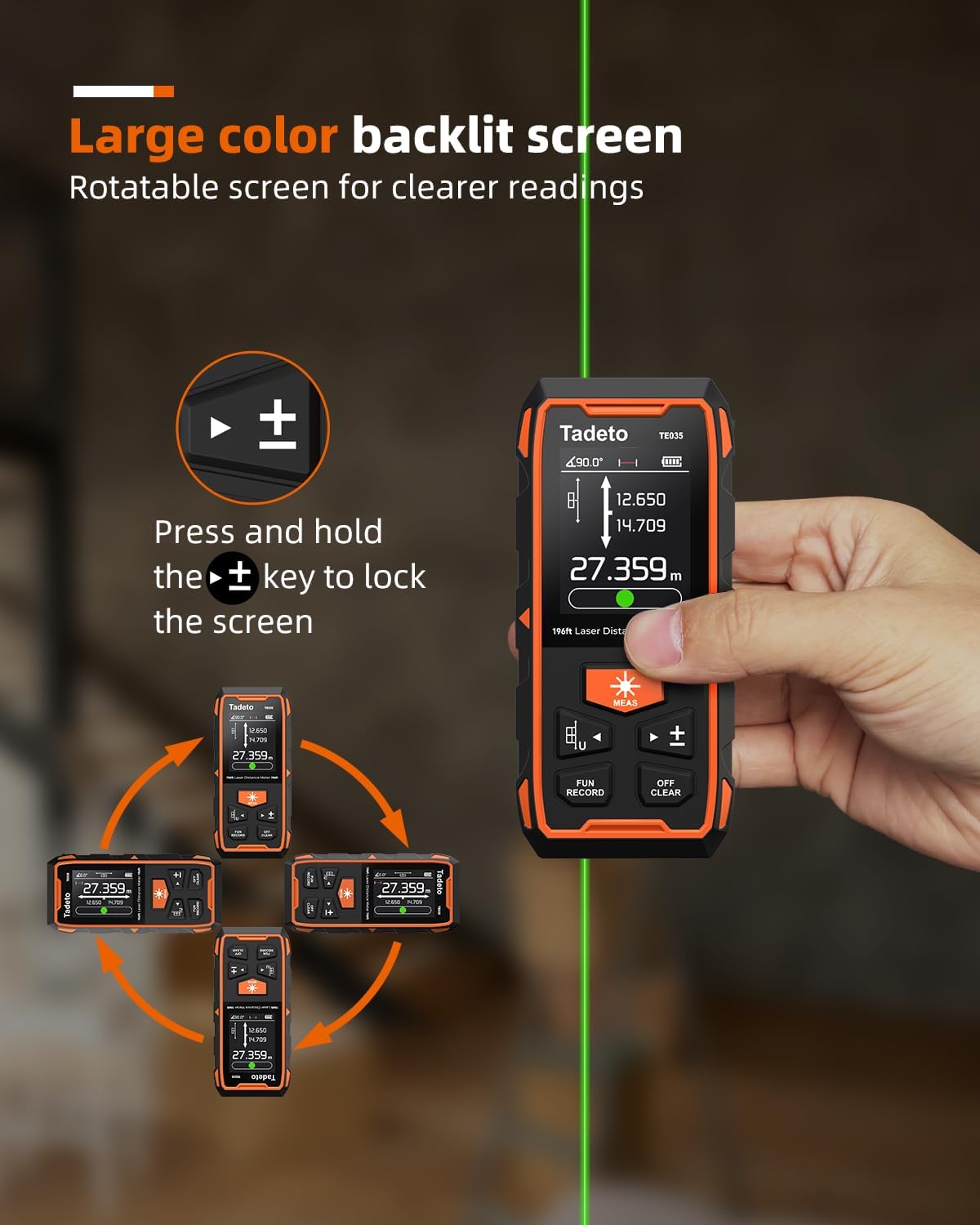
Image: The device demonstrating its large color backlit screen and automatic rotation feature for optimal readability.
Maintenance
- Cleaning: Wipe the device with a soft, damp cloth. Do not use harsh chemicals or abrasive materials. Ensure the laser apertures are clean and free of dust.
- Storage: Store the device in its carrying bag in a cool, dry place when not in use. Avoid extreme temperatures and direct sunlight.
- Battery Care: For optimal battery life, charge the device regularly, even if not in frequent use. Avoid fully discharging the battery for extended periods.
- Dust and Water Resistance: The device has an IP54 dustproof accreditation, meaning it is protected from limited dust ingress and water spray from any direction. However, it is not waterproof and should not be submerged.

Image: The device covered in dust, illustrating its IP54 dustproof rating, alongside its magnetic attraction and 1/4" tripod nut features.
Troubleshooting
| Problem | Possible Cause | Solution |
|---|---|---|
| Device does not power on. | Low battery. | Charge the device fully using the provided Type-C cable. |
| Laser dot is not visible or dim. | Bright ambient light; long distance; dirty lens. | Use in lower light conditions. Use the reflector card for longer distances. Clean the laser apertures. |
| Measurement error/inaccurate readings. | Target surface is too reflective/absorbent; device moved during measurement; obstruction in laser path. | Use the reflector card on difficult surfaces. Ensure device is stable. Clear any obstructions. |
| Screen display is frozen or unresponsive. | Temporary software glitch. | Long-press the OFF/CLEAR button to force power off, then restart the device. |
| "OUT OF MEASURE RANGE" error. | Target is too far or too close. | Ensure the target is within the specified measuring range (up to 120m/393ft). |
Specifications
| Feature | Detail |
|---|---|
| Model Number | TE035 |
| Measuring Range | Up to 120 m (393 ft) |
| Accuracy | Unidirectional: ±2 mm |
| Laser Type | Green Laser, Class II, output <1mW |
| Battery Type | Built-in 850mAh Lithium-Ion |
| Charging Port | Type-C |
| Measurements per Charge | 3500+ |
| Data Storage | Up to 100 sets |
| Dust/Water Protection | IP54 |
| Product Dimensions | 11.6 x 5.5 x 2.4 cm |
| Item Weight | 150 g |
| Material | Acrylonitrile Butadiene Styrene (ABS) |

Image: An overview graphic summarizing key features such as electronic angle, automatic screen rotation, magnetic suction, unit switching, IP54 dustproof, data storage, Type-C charging, and battery life.

Image: A visual summary of additional features including electronic angle measurement, strong magnetic suction, a 1/4" copper nut for tripod mounting, and Type-C charging.
Warranty and Support
Tadeto products are manufactured to high quality standards. For warranty information, technical support, or service inquiries, please refer to the contact information provided on the product packaging or the official Tadeto website. Please retain your proof of purchase for warranty claims.
Ask a question about this manual
Ask about setup, troubleshooting, compatibility, parts, safety, or missing instructions. Manuals+ will review the question and use this page’s manual context to help answer it.