
1. Introduction
Thank you for choosing the SOULION R80 PC Speaker. This device is a versatile soundbar designed for computers, laptops, tablets, and smartphones, offering multiple connectivity options, an integrated digital clock, and dynamic RGB lighting. This manual provides essential information for proper setup, operation, and maintenance to ensure optimal performance and longevity of your speaker.
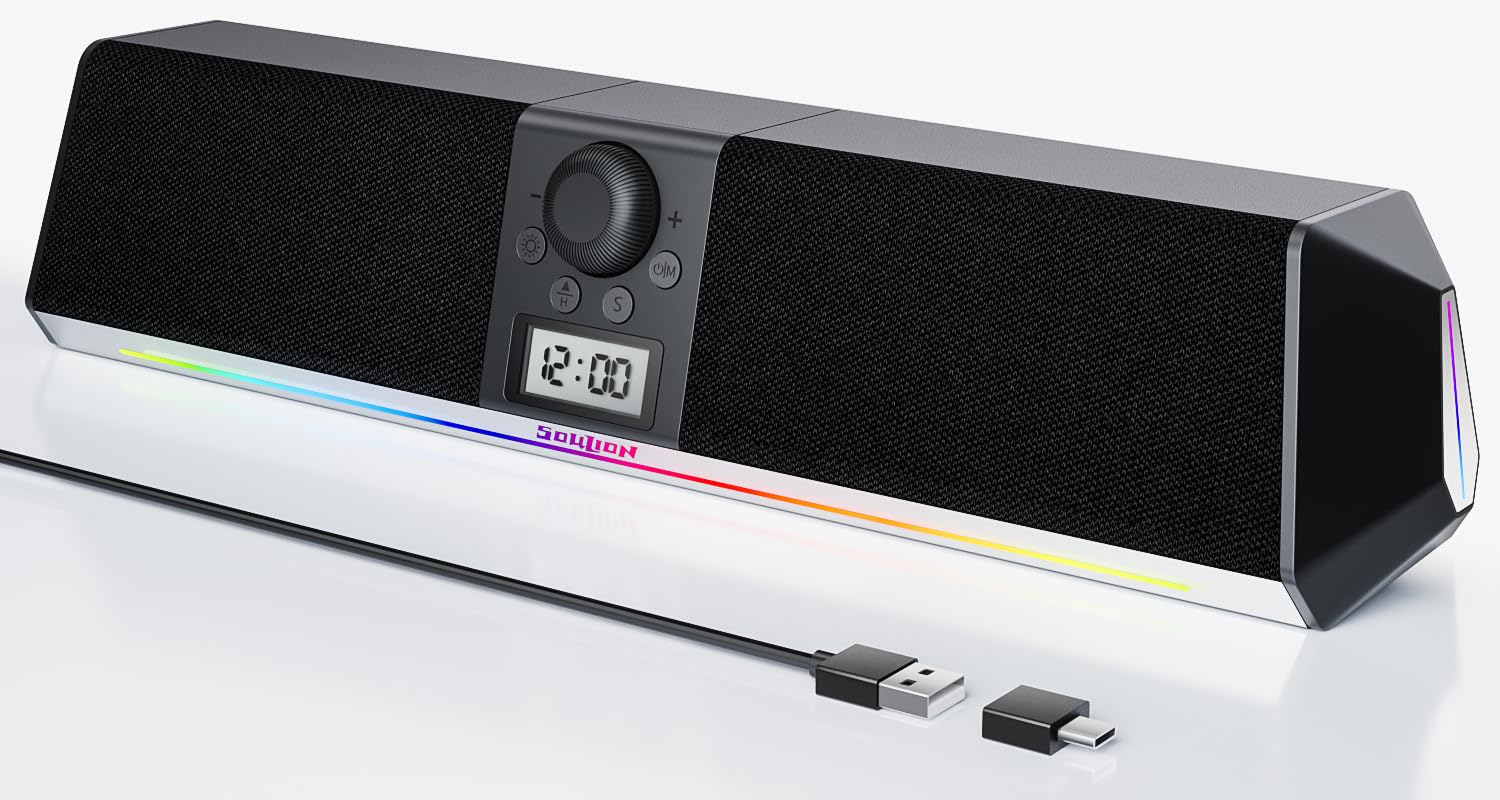
Image 1.1: SOULION R80 PC Speaker overview.
2. Package Contents
Please check the package for the following items:
- SOULION R80 Speaker Unit
- USB-A to USB-C Adapter
- User Manual
Note: 2 AA batteries for the clock are not included and must be purchased separately. An AUX 3.5mm cable is also not included.
3. Product Features
- All-in-One Multifunction: Integrates an LCD digital clock and 5 colorful ambient lights, serving as both a speaker and a desktop decoration.
- Clear and Powerful Sound: Features two 10W (5W x 2) full-range speakers and two independent diaphragms for rich, clear audio. Independent buttons and a rotary knob for volume adjustment.
- Eye-Friendly Optional Lighting: Soft, downward-projecting light with 5 effects (gradient, rhythm, fixed color, etc.). Non-glaring and can be turned off. Light settings are memorized.
- Multiple Modes:
- USB Mode: Plug and Play compatibility with PCs, laptops, tablets, smartphones, and USB-C devices. No drivers required. (Not suitable for USB hubs).
- Bluetooth Mode: Stable wireless connection up to 10 meters. Supports quick pairing and memory clearing. (Requires USB power).
- AUX Mode: 3.5mm interface for older devices. (Requires a 3.5mm 3-pole cable, sold separately. USB power required).

Image 3.1: Internal speaker components for clear and powerful sound.
4. Setup
4.1 Powering the Speaker
The SOULION R80 speaker is USB-powered. Connect the USB cable from the speaker to an available USB port on your computer, laptop, or a USB power adapter (5V DC).
4.2 Installing Clock Batteries
The digital clock requires two AA batteries (not included) for initial activation and time setting. Locate the battery compartment on the back or bottom of the speaker, insert the batteries according to the polarity markings, and close the compartment. The clock will then be powered by the USB connection once connected.

Image 4.2: Battery compartment for the digital clock.
5. Operating Instructions
5.1 Controls Overview
The speaker features intuitive controls for power, volume, mode selection, and light effects.

Image 5.1: Control buttons and their functions.
- Power On/Off / Mode Switch (U|M button): Press and hold to power on/off. Short press to cycle through USB, Bluetooth, and AUX modes.
- Volume Control (Rotary Knob): Turn clockwise to increase volume, counter-clockwise to decrease.
- Light Mode Switch (Sun icon button): Short press to cycle through light effects. Press and hold to turn lights off/on.
- Clock Setting Buttons (H, S, Triangle buttons): Used for setting the digital clock.
5.2 Connecting to Devices

Image 5.2: Various connection methods for the SOULION R80 speaker.
5.2.1 USB Mode (Plug and Play)
- Connect the speaker's USB cable to an available USB-A port on your computer or laptop.
- If your device has a USB-C port, use the included USB-A to USB-C adapter.
- The speaker will be automatically recognized by your operating system. Select "SOULION R80" as the audio output device in your sound settings.
Note: Ensure the speaker is powered via USB. This mode does not require additional drivers. Avoid connecting to USB hubs for optimal performance.
5.2.2 Bluetooth Mode
- Ensure the speaker is powered via USB.
- Short press the U|M button until the speaker announces "Bluetooth Mode" or the Bluetooth indicator light flashes.
- On your smartphone, tablet, or laptop, enable Bluetooth and search for available devices.
- Select "SOULION R80" from the list to pair. A confirmation sound will indicate successful pairing.
- To clear Bluetooth memory, refer to the troubleshooting section or consult the full manual.
Note: Bluetooth range is up to 10 meters.
5.2.3 AUX Mode
- Ensure the speaker is powered via USB.
- Short press the U|M button until the speaker announces "AUX Mode".
- Connect a 3.5mm 3-pole audio cable (not included) from your audio source (e.g., PC, older tablet) to the AUX input port on the speaker.
Note: For clearer audio and reduced background noise, USB or Bluetooth modes are generally recommended over AUX mode.
5.3 Setting the Digital Clock
To set the time on the integrated LCD digital clock:

Image 5.3: Step-by-step guide to setting the digital clock.
- Press the "H" key to select 12/24 hour format.
- Press the "S" key to select the hours for adjustment.
- Use the "Triangle" (up/down) keys to adjust the correct hour.
- Press the "S" key again to select the minutes for adjustment.
- Use the "Triangle" (up/down) keys to adjust the correct minutes.
- Finally, press the "S" key again to confirm and save the time.
5.4 Adjusting Light Modes
The SOULION R80 features 5 different ambient light effects.

Image 5.4: Available LED light modes.
- Short press the Light Mode Switch (Sun icon button) to cycle through the 5 different light effects: Rainbow Light, Gradient Light, Rhythm Jump, Breathe Mode, and Monochrome Fixed.
- Press and hold the Light Mode Switch to turn the ambient lights off or on.
The speaker remembers your last selected light effect even after being powered off and on.
6. Maintenance
- Cleaning: Use a soft, dry cloth to clean the speaker's surface. Do not use liquid cleaners or abrasive materials.
- Storage: Store the speaker in a cool, dry place away from direct sunlight and extreme temperatures.
- Avoid Water: The speaker is not waterproof. Keep it away from water and high humidity.
- Power: Always use a stable 5V DC USB power source.
7. Troubleshooting
| Problem | Possible Cause | Solution |
|---|---|---|
| No sound |
|
|
| Bluetooth connection unstable or fails to pair |
|
|
| Clock not displaying or incorrect time |
|
|
| Lights not working or stuck |
|
|
8. Specifications
| Model Name | R80 |
| Brand | SOULION |
| Dimensions (L x W x H) | 41.5 x 9.8 x 9.2 cm |
| Weight | 940 grams |
| Speaker Output Power | 10 Watts (5W x 2) |
| Frequency Response | 20 KHz |
| Connectivity Technology | USB, Bluetooth |
| Audio Output Mode | Stereo (2.0 channels) |
| Input Voltage | 5 Volts (DC) |
| Mounting Type | Table Mount |
| Material | Plastic |
| Speaker Type | Soundbar |
| Features | LED Light, USB Port, Digital Clock |
| Recommended Uses | Computers, Smartphones, Tablets, Music Players, Gaming Consoles |
| Color | Black |
| Waterproof | No |
| Bluetooth Range | 10 Meters |
| Control Method | Tactile (Buttons, Rotary Knob) |
| Speaker Size | 2 Inches (5 Centimeters) |
| Signal-to-Noise Ratio | 65 dB |
9. Warranty and Support
For warranty information and customer support, please refer to the documentation provided with your purchase or contact the manufacturer directly.
Manufacturer: Shenzhen Soulion Technology Co., LTD


