
1. Product Overview
The GEARELEC S3 is an advanced motorcycle helmet Bluetooth headset integrated with a 1080P HD camera. Designed for enhanced communication and recording during rides, it features full-duplex intercom for up to 8 riders, G-Sensor lock for collision footage, and a 128GB TF card for extensive recording. It also includes HiFi stereo sound, music sharing, FM radio, and triple noise reduction technology for clear audio even at high speeds. The device is built with an IP65 waterproof rating and a long-lasting 2000mAh battery.
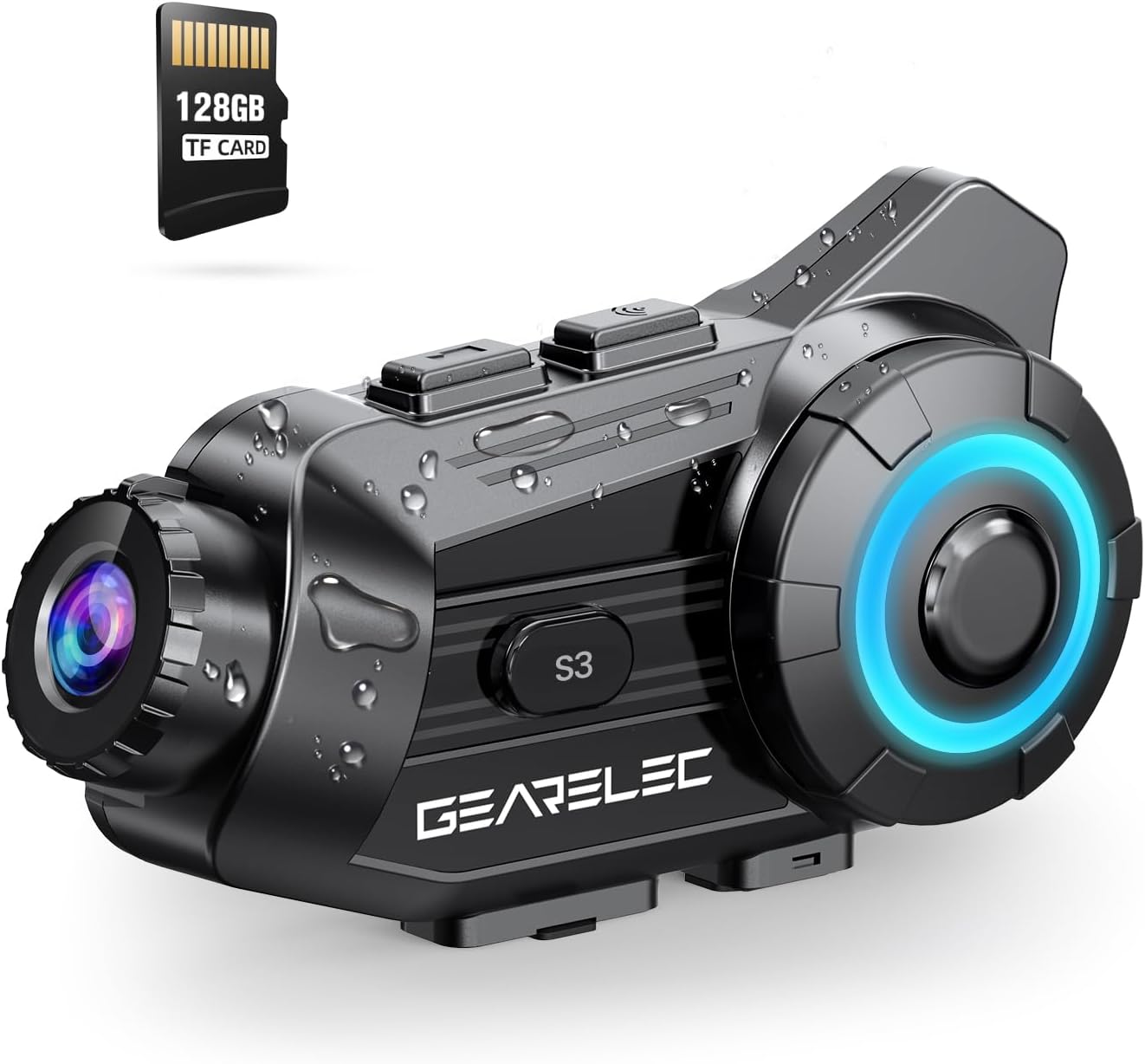
Figure 1: GEARELEC S3 Main Unit with 128GB TF Card.
2. Package Contents
Please verify that all items are present in the package:
- GEARELEC S3 Main Unit
- Headset Speakers and Microphone Kit
- Mounting Bracket (Clip and Adhesive)
- USB Charging Cable
- 128GB TF Card (pre-installed or separate)
- User Manual (this document)
3. Setup and Installation
3.1 Charging the Device
Before first use, fully charge the S3 unit. Connect the provided USB charging cable to the charging port on the S3 unit and to a standard USB power adapter (not included). The charging indicator light will show the charging status. A full charge takes approximately 3 hours.

Figure 2: Battery capacity and charging details. The 2000mAh battery provides up to 100 hours of music time and 7 hours of video recording.
3.2 Installing the TF Card
The S3 comes with a 128GB TF card. Locate the TF card slot on the unit. Gently insert the TF card into the slot until it clicks into place. Ensure the card is inserted correctly to enable video recording and storage.
3.3 Mounting on Helmet
Choose between the clip-on bracket or the adhesive bracket for mounting the S3 unit to your helmet. Ensure the mounting location allows for optimal camera view and easy access to controls. Securely attach the speakers inside the helmet's ear pockets and position the microphone near your mouth for clear audio.
4. Operating Instructions
4.1 Power On/Off
- Power On: Press and hold the Power button for approximately 3 seconds until the indicator light illuminates.
- Power Off: Press and hold the Power button for approximately 3 seconds until the indicator light turns off.
4.2 Bluetooth Pairing with Mobile Device
- Ensure the S3 unit is powered off.
- Press and hold the Power button for about 5-7 seconds until the indicator light flashes rapidly, indicating pairing mode.
- On your mobile phone, enable Bluetooth and search for available devices.
- Select "GEARELEC S3" from the list.
- Once paired, the indicator light will change, and you will hear a confirmation tone.
4.3 Intercom Communication
The S3 supports full-duplex intercom for 2 to 8 riders within a 2000-meter range.
- Ensure all S3 units are powered on and within range.
- Initiate intercom pairing according to the specific instructions for multi-unit connection (refer to the quick start guide for detailed steps on group pairing).
- Once connected, riders can communicate freely.

Figure 3: Intercom communication for multiple riders.
4.4 Camera Operation and Recording
The integrated 1080P HD camera captures video at 30 frames per second and 2MP still images. It features a 135° wide-angle lens and 20° lens rotation for flexible shooting angles.
- Start/Stop Recording: Press the Camera button once to start recording. Press again to stop.
- Take Photo: Press and hold the Camera button briefly to capture a still image.
- G-Sensor Lock: The built-in gravity sensor automatically detects collisions and locks the current recording segment to prevent it from being overwritten, serving as protected evidence.
- Loop Recording: When the TF card is full, the system automatically overwrites the oldest unprotected files, ensuring continuous recording.

Figure 4: 1080P HD lens with 20° rotation for clear shooting.

Figure 5: Loop Recording and Gravity Sensor functionality.
4.5 Using the "RoadCam" App
The S3 has a built-in Wi-Fi module, allowing you to connect to the "RoadCam" application on your smartphone (available on Google Play and the App Store). This app enables you to view recorded videos and photos directly on your phone, and download them for sharing or backup.

Figure 6: "RoadCam" App for viewing and downloading media.
4.6 Audio Features (Music, FM, Noise Reduction)
- Music Playback: Once paired with your phone, play music through your phone's media player. The S3's 40MM HiFi stereo speakers provide strong bass and clear sound.
- Music Sharing: The S3 supports music sharing between two riders within 30-50 meters. Activate this feature through the device controls or app.
- FM Radio: Tune into FM radio stations directly from the S3 unit.
- Noise Reduction: Equipped with DSP & CVC noise reduction and a windproof microphone, the S3 minimizes wind and engine noise, ensuring clear calls and music even at speeds up to 80mph.

Figure 7: HiFi Stereo Sound with 40mm speakers.

Figure 8: Triple Noise-Reduction Technology for clear audio.
5. Maintenance and Care
- Cleaning: Wipe the S3 unit with a soft, damp cloth. Do not use harsh chemicals or abrasive cleaners.
- Water Resistance: The S3 has an IP65 waterproof rating, making it suitable for use in rain and snow. However, avoid submerging the device in water.
- Storage: Store the device in a cool, dry place when not in use. Avoid extreme temperatures.
- Battery Care: For optimal battery life, avoid fully discharging the battery frequently. Charge the device regularly, even if not in active use for extended periods.
6. Troubleshooting
| Problem | Possible Cause | Solution |
|---|---|---|
| Device does not power on. | Low battery. | Charge the device for at least 3 hours. |
| Cannot pair with phone. | Device not in pairing mode; Bluetooth off on phone; too many paired devices. | Ensure S3 is in pairing mode. Turn phone Bluetooth off/on. Clear old Bluetooth connections on phone. |
| Poor audio quality/noise. | Microphone not positioned correctly; high wind noise; speaker placement. | Adjust microphone closer to mouth. Ensure speakers are aligned with ears. Noise reduction works best at certain speeds. |
| Camera not recording. | TF card full or not inserted correctly; card error. | Check TF card insertion. Format TF card (backup data first). Ensure sufficient space. |
| Intercom connection unstable. | Out of range; interference; low battery. | Ensure riders are within 2000m. Avoid obstacles. Charge devices. |
7. Specifications
| Feature | Detail |
|---|---|
| Model Name | S3 |
| Camcorder Type | Action Camera |
| Video Capture Resolution | 1080p |
| Video Capture Format | MP4 |
| Photo Sensor Technology | CMOS |
| Maximum Aperture | 1.8 Millimeters |
| Lens Angle | 135° Wide Angle |
| Lens Rotation | 20° |
| Connectivity Technology | Wireless (Bluetooth, Wi-Fi) |
| Special Features | Noise Cancellation (DSP & CVC), G-Sensor Lock, Loop Recording, Music Sharing, FM Radio |
| Intercom Range | Up to 2000 meters (full-duplex) |
| Max Riders (Intercom) | 8 Riders |
| Battery Capacity | 2000mAh |
| Charging Time | Approx. 3 hours |
| Music Time | Up to 100 hours |
| Video Recording Time | Up to 7 hours |
| Waterproof Rating | IP65 |
| Item Weight | 15.2 ounces |
| Color | Black |
8. Warranty and Support
For any questions, technical assistance, or warranty inquiries regarding your GEARELEC S3, please contact the seller directly. The seller, RuiSi Elctric, typically responds to inquiries within 6 hours.
To contact support, please visit the product page on Amazon and click on the seller's name "RuiSi Elctric" followed by "ASK A QUESTION".