
MiniCity Public Library
MiniCity Public Library Book Nook Kit Instruction Manual
Model: Public Library (B0DF7M6BS8)
1. Introduction
Thank you for choosing the MiniCity Public Library Book Nook Kit. This DIY miniature dollhouse kit allows you to construct a detailed replica of a public library, complete with LED lighting and intricate architectural features. This manual provides essential information for assembly, operation, and maintenance to ensure an enjoyable building experience and lasting enjoyment of your finished book nook.

Image 1: The assembled MiniCity Public Library Book Nook Kit.
The Public Library model is inspired by the reading room of the British Museum, featuring luxurious decoration, marble, fine woodwork, and a distinctive circular dome design. The assembly process is designed to enhance dexterity, patience, and creativity.
2. Safety Information
- Recommended Age: This kit is recommended for individuals aged 14 years and up. Adult supervision is advised for younger users.
- Small Parts: The kit contains small parts which may pose a choking hazard. Keep out of reach of small children.
- Sharp Edges: Some wooden pieces may have sharp edges. Handle with care during assembly.
- Adhesive: Use the provided glue in a well-ventilated area. Avoid contact with skin and eyes. In case of contact, rinse thoroughly with water.
- Batteries: Requires 2 AAA batteries (not included). Ensure correct polarity when inserting batteries. Do not mix old and new batteries, or different types of batteries. Remove batteries if the product is not used for an extended period.
3. Package Contents
Before beginning assembly, please verify that all components listed below are present in your kit. If any parts are missing or damaged, please contact MiniCity customer support.
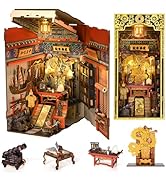
Image 2: All components included in the kit.
- Interior Wood Board sheets
- External Wood Board sheets
- Instruction Manual (Clear 3D Color Manual)
- Dust Cover (Acrylic)
- Adhesive Paper (for book covers and details)
- LED Lights with wiring and battery box
- Glue (B-7000 type recommended)
- Tweezers
- Frosted Rod
- Small Hammer
- Accessory Pack (various small decorative items)
4. Assembly Instructions
The assembly process typically takes 6-10 hours. Follow the detailed steps in the included 3D color manual. A downloadable E-manual is also available for easy zooming of pictures.
4.1. Preparation
- Clear a well-lit, spacious workspace.
- Familiarize yourself with the instruction manual and identify all parts.
- Prepare 2 AAA batteries (not included) for the LED lights.

Image 3: Following the detailed instructions for assembly.
4.2. General Assembly Steps
- Punch Out Pieces: Carefully detach each wooden piece from its sheet. Use the provided hammer or a craft knife if necessary.
- Apply Stickers: Use the adhesive paper to decorate miniature books and other elements as indicated in the manual. Tweezers are helpful for precision.
- Assemble Structures: Follow the numerical sequence in the manual to connect the wooden pieces. The pieces are designed to fit snugly; use glue for permanent adhesion.
- Install LED Lights: Integrate the LED wiring and lights as instructed. Ensure all connections are secure before final assembly.
- Add Details: Place all miniature furniture and decorative accessories in their designated spots.
- Final Enclosure: Secure the outer panels and the dust cover.

Image 4: Exploded view of the kit's main components.
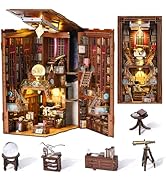
Image 5: Examples of miniature furniture pieces.
4.3. Assembly Videos
The following videos provide visual guidance for the assembly process. While some videos may feature different MiniCity book nook models, the general assembly techniques and principles are applicable.
Video 1: Detailed assembly guide for a MiniCity Book Nook Kit (Law Library model), demonstrating various construction steps.
Video 2: Assembly demonstration for the Abbey Library Book Nook, highlighting intricate details and construction techniques.
Video 3: Overview of the BELEEV Magic World Book Nook Kit assembly, showing the unboxing and initial steps.
5. Operating Instructions
5.1. LED Lighting
Your MiniCity Book Nook is equipped with warm LED lights to illuminate the miniature scene. The lights are controlled by a touch switch.
- Ensure 2 AAA batteries are correctly installed in the battery box.
- Locate the touch switch, typically integrated into the top or side panel of the book nook.
- Gently touch the switch to turn the LED lights on or off.
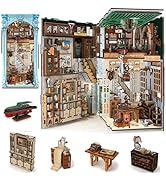
Image 6: Activating the LED lights with the touch switch.
5.2. Dust Cover
A transparent dust cover is included to protect your miniature scene from dust and maintain its pristine condition.
- After completing assembly, carefully slide the dust cover into the designated grooves on the top of the book nook.
- Ensure it is securely fitted to prevent dust accumulation.
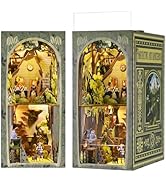
Image 7: Installing the dust cover.
6. Maintenance
- Cleaning: Use a soft, dry cloth or a small brush to gently remove dust from the interior. For the acrylic dust cover, use a soft cloth and a mild, non-abrasive cleaner if necessary.
- Storage: Store the book nook in a cool, dry place away from direct sunlight and extreme temperatures to prevent warping or fading of materials.
- Battery Replacement: Replace batteries when the LED lights dim. Follow the instructions for battery safety.
7. Troubleshooting
- LED Lights Not Working:
- Check if batteries are inserted correctly with the right polarity.
- Ensure batteries are new and fully charged.
- Verify all wiring connections are secure and not loose.
- Pieces Not Fitting:
- Refer to the 3D color manual to ensure the correct piece is being used for the step.
- Apply gentle pressure. If a piece is too tight, lightly sand the edges with fine-grit sandpaper (not included).
- Missing or Damaged Parts:
- The kit is 100% checked before delivery. If any parts are missing or damaged, please contact MiniCity customer support for assistance.
8. Specifications
| Brand | MiniCity |
| Model | Public Library |
| Material | Wood |
| Product Dimensions | 17.78 x 22.86 x 10.92 cm |
| Product Weight | 1.74 kg |
| Recommended Age | 14 years and up |
| Batteries Required | Yes (2 x AAA, not included) |
| Assembly Required | Yes |
| Educational Objective | Enhance fine motor skills, patience, and creativity |
9. Warranty and Support
MiniCity ensures that each Book Nook Kit undergoes a 100% careful check before delivery to confirm all accessories are complete and accounted for. If you have any questions or encounter issues during assembly, please do not hesitate to contact MiniCity customer support. We are committed to resolving any problems as quickly as possible.
For support, please refer to the contact information provided with your purchase or on the official MiniCity website.
Related documentsPublic Library


Ask a question about this manual
Ask about setup, troubleshooting, compatibility, parts, safety, or missing instructions. Manuals+ will review the question and use this page’s manual context to help answer it.