
Introduction
Welcome to the anyloop AMOLED Fitness Tracker Watch user manual. This guide provides detailed instructions on how to set up, operate, maintain, and troubleshoot your new fitness tracker. Designed for men and women, this device offers comprehensive health monitoring, activity tracking, and smart notifications to help you achieve your fitness goals and stay connected.
Key Features
- Stunning AMOLED Display & Premium Metal Design: 1.58" AMOLED Screen with 228×460 resolution and 450 nits brightness. Durable curved metal casing and clasp for comfortable wear. Over 100 customizable watch faces.
- Super Swimming Algorithm & IP68 Waterproofing: Calculates swimming trips, time, calories, and heart rate. Suitable for daily activities like handwashing, showers, and rainy weather, with water resistance up to 1.5 meters.
- SpO2 & 24/7 Heart Rate Tracking: Manual single-time blood oxygen and real-time heart rate monitoring. Alarms for high heart rate saturation.
- Advanced Sleep & Stress Tracking: Measures deep sleep, light sleep, awake periods, and supports nap tracking. Manual stress monitoring for real-time well-being assessment.
- 100+ Sports Modes & All-Day Activity Tracking: Tracks various exercises including walking, running, cycling, swimming, and more. Records all-day activities with professional analysis.
- Intelligent Notifications & Multifunctional Assistance: Connects to iOS/Android smartphones for timely alerts (calls, messages, emails, social media). Includes weather updates, menstrual cycle reminders, camera/music control, sedentary/drink water reminders, alarm clock, stopwatch, and more.
- 21+ Days Ultra Long Battery Life: Built-in 250mAh battery provides 21 days standby time or 10-12 days of daily use with 1.5 hours magnetic charging.
Setup
What's Included
Your anyloop Fitness Tracker Watch package includes:
- anyloop AMOLED Fitness Tracker Watch
- Charging Cable (1)
- User Manual
Initial Setup & Charging
Before first use, ensure your watch is fully charged.
- Power On: Hold the side button for 3 seconds to power on the watch.
- Charging: Connect the magnetic charging cable to the charging points on the back of the watch. Connect the USB end to a power adapter (not included) or a computer USB port. A full charge takes approximately 1.5 hours.

The anyloop AMOLED Fitness Tracker Watch with its sleek design.

Magnetic charging cable attached to the back of the watch.
App Download & Pairing
To unlock the full potential of your anyloop Fitness Tracker, download and pair it with the official anyloop App.
- Download App: Scan the QR code provided in the manual or on the watch screen (if available) or search for "anyloop App" in the App Store (iOS 9.0+ and above) or Google Play Store (Android 5.0 and above).
- Enable Bluetooth: Ensure Bluetooth is enabled on your smartphone.
- Open App & Register: Open the anyloop App and follow the on-screen instructions to register your account.
- Add Device: In the app, navigate to "More settings" and select "Add Device". Choose your watch's Bluetooth name (e.g., "anyloop Band 2") from the list to initiate pairing.
- Confirm Pairing: Accept the binding request on both your phone and the watch. Once paired, the watch will automatically sync time and data.
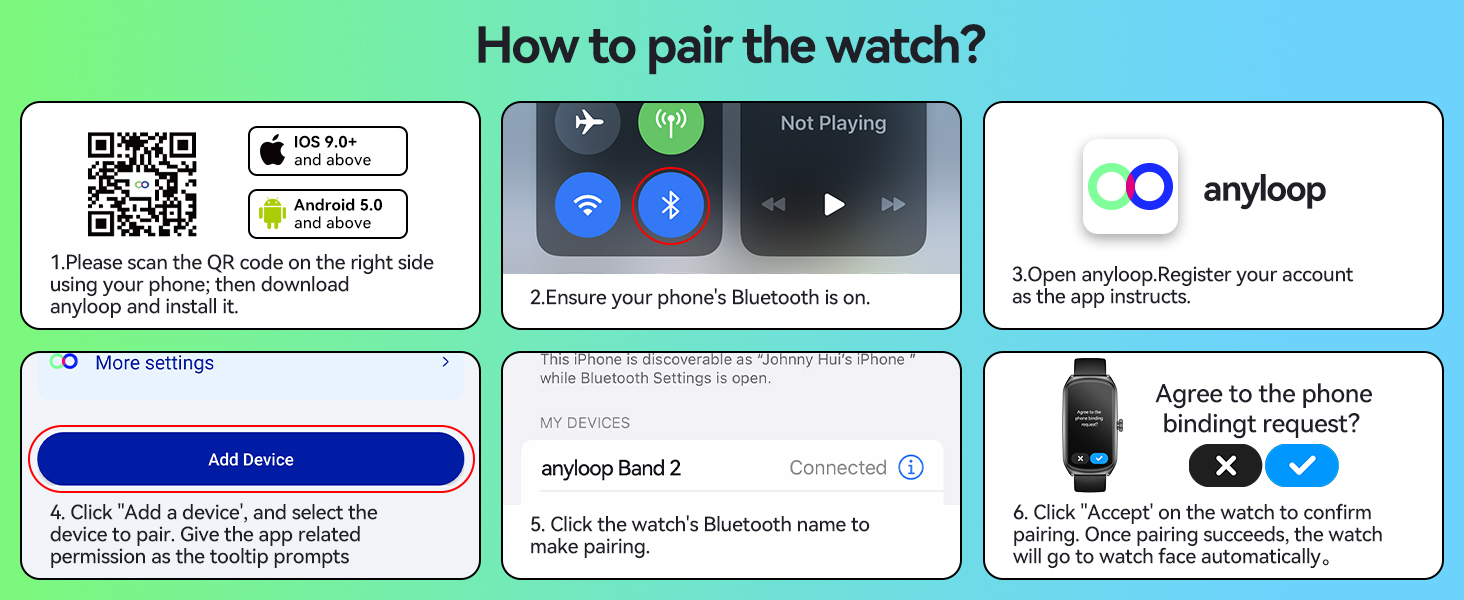
Step-by-step guide for pairing your anyloop watch with the app.
Official video demonstrating the features and setup of the anyloop Fitness Tracker Band 2.
Operating Your Device
Basic Navigation
The anyloop Fitness Tracker features a full touch screen and a side button for navigation.
- Touchscreen: Swipe left/right or up/down to navigate through different screens and menus. Tap to select an option.
- Side Button: Press the side button to wake the screen, return to the main watch face, or access the app list.
- Raise to Wake: The screen will automatically light up when you raise your wrist to view the watch.
Customization
Personalize your watch to match your style and needs.
- Watch Faces: Choose from over 100 watch faces available in the anyloop App. You can also personalize the watch face with your own photos.

Explore over 100 watch faces and personalize your display.
Intelligent Notifications
Stay connected by receiving alerts directly on your wrist.
- Receive timely alerts for incoming calls, messages, emails, and social media notifications (e.g., WhatsApp, Facebook, Instagram, TikTok) through vibrations and on-screen displays.

View calls, messages, and social media notifications directly on your watch.
Music Control
Control your smartphone's music playback directly from your watch.
- Access music controls to play, pause, skip tracks, and adjust volume.
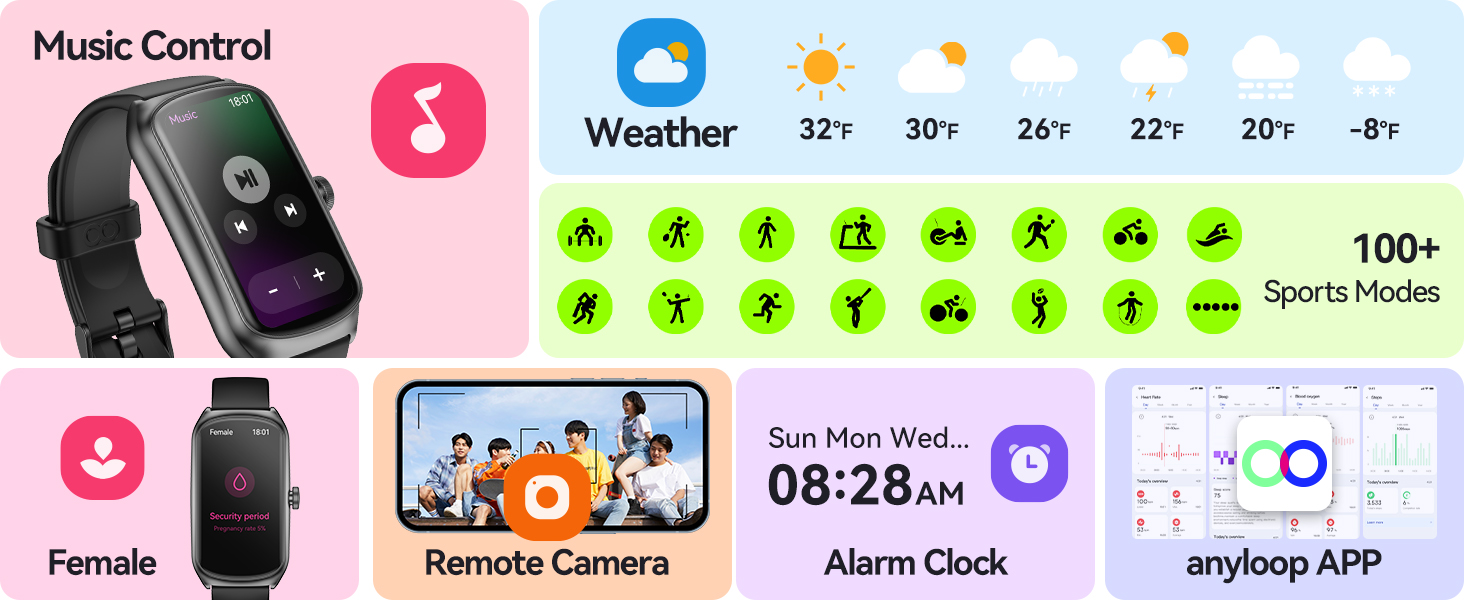
Control music playback and access various smart features.
Health Monitoring
Your anyloop Fitness Tracker provides comprehensive health data to help you stay informed about your well-being.
- 24/7 Heart Rate Tracking: Monitors your heart rate in real-time throughout the day. The watch will sound an alarm if your heart rate saturation is high.
- SpO2 Monitoring: Offers manual single-time blood oxygen measurements. View detailed all-day records on the anyloop App.
- Advanced Sleep Tracking: Accurately measures sleep quality, including deep sleep, light sleep, and awake periods. Supports nap tracking to help improve sleep habits.
- Stress Tracking: Manual stress monitoring feature enables real-time assessment of your physical and mental well-being.

Detailed health metrics including heart rate, SpO2, and sleep data.
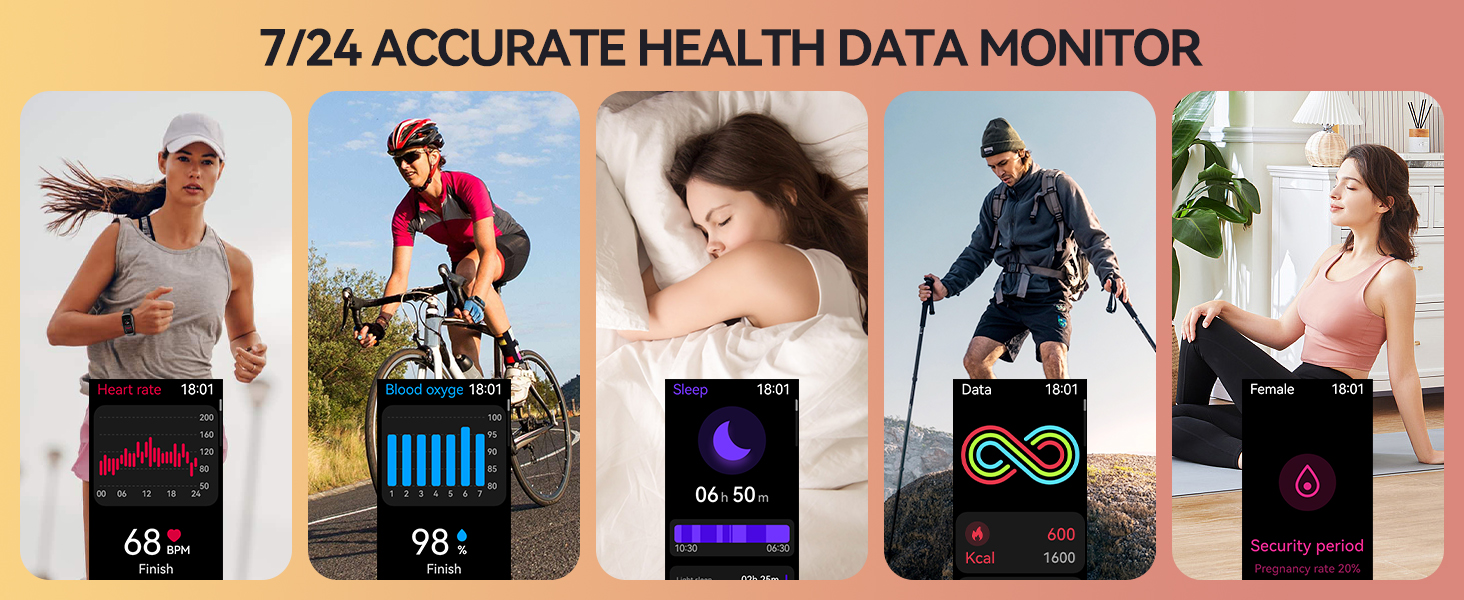
Continuous monitoring of heart rate, blood oxygen, sleep, and other health parameters.
Activity Tracking
Track your workouts and daily activities with precision.
- 100+ Sports Modes: Select from a wide range of sports modes including Walking, Running, Treadmill, Hiking, Cycling, Basketball, Swimming, and more.
- All-Day Activity Tracking: Accurately records steps, calories burned, and distance covered.
- Super Swimming Algorithm: Specifically designed for swimming enthusiasts, it calculates trips, time, calories, and heart rate during swimming sessions. You can set swimming goals and pool length.
- IP68 Waterproofing: The watch is IP68 waterproof, making it suitable for daily activities like handwashing, showers, and rainy weather. It can withstand water depth up to 1.5 meters.

Track your performance across 100+ professional sports modes, including swimming.

The tracker supports over 100 sports modes for diverse activities.
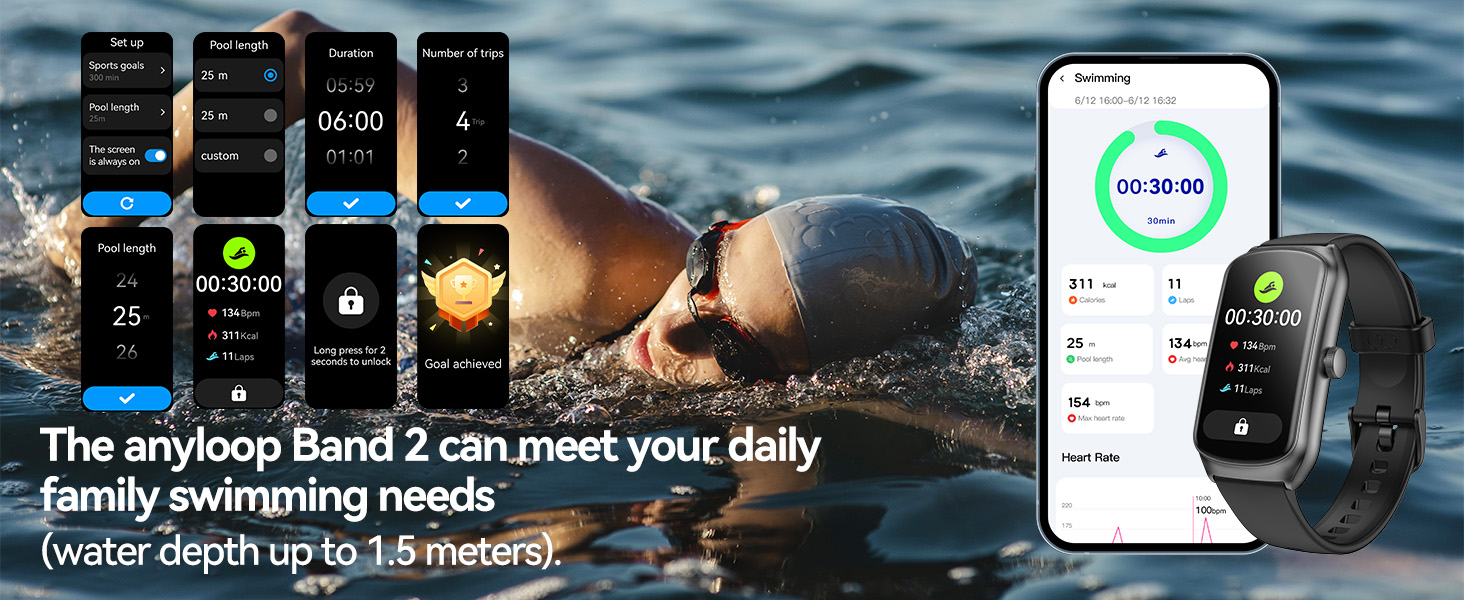
The anyloop Band 2 is waterproof and suitable for swimming up to 1.5 meters.
Other Smart Functions
The anyloop Fitness Tracker offers a variety of additional smart features:
- Weather Updates: Get real-time weather information.
- Menstrual Cycle Reminders: For women, track and receive reminders for menstrual cycles.
- Remote Camera Control: Control your smartphone's camera remotely from your watch.
- Alarm Clock, Stopwatch, Timer: Utilize these convenient tools for daily tasks and workouts.
- Sedentary & Drink Water Reminders: Receive alerts to encourage movement and hydration.
- Find Phone: Locate your misplaced smartphone using your watch.

Manage your body data and discover more features within the anyloop App.
Maintenance
Cleaning
To ensure optimal performance and longevity of your device, keep it clean and dry.
- Wipe the watch and band regularly with a soft, damp cloth.
- Avoid using harsh chemicals or abrasive materials.
- Ensure the charging contacts are clean and dry before charging.
Water Resistance
The anyloop Fitness Tracker Watch is IP68 waterproof.
- It is suitable for daily activities such as handwashing, showering, and use in rainy weather.
- It can withstand immersion in water up to 1.5 meters.
- Avoid prolonged exposure to hot water or steam (e.g., hot tubs, saunas) as this may affect water resistance.
Battery Care
Proper battery care helps maximize the lifespan of your device.
- Charge the watch using the provided magnetic charging cable.
- A full charge takes approximately 1.5 hours.
- The 250mAh battery supports up to 21 days of standby time or 10-12 days of daily use.
- Avoid completely draining the battery frequently.

Information on battery life and magnetic suction charging.
Troubleshooting
If you encounter any issues with your anyloop Fitness Tracker Watch, please refer to the following common solutions:
- Watch not powering on: Ensure the watch is fully charged. Hold the side button for 3 seconds to power on.
- Unable to pair with phone:
- Ensure Bluetooth is enabled on your phone.
- Make sure the watch is within the Bluetooth range of your phone.
- Restart both your phone and the watch.
- Check if the anyloop App is updated to the latest version.
- Inaccurate health data (HR, SpO2): Ensure the watch is worn properly – snug but comfortable on your wrist, with the sensors making good contact with your skin.
- Screen unresponsive: Try pressing the side button to wake the screen. If unresponsive, restart the watch by holding the side button until it powers off, then power it back on.
- Weather not updating: Ensure your phone has a stable network connection and the anyloop App is running in the background.
For further assistance, please contact anyloop customer support.
Specifications
| Feature | Specification |
|---|---|
| Brand | anyloop |
| Model Name | ALB2 |
| Screen Size | 1.58 Inches AMOLED |
| Battery Capacity | 250 mAh |
| Battery Life (Daily Use) | 10-12 days |
| Battery Life (Standby) | 21+ days |
| Charging Time | 1.5 hours |
| Waterproof Rating | IP68 |
| Connectivity | Bluetooth |
| Operating System | anyloop APP (iOS 9.0+ / Android 5.0+) |
| Memory Storage Capacity | 128 MB |
| Item Package Dimensions | 5.9 x 3.14 x 0.6 inches |
| Package Weight | 80 Grams |
Warranty and Support
Your anyloop Fitness Tracker Watch comes with a 1-Year Warranty from the date of purchase.
For warranty claims, technical support, or any questions regarding your device, please contact anyloop customer service through the official website or the contact information provided in your product packaging.


