
Introduction
This manual provides comprehensive instructions for the assembly, operation, maintenance, and troubleshooting of your SEDETA Corner Computer Desk. This versatile U-shaped desk features a reversible design, integrated power outlet, LED lighting, three fabric drawers, and ample storage shelves, making it suitable for various home office and gaming setups.
Important Safety Information
Please read all safety warnings and instructions carefully before assembly and use. Failure to follow these instructions may result in injury or damage to the product.
- Ensure proper anchoring to the wall to prevent tipping. Wall anchoring hardware may be required and is recommended for stability.
- Do not exceed the weight limit of 76 pounds on the desk surface. Distribute weight evenly.
- Follow the assembly instructions carefully to ensure structural stability. Do not overtighten screws.
- Keep electrical components (power outlet, LED lights) away from water and moisture to prevent electric shock.
- Do not modify the electrical components or wiring.
- Keep small parts and packaging materials away from children to prevent choking hazards.
Setup and Assembly
The SEDETA Corner Computer Desk requires assembly. It is recommended that two people perform the assembly for ease and safety.
Before beginning, ensure all parts are present and undamaged. Refer to the included hardware pack and assembly guide for detailed step-by-step instructions.
Reversible Design
This desk features a reversible design, allowing you to configure the L-shape with the longer section on either the left or right side to best suit your space. Follow the specific instructions in your assembly guide for the desired orientation.
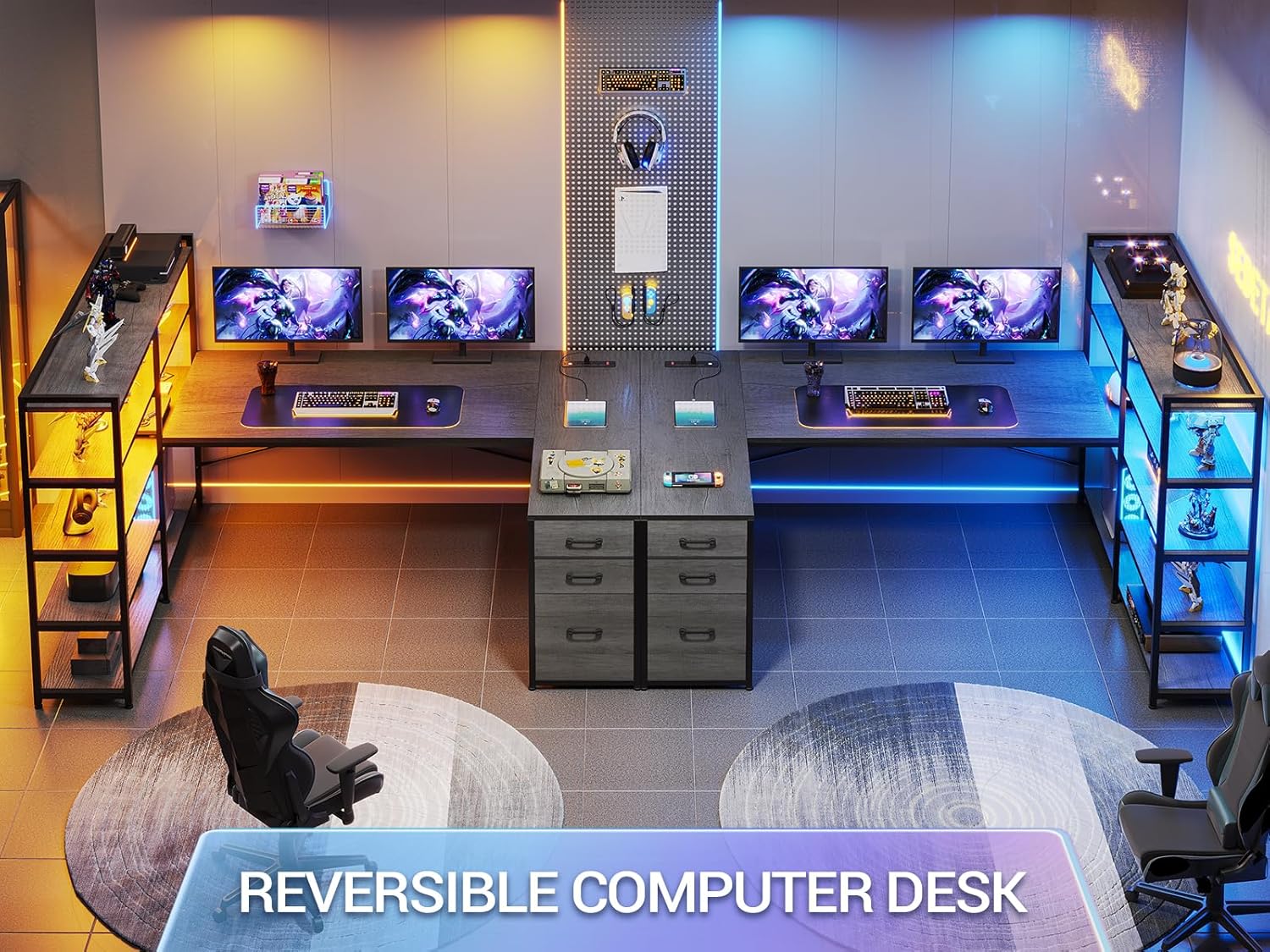
The desk can be assembled in two different orientations to fit your room layout.
Product Dimensions
Understanding the dimensions is crucial for proper placement and assembly. The overall dimensions are approximately 19"D x 64.5"W x 29.5"H. The desk offers a large workspace, with the main desk surface measuring approximately 64.5 inches in length.
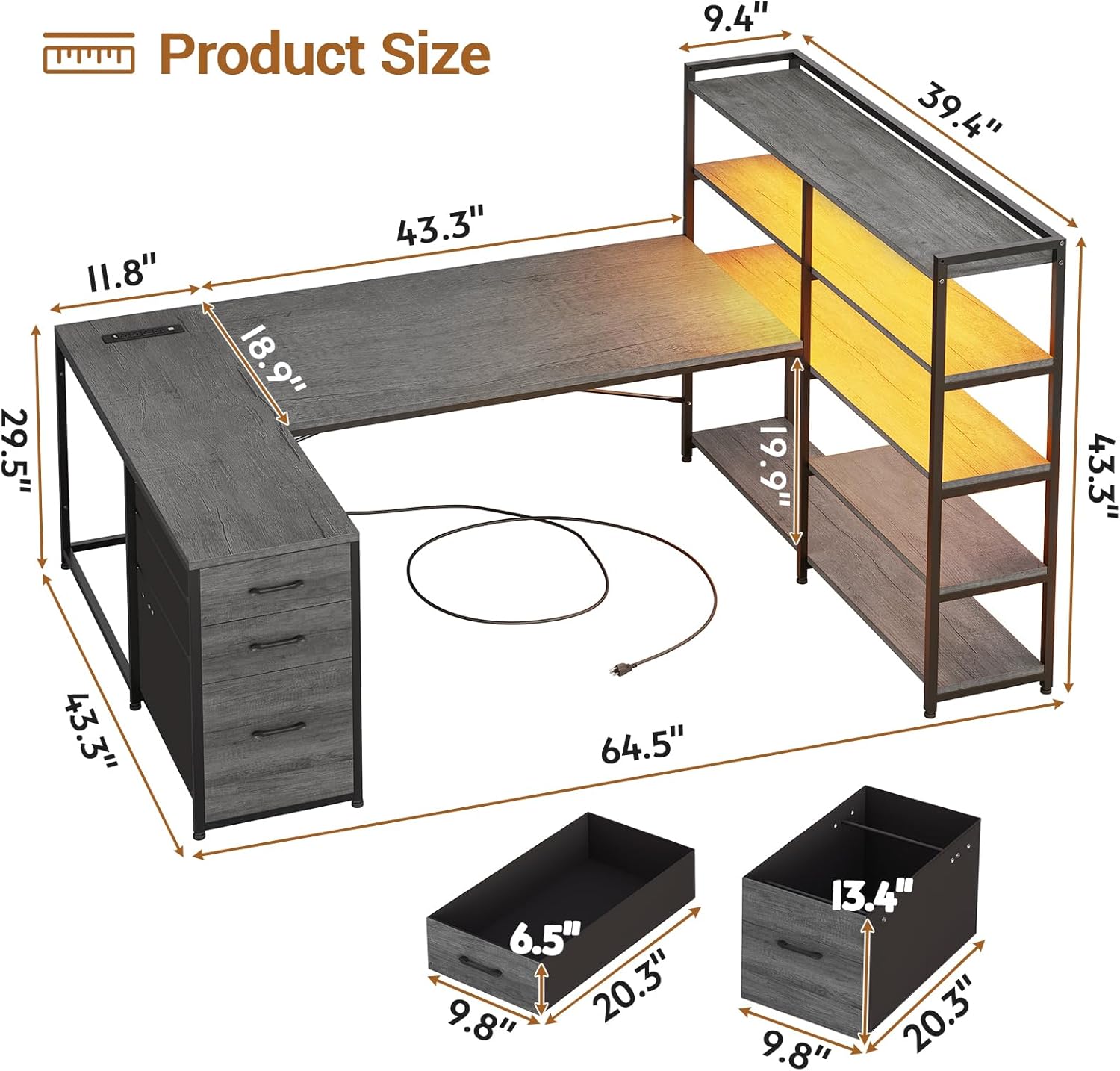
Detailed product dimensions for planning your space.

The desk provides a spacious 64.5-inch main working surface.
Operating Instructions
Integrated Power Outlet
The desk is equipped with a built-in power strip for convenient access to power. This charging station includes:
- 4 AC Outlets (125V/12A)
- 2 USB Ports (5V/2A)
- 1 On/Off Power Switch
To use, simply plug the desk's power cord into a wall outlet. Use the integrated power switch to turn the power strip on or off, ensuring safe electricity use and easy power management for connected devices like cell phones, tablets, and notebooks.
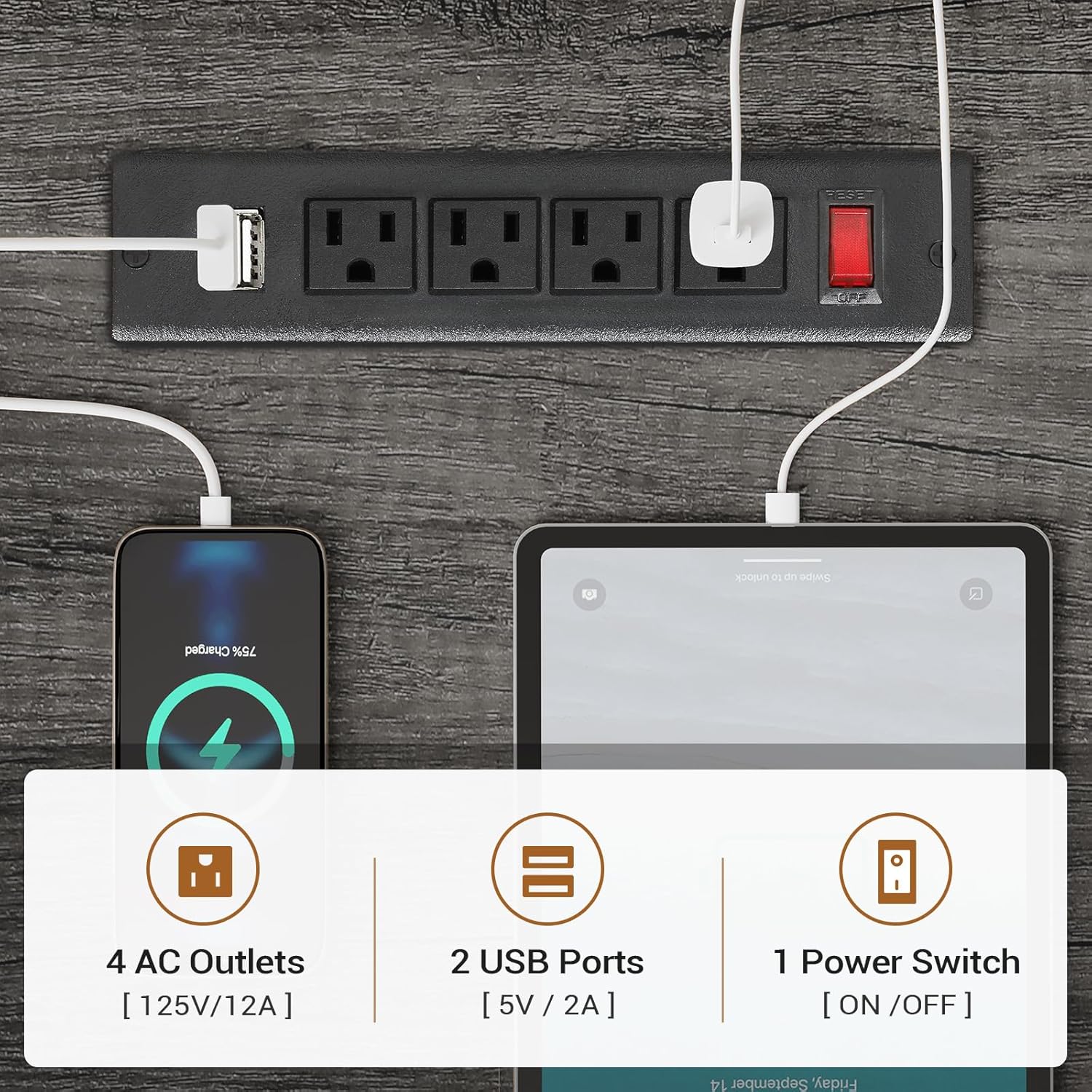
The integrated power strip provides convenient charging for multiple devices.
LED Lighting System
The corner gaming desk features RGB LED lights for customizable ambiance. The LED lights can be controlled via a remote control or a dedicated mobile application.
- Color Options: Choose from over 60,000 colors.
- Flashing Modes: Select from 29 different flashing modes.
- Music Sync Function: The built-in sensitivity adjustable microphone allows the LED light color to change rhythmically with sound and music.
- Control: Use the provided remote control or download the specified app for advanced control options.

Control your LED lights with a remote or smartphone app for dynamic lighting effects.
Fabric Storage Drawers
The desk includes three fabric drawers designed for organized storage. These drawers can accommodate various document sizes, including Legal, Letter, and A4 files. The top drawer can also serve as a general storage cabinet for office items.

The fabric drawers provide versatile storage for documents and office supplies.
Storage Shelves
The desk features a 5-tier storage shelf unit, providing ample space for books, files, printers, and decorative items. These shelves are integrated into the desk's design, offering convenient access to your essentials.
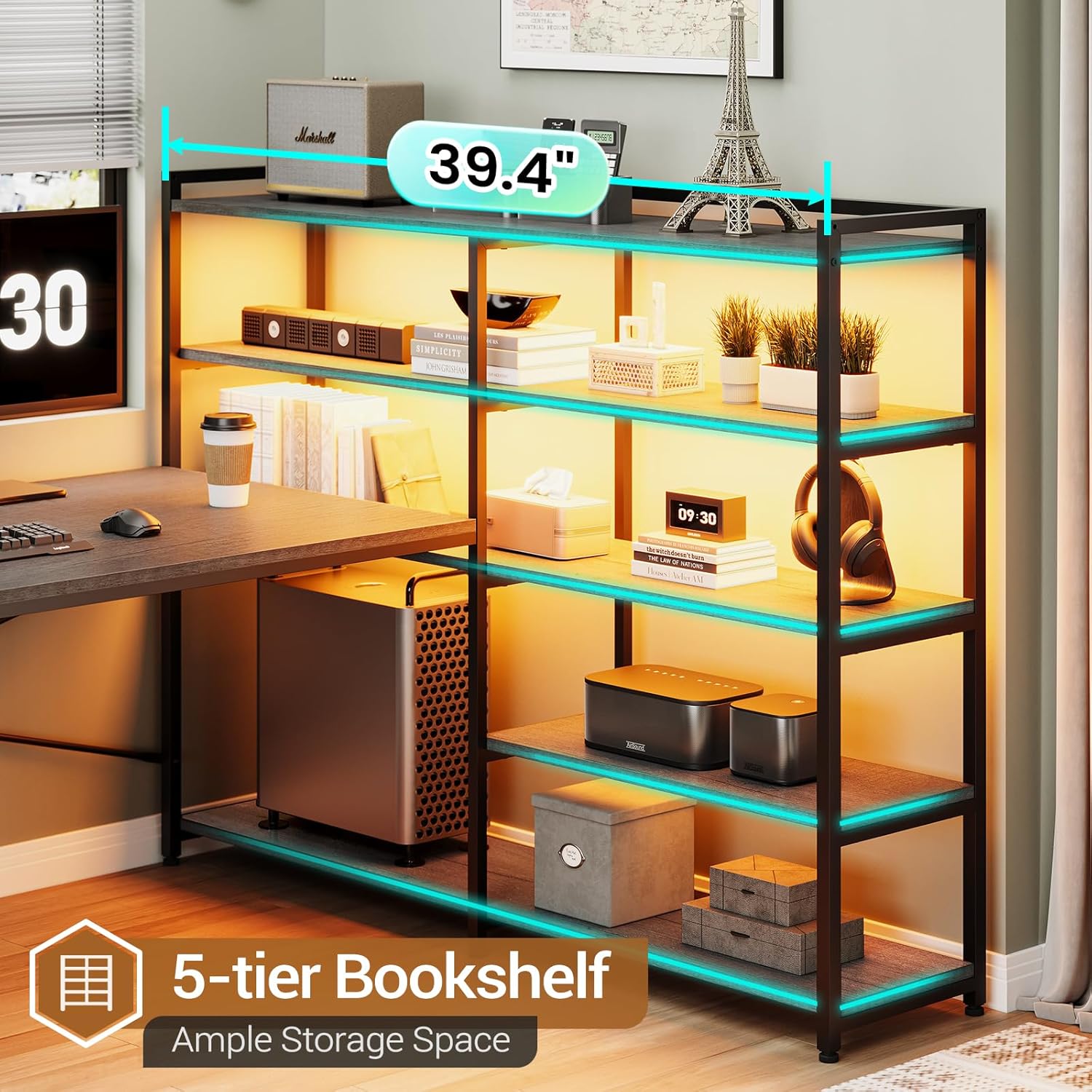
The 5-tier bookshelf offers extensive storage capacity.
Maintenance
- Cleaning: Wipe the desk surfaces with a soft, damp cloth. Avoid harsh chemicals or abrasive cleaners that may damage the finish.
- Dusting: Regularly dust all surfaces, including shelves and drawers, to prevent buildup.
- Electrical Components: Ensure the power outlet and LED lights are kept dry. If cleaning around these components, unplug the desk from the wall outlet first.
- Hardware: Periodically check all screws and fasteners to ensure they remain tight. Retighten if necessary to maintain stability.
- Fabric Drawers: Spot clean fabric drawers with a mild detergent and water if needed. Allow to air dry completely before reinserting.
Troubleshooting
| Problem | Possible Cause | Solution |
|---|---|---|
| Desk is wobbly or unstable. | Loose fasteners; uneven floor; improper assembly. | Check and tighten all screws. Ensure the desk is on a level surface. Verify assembly steps were followed correctly. Consider using the wall anchoring kit if not already installed. |
| LED lights are not working. | Power not connected; remote battery low; app connection issue; damaged wiring. | Ensure the desk's power cord is plugged in and the power strip switch is ON. Check remote control battery. Re-pair the app if using. Inspect wiring for visible damage (unplug first). |
| Power outlets/USB ports not providing power. | Power strip switch OFF; desk not plugged in; circuit breaker tripped. | Ensure the red power switch on the power strip is ON. Verify the desk's main power cord is securely plugged into a working wall outlet. Check your home's circuit breaker. |
| Drawers do not slide smoothly. | Obstruction; misaligned drawer slides; overloaded drawer. | Remove contents and check for obstructions. Ensure drawer slides are properly aligned and installed. Do not overload drawers beyond their capacity. |
Specifications
| Feature | Detail |
|---|---|
| Brand | SEDETA |
| Model Number | 265-desk |
| Model Name | Reversible Computer Desk |
| Product Dimensions (D x W x H) | 19"D x 64.5"W x 29.5"H |
| Item Weight | 76 Pounds |
| Weight Limit | 76 Pounds (on desk surface) |
| Color | Grey |
| Style | Industrial |
| Base Material | Iron |
| Top Material Type | Engineered Wood |
| Finish Type | Powder Coated |
| Special Features | Built-In USB Outlet, Reversible Design, LED Lights |
| Number of Drawers | 3 (Fabric Drawers) |
| Drawer Type | File Drawer (Legal/Letter/A4 compatible) |
| Number of Shelves | 5 |
| Power Outlet | 4 AC Outlets, 2 USB Ports, On/Off Switch |
| LED Lights | RGB, APP/Remote Control, Music Sync |
| Required Assembly | Yes |
| Recommended People for Assembly | 2 |
Warranty and Support
For any questions, concerns, or assistance with your SEDETA Corner Computer Desk, please contact SEDETA customer support. Refer to your purchase documentation or the SEDETA brand store for specific warranty details and contact information.
You can visit the official SEDETA store on Amazon for more information and support: SEDETA Store