
AquaClean AC1000 Pro
AquaClean AC1000 PRO Cordless Robotic Pool Cleaner User Manual
Model: AC1000 Pro
Introduction
Welcome to the AquaClean AC1000 PRO Cordless Robotic Pool Cleaner user manual. This guide provides essential information for the safe and efficient operation, maintenance, and troubleshooting of your new pool cleaner. Please read this manual thoroughly before first use and retain it for future reference.
Important Safety Information
Always follow basic safety precautions when using electrical appliances, especially near water.
- Read all instructions before operating the cleaner.
- Do not operate the cleaner if the power cord or charger is damaged.
- Ensure the cleaner is fully submerged before starting operation.
- Keep children and pets away from the pool area during operation.
- Disconnect the cleaner from the charger before performing any maintenance or cleaning.
- Use only the charger supplied by the manufacturer.
Product Features

The AquaClean AC1000 PRO, a cordless robotic pool cleaner, designed for efficient pool maintenance.

Side view of the AquaClean AC1000 PRO, highlighting its robust scrubbing brushes and durable tracks for comprehensive cleaning.
- Cordless Operation: Enjoy unrestricted movement and easy deployment without tangled cords.
- Comprehensive Coverage: Cleans pool floors, walls, and waterlines in pools up to 1500 sq. ft.
- Smart Navigation: Equipped with intelligent path planning for thorough and efficient cleaning.
- Long Battery Life: Provides up to 110 minutes of continuous cleaning on a single charge.
- Fast Charging: Quickly recharges to minimize downtime between cleaning cycles.
- Wall Climbing Capability: Designed to climb pool walls for complete surface cleaning.

Visual representation of the intelligent path planning system, ensuring no area of the pool is missed during cleaning.
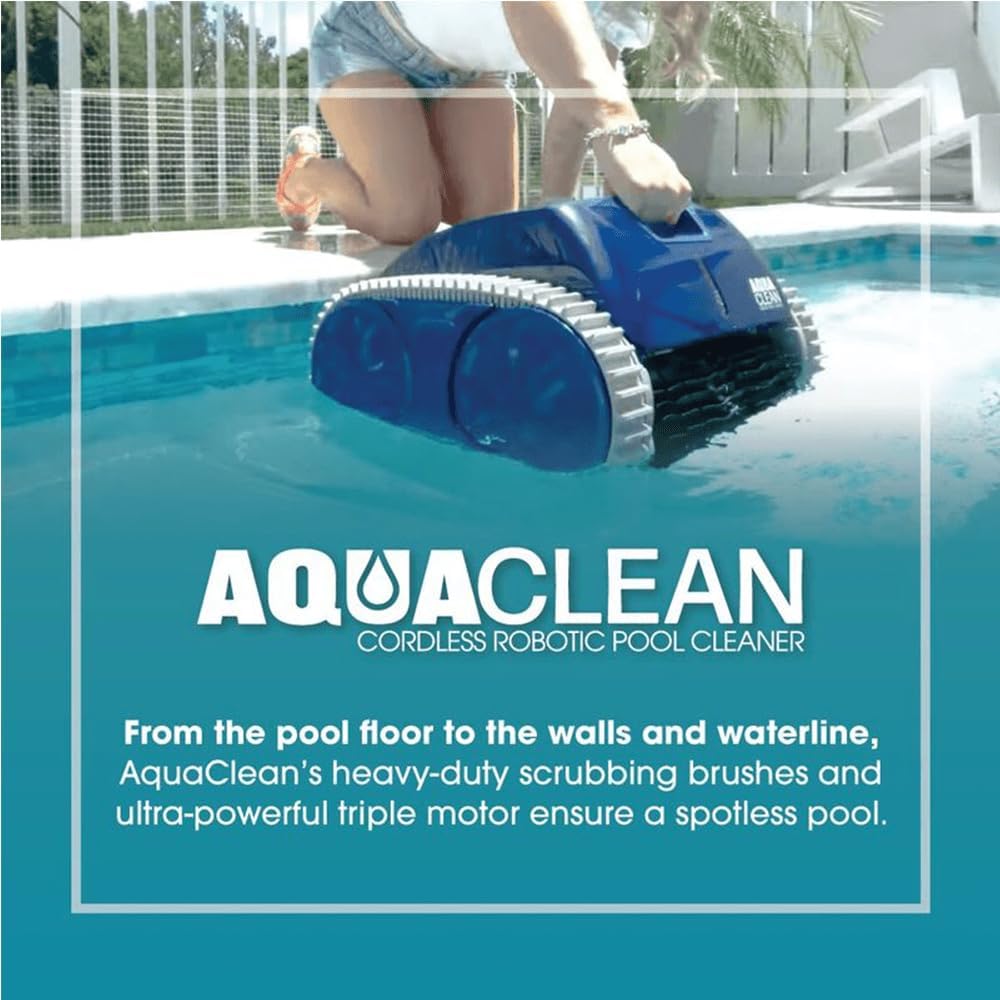
The AquaClean AC1000 PRO actively cleaning the waterline of an in-ground pool, demonstrating its wall-climbing ability.
Package Contents
Please check the package for the following items:
- AquaClean AC1000 PRO Robotic Pool Cleaner
- Fast Charging Power Adapter
- User Manual (this document)
- Filter Basket (pre-installed)
Setup
Initial Charging
Before first use, fully charge the AquaClean AC1000 PRO.
- Connect the fast charging power adapter to a suitable power outlet.
- Plug the charging cable into the charging port on the cleaner.
- The indicator light will show charging status (refer to LED indicator section for details).
- A full charge takes approximately 110 minutes.
Preparing the Cleaner
Ensure the filter basket is properly installed and clean before placing the cleaner in the pool.

The robust tracks and wheels of the AquaClean AC1000 PRO, designed for optimal movement on pool surfaces.
Operating Instructions
Placing the Cleaner in the Pool
- Gently lower the AquaClean AC1000 PRO into the pool.
- Allow it to sink to the bottom, ensuring all trapped air escapes.
Starting a Cleaning Cycle
The cleaner is controlled via a dedicated application.
- Ensure your smartphone or tablet is connected to the cleaner via Bluetooth or Wi-Fi (refer to app instructions for pairing).
- Open the AquaClean application.
- Select the desired cleaning mode (e.g., floor only, floor and walls, waterline).
- Press the "Start" button within the application to begin the cleaning cycle.
Ending a Cleaning Cycle
The cleaner will automatically return to a designated area or stop when the battery is low or the cycle is complete.
- Use the retrieval hook (if included, or carefully pull the cleaner using its handle) to lift the cleaner out of the pool.
- Allow excess water to drain from the cleaner.
Maintenance
Cleaning the Filter Basket
Regular cleaning of the filter basket is crucial for optimal performance.
- After each cleaning cycle, remove the filter basket from the cleaner.
- Empty any collected debris into a waste bin.
- Rinse the filter basket thoroughly with a garden hose until clean.
- Allow the filter basket to air dry completely before re-installing it.
Cleaning the Cleaner Body
Wipe down the exterior of the cleaner with a soft, damp cloth as needed. Do not use harsh chemicals or abrasive cleaners.
Storage
When not in use for extended periods, store the cleaner in a cool, dry place, away from direct sunlight and extreme temperatures. Ensure the battery is partially charged (around 50%) before long-term storage.
Troubleshooting
| Problem | Possible Cause | Solution |
|---|---|---|
| Cleaner does not start | Low battery; Power button not pressed; App not connected | Charge the cleaner; Ensure cleaner is turned on via app; Re-pair with app |
| Poor cleaning performance | Clogged filter basket; Obstruction in brushes; Low battery | Clean filter basket; Remove obstructions; Charge cleaner |
| Cleaner gets stuck | Large debris; Uneven pool surface | Remove large debris; Manually reposition cleaner; Ensure pool is free of obstacles |
| Cleaner does not climb walls | Dirty brushes/tracks; Low battery; Water chemistry imbalance | Clean brushes and tracks; Charge cleaner; Check pool water chemistry |
Specifications
| Feature | Detail |
|---|---|
| Model | AC1000 Pro |
| Brand | AquaClean |
| Power Source | Battery Powered |
| Item Weight | 20 Pounds (9.07 kg) |
| Special Feature | Smart Route Pattering, Up To 1500ft² (139m²) Pools, Fast Charging |
| Control Method | App |
| Battery Life | Up to 110 minutes |
| Charging Time | Approximately 110 minutes |
| Product Dimensions | 16.9"L x 11.8"W x 18.1"H (42.9 x 30 x 46 cm) |
| Material | Plastic |
| Color | Blue |
| UPC | 664254031366 |
Warranty and Support
For warranty information and technical support, please refer to the warranty card included with your product or visit the official AquaClean website.
If you encounter any issues not covered in this manual, please contact AquaClean customer service for assistance.
Related documentsAC1000 Pro


Ask a question about this manual
Ask about setup, troubleshooting, compatibility, parts, safety, or missing instructions. Manuals+ will review the question and use this page’s manual context to help answer it.