
EBTOOLS EBmzr6g92ngp-11
EBTOOLS 2MP 1920P HD Endoscope Inspection Camera User Manual
Model: EBmzr6g92ngp-11
Introduction
Thank you for purchasing the EBTOOLS 2MP 1920P HD Endoscope Inspection Camera. This device is designed for inspecting hard-to-reach areas, providing clear images and videos. It features an IP67 waterproof probe, 8 adjustable LED lights, and compatibility with iOS and Android devices. Please read this manual thoroughly before use to ensure proper operation and longevity of your device.
Product Overview
The EBTOOLS Endoscope Inspection Camera offers advanced features for detailed inspections:
- High-Resolution Imaging: Equipped with a 2.0MP camera, it captures clear snapshot images and videos at 1920x1440 resolution.
- Adjustable LED Illumination: Features 8 adjustable LED lights to provide optimal brightness in dark or dimly lit environments, ensuring clear visibility.
- Flexible and Durable Probe: The 7.9mm semi-rigid cable can be freely bent and maintains its shape, allowing easy navigation through complex spaces.
- IP67 Waterproof Rating: The camera probe is IP67 rated, enabling it to operate underwater for up to 1 hour at a maximum depth of 3.28 feet (1 meter).
- Wide Compatibility: Easily connects to iOS 9.0 and above, and Android 7 and above devices via a simple interface.
- Versatile Applications: Ideal for inspecting car engines, plumbing, residential wiring, and other inaccessible areas.

Image: The EBTOOLS Endoscope Camera, showcasing its flexible cable, control unit, and USB-C connector.
Package Contents
Please verify that all items are present in your package:
- 1 x Endoscope Camera (1m / 3.28ft)
- 1 x Adapter
- 4 x Sleeves
- 1 x Sleeve Storage Bottle
- 1 x Instruction Manual
Setup Guide
- Download the Application:
Search for SUP-ANESOK in your device's APP store (compatible with iOS 9.0+ and Android 7+). Alternatively, scan the QR code provided in the included instruction manual to download the application.
- Connect the Endoscope:
Plug the endoscope camera's USB-C connector into your compatible smartphone or tablet. Ensure the connection is secure.
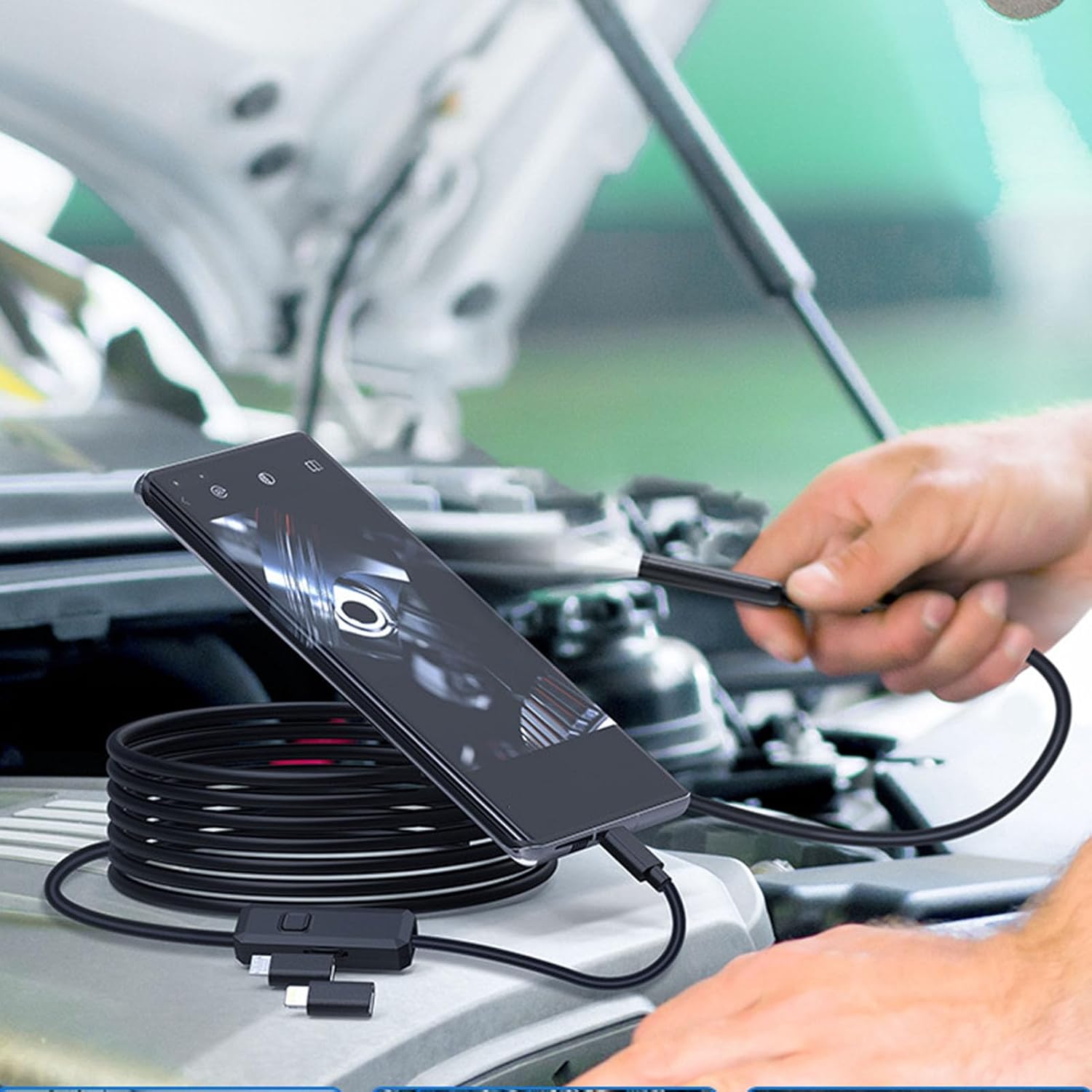
Image: The endoscope camera connected to a smartphone, demonstrating its use for inspecting a car engine.
- Launch the Application:
Open the SUP-ANESOK application on your device. The camera feed should appear automatically.
- Adjust LED Lights:
Use the integrated control unit on the cable to adjust the brightness of the 8 LED lights. This allows for optimal visibility in various lighting conditions.

Image: A close-up view of the endoscope camera head, highlighting the 8 LED lights and illustrating the 2-10cm focal length.
Operating Instructions
- Positioning the Probe:
Carefully guide the 7.9mm semi-rigid probe into the area you wish to inspect. The flexible cable allows you to maneuver it around obstacles.

Image: The endoscope camera demonstrating its versatility in various inspection scenarios, including AC vents, industrial pipes, and structural cracks.
- Adjusting Focus and Brightness:
The camera has a focal length of approximately 2-10cm (0.79-3.94 inches). Adjust the distance to the object for the clearest image. Use the LED brightness control on the cable to enhance visibility as needed.
- Capturing Images and Videos:
Within the SUP-ANESOK application, you can capture still images or record videos. Refer to the app's interface for specific buttons or gestures. The control unit on the cable also features a one-click photo button.

Image: A close-up of the endoscope's control unit, highlighting the one-click photo button for easy image capture.
- Reviewing Media:
Captured images and videos are saved directly to your connected device's gallery or within the SUP-ANESOK application. You can review them at any time.
Maintenance
- Cleaning the Lens: After each use, gently wipe the camera lens with a soft, dry cloth to remove any debris or moisture. For stubborn dirt, use a lens cleaning solution sparingly.
- Cable Care: Avoid sharp bends or kinks in the cable. Store it neatly coiled to prevent damage. The cable features a pure copper superconducting wire core for durability and stable image transmission.
- Water Exposure: While the probe is IP67 waterproof, ensure the USB connector and control unit are kept dry. If the probe has been submerged, dry it thoroughly before storage.
- Storage: Store the endoscope camera in a cool, dry place, away from direct sunlight and extreme temperatures. Use the provided sleeve storage bottle for accessories.

Image: A detailed view of the endoscope cable's internal structure, highlighting the pure copper superconducting wire core for enhanced durability and signal integrity.

Image: The endoscope camera probe submerged in water, visually confirming its IP67 waterproof rating and suitability for wet environments.
Troubleshooting
| Problem | Possible Cause | Solution |
|---|---|---|
| No image on screen | 1. Incorrect app installed or not running. 2. Loose connection. 3. Device not compatible. |
1. Ensure SUP-ANESOK app is installed and open. 2. Reconnect the endoscope firmly to your device. 3. Verify your device runs iOS 9.0+ or Android 7+. |
| Image is blurry | 1. Incorrect focal distance. 2. Dirty lens. 3. Insufficient lighting. |
1. Adjust the distance between the camera and the object (optimal 2-10cm). 2. Clean the camera lens. 3. Increase LED brightness using the control unit. |
| LED lights not working | 1. Brightness set to minimum. 2. Power issue. |
1. Adjust the brightness dial on the control unit. 2. Ensure the endoscope is properly connected and receiving power from your device. |
| Cannot connect to device | 1. Incompatible device. 2. App permissions not granted. |
1. Check device compatibility (iOS 9.0+ / Android 7+). 2. Grant all necessary permissions to the SUP-ANESOK app in your device settings. |
Specifications
| Brand | EBTOOLS |
| Model Number | EBmzr6g92ngp-11 |
| Item Type | Endoscope Camera |
| Material | ABS, Copper |
| Pixels | 2MP |
| Lens | Monocular |
| Focal Length | Approx. 2-10 cm (0.79-3.94 inches) |
| Auxiliary Light | 8 LED Lights |
| Lens Waterproof Rating | IP67 |
| Probe Diameter | 7.9 mm (0.3 inches) |
| Cable Length | 1 m (3.28 feet) |
| Compatibility | iOS 9.0+ / Android 7+ |
| Item Weight | 74 g |
| ASIN | B0DF5VT9CW |
Warranty and Support
For warranty information and technical support, please refer to the contact details provided with your purchase or visit the official EBTOOLS website. Keep your purchase receipt as proof of purchase for any warranty claims.
For further assistance, you may contact EBTOOLS customer service through their official channels. The brand store link is EBTOOLS Store on Amazon.co.jp.
Ask a question about this manual
Ask about setup, troubleshooting, compatibility, parts, safety, or missing instructions. Manuals+ will review the question and use this page’s manual context to help answer it.