
Product Overview
The XuanPad K10 Projector is a versatile home theater device designed for an immersive viewing experience. It features official Netflix licensing, automatic focus and keystone correction, and a highly adaptable 210° rotatable stand. With Full HD 1080P native resolution and 4K support, coupled with 700 ANSI brightness, it delivers clear and vibrant images. Advanced connectivity options include WiFi 6 and Bi-directional Bluetooth 5.2, ensuring seamless streaming and audio integration. The projector also incorporates a dust removal and efficient heat dissipation design for enhanced durability and performance.

Image: The XuanPad K10 Projector showcasing its compact design and integration with streaming services.
Setup Guide
Follow these steps for initial setup of your XuanPad K10 Projector:
- Unboxing: Carefully remove all components from the packaging. Ensure you have the projector, power cord, remote, HDMI cable, and AV cable.
- Power Connection: Connect the power cord to the projector's power input port and then to a power outlet. The power indicator light will illuminate.
- Placement: Place the projector on a stable, flat surface. The 210° rotatable stand allows for flexible positioning, including ceiling, tabletop, or floor mounting.
- Initial Power On: Press the power button on the projector or the remote control to turn on the device.
- Network Setup: Navigate to the 'Network' settings to connect to your Wi-Fi network. The projector supports fast WiFi 6 for stable wireless connections.
- Auto Focus & Keystone Correction: The projector features state-of-the-art AI focus and displacement gyroscope technology that automatically focuses and corrects trapezoidal distortion within 3 seconds. Manual adjustments can also be made via the remote if needed.
- App Access: The smart system provides seamless access to certified apps like Netflix. Ensure you are logged into your accounts to access content.
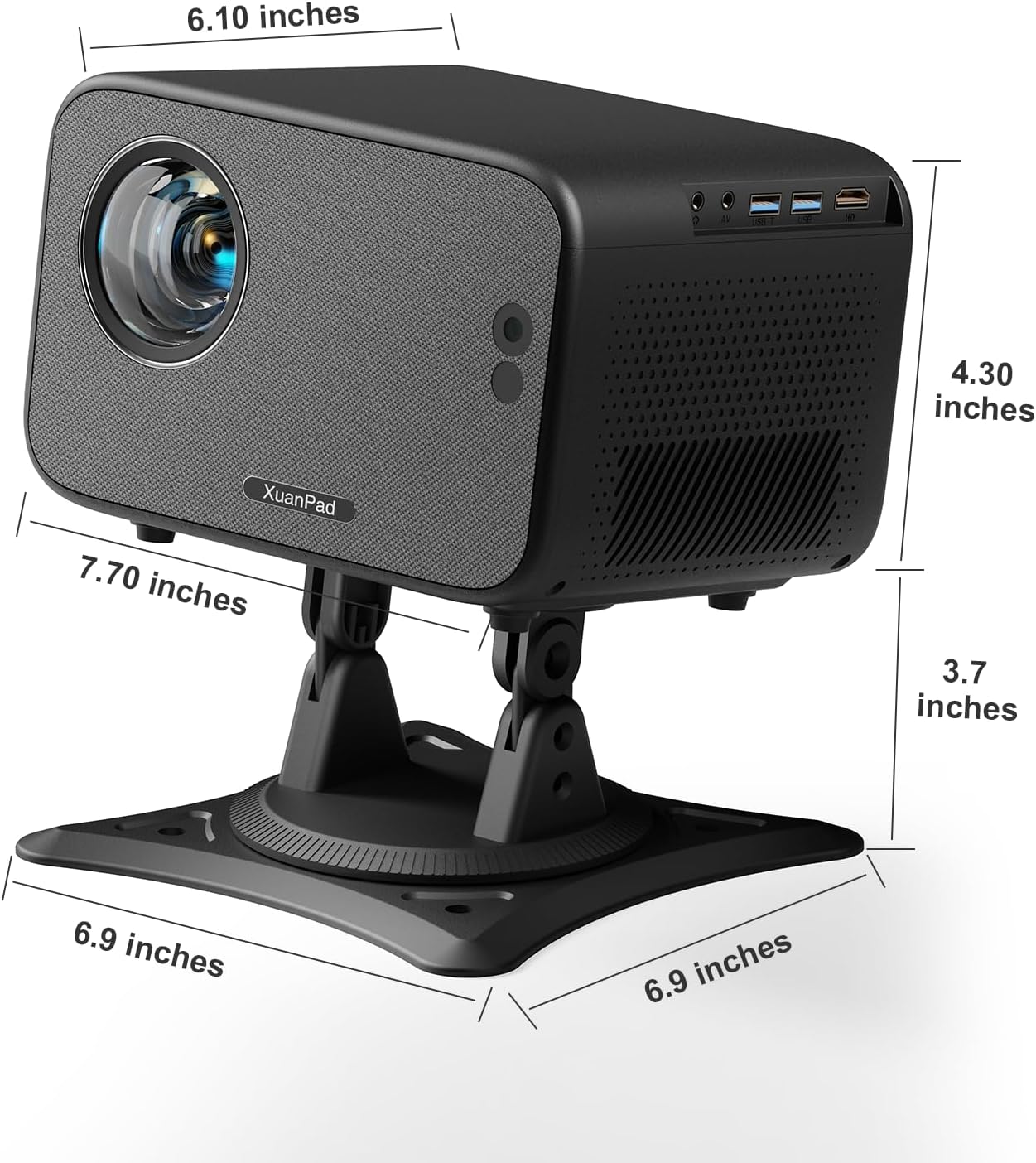
Image: Rear view of the projector highlighting the power input, USB, and HDMI ports for connectivity.
Operating Instructions
Adjusting Image Quality
- Auto Focus & Keystone: The projector automatically adjusts focus and corrects trapezoidal distortion. For manual adjustment, use the remote control's focus and keystone buttons.
- Zoom Function: Adjust the image size from 50% to 100% using the zoom setting in the menu.
- Brightness & Color: The projector offers 700 ANSI brightness and covers 99% of the NTSC color gamut. Adjust picture mode settings (e.g., standard, vivid, user) via the menu for optimal viewing.

Image: Visual representation of the projector's auto focus and auto keystone correction features.
Connectivity
- Wi-Fi 6: Connect to your home network for high-speed, stable streaming and wireless projection.
- Bi-directional Bluetooth 5.2: Connect external speakers or headphones for enhanced audio, or use the projector as a standalone Bluetooth speaker.
- HDMI & USB: Use the HDMI port to connect external devices like laptops, gaming consoles, or streaming sticks. The USB port allows for media playback from USB drives.

Image: Depiction of the projector's ultra-fast WiFi 6 capabilities for smooth streaming.
Maintenance
Regular maintenance ensures optimal performance and longevity of your projector:
- Dust Removal: The projector is designed with features to minimize dust accumulation. Periodically clean the exterior with a soft, dry cloth. Avoid using abrasive cleaners or solvents.
- Heat Dissipation: Ensure proper ventilation around the projector to allow for effective heat dissipation. Do not block the vents.
- Lens Cleaning: Use a specialized lens cleaning cloth and solution to gently clean the projector lens. Avoid touching the lens directly with your fingers.
- Storage: When not in use for extended periods, store the projector in a cool, dry place, away from direct sunlight and extreme temperatures.
Troubleshooting
If you encounter issues with your XuanPad K10 Projector, refer to the following common solutions:
- No Image/Blurry Image:
- Ensure the power cord is securely connected.
- Check the focus and keystone settings. The auto-focus feature should correct most blurriness.
- Verify the input source (HDMI, Home) is correctly selected.
- Adjust the projector's position to be perpendicular to the screen/wall.
- No Sound:
- Check the projector's volume level and ensure it is not muted.
- Verify audio connection cables (if using external speakers) are properly connected.
- Adjust audio output settings on the connected device.
- If using Bluetooth, ensure the external speaker is paired and connected.
- Connectivity Issues (Wi-Fi/Bluetooth):
- Ensure the Wi-Fi network is stable and within range.
- Restart the projector and your Wi-Fi router.
- For Bluetooth, ensure the external device is in pairing mode and within range.
- Remote Control Not Responding:
- Check and replace the batteries in the remote control.
- Ensure there are no obstructions between the remote and the projector's IR receiver.

Image: Detailed user guide providing tips for optimizing picture and audio quality.
Specifications
| Feature | Detail |
|---|---|
| Brand | XuanPad |
| Model Number | K10 |
| Item Weight | 5.35 pounds |
| Product Dimensions | 7.7 x 4.3 x 6.1 inches |
| Color | Black |
| Display Resolution | 1920 x 1080 (Native 1080P, 4K Support) |
| Brightness | 700 ANSI |
| Connectivity Technology | Bluetooth, HDMI, USB, Wi-Fi |
| Special Features | Auto Focus; Built-in Apps (Netflix licensed); 360° Rotatable Stand; 70° Vertical Adjustment; Auto Keystone Correction; Bi-directional Bluetooth 5.2; 50%-100% Zoom; 3D Stereo Sound; Portable Size |
| Visible Screen Diagonal | 300" / 762 cm |
Warranty & Support
Your XuanPad K10 Projector is designed for reliability and performance. For any inquiries or assistance, please refer to the following:
- Protection Plans: Extended protection plans are available for purchase, including 2-Year and 3-Year options.
- Customer Service: XuanPad offers 24/7 professional customer service.
- Technical Support: Lifetime technical support is provided for your product.
- Authenticity: This product is Verified by Transparency, ensuring its authenticity with a unique code verified before shipping.
For further assistance, please contact XuanPad customer support through their official channels.

Image: Information regarding XuanPad's 24/7 professional service and lifetime technical support.
