
Jectse Jectse12u8gy7kmn
Jectse RC Airplane Servo PDB Module User Manual
Model: Jectse12u8gy7kmn | Brand: Jectse
1. Introduction
The Jectse RC Airplane Servo PDB Module is specifically designed for RC fixed wing aircraft FPV applications. It provides a stable and adjustable power output for servo components, ensuring reliable performance for your aircraft's control systems.
This module integrates a 4Amp BEC (Battery Eliminator Circuit) to efficiently meet the power requirements of various servo setups. Its compact design and clear labeling facilitate easy and correct installation.
2. Product Overview
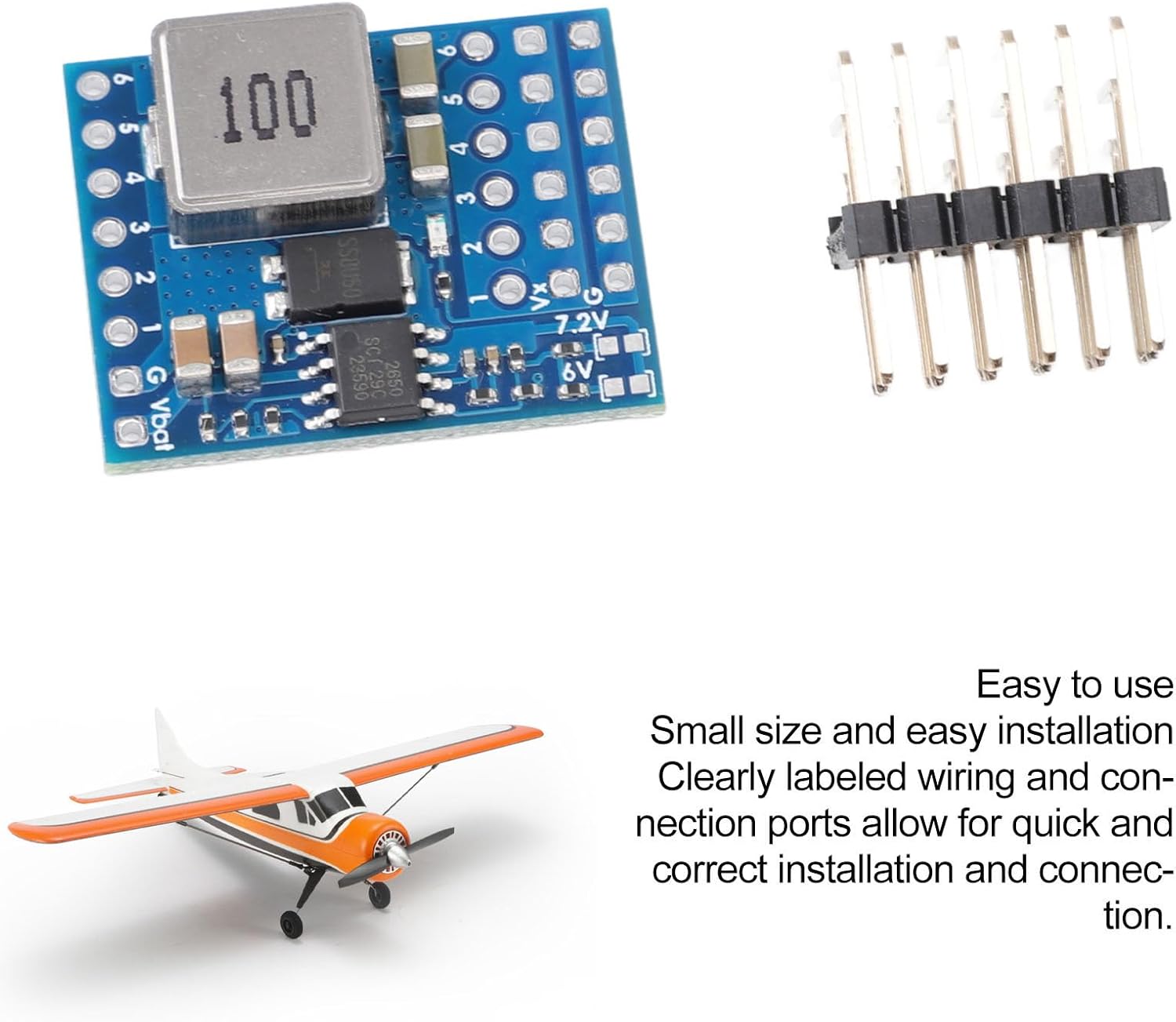
The Jectse RC Airplane Servo PDB Module is a printed circuit board (PCB) with integrated components for power regulation and distribution. It includes input terminals for battery connection and multiple output terminals for connecting servos.

3. Specifications
| Feature | Detail |
|---|---|
| Item Type | RC Airplane Servo PDB Module |
| Material | PCB |
| Application Scope | RC Fixed Wing Airplane FPV |
| Input Voltage Range | 5.5V to 36V (Compatible with lithium batteries up to 8S) |
| Output Voltage (Servo) | Default 5V, 6V, 7.2V (Adjustable 5V option) |
| Continuous Current Load | 4A |
| Burst Current Capacity | 7A |
| Integrated BEC | 4Amp |
| Package Dimensions | 4.72 x 3.15 x 0.39 inches |
| Item Weight | 0.317 ounces |
| Model Number | Jectse12u8gy7kmn |
4. Setup and Installation
The module is designed for straightforward installation due to its compact size and clearly labeled connection ports. Follow these steps for correct setup:
- Identify Connection Points: Locate the input voltage (Vbat) and ground (G) pads, as well as the servo output pads (1-6) and voltage selection jumpers (6V, 7.2V, 5V adjustable).
- Power Input: Connect your power source (5.5V to 36V, e.g., lithium battery up to 8S) to the Vbat and G pads. Ensure correct polarity to prevent damage.
- Servo Connections: Connect your servos to the numbered output pads. The module provides regulated power output for these servo components.
- Voltage Selection:
- The module supports default servo settings of 5V, 6V, and 7.2V.
- Use the jumpers or designated pads on the PCB to select the desired output voltage for your servos. Refer to the markings on the PCB for 6V and 7.2V options.
- An adjustable 5V option is also available for fine-tuning.
- Secure Installation: Mount the module securely within your RC fixed wing aircraft. Ensure it is protected from vibrations, moisture, and potential physical damage.

5. Operating Instructions
Once installed and connected, the module operates by converting the input voltage from your battery to the selected stable output voltage for your servos. It ensures efficient and consistent power delivery to all connected servo components.
- Power On: Apply power to the Vbat input. The integrated 4Amp BEC will automatically regulate the voltage for the servo outputs based on your selection.
- Current Capacity: The module provides a continuous current load of 4A and a burst current capacity of 7A, which is sufficient for most standard RC servo requirements. Ensure the total current draw of your servos does not exceed these limits.
- Performance Monitoring: During initial operation and subsequent flights, it is advisable to monitor the performance of your servos and the overall power system to ensure stable operation.

6. Maintenance
The Jectse RC Airplane Servo PDB Module is designed for durability and requires minimal maintenance. However, following these guidelines can help ensure its longevity and optimal performance:
- Keep Clean: Regularly inspect the module for dust, dirt, or debris. Gently clean with a soft, dry brush or compressed air if necessary. Avoid using liquids or harsh chemicals.
- Inspect Connections: Periodically check all wiring connections to ensure they are secure and free from corrosion or damage. Loose connections can lead to intermittent power supply or performance issues.
- Environmental Protection: Protect the module from extreme temperatures, high humidity, and direct sunlight. While robust, these conditions can degrade electronic components over time.
- Avoid Physical Stress: Do not bend or apply excessive force to the PCB or its components. Ensure it is mounted in a location where it will not be subjected to impacts or excessive vibration.
7. Troubleshooting
If you encounter issues with your Jectse RC Airplane Servo PDB Module, consider the following troubleshooting steps:
- No Power Output:
- Verify the input voltage source (battery) is charged and connected correctly to the Vbat and G pads.
- Check for any loose or disconnected wires in the power path.
- Ensure the input voltage is within the specified range (5.5V to 36V).
- Incorrect Output Voltage:
- Confirm that the voltage selection jumpers or settings are correctly configured for your desired output (5V, 6V, or 7.2V).
- Measure the output voltage with a multimeter to confirm the actual voltage.
- Servos Behaving Erratically or Weakly:
- This could indicate insufficient current. Ensure the total current draw of your servos does not consistently exceed the module's continuous (4A) or burst (7A) current capacity.
- Check for short circuits in the servo wiring or faulty servos.
- Verify that the servos themselves are functioning correctly by testing them with an alternative power source if possible.
- Module Overheating:
- Ensure adequate airflow around the module, especially if it's enclosed.
- Check if the current draw is consistently exceeding the continuous current rating, leading to excessive heat generation.
- Verify that the input voltage is not excessively high, which can cause the BEC to dissipate more heat.
If problems persist after attempting these steps, contact customer support for further assistance.
8. Warranty and Support
This product is covered by a standard return policy. For specific details regarding warranty coverage, returns, or technical support, please refer to the purchase platform or contact Jectse customer service directly.
Customer Service: For assistance, please visit the Jectse Store on Amazon or refer to the contact information provided with your purchase.
Ask a question about this manual
Ask about setup, troubleshooting, compatibility, parts, safety, or missing instructions. Manuals+ will review the question and use this page’s manual context to help answer it.