
1. Introduction
This manual provides essential instructions for the safe and effective use of your Radiomaster Pocket Crush 2.4GHz ELRS Hall Gimbal Transmitter. Please read this manual thoroughly before operating the device to ensure proper setup, operation, and maintenance. Retain this manual for future reference.
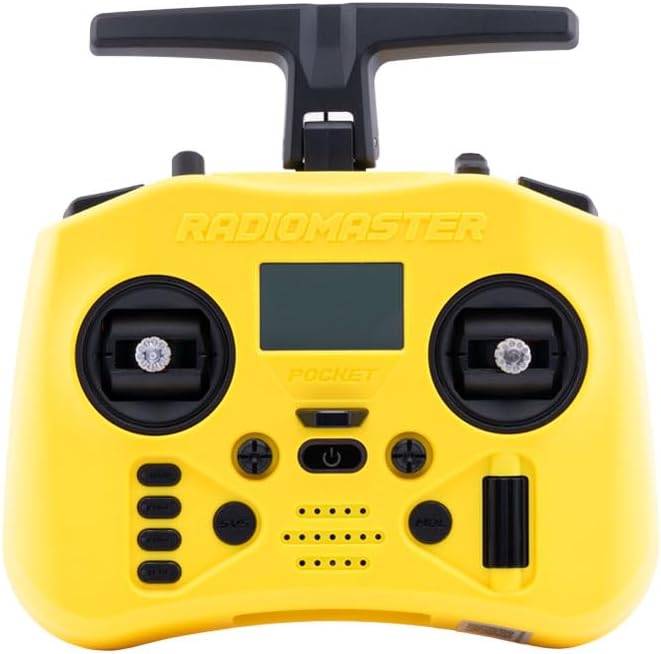
Figure 1.1: Front view of the Radiomaster Pocket Crush Transmitter.
2. What's in the Box
Upon unboxing your Radiomaster Pocket Crush, verify that all the following items are included:
- 1 x Pocket Crush Radio Transmitter
- 1 x Custom Carry Pouch
- 1 x USB-C Cable
- 1 x Screen Protector
- 1 x Sticker Sheet

Figure 2.1: Included items in the Radiomaster Pocket Crush package.
3. Setup
3.1 Battery Installation
The Pocket Crush transmitter requires two 18650 batteries (not included) for operation. To install:
- Locate the battery compartment on the rear of the transmitter.
- Open the battery compartment cover.
- Insert two 18650 batteries, ensuring correct polarity as indicated inside the compartment.
- Close the battery compartment cover securely.

Figure 3.1: Battery compartment for 18650 batteries.
3.2 Antenna and Stick End Configuration
The transmitter features a foldable antenna and removable stick ends for portability and customization.
- Antenna: Unfold the antenna to its upright position before operation to ensure optimal signal transmission. Fold it down for compact storage.
- Stick Ends: The included stick ends are removable. You can replace them with preferred aftermarket stick ends if desired.

Figure 3.2: Removable stick ends and foldable antenna for portability.
3.3 Initial Power-On and Binding
After battery installation, press and hold the power button to turn on the transmitter. The display will illuminate. Refer to the specific firmware documentation (e.g., EdgeTX manual) for detailed instructions on initial setup, model creation, and binding procedures with your receiver.

Figure 3.3: Close-up of a Hall effect gimbal.
4. Operating Instructions
4.1 Basic Controls
The Radiomaster Pocket Crush features X5 Hall effect gimbals for precise control and various switches for auxiliary functions.
- Gimbals: Control primary flight surfaces (e.g., aileron, elevator, rudder, throttle).
- Switches: Utilize the various two-position and three-position switches for arming, flight modes, and other programmable functions.
- Buttons: Navigate menus and confirm selections using the dedicated buttons below the display.

Figure 4.1: Side view illustrating switches and ports.
4.2 Display Navigation
The monochrome LCD provides essential information and access to transmitter settings. Use the scroll wheel and menu buttons to navigate through the firmware interface. Consult the firmware manual for detailed menu structures and parameter adjustments.
4.3 External Module Bay
The Pocket Crush includes an external Nano-size module bay, compatible with RadioMaster Nano-size modules and TBS Nano Crossfire/Nano Tracer modules. This allows for expanded protocol support and increased range capabilities.

Figure 4.2: External Nano Module Bay with an installed module.
5. Maintenance
5.1 Cleaning and Storage
- Keep the transmitter clean by wiping it with a soft, dry cloth. Avoid using harsh chemicals or solvents.
- Store the transmitter in a cool, dry place, away from direct sunlight and extreme temperatures.
- When storing for extended periods, remove the 18650 batteries to prevent leakage.
5.2 Firmware Updates
Regularly check for and install firmware updates for your transmitter. Firmware updates can improve performance, add new features, and fix bugs. Updates are typically performed via the USB-C port or an SD card. Refer to the official Radiomaster website or firmware documentation for the latest updates and instructions.
6. Troubleshooting
If you encounter issues with your Radiomaster Pocket Crush, consider the following troubleshooting steps:
- Transmitter Not Powering On: Ensure batteries are correctly installed and fully charged. Check for any physical damage to the battery contacts.
- Binding Issues: Verify that both the transmitter and receiver are in binding mode. Ensure the correct protocol is selected on the transmitter. Consult the receiver's manual for its specific binding procedure.
- Unresponsive Controls: Check that the gimbals and switches are physically intact. Recalibrate gimbals if necessary through the firmware settings.
- Display Problems: If the display is blank or shows errors, try restarting the transmitter. Ensure the screen protector is properly applied and not obstructing the view.
- Firmware Errors: If you experience unexpected behavior, consider performing a firmware re-flash or update. Back up your model settings before any firmware operations.
For persistent issues, refer to the comprehensive firmware documentation or contact Radiomaster customer support.
7. Specifications
Key technical specifications for the Radiomaster Pocket Crush Transmitter:
| Feature | Specification |
|---|---|
| Product Dimensions | 4 x 3 x 2 inches (approx.) |
| Weight | 288 grams (approx.) |
| Operating Frequency | 2.400GHz-2.480GHz |
| Internal RF Options | ELRS 2.4GHz |
| Control Distance | >2km @ 20dBm |
| Operating System | EdgeTX |
| Control Channels | Maximum 16 (receiver dependent) |
| Display | 128*64 Monochrome LCD |
| Battery | Two 18650 batteries (not included) |
| Charging | Built-in USB-C QC3 Charging |
| Gimbal Type | Hall-effect (upgradable to AG01 NANO CNC Hall effect gimbals) |
| Module Bay | Nano Size (Compatible with RadioMaster Nano-size modules, TBS Nano Crossfire / Nano Tracer) |
| Upgradable Firmware | Via USB or the included SD card |
8. Warranty and Support
For warranty information and technical support, please refer to the official Radiomaster website or contact your authorized dealer. Keep your proof of purchase for warranty claims. The manufacturer of this product is Greathobby RC.
9. Safety Information
Always operate your remote control equipment responsibly. Ensure you understand and comply with all local regulations regarding radio-controlled models. Never operate your transmitter in unsafe conditions or near people, animals, or property that could be harmed. Always perform pre-flight checks and ensure your model is functioning correctly before each use.
