Introduction
This manual provides essential information for the safe and efficient operation of your Nippon America AR-500 Automatic Voltage Regulator. The AR-500 is designed to stabilize voltage fluctuations, protecting connected electronic devices from potential damage caused by unstable power supply. Please read this manual thoroughly before installation and use, and retain it for future reference.
Safety Instructions
- Read all instructions: Before operating the device, ensure you have read and understood all safety and operating instructions.
- Proper Ventilation: Place the voltage regulator in a well-ventilated area. Do not block ventilation openings. Overheating can cause damage.
- Avoid Moisture: Do not expose the unit to rain, moisture, or excessive humidity.
- Correct Capacity: Do not exceed the maximum rated capacity of 500 watts. Overloading can damage the unit and connected appliances.
- Grounding: Ensure the unit is properly grounded.
- Power Cord: Do not use damaged power cords. Always grasp the plug, not the cord, when disconnecting from the power outlet.
- Internal Components: Do not attempt to open or service the unit yourself. Refer all servicing to qualified service personnel.
- Children and Pets: Keep the unit out of reach of children and pets.
Product Features
- 500 Watts Capacity: Provides stable power for devices up to 500 watts.
- Delay Output Circuit: Protects the transformer from frequent switching, extending appliance lifespan.
- Output Voltage Display: Integrated meter for real-time monitoring of output voltage.
- Dual AC Sockets: Two US standard sockets for 110V-120V appliances.
- Power On/Off Switch: Convenient control for unit operation.
- Input Voltage Selector: Allows selection between 110V and 220V input.
- High Voltage Protection: Safeguards connected appliances from excessive voltage.
- Efficient Heat Dissipation: Designed with large ventilation holes for effective internal heat management.
- Convenient Handle: Integrated handle for easy portability.

Figure 1: Front view of the Nippon America AR-500 Automatic Voltage Regulator, showing the output meter, power switch, AC outlets, and carrying handle.
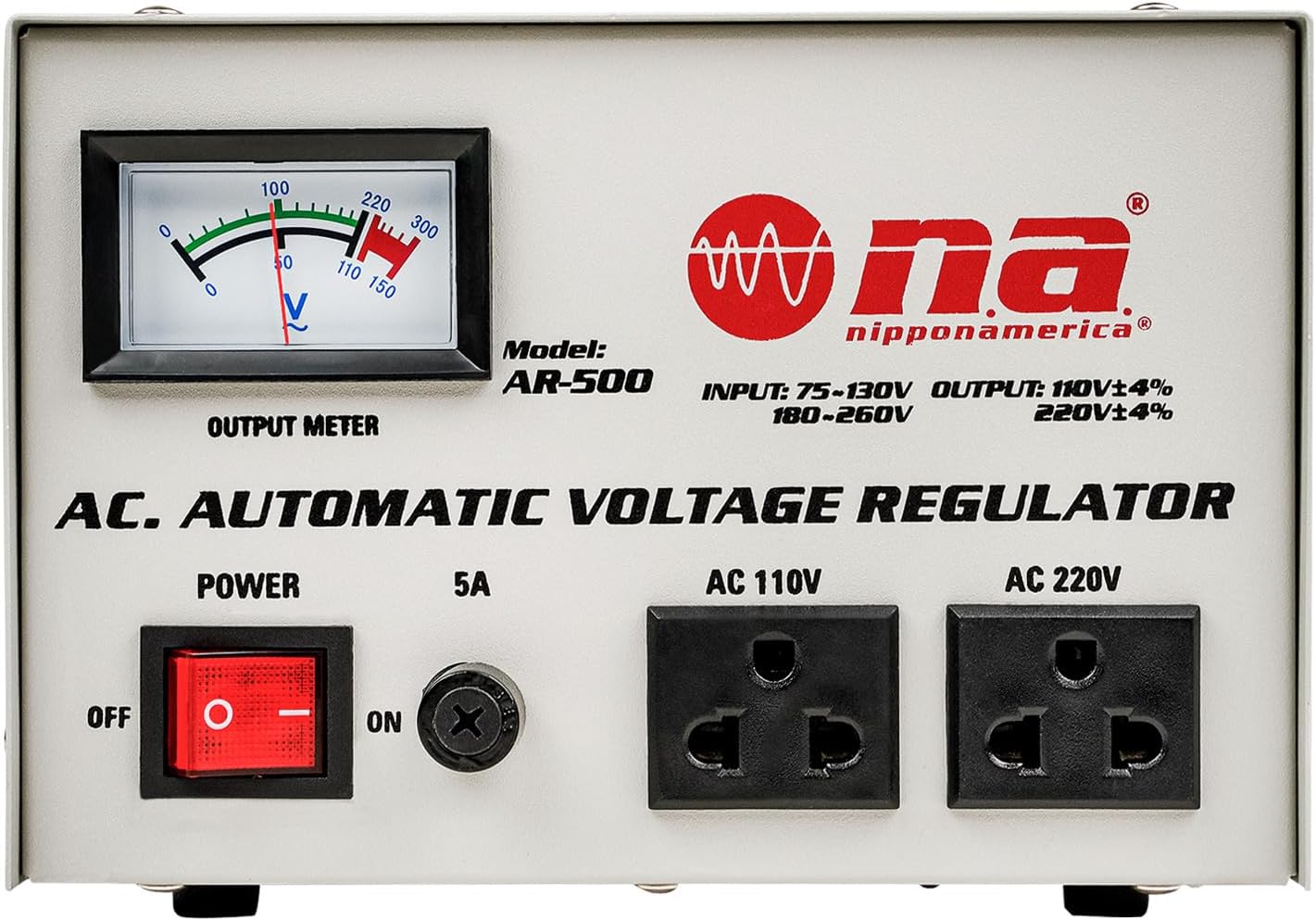
Figure 2: Close-up of the AR-500 front panel, highlighting the output meter, power switch, 5A fuse, AC 110V outlets, and AC 220V outlets.
Setup
- Unpack the Unit: Carefully remove the AR-500 from its packaging. Inspect for any signs of damage.
- Placement: Place the voltage regulator on a stable, flat surface in a dry, well-ventilated area, away from direct sunlight, heat sources, and moisture. Ensure adequate space around the unit for air circulation.
- Select Input Voltage: Locate the red input voltage selector switch on the rear panel of the unit. Use a flathead screwdriver to set the switch to either 110V or 220V, matching your local power supply voltage. Incorrect selection can damage the unit and connected devices.

Figure 3: Rear panel of the AR-500, showing the input voltage selector switch (red) and input power cord. Ensure the switch is set to match your local power supply.
- Connect to Power: Plug the AR-500's power cord into a wall outlet that matches the selected input voltage.
- Connect Appliances: Plug your electronic devices into the appropriate AC outlets on the front panel of the AR-500. Use the AC 110V outlets for 110V-120V appliances. Ensure the total wattage of connected devices does not exceed 500 watts.
Operating Instructions
- Power On: Press the red POWER switch on the front panel to the 'ON' position. The output meter will illuminate and display the output voltage.
- Monitor Output: Observe the output meter to ensure the voltage is stable and within the acceptable range for your connected devices.
- Delay Output Circuit: The unit features a delay output circuit. Upon powering on, there may be a brief delay before power is supplied to the output sockets. This is normal and protects connected equipment.
- Power Off: To turn off the unit, press the POWER switch to the 'OFF' position. Disconnect appliances before prolonged storage.
Maintenance
- Cleaning: Disconnect the unit from power before cleaning. Use a soft, dry cloth to wipe the exterior. Do not use liquid cleaners or aerosols.
- Ventilation: Periodically check that the ventilation holes are clear of dust and debris.
- Storage: If storing the unit for an extended period, ensure it is clean, dry, and stored in a cool, well-ventilated place.

Figure 4: Top view of the AR-500, illustrating the heat dissipation vents designed for efficient cooling.
Troubleshooting
- No Power:
- Check if the power cord is securely plugged into both the unit and the wall outlet.
- Ensure the POWER switch is in the 'ON' position.
- Verify the wall outlet is functioning by plugging in another device.
- Check the fuse (if accessible and replaceable by user, otherwise contact service).
- Unstable Output Voltage:
- Ensure the total load of connected devices does not exceed 500 watts.
- Verify the input voltage selector switch on the rear panel is set correctly for your local power supply.
- Ensure the unit is in a well-ventilated area and not overheating.
- Unit Shuts Off:
- This may indicate an overload or high voltage protection activation. Disconnect some devices or check the input voltage.
- Allow the unit to cool down if it feels hot.
If problems persist after following these steps, contact customer support or qualified service personnel.
Specifications
| Model Number | AR-500 |
| Capacity | 500 Watts |
| Input Voltage Range | 180-260V or 75-130V (selectable) |
| Output Voltage | 110V/220V (±4%) |
| Phase | Single Phase |
| Frequency | 50/60Hz |
| Item Weight | 11.2 pounds |
| UPC | 784644411568 |
Warranty and Support
For warranty information, technical support, or service inquiries, please refer to the warranty card included with your product or contact Nippon America customer service directly. Please have your model number (AR-500) and serial number (e.g., 1123AR50000156, found on the rear panel) available when contacting support.
You can visit the official Nippon America website for additional resources and contact information.


