
1. Introduction
Thank you for choosing the Kestanlora Hidden Camera Clock. This device is designed for discreet surveillance, offering 1080P HD video recording, Wi-Fi connectivity, and motion detection capabilities. This manual provides detailed instructions to help you set up, operate, and maintain your device effectively.

Figure 1: Kestanlora Hidden Camera Clock with its mobile application interface.
2. Package Contents
Please verify that all items are present in your package:
- Kestanlora Hidden Camera Clock Unit
- USB Charging Cable
- Rechargeable Battery
- User Guide (this manual)
- SIM Ejector Tool (for reset button access)
- USB Card Reader

Video 1: Unboxing the Kestanlora Hidden Camera Clock and its accessories.
3. Setup Guide
3.1. Battery Installation and Charging
- Carefully open the battery compartment on the back of the device.
- Insert the provided rechargeable battery, ensuring correct polarity.
- Close the battery compartment.
- Connect the device to a USB power source using the included USB charging cable. A full charge provides approximately 130 minutes of continuous operation. For 24-hour continuous live broadcasting, keep the device connected to a USB power source.
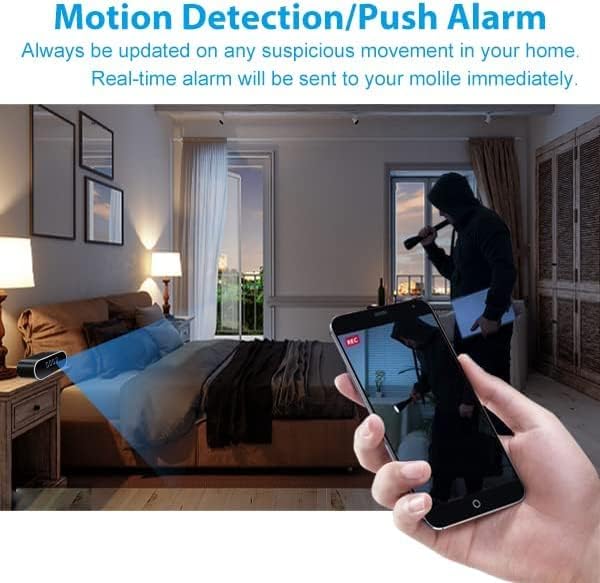
Figure 2: The hidden camera clock connected for charging, illustrating its use for monitoring children and pets.
3.2. Memory Card Installation (Not Included)
The device supports a Micro SD card up to 128GB for storing recorded video. Insert the memory card into the designated slot. When the storage is full, new content will automatically overwrite the oldest files, ensuring continuous operation.
3.3. App Download and Connection
To use the camera's full features, download the dedicated mobile application. Once installed, power on the camera and follow the in-app instructions to connect the camera to your phone. The connection can be established in two ways:
- AP Mode (Access Point Mode): This mode does not require a Wi-Fi network. You can connect your mobile device directly to the camera's own signal for real-time viewing. Ensure your device and the camera are within 49.2 feet (15 meters) of each other.
- P2P Mode (Peer-to-Peer Mode): This mode requires a 2.4GHz Wi-Fi network. By connecting the camera to your home Wi-Fi, you can remotely monitor scenes from anywhere in the world. Ensure both the camera and your Wi-Fi signal maintain sufficient signal strength.
No professional knowledge is required for setup; simply follow the app's intuitive instructions.
4. Operating Instructions
4.1. Live View and Recording
Once connected to the app, you can view live video streams in 1080P HD. The camera records at a 150° wide angle. You can remotely stream videos and download videos and photos directly to your smart device. The continuous loop recording feature ensures that the camera keeps working by overwriting older files when the memory card is full.

Figure 3: Demonstrating the 1080P HD camera capability for clear video.
4.2. Motion Detection and Alert Push
The camera features motion sensing capabilities. When motion is detected, the camera will automatically send a push notification with an image to your phone. You can then log into the app to view the live feed and see what is happening. This feature helps you stay updated on any suspicious movement in your home.

Figure 4: Motion detection feature sending alerts to your mobile device.
4.3. Night Vision
The camera is equipped with night vision functionality to provide monitoring in low-light conditions. While designed to capture clear images in the dark, some users have reported that the night vision may appear in black and white or have limited clarity. Ensure adequate lighting for optimal performance when possible.
4.4. Versatile Placement
The discreet design of the hidden camera clock allows it to blend seamlessly into various environments, making it suitable for monitoring different areas such as living rooms, bedrooms, offices, or stores.

Figure 5: Examples of suitable locations for the hidden camera clock.
5. Maintenance
- Cleaning: Use a soft, dry cloth to clean the exterior of the device. Avoid using liquid cleaners or abrasive materials.
- Storage: When not in use for extended periods, store the camera in a cool, dry place away from direct sunlight and extreme temperatures.
- Battery Care: To prolong battery life, avoid fully discharging the battery frequently. Recharge the battery regularly, even if the device is not in constant use.
- Software Updates: Check the mobile application periodically for any available firmware updates for your camera to ensure optimal performance and access to new features.
6. Troubleshooting
If you encounter issues with your Kestanlora Hidden Camera Clock, please refer to the following common problems and solutions:
| Problem | Possible Cause | Solution |
|---|---|---|
| Device loses connection frequently. | Weak Wi-Fi signal; distance from router; app issues. | Ensure camera is within range of a strong 2.4GHz Wi-Fi signal. Restart the camera and the app. Re-pair the device if necessary. |
| Display went blank or device stopped working. | Battery drained; internal malfunction. | Ensure the device is fully charged or connected to power. Try resetting the device using the SIM ejector tool. If the issue persists, contact customer support. |
| Poor night vision quality (black and white images). | Normal operation for infrared night vision; insufficient ambient light. | Infrared night vision typically produces black and white images. Ensure there are no obstructions blocking the camera's view. For color images, ensure adequate ambient light. |
| Cannot connect to phone. | Incorrect Wi-Fi band (only 2.4G supported); incorrect pairing steps. | Verify your Wi-Fi network is 2.4GHz. Follow the app's connection instructions carefully. Try resetting the camera and your phone's network settings. |
7. Specifications
| Feature | Detail |
|---|---|
| Product Dimensions | 2.3 x 3.2 x 0.8 inches |
| Item Weight | 6.7 ounces |
| Video Resolution | 1080P HD |
| Viewing Angle | 150° |
| Wi-Fi Connectivity | 2.4GHz only |
| Memory Card Support | Up to 128GB (Micro SD, not included) |
| Battery Life (Continuous) | Approx. 130 minutes (on full charge) |
| Manufacturer | Kestanlora |
8. Warranty and Support
The Kestanlora Hidden Camera Clock comes with a full warranty. For any product-related inquiries, technical support, or warranty claims, please contact Kestanlora customer service through the platform where you purchased the product. Please retain your proof of purchase for warranty validation.