
Aoxun TM-MDG001
Aoxun Farmhouse Dresser TV Stand User Manual
Model: TM-MDG001
Introduction
Thank you for choosing the Aoxun Farmhouse Dresser TV Stand. This manual provides essential information for the safe assembly, operation, and maintenance of your new furniture. Please read these instructions carefully before beginning assembly and retain them for future reference.
Safety Information
- Always assemble on a soft, clean surface to prevent scratches.
- Ensure all parts are present before assembly. If any parts are missing or damaged, do not proceed with assembly. Contact customer support.
- Do not overtighten screws, as this may damage the material.
- Keep small parts away from children during assembly.
- For stability, place the unit on a level surface.
- Consider using wall anchor straps (if included) to prevent tipping, especially in homes with children or pets.
Package Contents
Before assembly, verify that all components listed below are present. If any items are missing, please contact Aoxun customer service.
- Top Panel
- Side Panels (Left & Right)
- Bottom Panel
- Back Panels
- Drawer Panels & Slides (3 sets)
- Door Panels & Hinges (2 sets)
- Adjustable Shelves (quantity may vary)
- Hardware Pack (screws, dowels, cam locks, handles, etc.)
- Assembly Tools (e.g., Allen wrench, if required)
Assembly Instructions
Follow these steps carefully for proper assembly. It is recommended to have two people for assembly.
Step 1: Prepare the Workspace
Clear a spacious area and lay out all components on a soft, clean surface to prevent damage.

Image: The Aoxun Farmhouse Dresser TV Stand, showcasing its design and potential use.
Step 2: Assemble the Base Frame
Attach the side panels to the bottom panel using the provided hardware. Ensure all connections are secure.
Step 3: Install Drawer Slides and Internal Dividers
Secure the drawer slides to the designated internal panels. Install any central dividers or support beams as per the diagram.

Image: Internal structure of the TV stand with doors open, showing storage compartments.
Step 4: Assemble and Insert Drawers
Assemble the three drawers according to the instructions, attaching the drawer fronts and handles. Carefully insert the assembled drawers into their respective slides.

Image: Detail of the three functional drawers, demonstrating their storage capacity.
Step 5: Attach Doors and Adjustable Shelves
Mount the two doors using the provided hinges. Insert the adjustable shelves into the desired positions within the side compartments.

Image: Illustration of the adjustable shelf, highlighting its flexibility for different storage needs.
Step 6: Install Back Panels and Top Panel
Secure the back panels to the rear of the unit. Finally, place and secure the top panel.
Step 7: Final Inspection and Placement
Ensure all connections are tight and the unit is stable. Place the TV stand in its desired location. If applicable, attach anti-tip hardware to a wall stud.
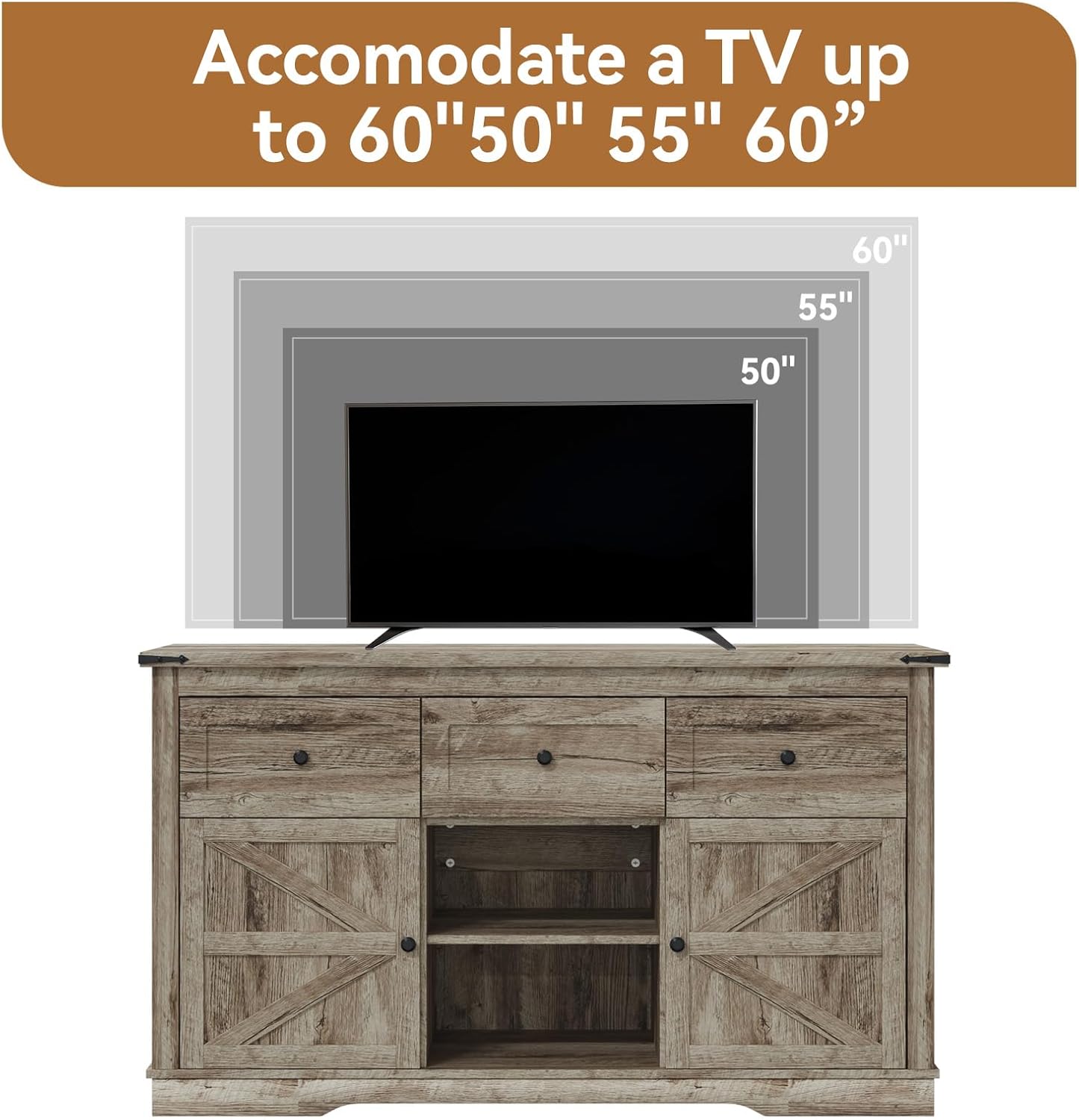
Image: Visual guide for TV size compatibility, showing the stand can hold TVs up to 60 inches.
Operating Instructions
Using Drawers
Gently pull the handles to open the drawers. Push firmly to close. Avoid overloading drawers to ensure smooth operation and prevent damage to the slides.
Using Doors
Open and close the cabinet doors by pulling or pushing the handles. Ensure doors are fully closed to protect contents from dust.
Adjusting Shelves
To adjust the height of the internal shelves, carefully remove the shelf and reposition the shelf pins to the desired height. Then, place the shelf back onto the pins.
Maintenance
Cleaning
Wipe surfaces with a soft, damp cloth. Avoid using harsh chemicals or abrasive cleaners, as these can damage the finish. Dry immediately with a clean cloth.
Care
- Avoid direct sunlight and extreme temperature changes to prevent warping or fading.
- Do not place hot items directly on the surface; use coasters or protective pads.
- Periodically check and tighten all hardware to ensure stability.
Troubleshooting
Unit is Wobbly
Ensure the unit is on a level surface. Check all screws and cam locks to confirm they are fully tightened. If necessary, adjust the leveling feet (if present) or place shims under the base.
Drawers Do Not Slide Smoothly
Verify that the drawer slides are correctly installed and aligned. Ensure drawers are not overloaded. Check for any obstructions in the drawer tracks.
Doors Are Misaligned
Adjust the hinges on the doors. Most hinges allow for minor adjustments to align the doors properly. Refer to the hinge manufacturer's instructions if specific adjustments are needed.
Specifications
| Brand | Aoxun |
| Model Name | TM-MDG001 |
| Product Dimensions (D x W x H) | 16" x 53.9" x 31.4" |
| Item Weight | 108 pounds |
| Number of Doors | 2 |
| Number of Drawers | 3 |
| Special Feature | Adjustable Shelf |
| Assembly Required | Yes |

Image: Detailed product dimensions and load capacity information.
Warranty and Support
Aoxun stands behind the quality of its products. For specific warranty information, please refer to the documentation included with your purchase or visit the official Aoxun website. If you have any questions, require replacement parts, or need assistance with assembly, please contact Aoxun customer support through the retailer where the product was purchased or via the contact information provided on the Aoxun website.
Related documentsTM-MDG001


Ask a question about this manual
Ask about setup, troubleshooting, compatibility, parts, safety, or missing instructions. Manuals+ will review the question and use this page’s manual context to help answer it.